SlopeGraph for QlikView
January 2, 2014 · View on GitHub
The chart type Slopegraph has been invented by Edward Tufte. This solution brings the concept of SlopeGraphs to QlikView using the concept of QlikView Extensions. Screenshots
A detailed article describing the concept behind this solution is published on qlikblog.at
Screenshots
D3SlopeGraph in Action - Basic Example:

D3SlopeGraph in Action - Hovering a Value Pair:
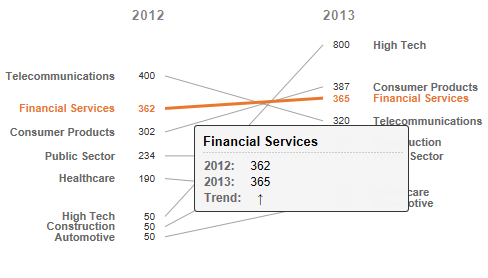
D3SlopeGraph in Action - Collision Detection & Resolution:

D3SlopeGraph - Configuration Dialog:

Configuration & Installation
Installation of the QlikView Extension is straightforward, there is nothing special to take care of:
- Download the extension
- (Download the sample QlikView application)
- Install the extension on your local computer (doubleclick the .qar file)
- Drag’n’Drop the extension within QlikView Desktop (using WebView)
- Set the extension's properties as described above
- Finally deploy the extension to your server (→ detailed instruction)
Configuration
The table below explains the properties available for configuring the behavior of this extension:
| Property | Type | Description |
|---|---|---|
| Dimension | AlphaNumeric | The dimension for the Slope Graph Chart |
| Value 1 | Numeric | Numeric value for the value on the left |
| Value 2 | Numeric | Numeric value for the value on the right |
| Title Left | AlphaNumeric | Left Title (default: blank) |
| Title Right | AlphaNumeric | Right Title (default: blank) |
| Plot Height | Numeric | Plotting Area height in pixel for sizing the plotting area independently from the extension's height (default: -1) |
Additional Information
Compatibility
Tested and developed for the following systems:
- Windows 7, Windows 8, Windows 2012
- You'll need a modern browser which supports SVG
- QlikView 11 SR2+, QlikView 11.2
Change Log
- Version 1.0.0 - 01/01/2014
- Initial Release
Issues & Code-Contributions
Code contributions are very welcome. If you have any issues, please post them here on GitHub.
License
The software is made available "AS IS" without any warranty of any kind under the MIT License (MIT). Since this is a private project QlikTech support agreement does not cover support for this software.
→ Full License statement + list of components used for this solution.