SSD: Single Shot MultiBox Detector
July 7, 2016 · View on GitHub
By Wei Liu, Dragomir Anguelov, Dumitru Erhan, Christian Szegedy, Scott Reed, Cheng-Yang Fu, Alexander C. Berg.
Introduction
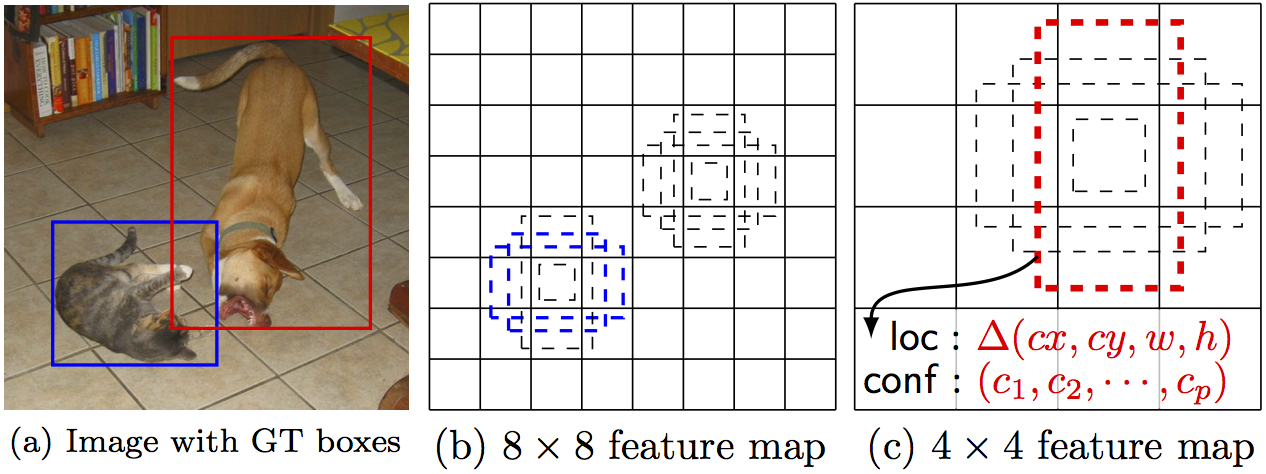
SSD is an unified framework for object detection with a single network. You can use the code to train/evaluate a network for object detection task. For more details, please refer to our arXiv paper.
| System | VOC2007 test mAP | FPS (Titan X) | Number of Boxes |
|---|---|---|---|
| Faster R-CNN (VGG16) | 73.2 | 7 | 300 |
| Faster R-CNN (ZF) | 62.1 | 17 | 300 |
| YOLO | 63.4 | 45 | 98 |
| Fast YOLO | 52.7 | 155 | 98 |
| SSD300 (VGG16) | 72.1 | 58 | 7308 |
| SSD300 (VGG16, cuDNN v5) | 72.1 | 72 | 7308 |
| SSD500 (VGG16) | 75.1 | 23 | 20097 |
Citing SSD
Please cite SSD in your publications if it helps your research:
@article{liu15ssd,
  Title = {{SSD}: Single Shot MultiBox Detector},
  Author = {Liu, Wei and Anguelov, Dragomir and Erhan, Dumitru and Szegedy, Christian and Reed, Scott and Fu, Cheng-Yang and Berg, Alexander C.},
  Journal = {arXiv preprint arXiv:1512.02325},
  Year = {2015}
}
Contents
Installation
- Get the code. We will call the directory that you cloned Caffe into
$CAFFE_ROOT
git clone https://github.com/weiliu89/caffe.git
cd caffe
git checkout ssd
- Build the code. Please follow Caffe instruction to install all necessary packages and build it.
# Modify Makefile.config according to your Caffe installation.
cp Makefile.config.example Makefile.config
make -j8
# Make sure to include $CAFFE_ROOT/python to your PYTHONPATH.
make py
make test -j8
make runtest -j8
# If you have multiple GPUs installed in your machine, make runtest might fail. If so, try following:
export CUDA_VISIBLE_DEVICES=0; make runtest -j8
# If you have error: "Check failed: error == cudaSuccess (10 vs. 0)  invalid device ordinal",
# first make sure you have the specified GPUs, or try following if you have multiple GPUs:
unset CUDA_VISIBLE_DEVICES
Preparation
-
Download fully convolutional reduced (atrous) VGGNet. By default, we assume the model is stored in
$CAFFE_ROOT/models/VGGNet/ -
Download VOC2007 and VOC2012 dataset. By default, we assume the data is stored in
$HOME/data/
# Download the data.
cd $HOME/data
wget http://host.robots.ox.ac.uk/pascal/VOC/voc2012/VOCtrainval_11-May-2012.tar
wget http://host.robots.ox.ac.uk/pascal/VOC/voc2007/VOCtrainval_06-Nov-2007.tar
wget http://host.robots.ox.ac.uk/pascal/VOC/voc2007/VOCtest_06-Nov-2007.tar
# Extract the data.
tar -xvf VOCtrainval_11-May-2012.tar
tar -xvf VOCtrainval_06-Nov-2007.tar
tar -xvf VOCtest_06-Nov-2007.tar
- Create the LMDB file.
cd $CAFFE_ROOT
# Create the trainval.txt, test.txt, and test_name_size.txt in data/VOC0712/
./data/VOC0712/create_list.sh
# You can modify the parameters in create_data.sh if needed.
# It will create lmdb files for trainval and test with encoded original image:
#   - $HOME/data/VOCdevkit/VOC0712/lmdb/VOC0712_trainval_lmdb
#   - $HOME/data/VOCdevkit/VOC0712/lmdb/VOC0712_test_lmdb
# and make soft links at examples/VOC0712/
./data/VOC0712/create_data.sh
Train/Eval
- Train your model and evaluate the model on the fly.
# It will create model definition files and save snapshot models in:
#   - $CAFFE_ROOT/models/VGGNet/VOC0712/SSD_300x300/
# and job file, log file, and the python script in:
#   - $CAFFE_ROOT/jobs/VGGNet/VOC0712/SSD_300x300/
# and save temporary evaluation results in:
#   - $HOME/data/VOCdevkit/results/VOC2007/SSD_300x300/
# It should reach 72.* mAP at 60k iterations.
python examples/ssd/ssd_pascal.py
If you don't have time to train your model, you can download a pre-trained model at here.
- Evaluate the most recent snapshot.
# If you would like to test a model you trained, you can do:
python examples/ssd/score_ssd_pascal.py
- Test your model using a webcam. Note: press esc to stop.
# If you would like to attach a webcam to a model you trained, you can do:
python examples/ssd/ssd_pascal_webcam.py
Here is a demo video of running a SSD500 model trained on MSCOCO dataset.
-
Check out
examples/ssd_detect.ipynborexamples/ssd/ssd_detect.cppon how to detect objects using a SSD model. -
To train on other dataset, please refer to data/OTHERDATASET for more details. We currently add support for MSCOCO and ILSVRC2016.