cloudflared-mon
April 8, 2023 · View on GitHub
Cloudflared-Mon is a python based Cloudflare Zero Tunnel monitoring. With Cloudflare you will be notified when tunnel health has changed.
Components and Frameworks used in cloudflared-mon:
- Loguru For logging.
- pyTelegramBotAPI For the Bot.
- schedule For scheduling route checks.
Installation
Before we can start working with Cloudflared-Mon, we need to create a new telegram bot.
Create Telegram bot
How to Create a New Bot for Telegram Open Telegram messenger, sign in to your account or create a new one.
Enter @Botfather in the search tab and choose this bot (Official Telegram bots have a blue checkmark beside their name.)

Click “Start” to activate BotFather bot.
In response, you receive a list of commands to manage bots. Choose or type the /newbot command and send it.

Choose a name for your bot — your subscribers will see it in the conversation. And choose a username for your bot — the bot can be found by its username in searches. The username must be unique and end with the word “bot.”
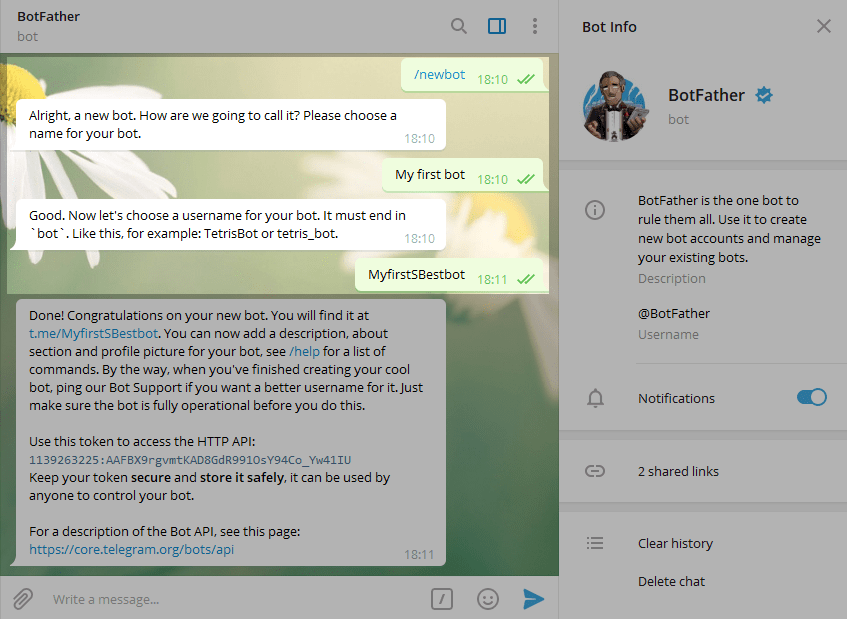
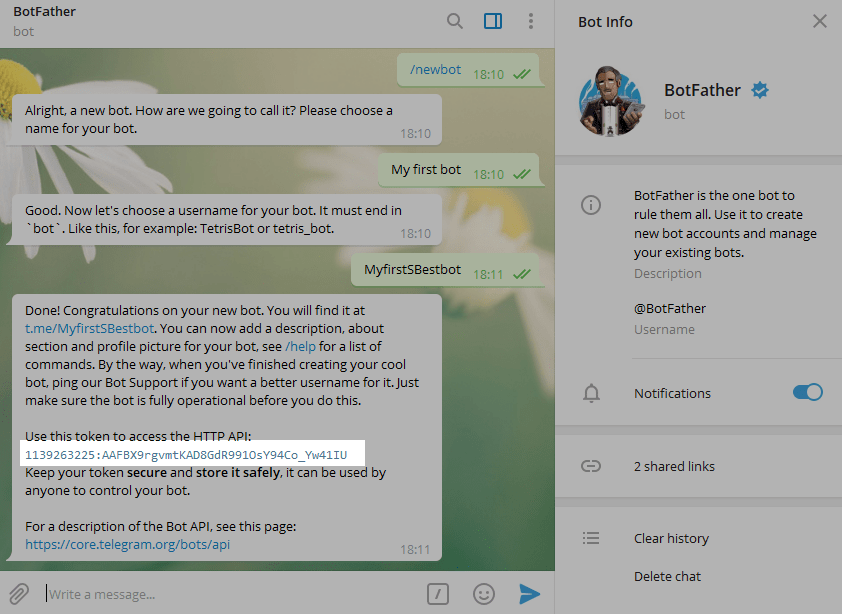
After you choose a suitable name for your bot — the bot is created. You will receive a message with a link to your bot t.me/<bot_username>, recommendations to set up a profile picture, description, and a list of commands to manage your new bot.
Docker
Cloudflared-Mon is a docker based application that can be installed using docker compose:
version: "3.7"
services:
  cloudflared-mon:
    image: techblog/cloudflared-mon
    container_name: cloudflared-mon
    restart: always
    environment:
      - CHECK_INTERVALS=60
      - NOTIFIERS=
      - CF_TOKEN=
      - CF_EMAIL=
      - CF_ACCOUNT_ID=
    volumes:
      - ./cloudflared-mon/db:/app/db
Environment
- CHECK_INTERVALS - Optional. Time in seconds between checks. Default is set to 60.
- NOTIFIERS - Set the nofitications, using APPRIS.
- CF_TOKEN - Your cloudflare account token. this can be found on your cloudflare profile. Make sure to create Token with read only permissions Read here how
- CF_EMAIL - Your cloudflare account email address.
- CF_ACCOUNT_ID - Your cloudflare account ID. The account id is part of the URL: https://dash.cloudflare.com/xxd00270exxxxxxxxxxxxxxxxxxxxxxx
Volumes
Cloudflare-Mon is using sqlite database to save and monitor the Tunnels state. Use docker persistent storage to keep the db after update or changes.
Supported Notifications
The section identifies all of the services supported by this library. Check out the wiki for more information on the supported modules here.
Popular Notification Services
The table below identifies the services this tool supports and some example service urls you need to use in order to take advantage of it. Click on any of the services listed below to get more details on how you can configure Apprise to access them.
| Notification Service | Service ID | Default Port | Example Syntax |
|---|---|---|---|
| Apprise API | apprise:// or apprises:// | (TCP) 80 or 443 | apprise://hostname/Token |
| AWS SES | ses:// | (TCP) 443 | ses://user@domain/AccessKeyID/AccessSecretKey/RegionName ses://user@domain/AccessKeyID/AccessSecretKey/RegionName/email1/email2/emailN |
| Boxcar | boxcar:// | (TCP) 443 | boxcar://hostname boxcar://hostname/@tag boxcar://hostname/device_token boxcar://hostname/device_token1/device_token2/device_tokenN boxcar://hostname/@tag/@tag2/device_token |
| Discord | discord:// | (TCP) 443 | discord://webhook_id/webhook_token discord://avatar@webhook_id/webhook_token |
| Emby | emby:// or embys:// | (TCP) 8096 | emby://user@hostname/ emby://user:password@hostname |
| Enigma2 | enigma2:// or enigma2s:// | (TCP) 80 or 443 | enigma2://hostname |
| Faast | faast:// | (TCP) 443 | faast://authorizationtoken |
| FCM | fcm:// | (TCP) 443 | fcm://project@apikey/DEVICE_ID fcm://project@apikey/#TOPIC fcm://project@apikey/DEVICE_ID1/#topic1/#topic2/DEVICE_ID2/ |
| Flock | flock:// | (TCP) 443 | flock://token flock://botname@token flock://app_token/u:userid flock://app_token/g:channel_id flock://app_token/u:userid/g:channel_id |
| Gitter | gitter:// | (TCP) 443 | gitter://token/room gitter://token/room1/room2/roomN |
| Google Chat | gchat:// | (TCP) 443 | gchat://workspace/key/token |
| Gotify | gotify:// or gotifys:// | (TCP) 80 or 443 | gotify://hostname/token gotifys://hostname/token?priority=high |
| Growl | growl:// | (UDP) 23053 | growl://hostname growl://hostname:portno growl://password@hostname growl://password@hostname:port Note: you can also use the get parameter version which can allow the growl request to behave using the older v1.x protocol. An example would look like: growl://hostname?version=1 |
| Home Assistant | hassio:// or hassios:// | (TCP) 8123 or 443 | hassio://hostname/accesstoken hassio://user@hostname/accesstoken hassio://user:password@hostname:port/accesstoken hassio://hostname/optional/path/accesstoken |
| IFTTT | ifttt:// | (TCP) 443 | ifttt://webhooksID/Event ifttt://webhooksID/Event1/Event2/EventN ifttt://webhooksID/Event1/?+Key=Value ifttt://webhooksID/Event1/?-Key=value1 |
| Join | join:// | (TCP) 443 | join://apikey/device join://apikey/device1/device2/deviceN/ join://apikey/group join://apikey/groupA/groupB/groupN join://apikey/DeviceA/groupA/groupN/DeviceN/ |
| KODI | kodi:// or kodis:// | (TCP) 8080 or 443 | kodi://hostname kodi://user@hostname kodi://user:password@hostname:port |
| Kumulos | kumulos:// | (TCP) 443 | kumulos://apikey/serverkey |
| LaMetric Time | lametric:// | (TCP) 443 | lametric://apikey@device_ipaddr lametric://apikey@hostname:port lametric://client_id@client_secret |
| Mailgun | mailgun:// | (TCP) 443 | mailgun://user@hostname/apikey mailgun://user@hostname/apikey/email mailgun://user@hostname/apikey/email1/email2/emailN mailgun://user@hostname/apikey/?name="From%20User" |
| Matrix | matrix:// or matrixs:// | (TCP) 80 or 443 | matrix://hostname matrix://user@hostname matrixs://user:pass@hostname:port/#room_alias matrixs://user:pass@hostname:port/!room_id matrixs://user:pass@hostname:port/#room_alias/!room_id/#room2 matrixs://token@hostname:port/?webhook=matrix matrix://user:token@hostname/?webhook=slack&format=markdown |
| Mattermost | mmost:// or mmosts:// | (TCP) 8065 | mmost://hostname/authkey mmost://hostname:80/authkey mmost://user@hostname:80/authkey mmost://hostname/authkey?channel=channel mmosts://hostname/authkey mmosts://user@hostname/authkey |
| Microsoft Teams | msteams:// | (TCP) 443 | msteams://TokenA/TokenB/TokenC/ |
| MQTT | mqtt:// or mqtts:// | (TCP) 1883 or 8883 | mqtt://hostname/topic mqtt://user@hostname/topic mqtts://user:pass@hostname:9883/topic |
| Nextcloud | ncloud:// or nclouds:// | (TCP) 80 or 443 | ncloud://adminuser:pass@host/User nclouds://adminuser:pass@host/User1/User2/UserN |
| NextcloudTalk | nctalk:// or nctalks:// | (TCP) 80 or 443 | nctalk://user:pass@host/RoomId nctalks://user:pass@host/RoomId1/RoomId2/RoomIdN |
| Notica | notica:// | (TCP) 443 | notica://Token/ |
| Notifico | notifico:// | (TCP) 443 | notifico://ProjectID/MessageHook/ |
| Office 365 | o365:// | (TCP) 443 | o365://TenantID:AccountEmail/ClientID/ClientSecret o365://TenantID:AccountEmail/ClientID/ClientSecret/TargetEmail o365://TenantID:AccountEmail/ClientID/ClientSecret/TargetEmail1/TargetEmail2/TargetEmailN |
| OneSignal | onesignal:// | (TCP) 443 | onesignal://AppID@APIKey/PlayerID onesignal://TemplateID:AppID@APIKey/UserID onesignal://AppID@APIKey/#IncludeSegment onesignal://AppID@APIKey/Email |
| Opsgenie | opsgenie:// | (TCP) 443 | opsgenie://APIKey opsgenie://APIKey/UserID opsgenie://APIKey/#Team opsgenie://APIKey/*Schedule opsgenie://APIKey/^Escalation |
| ParsePlatform | parsep:// or parseps:// | (TCP) 80 or 443 | parsep://AppID:MasterKey@Hostname parseps://AppID:MasterKey@Hostname |
| PopcornNotify | popcorn:// | (TCP) 443 | popcorn://ApiKey/ToPhoneNo popcorn://ApiKey/ToPhoneNo1/ToPhoneNo2/ToPhoneNoN/ popcorn://ApiKey/ToEmail popcorn://ApiKey/ToEmail1/ToEmail2/ToEmailN/ popcorn://ApiKey/ToPhoneNo1/ToEmail1/ToPhoneNoN/ToEmailN |
| Prowl | prowl:// | (TCP) 443 | prowl://apikey prowl://apikey/providerkey |
| PushBullet | pbul:// | (TCP) 443 | pbul://accesstoken pbul://accesstoken/#channel pbul://accesstoken/A_DEVICE_ID pbul://accesstoken/email@address.com pbul://accesstoken/#channel/#channel2/email@address.net/DEVICE |
| Pushjet | pjet:// or pjets:// | (TCP) 80 or 443 | pjet://hostname/secret pjet://hostname:port/secret pjets://secret@hostname/secret pjets://hostname:port/secret |
| Push (Techulus) | push:// | (TCP) 443 | push://apikey/ |
| Pushed | pushed:// | (TCP) 443 | pushed://appkey/appsecret/ pushed://appkey/appsecret/#ChannelAlias pushed://appkey/appsecret/#ChannelAlias1/#ChannelAlias2/#ChannelAliasN pushed://appkey/appsecret/@UserPushedID pushed://appkey/appsecret/@UserPushedID1/@UserPushedID2/@UserPushedIDN |
| Pushover | pover:// | (TCP) 443 | pover://user@token pover://user@token/DEVICE pover://user@token/DEVICE1/DEVICE2/DEVICEN Note: you must specify both your user_id and token |
| PushSafer | psafer:// or psafers:// | (TCP) 80 or 443 | psafer://privatekey psafers://privatekey/DEVICE psafer://privatekey/DEVICE1/DEVICE2/DEVICEN |
| reddit:// | (TCP) 443 | reddit://user:password@app_id/app_secret/subreddit reddit://user:password@app_id/app_secret/sub1/sub2/subN | |
| Rocket.Chat | rocket:// or rockets:// | (TCP) 80 or 443 | rocket://user:password@hostname/RoomID/Channel rockets://user:password@hostname:443/#Channel1/#Channel1/RoomID rocket://user:password@hostname/#Channel rocket://webhook@hostname rockets://webhook@hostname/@User/#Channel |
| Ryver | ryver:// | (TCP) 443 | ryver://Organization/Token ryver://botname@Organization/Token |
| SendGrid | sendgrid:// | (TCP) 443 | sendgrid://APIToken:FromEmail/ sendgrid://APIToken:FromEmail/ToEmail sendgrid://APIToken:FromEmail/ToEmail1/ToEmail2/ToEmailN/ |
| ServerChan | serverchan:// | (TCP) 443 | serverchan://token/ |
| SimplePush | spush:// | (TCP) 443 | spush://apikey spush://salt:password@apikey spush://apikey?event=Apprise |
| Slack | slack:// | (TCP) 443 | slack://TokenA/TokenB/TokenC/ slack://TokenA/TokenB/TokenC/Channel slack://botname@TokenA/TokenB/TokenC/Channel slack://user@TokenA/TokenB/TokenC/Channel1/Channel2/ChannelN |
| SMTP2Go | smtp2go:// | (TCP) 443 | smtp2go://user@hostname/apikey smtp2go://user@hostname/apikey/email smtp2go://user@hostname/apikey/email1/email2/emailN smtp2go://user@hostname/apikey/?name="From%20User" |
| Streamlabs | strmlabs:// | (TCP) 443 | strmlabs://AccessToken/ strmlabs://AccessToken/?name=name&identifier=identifier&amount=0¤cy=USD |
| SparkPost | sparkpost:// | (TCP) 443 | sparkpost://user@hostname/apikey sparkpost://user@hostname/apikey/email sparkpost://user@hostname/apikey/email1/email2/emailN sparkpost://user@hostname/apikey/?name="From%20User" |
| Spontit | spontit:// | (TCP) 443 | spontit://UserID@APIKey/ spontit://UserID@APIKey/Channel spontit://UserID@APIKey/Channel1/Channel2/ChannelN |
| Syslog | syslog:// | (UDP) 514 (if hostname specified) | syslog:// syslog://Facility syslog://hostname syslog://hostname/Facility |
| Telegram | tgram:// | (TCP) 443 | tgram://bottoken/ChatID tgram://bottoken/ChatID1/ChatID2/ChatIDN |
| twitter:// | (TCP) 443 | twitter://CKey/CSecret/AKey/ASecret twitter://user@CKey/CSecret/AKey/ASecret twitter://CKey/CSecret/AKey/ASecret/User1/User2/User2 twitter://CKey/CSecret/AKey/ASecret?mode=tweet | |
| Twist | twist:// | (TCP) 443 | twist://pasword:login twist://password:login/#channel twist://password:login/#team:channel twist://password:login/#team:channel1/channel2/#team3:channel |
| XBMC | xbmc:// or xbmcs:// | (TCP) 8080 or 443 | xbmc://hostname xbmc://user@hostname xbmc://user:password@hostname:port |
| XMPP | xmpp:// or xmpps:// | (TCP) 5222 or 5223 | xmpp://user:password@hostname xmpps://user:password@hostname:port?jid=user@hostname/resource xmpps://user:password@hostname/target@myhost, target2@myhost/resource |
| Webex Teams (Cisco) | wxteams:// | (TCP) 443 | wxteams://Token |
| Zulip Chat | zulip:// | (TCP) 443 | zulip://botname@Organization/Token zulip://botname@Organization/Token/Stream zulip://botname@Organization/Token/Email |