PRoot-Distro
July 25, 2026 · View on GitHub
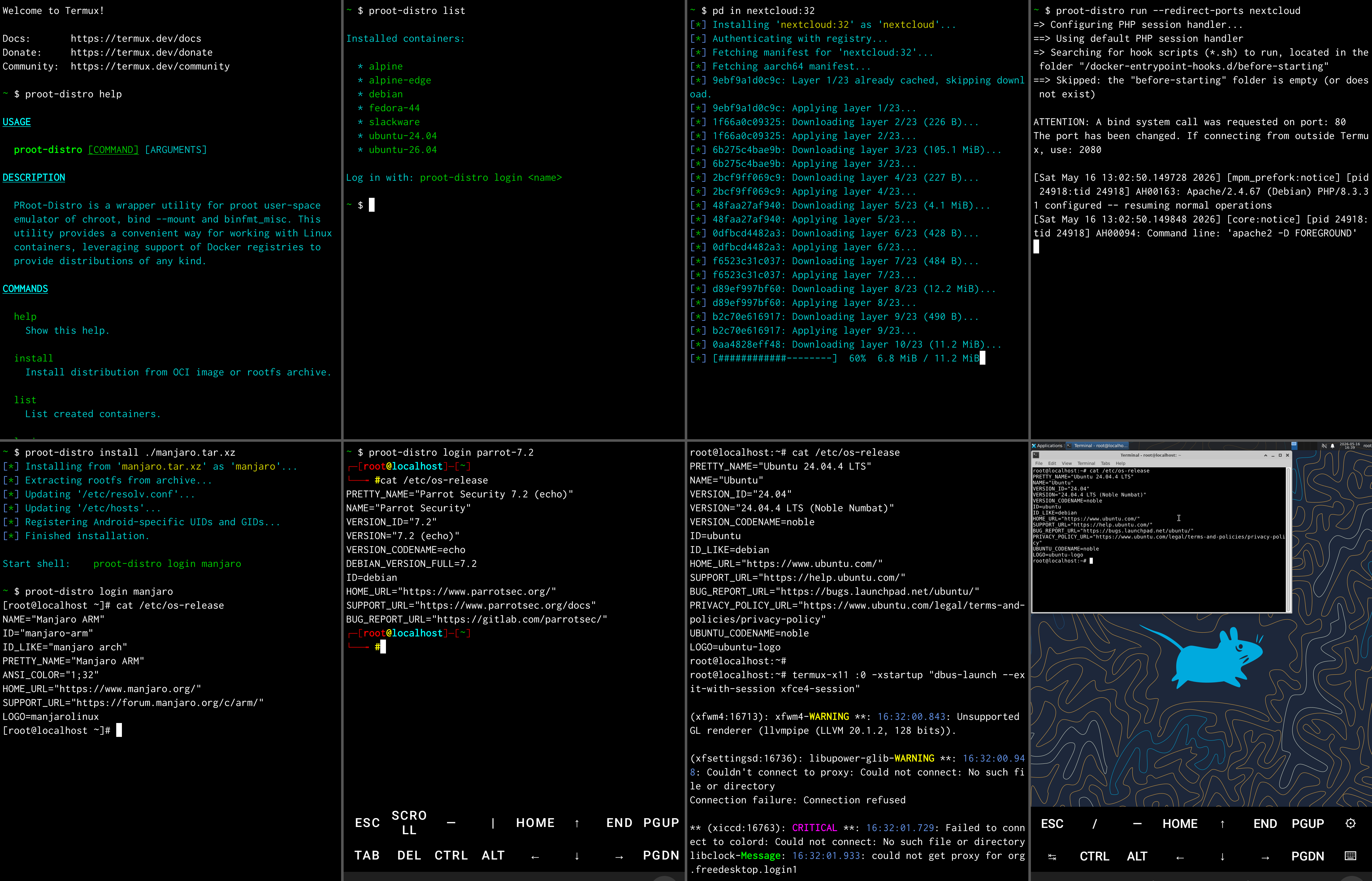
PRoot-Distro is a utility for managing rootless Linux containers in Termux and on regular Linux hosts. It uses proot to provide a chroot-like environment without requiring root access on the device.
Containers are created by pulling Docker/OCI images directly from Docker Hub or any compatible registry — or by extracting a local tarball / OCI image archive. The container filesystem is assembled from the image layers and stored locally, ready to be entered at any time.
PRoot-Distro can also build OCI images from a Dockerfile (no Docker daemon required), storing the result in the local manifest cache or exporting it as a standalone OCI tarball.
Table of contents
- Introduction
- Installation
- Quick start
- Commands
- How PRoot-Distro works
- Storage layout
- Environment variables
- Shell completions
- Limitations
- Donate
Introduction
PRoot-Distro lets you run a full Linux userland — Ubuntu, Debian, Alpine, Arch, openSUSE, distroless server images, anything available as a Docker/OCI image — on top of Termux on an Android device, or on top of a regular Linux distribution, without root, without a kernel module, and without a Docker daemon.
Typical use cases:
- Running a desktop-class Linux distribution on a phone or tablet.
- Cross-compiling for a different CPU architecture using QEMU user-mode.
- Spinning up server software (Nginx, Nextcloud, PostgreSQL, etc.) on Android by reusing the same OCI images you'd run on a server.
- Building custom OCI images from a Dockerfile, on-device, without needing a Docker daemon — and pushing them straight to Docker Hub, GitHub Container Registry, or any other OCI-compatible registry.
- Trying a distribution non-destructively: install, mess around,
proot-distro removewhen done.
The CLI is exposed both as proot-distro and the shorter alias pd.
Installation
PRoot-Distro is primarily distributed via Termux's pkg package
manager and via PyPI. Python 3.9 or newer is required. The only runtime
dependency is proot (and, optionally, a qemu-user-* package for
cross-architecture containers).
On Termux (Android)
Install Termux from F-Droid or the Termux GitHub Releases. Then, inside Termux:
pkg install proot-distro
This pulls in proot automatically as a dependency.
To install the latest published version from PyPI instead:
pkg install python proot
pip install proot-distro
On a regular Linux host
# Install proot via your distro's package manager, e.g. on Debian/Ubuntu:
sudo apt install proot python3-pip

pip install proot-distro          # from PyPI
# or
git clone https://github.com/termux/proot-distro
cd proot-distro
pip install .                     # from a local checkout
pip install -e .                  # editable install for development
First-run check
On startup the tool verifies that proot is available. If it isn't:
- On Termux, with an interactive terminal, you are prompted to
install it via
pkg install -y -q proot. - Otherwise, an install hint is printed and the program exits.
Set PD_PROOT_BIN to use a custom proot executable instead of the
PATH lookup; see the environment variables table below.
PRoot-Distro also refuses to run inside another proot (nested proot
is not supported by proot itself) and prints a warning if launched
as the root user.
Quick start
# Install Ubuntu 24.04 from Docker Hub
proot-distro install ubuntu:24.04

# Start a shell inside the container
proot-distro login ubuntu

# Same thing, but using the short command alias
pd sh ubuntu

# Run a single command and exit
proot-distro login ubuntu -- /bin/uname -a

# List all installed containers
proot-distro list

# List the OCI images sitting in the local cache
proot-distro list --image

# Build and install a custom image from a Dockerfile
proot-distro build -t myapp:1.0 --install-as myapp ./mycontext

# Publish the built image to a registry
export PD_DOCKER_AUTH=myuser:mypassword
proot-distro push myuser/myapp:1.0

# Rebuild from scratch (loses all in-container data)
proot-distro reset ubuntu

# Permanently remove a container
proot-distro remove ubuntu
Commands reference
The pd short alias works everywhere proot-distro does.
Every command supports --help (also -h, --usage), which prints
help text laid out for the current terminal width.
install — Install a container
proot-distro install [OPTIONS] (IMAGE or PATH)
Aliases: add, i, in, ins
Pull a Docker/OCI image and create a container from it, or extract one from a local archive file.
Options:
| Option | Description |
|---|---|
-n, --name NAME | Set a custom local name for the container. Defaults to the image name without tag/registry, or the archive filename without extension. Must start with a letter or digit; may contain only letters, digits, _, ., -. Empty name is rejected. The deprecated long form --override-alias is still accepted. |
-a, --architecture ARCH | Override the target CPU architecture. Accepts native names (aarch64, arm, i686, riscv64, x86_64) or Docker platform strings (linux/arm64, linux/amd64, linux/arm/v7, linux/386, linux/riscv64). Defaults to the host CPU. |
-q, --quiet | Suppress non-error output. |
From a Docker/OCI registry
IMAGE is a standard Docker image reference:
| Form | Example |
|---|---|
| Official image | ubuntu:24.04 |
Official, no tag (uses latest) | alpine |
| User image | myuser/myimage:tag |
| Custom registry | ghcr.io/foo/bar:latest |
Custom registries are detected by the first path component containing
. or : (i.e. a hostname). Public images on ghcr.io,
quay.io, registry.gitlab.com, etc. are pulled with an anonymous
Bearer token discovered from each registry's /v2/ challenge.
Private images require credentials. Set PD_DOCKER_AUTH to
username:password (or username:PAT) before running the install
command. The colon separator is mandatory — the value is sent as HTTP
Basic auth to the registry's token endpoint to obtain a scoped bearer
token:
# Docker Hub private image
export PD_DOCKER_AUTH=myuser:mypassword
proot-distro install myuser/private-image:tag

# GitHub Container Registry — use your GitHub username and a PAT
# with the read:packages scope
export PD_DOCKER_AUTH=myuser:ghp_xxx
proot-distro install ghcr.io/myorg/private-image:tag

# Any other OCI registry
export PD_DOCKER_AUTH=myuser:mypassword
proot-distro install registry.example.com/private/image:tag
When the env var is set, the authentication progress line notes
(user credentials) so you can confirm your credentials are being
picked up.
Layers are cached in $BASE_CACHE_DIR/oci_layers/ and reused on
subsequent installs. If both the resolved manifest (cached in
$BASE_CACHE_DIR/oci_manifests/) and all of its layers are already
present, installation runs fully offline.
Examples:
proot-distro install ubuntu:24.04
proot-distro install alpine:3.21 --name my-alpine
proot-distro install debian:bookworm --architecture aarch64
proot-distro install ghcr.io/myorg/myimage:latest
proot-distro install nextcloud:32
From a local archive
IMAGE can also be a path to a local archive file. A path is
recognised only when it starts with /, ./, ../, or ~ — a bare
token like ubuntu is always treated as a Docker image, even if a file
by that name happens to exist in the current directory.
Two archive formats are supported, auto-detected by reading the first 500 entries of the archive:
- Plain rootfs tarball — a tar archive whose top-level entries form
a standard Linux filesystem (
bin/,etc/,usr/, …). The tool scores strip levels 0–4 and picks the one that lands the most recognised rootfs directories at the root. Supported compression: gzip, bzip2, xz, lzma, or uncompressed. Nomanifest.jsonis written for this format (soresetandrunare not available). - OCI image layout — a tar archive that contains an
oci-layoutfile at its root (as produced bydocker save,skopeo copy oci-archive:, or similar tools). Layers are applied in order with full whiteout semantics, layer blobs are cached, andmanifest.jsonis written soresetandrunwork like with a registry-pulled image.
The container name is derived from the archive filename by stripping
known extensions (.tar, .tar.gz, .tgz, .tar.bz2, .tbz2,
.tar.xz, .txz, .tar.lzma, .tlzma, .oci.tar, .oci.tar.gz,
.oci.tar.xz) and sanitising the result. Use --name to set an
explicit name.
Examples:
# Plain rootfs tarball
proot-distro install ./alpine-rootfs.tar.gz

# OCI image layout saved with docker
docker save myimage:latest -o myimage.oci.tar
proot-distro install ./myimage.oci.tar --name myimage

# Explicit name and architecture override
proot-distro install /tmp/debian-arm.tar.xz --name debian --architecture arm
After installation the resolved image tag is shown (e.g.
Installing 'ubuntu:24.04'). If the image defines an Entrypoint, a
Run entrypoint: proot-distro run <name> hint is printed alongside
Start shell: proot-distro login <name>.
From an URL
When URL is specified instead of local path, the content will be fully downloaded and then processed by same method used for local file installation.
Only HTTP or HTTPS links are supported.
The default container name derived from the last URL component. Use --name
to override.
build — Build an image from a Dockerfile
proot-distro build [OPTIONS] [PATH]
Build an OCI/Docker-compatible image from a Dockerfile. PATH is the
build context directory (default .); all COPY/ADD source paths
are resolved relative to it.
By default the built image is stored in the local manifest cache
under the tag given by --tag (defaulting to
<basename(PATH)>:latest). A subsequent
proot-distro install <tag> finds the manifest in the cache and
installs entirely without network access.
Options:
| Option | Description |
|---|---|
-f, --file PATH | Use a Dockerfile at PATH instead of <PATH>/Dockerfile. Pass - to read the Dockerfile from stdin. |
-t, --tag REF | Image reference to assign. Repeatable. Defaults to <basename(PATH)>:latest. |
--build-arg K=V | Set a build-time ARG. Only ARGs declared in the Dockerfile are honoured. Repeatable. |
--architecture ARCH | Target CPU architecture (default: host). Accepts proot-distro names (aarch64, arm, i686, riscv64, x86_64) or Docker platform strings (linux/arm64, …). |
--target STAGE | Stop after the named stage of a multi-stage build. |
--emulator PATH | Override the QEMU user-mode binary for cross-architecture builds. |
-o, --output FILE | Write the built image as an OCI image-layout tarball to FILE. Compression is inferred from the extension (.oci.tar, .oci.tar.gz, .oci.tar.xz). Repeatable. |
--install-as NAME | After build, install the image as a container named NAME. |
--no-cache | Disable per-step build caching. |
-v, --verbose | Echo each instruction and stream RUN output. |
-q, --quiet | Suppress non-error output. |
Supported Dockerfile instructions:
FROM (including multi-stage with AS name, FROM scratch,
FROM <stage>, COPY --from=<stage-or-image>), RUN (shell + JSON
exec + here-doc forms), COPY (with --from, --chown, --chmod),
ADD (local files, automatic tar extraction, remote URL fetch),
CMD, ENTRYPOINT, ENV, ARG (with --build-arg), LABEL,
MAINTAINER, USER, WORKDIR, EXPOSE, VOLUME, STOPSIGNAL,
HEALTHCHECK, SHELL, ONBUILD.
Parser directives recognised at the top of the file: # syntax=…
(recorded; not acted on), # escape= (\ or `; changes the
line-continuation character), # check=… (recorded; not acted on).
BuildKit-only features (RUN --mount, RUN --network,
RUN --security, COPY --link, COPY --parents) are rejected with
an explicit error.
proot requirement:
If the Dockerfile contains any RUN (or ONBUILD RUN) instruction,
proot must be installed because each RUN is executed against the
in-progress rootfs under proot. Dockerfiles composed only of
metadata + COPY/ADD/ENV/etc. instructions build in pure-Python
mode and do not require proot — they are useful, for example, for
assembling distroless images from prebuilt artefacts on a host that
doesn't have proot available.
Output variants:
| Output | Trigger | Format |
|---|---|---|
| Manifest cache | Always (free) | $BASE_CACHE_DIR/oci_manifests/<key>.json referencing layer blobs in $BASE_CACHE_DIR/oci_layers/. Installable via proot-distro install <tag> with no network access. |
| OCI tarball | -o/--output FILE | Standard OCI image-layout tarball (oci-layout, index.json, blobs/sha256/*). Installable via proot-distro install ./FILE; also consumable by docker load. |
| Container | --install-as NAME | Installed container at containers/<NAME>/. Performed after the build by invoking the install command with the just-built tag. |
Build cache:
Each instruction is keyed by a recipe hash combining the parent layer
digest, the instruction text (with flags and here-doc bodies), and
the relevant inputs (file digests for COPY/ADD, env+ARG state for
RUN). A cache hit applies the previously-built layer instead of
re-running the instruction. Pass --no-cache to skip cache lookups.
The build cache index lives at
$BASE_CACHE_DIR/build_cache_index.json; layer blobs themselves are
stored alongside registry-pulled blobs in $BASE_CACHE_DIR/oci_layers/.
proot-distro clear-cache deletes both.
Examples:
# Build with the default tag (basename of '.' + ':latest')
proot-distro build .

# Build with an explicit tag and install in one step
proot-distro build -t myapp:1.0 --install-as myapp .

# Cross-arch build, write to an OCI tarball
proot-distro build -t myapp:arm64 \
    --architecture aarch64 \
    --output myapp-arm64.oci.tar.gz .

# Build a specific stage of a multi-stage Dockerfile
proot-distro build -t myapp:debug --target debugger .

# Read the Dockerfile from stdin (build context is still required)
cat Dockerfile.test | proot-distro build -f - -t myapp:test .

# Build-arg propagation into RUN
proot-distro build --build-arg HTTP_PROXY=$HTTP_PROXY -t myapp .
Limitations:
RUN steps run under proot, not a real container runtime: no PID,
network, or IPC isolation, no cgroups, no seccomp. Build steps
that depend on real namespaces or kernel features will fail or
behave subtly differently from a docker build. Multi-platform
manifest lists are not produced — build once per target architecture
and use --tag to keep them distinct.
push — Push a built image to a registry
proot-distro push [OPTIONS] IMAGE
Upload a locally built image to a Docker/OCI registry. The image must
have been produced by proot-distro build -t IMAGE first; push
reads the manifest and all blobs directly from the local cache and
streams them to the registry. No Docker daemon and no on-disk
intermediate archive are involved.
IMAGE is the same reference passed to build -t. When the last
path component lacks an explicit :tag suffix, :latest is appended
(matching build's behaviour). The registry is derived from the
image reference: a bare or user/repo form goes to Docker Hub, a host
form like ghcr.io/foo/bar:tag goes to the named registry.
Options:
| Option | Description |
|---|---|
--architecture ARCH | Push the manifest built for the given architecture. Accepts proot-distro names (aarch64, arm, i686, riscv64, x86_64) or Docker platform strings (linux/arm64, linux/amd64, …). Default: host architecture. The manifest cache is keyed by (IMAGE, arch), so the value must match the architecture you built for. |
-q, --quiet | Suppress non-error output. |
Authentication:
push uses the same PD_DOCKER_AUTH=username:password contract as
install. The colon separator is mandatory — the value is forwarded
as HTTP Basic auth to the registry's token endpoint to obtain a
scoped bearer token with pull,push actions:
# Docker Hub
export PD_DOCKER_AUTH=myuser:mypassword
proot-distro push myuser/myapp:1.0

# GitHub Container Registry — use a PAT with the write:packages scope
export PD_DOCKER_AUTH=myuser:ghp_xxx
proot-distro push ghcr.io/myorg/myapp:1.0

# Any other OCI registry
export PD_DOCKER_AUTH=myuser:mypassword
proot-distro push registry.example.com/private/myapp:1.0
Self-hosted registries that allow anonymous push do not need
PD_DOCKER_AUTH set — the token endpoint returns an empty token and
the registry accepts unauthenticated PUTs.
Behaviour:
- Each layer is HEAD-probed against the registry first; blobs that already exist are skipped, so re-pushing an unchanged image transfers only the manifest.
- New layers stream from disk via a single monolithic
PUTper blob — memory usage stays flat regardless of layer size. - The image config bytes are re-canonicalised from the cached dict and their SHA-256 is verified to match the digest recorded in the manifest before upload. A mismatch indicates a corrupted local cache and aborts the push.
- 401/403 responses (on any phase: token fetch, blob upload, manifest
PUT) are reported with a hint to set or fix
PD_DOCKER_AUTH.
Examples:
# Build then push to Docker Hub
proot-distro build -t myuser/myapp:1.0 ./mycontext
export PD_DOCKER_AUTH=myuser:mypassword
proot-distro push myuser/myapp:1.0

# Build a cross-arch image and push it
proot-distro build -t myuser/myapp:arm64 --architecture aarch64 .
proot-distro push --architecture aarch64 myuser/myapp:arm64

# Push to a self-hosted, unauthenticated registry
proot-distro build -t registry.lan:5000/internal/tool:dev .
proot-distro push registry.lan:5000/internal/tool:dev

# Quiet mode (only errors print)
proot-distro push -q myuser/myapp:1.0
Limitations:
Multi-architecture manifest lists are not produced — each push writes a single-arch manifest under the tag. To publish a multi-arch image, build and push each architecture separately; the tag is overwritten on each push, so a higher-level tool would be required to assemble a manifest list. Cross-repository blob mounting and chunked uploads are not implemented; layers shared across repositories on the same registry are re-uploaded in full, and a failed multi-gigabyte layer upload must restart from zero.
login — Start a shell inside a container
proot-distro login [OPTIONS] CONTAINER [-- COMMAND ...]
Aliases: sh
Spawn an interactive shell (or a custom command) inside an installed
container. The -- separator passes a command to run inside the
container's login shell (the shell still wraps it, so quoting and
redirection inside COMMAND work as expected).
Examples:
# Interactive shell as root
proot-distro login ubuntu

# Interactive shell as a non-root user
proot-distro login ubuntu --user myuser

# Run a single command
proot-distro login ubuntu -- /bin/ls /etc

# Run a shell command string
proot-distro login ubuntu -- bash -c "echo hello"

# Use the short alias
pd login ubuntu

# Inspect the full proot command line without running it
proot-distro login ubuntu --get-proot-cmd
Options always available:
| Option | Description |
|---|---|
-u, --user USER | Log in as USER (default: root). Accepts name, numeric uid, name:group, or uid:gid. For containers without /etc/passwd, only a numeric UID or the literal root is accepted (and a numeric GID when :group is given). |
-P, --redirect-ports | Redirect privileged ports 1–1023 to higher numbers (22 → 2022, 80 → 2080, …). The offset is hardcoded inside proot. |
--shared-home | Bind the host home directory into the container (mounted at /root for the root user, at the user's home otherwise; for termux-type containers it goes to /data/data/com.termux/files/home). |
--shared-tmp | Bind the host $PREFIX/tmp to /tmp inside the container (Termux only; skipped for termux-type containers). |
--shared-x11 | Bind $PREFIX/tmp/.X11-unix to /tmp/.X11-unix (Termux only; skipped for termux-type containers). |
-b, --bind SRC[:DST] | Bind a custom path (repeatable). SRC is resolved via os.path.abspath. DST, when given, must be an absolute path (relative destinations are rejected). Overlap with an existing destination emits a warning but the bind is still added. |
--emulator PATH | Override the QEMU emulator binary for cross-arch containers. PATH must be executable. Only QEMU user-mode and Blink are known to work. |
--kernel STRING | Customize the kernel release string reported by uname -r. Default: 6.17.0-PRoot-Distro. |
--hostname STRING | Customize the hostname inside the container. Default: localhost. |
-w, --work-dir PATH | Set the initial working directory. Default: the user's home directory. |
-e, --env VAR=VALUE | Set an environment variable in the guest (repeatable). Wins over image-defined Env and the baseline defaults. |
-d, --detach | Start the session in the background and return to the prompt immediately. The session is daemonized (double-fork + setsid, detached from the controlling terminal) and its stdin/stdout/stderr are redirected to /dev/null, so output is discarded — redirect inside your own command if you need logs. A detached login with no -- COMMAND exits at once (the shell reads EOF). Track it with proot-distro ps and stop it with proot-distro kill. |
--get-proot-cmd | Print the fully assembled env + proot command line (escaped, with line continuations) and exit without running. |
Options available only on Termux (Android):
| Option | Description |
|---|---|
--isolated | Skip non-essential host bindings (Android system dirs, Termux $HOME, /sdcard, Termux app paths). Keeps the link2symlink/sysvipc/kill-on-exit proot extensions and the kernel-release override. Mutually exclusive with --minimal. |
--minimal | Bare-minimum proot: only /dev, /proc, /sys are bound, --sysvipc is disabled, no fake /proc stubs, no --kernel-release. Guest env contains only your --env entries plus TERM/COLORTERM. Mutually exclusive with --isolated. |
--no-link2symlink | Disable proot's hard-link emulation. Only safe on devices with SELinux in permissive mode. |
--no-sysvipc | Disable System V IPC emulation. Only useful on kernels that already implement it. |
--no-kill-on-exit | Wait for all child processes before exiting the session. |
Host bindings (Termux, default mode)
Without --isolated or --minimal, the following host paths are
mounted inside the container when present and readable:
/apex
/data/app
/data/dalvik-cache
/data/misc/apexdata/com.android.art/dalvik-cache
/data/data/<termux-app-package>
/linkerconfig/com.android.art/ld.config.txt
/linkerconfig/ld.config.txt
/odm
/plat_property_contexts
/product
/property_contexts
/sdcard
/storage/emulated/0
/storage/self/primary
/system
/system_ext
/vendor
Each entry is filtered through realpath + permission check: traversable
directories (modes 1/5/7) and readable files are bound; anything
else is silently skipped.
Plus, for normal-type containers, the Termux $PREFIX is bound at its
original path inside the guest so Termux utilities (termux-api,
pkg, etc.) are reachable.
Guest environment
The host's environment is not carried into the guest. PRoot-Distro
builds a clean environment dict and passes it to os.execvpe("proot", …). Precedence (later entries win):
- Baseline:
PATH(fromDEFAULT_PATH_ENV),MOZ_FAKE_NO_SANDBOX=1,PULSE_SERVER=127.0.0.1(Termux only). - Image-defined
Envfrommanifest.json. Cannot override Android system vars,MOZ_FAKE_NO_SANDBOX,PULSE_SERVER,TERM, orCOLORTERM. - Android system vars (
ANDROID_*,BOOTCLASSPATH, etc.), Termux only, when not--isolatedand not--minimal. - Your
--env VAR=VALUEentries. HOME,USER,TERM(defaulting toxterm-256color),COLORTERM(only when set on the host).
After the precedence pass, $PREFIX/bin is appended to PATH so
Termux host tools stay reachable inside the guest. A snippet at
/etc/profile.d/termux-profile.sh re-applies every login-time
environment variable (PATH, image Env, Android system vars, --env
flags) after the distro's /etc/profile resets the environment on
login — without it, running su - someuser inside the container
would silently drop those values. Per-session vars (HOME, USER,
TERM, COLORTERM) and proot-internal vars are excluded.
In --minimal mode steps 1–3 and the PATH post-processing are
skipped; only your --env entries plus TERM/COLORTERM are
exported.
Legacy migration
If a container was created by an older version of PRoot-Distro and its
rootfs is still at the legacy path
($RUNTIME_DIR/installed-rootfs/<name>), login automatically migrates
it to the new layout ($RUNTIME_DIR/containers/<name>/rootfs) on first
use, including rewriting any internal proot link2symlink (l2s)
symlinks. This may take a while on large containers.
run — Run the image-defined entrypoint
proot-distro run [OPTIONS] CONTAINER [-- ARG ...]
Run the Entrypoint and/or Cmd defined in the container's Docker
image manifest. This is equivalent to docker run: the container
starts, executes the image-defined command, and exits when it
finishes.
run requires that the container was installed from an OCI image
(plain tarball installs have no manifest.json and therefore no
recorded Entrypoint/Cmd).
Entrypoint and Cmd resolution:
| Image | Args after -- | Inner command |
|---|---|---|
Entrypoint + Cmd | (none) | Entrypoint + Cmd |
Entrypoint + Cmd | ARGS | Entrypoint + ARGS (Cmd replaced) |
Only Cmd | (none) | Cmd |
Only Cmd | ARGS | ARGS (Cmd replaced) |
Only Entrypoint | (none) | Entrypoint |
Only Entrypoint | ARGS | Entrypoint + ARGS |
| Neither | (none) | Error |
| Neither | ARGS | ARGS |
When --work-dir is not given, run uses the image's WorkingDir
(falling back to / if it is empty).
run accepts the same options as login (--user, --bind,
--isolated, --minimal, --env, --shared-tmp, --shared-x11,
--emulator, --detach, --get-proot-cmd, etc.). See
proot-distro login --help. -d/--detach is especially useful here
for server images: it backgrounds the session and returns immediately;
list it with proot-distro ps and stop it
with proot-distro kill (which also tears
down the server's child processes, unlike a bare kill PID).
Examples:
# Run the image's default entrypoint
proot-distro run hello-world

# Run with port redirection (so 80 → 2080)
proot-distro run nextcloud --redirect-ports

# Start a server in the background, then check on it
proot-distro run nextcloud --detach
proot-distro ps

# Pass arguments to the entrypoint (overrides image Cmd)
proot-distro run ubuntu -- /bin/echo hi

# Print the proot command line without executing
proot-distro run nextcloud --get-proot-cmd
list — List installed containers
proot-distro list [-i|--image]
Aliases: li, ls
Show all installed containers (subdirectories of containers/ that
have a rootfs/). When none are installed, an install suggestion is
printed.
| Option | Description |
|---|---|
-i, --image | List cached OCI images instead of containers. |
-q, --quiet | Print only container names — or image references with --image — one per line (different from the global --quiet). |
Listing cached images
proot-distro list --image inventories the local image cache: every
image pulled by install or produced
by build, i.e. a manifest
in $BASE_CACHE_DIR/oci_manifests/ plus its layer blobs in
$BASE_CACHE_DIR/oci_layers/.
IMAGE                 ARCH     ID            SIZE      CREATED
ubuntu:24.04          aarch64  a1b2c3d4e5f6  28.9 MiB  2 days ago
ghcr.io/foo/bar:1.0   x86_64   9f8e7d6c5b4a  120.4 MiB 3 weeks ago
myapp:latest*         aarch64  0f1e2d3c4b5a  12.0 MiB  5 minutes ago

* incomplete - some layers are missing from the cache
SIZEis the disk space the image's layers currently occupy. Layers shared with another image are counted for both.CREATEDcomes from the image config, falling back to when the image was cached — which is what locally built images show.- Images are cached per architecture, so the same reference can appear once per architecture it was pulled or built for.
- A
*marks an incomplete image: some of its layers are gone from the cache, so installing it needs network access again. - An image whose reference cannot be recovered — cached by a version
that did not record it, with no container left to identify it —
shows a
<none>tag and can still be removed by its ID.
On a terminal too narrow for the columns (a phone), each image is printed as a two-line block instead.
Pipe-friendly form:
# One reference per line, for scripting
proot-distro list --image --quiet

# Drop every cached image
proot-distro list --image -q | xargs -rn1 proot-distro remove --image
ps — List active sessions
proot-distro ps
List every active container session — each running login and run
spawns one. A single container may have several sessions at once; each
is shown on its own line:
PID     CONTAINER  TYPE   USER  UPTIME  COMMAND
12345   ubuntu     login  root  3m12s   /bin/bash -l
12388   debian     run*   root  0m44s   nginx -g 'daemon off;'

* detached session
The PID is the session's proot process. To stop a session reliably,
pass that PID (or the container name) to
proot-distro kill, which tears down the
whole guest process tree rather than just the proot parent.
Sessions started with -d/--detach
are marked with a * after their TYPE (e.g. run*).
Tracking is robust: a session is considered active only while its
process is alive. Each session holds an inherited flock on its
registry file (under sessions/), which the kernel releases
automatically when the process exits — even on a crash or kill -9 —
so stale entries are never displayed and are cleaned up on the next
ps. It does not rely on os.kill(pid, 0), which a recycled PID could
fool.
| Option | Description |
|---|---|
-q, --quiet | Print only the PID of each active session, one per line. Handy for scripting (e.g. proot-distro ps -q | xargs -r kill). |
kill — Stop active sessions
proot-distro kill [OPTIONS] (PID | CONTAINER | --all)
Stop one or more active sessions by terminating their entire process
tree. The target is a PID from proot-distro ps,
a container name (stops every session of that container), or --all
(stops every active session):
# Stop one session by PID
proot-distro kill 12345

# Stop every session of a container
proot-distro kill nextcloud

# Force kill everything
proot-distro kill --signal KILL --all
By default SIGTERM is sent to the whole tree at once. Use --signal
to deliver a different signal (for example KILL for immediate shut down).
A bare number is always treated as a PID; only sessions tracked by
proot-distro ps can be targeted, so kill can never touch unrelated
host processes.
| Option | Description |
|---|---|
-s, --signal | Signal to send instead of the default SIGTERM. Accepts a name (SIGTERM, KILL, HUP) or a number (15, 9, 1). |
--all | Stop every active session. |
remove — Delete a container
proot-distro remove [OPTIONS] CONTAINER
proot-distro remove -i|--image [OPTIONS] IMAGE
Aliases: rm
Permanently delete the specified container and all its data. This cannot be undone and is not confirmed. Permissions of chmod-000'd files are fixed on the fly so the rootfs can always be cleared.
| Option | Description |
|---|---|
-i, --image | Delete a cached OCI image instead of a container. |
-a, --architecture | Only delete the variant built for this architecture. Requires --image. |
-v, --verbose | Log each deleted file. |
-q, --quiet | Suppress non-error output. Mutually exclusive with --verbose. |
Removing a cached image
With --image, the argument names an image from
list --image rather than a
container. Accepted forms:
- a reference —
ubuntu:24.04,ghcr.io/foo/bar:1.0; a missing tag defaults to:latest, exactly asinstallandpushtreat it; - an image ID, or any prefix of at least four characters of one — an ambiguous prefix is refused with the candidates listed;
- the cache key (the
oci_manifests/file name).
A reference matches every architecture cached under it, so the
image is really gone afterwards. Pass -a/--architecture to delete
just one variant.
Removal deletes the manifest entry plus every layer blob no remaining cached image still references — layers shared with another image stay. The space freed is reported in human-readable units.
Installed containers are not affected: their filesystem is an
independent copy, so they keep working. Only
reset needs the image
back, and will download it again; the command points this out when a
container was installed from the image being removed.
An image being written by a concurrent
build or uploaded by
push cannot be removed —
the same BuildLock guards all three, and the conflict is reported
with the PID holding it.
# Every cached architecture of this reference
proot-distro remove --image ubuntu:24.04

# Only the aarch64 variant
proot-distro remove --image --architecture aarch64 myapp:latest

# By image ID prefix, logging each deleted file
proot-distro remove --image 9f8e7d6c -v

# Same thing with short flags and the command alias
proot-distro rm -i 9f8e7d6c -v
rename — Rename a container
proot-distro rename OLDNAME NEWNAME
Rename a container from OLDNAME to NEWNAME. Also rewrites every
proot link2symlink (l2s) symlink whose target is still pointing into
the old rootfs path, so hardlinks remain valid. This may take a while
on large containers.
For data-integrity reasons, CTRL-C and CTRL-\ are intercepted during the l2s rewrite. The signal is replaced with a one-line warning; the rewrite continues until done.
| Option | Description |
|---|---|
-q, --quiet | Suppress non-error output. |
reset — Reinstall a container from scratch
proot-distro reset CONTAINER
Remove the container rootfs and reinstall it from the Docker image recorded at install time. All data inside the container is lost.
The image reference and target architecture are read from
containers/<name>/manifest.json. If that file is missing, the command
exits with an error — reset is supported for OCI image installs only
(plain rootfs tarballs cannot be re-pulled).
| Option | Description |
|---|---|
-q, --quiet | Suppress non-error output. |
backup — Archive a container
proot-distro backup [OPTIONS] CONTAINER
Aliases: bak, bkp
Create a TAR archive of the container. The archive contains
<name>/manifest.json (when present) and <name>/rootfs/.
Options:
| Option | Description |
|---|---|
-o, --output FILE | Write to FILE instead of stdout. Refuses to overwrite an existing file. |
-c, --compress TYPE | Force compression: gzip, bzip2, xz, or none. Overrides extension-based detection. |
-v, --verbose | Log each archived file. |
-q, --quiet | Suppress non-error output. Mutually exclusive with --verbose. |
When --output is given, the compression algorithm is inferred from
the file extension (.tar.gz, .tgz, .tar.bz2, .tbz2, .tar.xz,
.txz, .tar.lzma, .tlzma, or plain .tar) unless --compress
overrides it. Unsupported extensions (.tar.zst, .tzst, .tar.lz4,
.tar.lz) are rejected.
Without --output, the archive is written to stdout, uncompressed by
default. Stdout cannot be a TTY (you must redirect or pipe).
File ownership in the archive is zeroed (uid=gid=0, no uname/gname). Block devices, character devices, FIFOs, and sockets are silently skipped. Symlinks to directories are stored as single entries. Before archiving, the rootfs permissions are fixed up so chmod-000'd subtrees become at least readable by the owner.
backup is TTY-safe when piping into an interactive consumer
(e.g. gpg -c with a pinentry prompt): all progress output is
suppressed while the downstream process holds the TTY in
non-canonical/no-echo mode, then resumes once the TTY returns to
normal.
Examples:
# Create a compressed backup
proot-distro backup ubuntu --output ubuntu.tar.xz

# Pipe to another command
proot-distro backup ubuntu | gzip > ubuntu.tar.gz

# Encrypt with GPG (pinentry-safe)
proot-distro backup ubuntu | gpg -c > ubuntu.tar.gpg

# Verbose listing while archiving
proot-distro backup ubuntu --output ubuntu.tar --verbose
restore — Restore a container from a backup
proot-distro restore [OPTIONS] [BACKUP_FILE]
Restore a container from a TAR archive. When BACKUP_FILE is omitted,
archive data is read from stdin.
Compression is detected automatically — tarfile's r|* auto-detect
handles file input; for stdin, the first 6 magic bytes are peeked to
identify gzip / bzip2 / xz / lzma streams.
Options:
| Option | Description |
|---|---|
-v, --verbose | Log each extracted file. |
-q, --quiet | Suppress non-error output. Mutually exclusive with --verbose. |
Archive format requirements:
- Files must be stored under a subdirectory named after the container
(
<name>/manifest.json,<name>/rootfs/...). Bare-root archives (e.g.tarof a rootfs without any leading directory) are rejected. - If
manifest.jsonis not present in the archive, the container is restored without it (login still works, butresetandrunwill not). - Legacy archives (
installed-rootfs/<name>/...) are accepted and automatically re-rooted to the new layout.
The existing rootfs for each container in the archive is cleared
recursively on the first entry seen for that container. Hard links
inside the archive are resolved against the archive's own paths and
materialised as independent file copies (via shutil.copy2) rather
than real hard links, because the on-disk rootfs uses proot's
link2symlink emulation and a host-level hard link would alias what
the guest treats as separate inodes.
restore is TTY-safe when reading from a pipe that involves an
interactive producer (gpg -d archive.gpg | proot-distro restore):
progress output stays silent while the upstream pinentry holds the
TTY, then resumes once the TTY returns to normal.
Examples:
# Restore from a file
proot-distro restore ubuntu.tar.xz

# Restore from stdin
cat ubuntu.tar.xz | proot-distro restore

# Decrypt + restore in one pipeline
gpg -d ubuntu.tar.gpg | proot-distro restore
copy — Copy files to or from a container
proot-distro copy [OPTIONS] [CONTAINER:]SRC [CONTAINER:]DEST
Aliases: cp
Copy files between the host filesystem and a container rootfs, or
between two containers. Paths inside a container are prefixed with the
container name and a colon: ubuntu:/etc/resolv.conf.
| Option | Description |
|---|---|
-r, --recursive | Copy directories recursively (preserves symlinks). |
-m, --move | Move instead of copying (deletes source after success). |
-v, --verbose | Log each copied file. |
-q, --quiet | Suppress non-error output. Mutually exclusive with --verbose. |
Directories . and .. are accepted only as source, not as
destination. Glob patterns are not supported (rely on the shell).
Examples:
# Copy a local file into a container
proot-distro copy ./file.txt ubuntu:/root/file.txt

# Copy a file out of a container
proot-distro copy ubuntu:/etc/resolv.conf ./resolv.conf.bak

# Copy between two containers
proot-distro copy arch:/etc/pacman.conf ubuntu:/tmp/pacman.conf

# Recursive copy of a local directory
proot-distro copy --recursive ./myapp ubuntu:/opt/myapp
sync — Synchronize files to or from a container
proot-distro sync [OPTIONS] [CONTAINER:]SRC [CONTAINER:]DEST
Synchronize SRC to DEST, copying only files that differ. Both paths
may be plain host paths or container:path references. Always
recursive — no flag needed.
Comparison method:
| Mode | What is compared |
|---|---|
| Default | File size and integer modification time |
--checksum | File size and CRC32 checksum |
Behavior:
- Symlinks are copied as-is (target not followed).
- Hard links become independent file copies (no inode tracking).
- Block/char devices, FIFOs, and sockets are silently skipped.
- File ownership is never changed (
chownis not called). - Access modes and modification timestamps are preserved.
- Regular files are written atomically (
.~pd_synctemp file →os.replace) so a partial copy never leaves a corrupt destination. - If a source file is not readable, a warning is printed and it is skipped.
- If the destination lacks write permission,
syncfirst attempts tochmodit. If that also fails, the command exits with an error.
| Option | Description |
|---|---|
-c, --checksum | Compare by size + CRC32 instead of size + mtime (slower, more strict). |
-d, --delete | Remove destination files and directories that have no counterpart in the source. Applied after the sync pass; only effective when source is a directory. |
-v, --verbose | Log each synced or deleted entry. Suppresses the progress bar. |
-q, --quiet | Suppress non-error output. Mutually exclusive with --verbose. |
Examples:
# Sync a local directory into a container
proot-distro sync ./app ubuntu:/opt/app

# Sync a directory out of a container
proot-distro sync ubuntu:/etc ./backup/etc

# Use checksum-based comparison
proot-distro sync --checksum ./data ubuntu:/data

# Make destination match source exactly (delete extras)
proot-distro sync --delete ./app ubuntu:/opt/app
clear-cache — Delete the download cache
proot-distro clear-cache
Aliases: clear, cl
Remove every entry from $BASE_CACHE_DIR — registry-pulled and
build-produced layer blobs (oci_layers/), resolved single-arch
manifests (oci_manifests/), and the build cache index
(build_cache_index.json) all go in one pass. Disk space freed is
reported after the operation in human-readable units.
| Option | Description |
|---|---|
-v, --verbose | Log each deleted file. |
-q, --quiet | Suppress non-error output. Mutually exclusive with --verbose. |
After clear-cache, the next install (or reset) of an image
requires network access again, and layers must be re-downloaded and
re-verified.
To reclaim the space taken by a single image instead of the whole
cache, use
remove --image, which keeps the layers
that other cached images still share.
How PRoot-Distro works
PRoot-Distro is a thin orchestration layer around two primary building blocks:
1. OCI registry client
The install command speaks the standard OCI Distribution protocol
directly over urllib:
- Public images on Docker Hub require no flags
(e.g.
ubuntu:24.04). - Public images on other registries are addressed by full reference
(e.g.
ghcr.io/myorg/myimage:tag). PRoot-Distro probeshttps://<registry>/v2/, follows the OCI Bearer auth challenge, and pulls an anonymous token. - Manifest lists are resolved to the platform that matches your CPU
(or the
--architectureoverride). - Each layer blob is downloaded with its SHA-256 verified before
being promoted into the cache. Cross-host redirects (Docker Hub →
CDN) have their
Authorizationheader stripped to satisfy CDNs that reject bearer tokens. - Layer blobs and the resolved single-arch manifest are cached locally. Subsequent installs of the same image are fully offline.
Layers are applied in order on top of an empty rootfs directory, with
full OCI whiteout semantics (.wh..wh..opq and .wh.<name> markers).
Hard links are materialised as copies for self-containment. Block
devices, character devices, and FIFOs are skipped.
After all layers are applied, PRoot-Distro adds three small fixups when
the image has /etc/:
/etc/resolv.confis replaced with Google DNS (8.8.8.8 / 8.8.4.4)./etc/hostsis populated with a minimal localhost mapping.- The host's Termux/Android user is registered as
aid_<name>in/etc/passwd,/etc/shadow,/etc/group, and/etc/gshadowso Android's UID-based permissions work inside the container.
The full OCI manifest and image config are saved to
containers/<name>/manifest.json. This lets reset re-pull the
exact same image later, and run know what to execute by default.
A local archive also can be used with install command:
- A plain rootfs tarball (
alpine.tar.gz,debian.tar.xz, etc.): the leading path component count is detected automatically by scoring directory names likebin,usr,etc,var. - An OCI image layout (as produced by
docker saveorskopeo copy oci-archive:): detected by the presence of anoci-layoutfile at the archive root. The selected platform's layers are extracted into the cache and applied with the same code path used for registry pulls.
2. The proot utility
proot is a user-space implementation of
chroot, mount --bind, and binfmt_misc. It uses Linux's ptrace
mechanism to intercept system calls made by the guest process and
rewrite filesystem paths on the fly. The result is a chroot-like
environment that does not need root privileges.
When you run proot-distro login ubuntu, PRoot-Distro execs into a
proot command line that looks roughly like:
env PATH=… HOME=/root … \
  proot --kill-on-exit --link2symlink --sysvipc \
        --kernel-release=… -L \
        --change-id=0:0 \
        --rootfs=/…/containers/ubuntu/rootfs --cwd=/root \
        --bind=/dev --bind=/proc --bind=/sys \
        --bind=/storage --bind=/system --bind=/apex … \
        /bin/sh -l
You can see this exact command for any container by adding the
--get-proot-cmd flag to login or run.
Cross-architecture support
Architectures supported as containers: aarch64, arm, i686,
x86_64, riscv64. The host CPU is detected via os.uname().machine.
Cross-architecture execution uses QEMU user-mode via proot's -q
flag. The matching qemu-user-<arch> package must be installed on the
host. 32-bit guests run natively on 64-bit hosts when the kernel
supports PER_LINUX32 (probed via ctypes).
Container architecture is detected automatically at every login by reading ELF headers of common shell binaries inside the rootfs — there is no separate config file to remember.
Storage layout
All runtime data is stored under $RUNTIME_DIR:
- Termux:
$TERMUX__PREFIX/var/lib/proot-distro/, whereTERMUX__PREFIXdefaults to/data/data/com.termux/files/usr. - Regular Linux:
$XDG_DATA_HOME/proot-distro/(default~/.local/share/proot-distro/).
The OCI download cache ($BASE_CACHE_DIR) is under $RUNTIME_DIR
on Termux, and under $XDG_CACHE_HOME/proot-distro/ (default
~/.cache/proot-distro/) on a regular Linux host.
All paths below are relative to $RUNTIME_DIR unless noted; cache
paths sit under $BASE_CACHE_DIR ($RUNTIME_DIR/cache on Termux,
$XDG_CACHE_HOME/proot-distro/ elsewhere).
| Path | Contents |
|---|---|
containers/<name>/rootfs/ | Container root filesystem |
containers/<name>/manifest.json | Image reference, arch, full OCI manifest, full image config |
containers/<name>/rootfs/.l2s/ | Proot link2symlink (l2s) backing store (created on first login) |
locks/<name>.lock | Per-container POSIX flock (shared for login/run, exclusive for install/remove/…) |
locks/build/<sha256-prefix>.lock | BuildLock keyed on (image_ref, arch) for build and push |
sessions/<pid>.json | Active-session registry entry for ps; holds an inherited flock for the session lifetime and is pruned when the session ends |
$BASE_CACHE_DIR/oci_layers/ | Cached OCI layer blobs (registry pulls and build outputs) |
$BASE_CACHE_DIR/oci_manifests/ | Cached resolved single-arch manifests (registry pulls and build -t tags), each recording the image reference and architecture it was cached for — this is what list --image inventories |
$BASE_CACHE_DIR/build_cache_index.json | build cache index: recipe-hash → layer-digest |
installed-rootfs/<name>/ | Legacy layout; auto-migrated by login. |
Environment variables
| Variable | Effect |
|---|---|
TERMUX__PREFIX | Override Termux prefix path; drives PREFIX and RUNTIME_DIR on Termux. Defaults to /data/data/com.termux/files/usr. |
TERMUX__HOME | Override the Termux home path used for --shared-home and the default storage bindings. Defaults to /data/data/com.termux/files/home. |
TERMUX_APP__PACKAGE_NAME | Override the Termux app package (default com.termux); used for --bind=/data/data/<pkg>/.... |
TERMUX_APP__APP_VERSION_NAME, TERMUX_VERSION | Either one (when set) counts as one of the indicators that flips on Termux mode in _detect_termux(). |
XDG_DATA_HOME | On non-Termux hosts, base for $XDG_DATA_HOME/proot-distro/. Defaults to ~/.local/share. |
XDG_CACHE_HOME | On non-Termux hosts, base for $XDG_CACHE_HOME/proot-distro/. Defaults to ~/.cache. |
PD_DOCKER_AUTH | Credentials for pulling and pushing Docker/OCI images. Must be in username:password or username:PAT format (colon required). Sent as HTTP Basic auth to the registry's token endpoint to obtain a scoped bearer token. Takes effect for install, build (FROM base-image pulls), and push (with pull,push scope). |
PD_PROOT_BIN | Absolute path to a custom proot executable, used in place of the PATH lookup for login, run, and build RUN steps. Must point at an existing, executable file or the command exits with an error. |
PD_FORCE_NO_COLORS | When set to any value, disables ANSI colors in PRoot-Distro's own output. |
PROOT_VERBOSE | Inherited and forwarded to proot for debugging. Skipped in --minimal mode. |
COLUMNS | Fallback terminal width for --help rendering. |
TERM, COLORTERM | Inherited from the host and exported into the guest (always; even in --minimal). In normal-type containers, TERM defaults to xterm-256color when unset on the host. |
Shell completions
The packaged distribution installs completion scripts for Bash, Zsh, and Fish to the standard locations:
share/bash-completion/completions/proot-distroshare/zsh/site-functions/_proot-distroshare/fish/vendor_completions.d/proot-distro.fish
All three scripts complete both proot-distro and the short alias pd.
If your shell does not pick them up automatically, copy them by hand:
# Bash, current user
mkdir -p ~/.local/share/bash-completion/completions
cp proot_distro/completions/proot-distro.bash \
   ~/.local/share/bash-completion/completions/proot-distro

# Zsh, current user
mkdir -p ~/.zsh/completions
cp proot_distro/completions/_proot-distro ~/.zsh/completions/_proot-distro
# and add 'fpath=(~/.zsh/completions $fpath)' to .zshrc before compinit

# Fish, current user
mkdir -p ~/.config/fish/completions
cp proot_distro/completions/proot-distro.fish \
   ~/.config/fish/completions/proot-distro.fish
Limitations
PRoot limitations
- Performance:
prootintercepts every system call viaptrace. Filesystem-heavy workloads (compilation, package managers) are noticeably slower than native execution. - Kernel features: features that depend on Linux kernel modules (FUSE, specific iptables targets, custom cgroup hierarchies, etc.) do not work.
- No real root: proot uses UID/GID remapping to fake root. Programs
that genuinely need kernel-level root (
sudo,mountof real filesystems,iptables, etc.) will fail. - No background services: starting service supervisors (
systemd,OpenRC, socket-activated daemons) is generally not possible. You can run individual long-running processes, but a full init system is out of scope. - No cgroups / namespaces: features that need real Linux kernel
namespaces (
unshare, container-in-container, network namespaces) do not work — proot is path translation, not kernel isolation. - No nesting: PRoot-Distro refuses to run inside another
proot, becauseprootitself cannot trace a process already being traced.
PRoot-Distro limitations
- Registry authentication: pulling private images and pushing to
private repositories require setting
PD_DOCKER_AUTH=user:password(oruser:personal-access-token). Credential helpers and Docker config file (~/.docker/config.json) are not read — only the environment variable is supported. - No zstd-compressed layers: Python's
tarfilemodule does not support zstd. Images using zstd-compressed layers (some newer Docker Hub images) fail to install with an explicit error. Try a different image or an older tag. - Image building runs under proot, not BuildKit:
proot-distro buildproduces OCI/Docker-compatible images, but eachRUNstep executes underproot(no PID/network/IPC isolation, nocgroups, noseccomp). BuildKit-only Dockerfile features (RUN --mount=type=cache|secret|ssh,RUN --network,RUN --security=insecure,COPY --link,COPY --parents) are rejected with an explicit error. Multi-platform manifest lists are not produced — build (andpush) once per architecture. For complex builds that depend on a real container runtime, usedocker build/buildah/nerdctlon a full host andproot-distro install ./myimage.oci.tar. pushis single-arch, single-stream: eachproot-distro pushwrites a single-arch manifest, with no manifest-list assembly, cross-repository blob mounting, or chunked uploads. Layers shared across repos on the same registry are re-uploaded in full, and a failed upload of a large layer must restart from zero.- No live state migration:
backup/restorearchive the rootfs and the OCI manifest, but in-memory state of running processes is not preserved. - Cross-architecture Termux-type containers are not supported: the host and the container share the same Termux prefix path, so QEMU emulation cannot hide the host's architecture-specific binaries.
- Termux-only flags on non-Termux hosts:
--isolated,--minimal,--no-link2symlink,--no-sysvipc, and--no-kill-on-exitare not exposed by argparse when running outside Termux. Most are Android-specific in spirit, and on a regular Linux host the default behavior is already isolated in the sense that there are no Android bindings to drop.
Donate
Support is important to keep the project up in a long term. I'm grateful for any amount of tip in cryptocurrency:
Bitcoin:
bc1qxuwtc0sfjt43n3sufck6s0gaeand8eaeguajxs
Ethereum:
0x1F5196A5b0120D4a66FCAABBe71728239B06EC12
Tron:
TEJiwRMMGV1JXvRYDRVJ1qw7kFgskEk3sJ
Recipient: the author of PRoot-Distro, @sylirre
Issues and contributing
- Bug reports: https://github.com/termux/proot-distro/issues
- License: GPL-3.0-only. See
LICENSE.