slider-entity-row
October 2, 2025 · View on GitHub
Add a slider to rows in lovelace entities cards.
Installing

Install using HACS or see this guide.
Quick Start
Add this to an entities card:
type: entities
entities:
  - light.bed_light
  - type: custom:slider-entity-row
    entity: light.kitchen_lights

Usage
entity can be an entity in one of the following domains:
light- set brightnessmedia_player- set volumeclimate- set temperaturecover- set positionfan- set speed (assumes first setting isoff)input_number- set value (only ifmode: slider)input_select- select optionnumber- set valuetimer- set number of seconds remaining
If you want to control more than one entity with the same slider, use light group, cover group or a custom made template entity.

Available options:
| Option | Values | Description | default |
|---|---|---|---|
min | number | Minimum value of slider | |
max | number | Maximum value of slider | |
step | number | Step size of slider selection | |
toggle | true/false | Show a toggle or mute button if possible | false |
hide_state | true/false | true: Do not display the current state false: Always display current state - even when the card is too narrow for it to be usable | none |
hide_when_off | true/false | true: Hide slider when state is off false: Always display slider | false |
grow | true/false | Make the slider as wide as possible (which is really just a little bit wider) | false |
full_row | true/false | Hide the icon and name and stretch slider to full width | false |
show_icon | true/false | Show an icon when full_row is true. This icon is NOT clickable | false |
attribute | (see below) | Which attribute the slider should control | |
colorize | true/false | Colorize the bar (only for some attributes) | false |
dir | ltr/rtl | Use this to override your languages Right-To-Left or Left-To-Right setting | language |
Most general Entities row options like name, icon and tap_action et.al. are also supported.
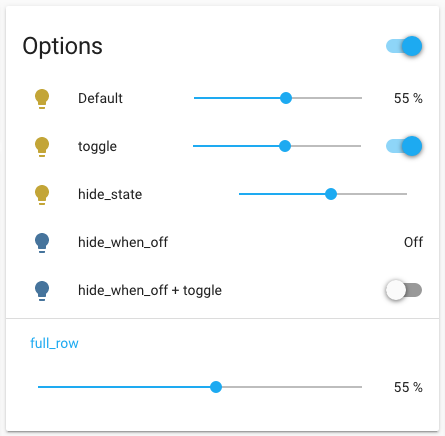
YAML code for screenshot above
type: entities
title: Options
entities:
  - type: custom:slider-entity-row
    entity: light.bed_light
    name: Default
  - type: custom:slider-entity-row
    entity: light.bed_light
    name: toggle
    toggle: true
  - type: custom:slider-entity-row
    entity: light.bed_light
    name: hide_state
    hide_state: true
  - type: custom:slider-entity-row
    entity: light.ceiling_lights
    name: hide_when_off
    hide_when_off: true
  - type: custom:slider-entity-row
    entity: light.ceiling_lights
    name: hide_when_off + toggle
    hide_when_off: true
    toggle: true
  - type: section
    label: full_row
  - type: custom:slider-entity-row
    entity: light.bed_light
    name: hide_state
    full_row: true
Attribute
Currently, the following attribute settings are supported.
For light domain:
brightness_pct- defaultbrightnesscolor_temphuesaturationredgreenblueeffectwhite- for RGBW lights onlycold_white- for RGBWW lights onlywarm_white- for RGBWW lights only
For cover domain:
position- defaulttilt