Workflow Metrics
March 17, 2026 · View on GitHub


An open-source dashboard for GitHub Actions metrics with AI-powered optimization suggestions.
Features
- GitHub OAuth login — Sign in with GitHub using
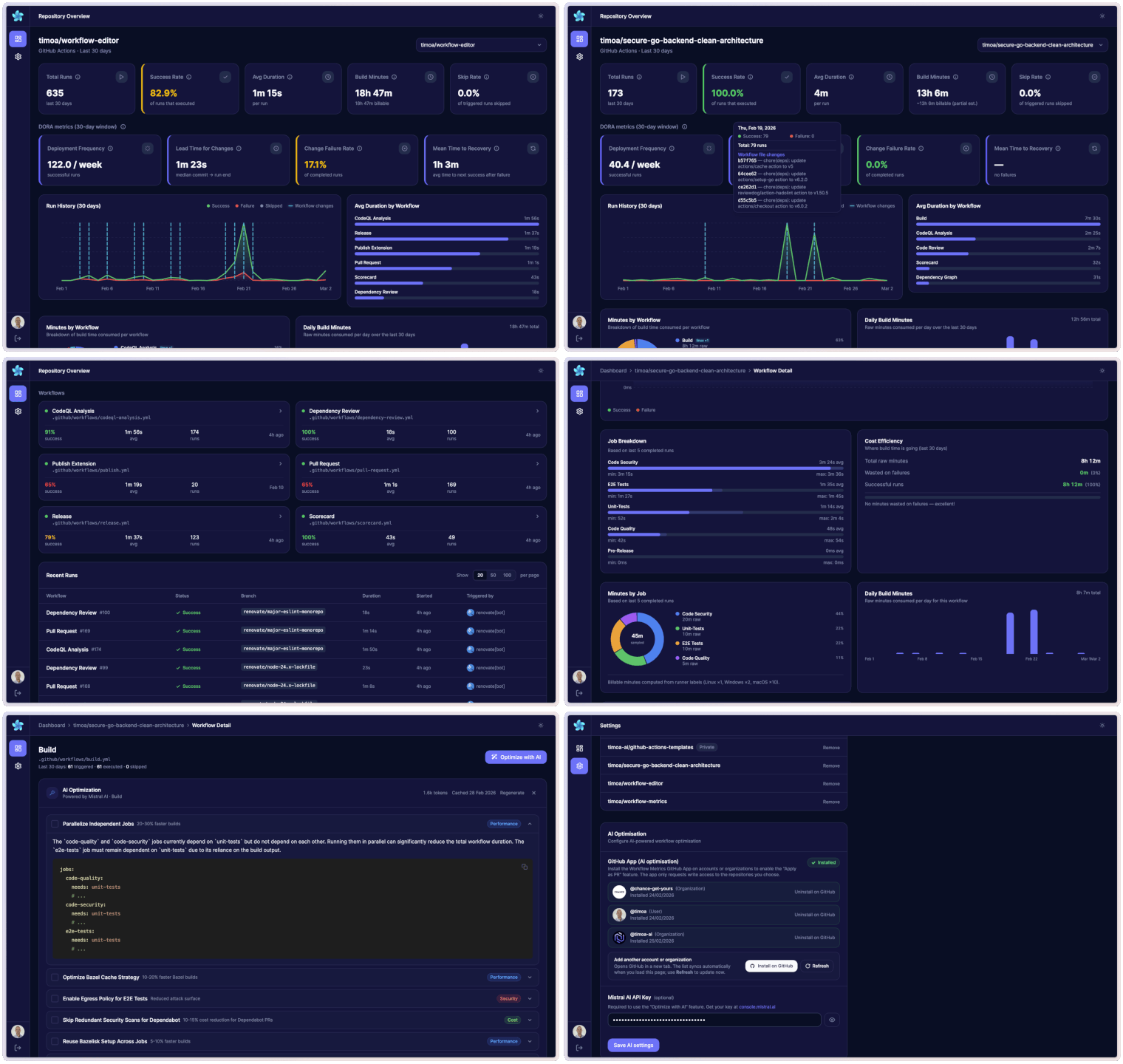
repoandread:orgscopes to access your workflows - Repository overview dashboard — Total runs, success rate, average duration, active workflows, and 7→30 day progressive loading
- DORA metrics — Deployment Frequency, Lead Time for Changes, Change Failure Rate, and Mean Time to Recovery over the last 30 days
- Run history + workflow-change markers — Visual breakdown of success/failure/cancelled runs plus commit markers when workflow files changed
- Duration by workflow — Bar chart comparing average duration across all workflows
- Build minutes + billable minutes — Raw build minutes with billable estimate using GitHub-hosted runner multipliers (Linux ×1, Windows ×2, macOS ×10)
- Minutes analytics — Minutes by workflow, daily build-minutes trend, per-workflow minutes by job, and daily workflow minutes trend
- Efficiency insights — Wasted minutes on failures, most expensive workflow, costliest branch, and frequency × duration table
- Skip analytics — Global skip rate, per-workflow skip rate, and top skipped workflows table
- Recent runs table — Filterable list of the latest runs with status, branch, actor, and duration
- Workflow list — All workflows with live success rate and quick navigation
- Workflow detail dashboard — Deep dive into a single workflow: P50/P95 duration, build minutes, billable minutes, skip rate, and cost efficiency
- Workflow structure flow chart — Interactive workflow graph (trigger + job dependency DAG) with runner labels and step counts
- Job + step breakdowns — Per-job timing analysis (avg/min/max) and slowest-job step-level breakdown from recent completed runs
- AI optimization with Mistral — Click "Optimize with AI" on any workflow to get streaming, actionable suggestions (caching, parallelization, runner optimization, cost, etc.)
- Apply as PR — Push AI optimization suggestions directly as a pull request via the GitHub App integration
- Settings page — Manage GitHub connections, tracked repositories, Mistral API key, and theme
- Dark / light mode — Dark by default, persisted per user preference
Workflow Flow Chart
Workflow detail pages include an interactive flow chart that visualizes trigger-to-job execution order and needs dependencies.
flowchart LR
    T([Trigger])
    L[lint]
    U[unit-tests]
    B[build]
    D[deploy]

    T --> L
    T --> U
    L --> B
    U --> B
    B --> D
Tech Stack
- Framework: Svelte 5 + SvelteKit 2
- Styling: TailwindCSS 4 +
@tailwindcss/vite - Auth & Database: Supabase (GitHub OAuth + PostgreSQL)
- GitHub API:
@octokit/rest - AI: Vercel AI SDK +
@ai-sdk/mistral(streaming) - Deployment: Cloudflare Pages via
@sveltejs/adapter-cloudflare - Package manager: PNPM
Design
The UI design and color system are inspired by the free template "Dark Admin Dashboard" by Malik Ali.
Figma template: Dark Admin Dashboards.
Getting Started
Prerequisites
- Node.js >= 24
- PNPM >= 10
1. Clone and install
git clone https://github.com/timoa/workflow-metrics.git
cd workflow-metrics
pnpm install
2. Create a Supabase project
- Create a new project at supabase.com.
- Run database migrations (choose one method):
- With Supabase CLI:
Your project ref is in the Supabase dashboard URL:supabase link --project-ref YOUR_PROJECT_REF supabase db pushhttps://supabase.com/dashboard/project/YOUR_PROJECT_REF. - Without CLI: In Supabase Dashboard → SQL Editor, run each file in
supabase/migrations/in numerical order, from001_initial.sqlthrough008_github_app_installations_avatar_name.sql.
- With Supabase CLI:
- Enable GitHub OAuth (use a GitHub OAuth App, not a GitHub App):
- Go to GitHub → Settings → Developer settings → OAuth Apps → New OAuth App.
- Set Authorization callback URL to your Supabase callback:
https://<your-project-ref>.supabase.co/auth/v1/callback. - Copy the Client ID and Client secret, then in Supabase → Authentication → Providers → GitHub, paste them and enable GitHub.
- In Supabase → Authentication → URL Configuration → Redirect URLs, add:
http://localhost:5173/auth/callback
https://your-project.pages.dev/auth/callback
- From Supabase → Project Settings → API, copy:
- Project URL →
PUBLIC_SUPABASE_URL - anon / public key →
PUBLIC_SUPABASE_ANON_KEY - service_role key →
SUPABASE_SERVICE_ROLE_KEY(server-only; bypasses RLS for cache writes — never expose this key to the browser or commit it to source control)
- Project URL →
3. Create a GitHub App (for "Apply as PR")
The "Apply as PR" feature — which pushes AI optimization suggestions directly as a pull request — requires a GitHub App (separate from the OAuth App used for login).
- Go to GitHub → Settings → Developer settings → GitHub Apps → New GitHub App.
- Fill in the details:
- GitHub App name: e.g.
workflow-metrics-bot - Homepage URL: your app URL (e.g.
https://your-project.pages.dev) - Callback URL:
https://your-project.pages.dev/auth/github-app/callback- For local dev, also add:
http://localhost:5173/auth/github-app/callback
- For local dev, also add:
- Webhook: uncheck Active (not needed)
- GitHub App name: e.g.
- Under Repository permissions, set:
- Contents: Read & Write
- Pull requests: Read & Write
- Workflows: Read & Write
- Actions: Read
- Click Create GitHub App.
- On the App settings page, note the App ID →
GITHUB_APP_ID. - Note the App slug from the URL (
github.com/apps/<slug>) →GITHUB_APP_SLUG. - Scroll to Private keys → Generate a private key. A
.pemfile will download.- Collapse the newlines for use as a single-line secret:
awk 'NF {sub(/\r/, ""); printf "%s\\n",\$0;}' your-app.pem - Use the output as
GITHUB_APP_PRIVATE_KEY.
- Collapse the newlines for use as a single-line secret:
4. Get a Mistral AI API key (for AI optimization)
The "Optimize with AI" feature streams actionable suggestions (caching, parallelization, runner optimization, cost reduction) powered by Mistral AI. The key is per-user and entered in the app Settings page — it is not a server environment variable.
- Sign up or log in at console.mistral.ai.
- Go to API Keys → Create new key.
- Copy the key — you will not be able to see it again.
- After logging into the app, go to Settings and paste the key into the Mistral API key field.
The key is stored encrypted in Supabase and is only used server-side. AI optimization is simply unavailable without one — the rest of the app works normally.
5. Configure environment variables
Copy .env.example to .env:
cp .env.example .env
Fill in the values:
# ── Supabase ──────────────────────────────────────────────────────────────────
PUBLIC_SUPABASE_URL=https://your-project.supabase.co
PUBLIC_SUPABASE_ANON_KEY=your-anon-key
SUPABASE_SERVICE_ROLE_KEY=your-service-role-key

# ── App URL (production only) ─────────────────────────────────────────────────
# Required in production so OAuth redirects back to the correct URL.
# Leave commented out for local dev — the app uses the request origin automatically.
# PUBLIC_APP_URL=https://your-project.pages.dev

# ── GitHub App (for "Apply as PR") ───────────────────────────────────────────
GITHUB_APP_ID=your-numeric-app-id
GITHUB_APP_PRIVATE_KEY="-----BEGIN RSA PRIVATE KEY-----\n...\n-----END RSA PRIVATE KEY-----"
GITHUB_APP_SLUG=your-github-app-slug
| Variable | Required | Description |
|---|---|---|
PUBLIC_SUPABASE_URL | Yes | Supabase project URL |
PUBLIC_SUPABASE_ANON_KEY | Yes | Supabase anon (public) key |
SUPABASE_SERVICE_ROLE_KEY | Yes | Supabase service role key — bypasses RLS for server-side cache writes. Never expose this to the browser or commit it to source control |
PUBLIC_APP_URL | Production only | Your deployed app URL (e.g. https://your-project.pages.dev), no trailing slash |
GITHUB_APP_ID | Yes | Numeric App ID from GitHub App settings |
GITHUB_APP_PRIVATE_KEY | Yes | RSA private key from GitHub App settings (full PEM, newlines as \n) |
GITHUB_APP_SLUG | Yes | URL slug of your GitHub App (e.g. workflow-metrics-bot) |
5.1 App-wide developer config
The app also supports a typed server-side config file for developer customization.
- Defaults live in
src/lib/server/config/app-config.ts - Local machine overrides live in
src/lib/server/config/app-config.local.ts(gitignored) - Start from
src/lib/server/config/app-config.local.example.ts - Optional env override for AI model:
AI_OPTIMIZATION_MODEL
Current configurable section:
aiOptimization- choose provider/model used by AI optimization
Example local override:
import type { AppConfigOverride } from '$lib/server/config/app-config';

const localConfig: AppConfigOverride = {
	aiOptimization: {
		defaultModel: 'mistral-medium-latest'
	}
};

export default localConfig;
6. Run locally
pnpm dev
Open http://localhost:5173.
Deployment (Cloudflare Pages)
1. Connect to Cloudflare Pages
Connect your GitHub repository to Cloudflare Pages with these build settings:
- Build command:
pnpm run build - Build output directory:
.svelte-kit/cloudflare - Node.js version: 24
2. Set environment variables
In Cloudflare Pages → Settings → Environment Variables, add all variables from the table above, including PUBLIC_APP_URL set to your production URL.
| Variable | Description |
|---|---|
PUBLIC_SUPABASE_URL | Supabase project URL |
PUBLIC_SUPABASE_ANON_KEY | Supabase anon (public) key |
SUPABASE_SERVICE_ROLE_KEY | Supabase service role key |
PUBLIC_APP_URL | Your production app URL (e.g. https://your-project.pages.dev) |
GITHUB_APP_ID | GitHub App ID |
GITHUB_APP_PRIVATE_KEY | GitHub App RSA private key (full PEM, newlines as \n) |
GITHUB_APP_SLUG | GitHub App URL slug |
3. Update Supabase OAuth redirect URLs
In Supabase → Authentication → URL Configuration → Redirect URLs, ensure all URLs are listed:
http://localhost:5173/auth/callback
https://your-project.pages.dev/auth/callback
https://your-custom-domain.com/auth/callback   ← if using a custom domain
Database Schema
See supabase/migrations/001_initial.sql for the full schema with RLS policies.
Tables:
github_connections— GitHub OAuth tokens per userrepositories— Tracked repositories per useruser_settings— Mistral API key (encrypted), theme, default repoworkflow_runs_cache— Cached workflow run data to reduce GitHub API callsworkflow_detail_runs_cache— Cached per-workflow run detailsoptimization_history— History of AI optimization suggestions per workflowgithub_app_installations— GitHub App installation records per repository
Related Projects
Workflow Editor — A VSCode extension that lets you edit GitHub Actions workflow files visually: jobs and dependencies as an interactive diagram, trigger configuration, matrix strategy, and step editing — all without touching YAML directly. A great companion to Workflow Metrics when you want to act on the insights and improve your workflows.
Contributing
Contributions welcome! See CONTRIBUTING.md for setup, coding standards, and the PR process.
License
MIT