O11 IDX Theme
November 17, 2025 · View on GitHub

A beautiful theme for VS Code inspired by Google IDX





Enjoying O11 IDX! Support the project by staring or become a sponsor on GitHub Sponsors.


✨ Features
O11 IDX is a carefully crafted dark theme that brings the elegant aesthetics of Google IDX to your VS Code environment. Designed with developer comfort and productivity in mind, this theme offers:
🎨 Beautiful Color Palette
- Deep, comfortable backgrounds - Reduce eye strain during long coding sessions
- Carefully selected syntax colors - Enhanced code readability with distinct token colors
- Soft, vibrant accents - Purple, blue, and green highlights that pop without overwhelming
🔍 Enhanced Readability
- High contrast where it matters - Keywords, strings, and functions stand out clearly
- Optimized bracket highlighting - Easily track code blocks with color-coded brackets
- Subtle UI elements - Interface components that don't distract from your code
💡 Smart Syntax Highlighting
- Multi-language support - Consistent, beautiful colors across JavaScript, TypeScript, Python, HTML, CSS, C/C++, Haskell and more
- Semantic token colors - Variables, functions, classes, and constants are distinctly colored
- Markdown support - Beautiful rendering for documentation
🎯 Polished UI Elements
- Dark activity bar - Clean, modern sidebar with purple accents
- Elegant editor tabs - Easy-to-read tabs with active state indicators
- Refined status bar - Subtle information display at the bottom
- Consistent terminal colors - ANSI colors that match the theme aesthetic
📸 Screenshots
Editor View
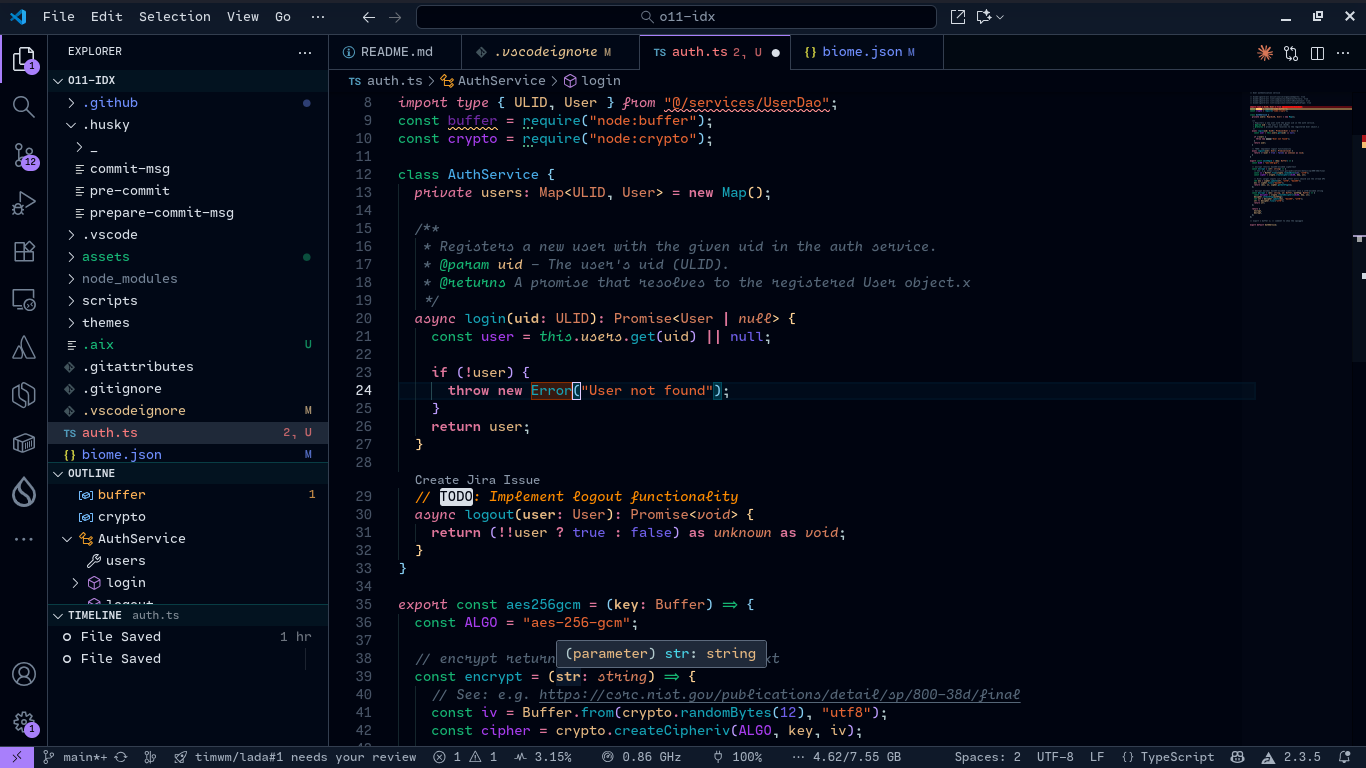
Theme Preview
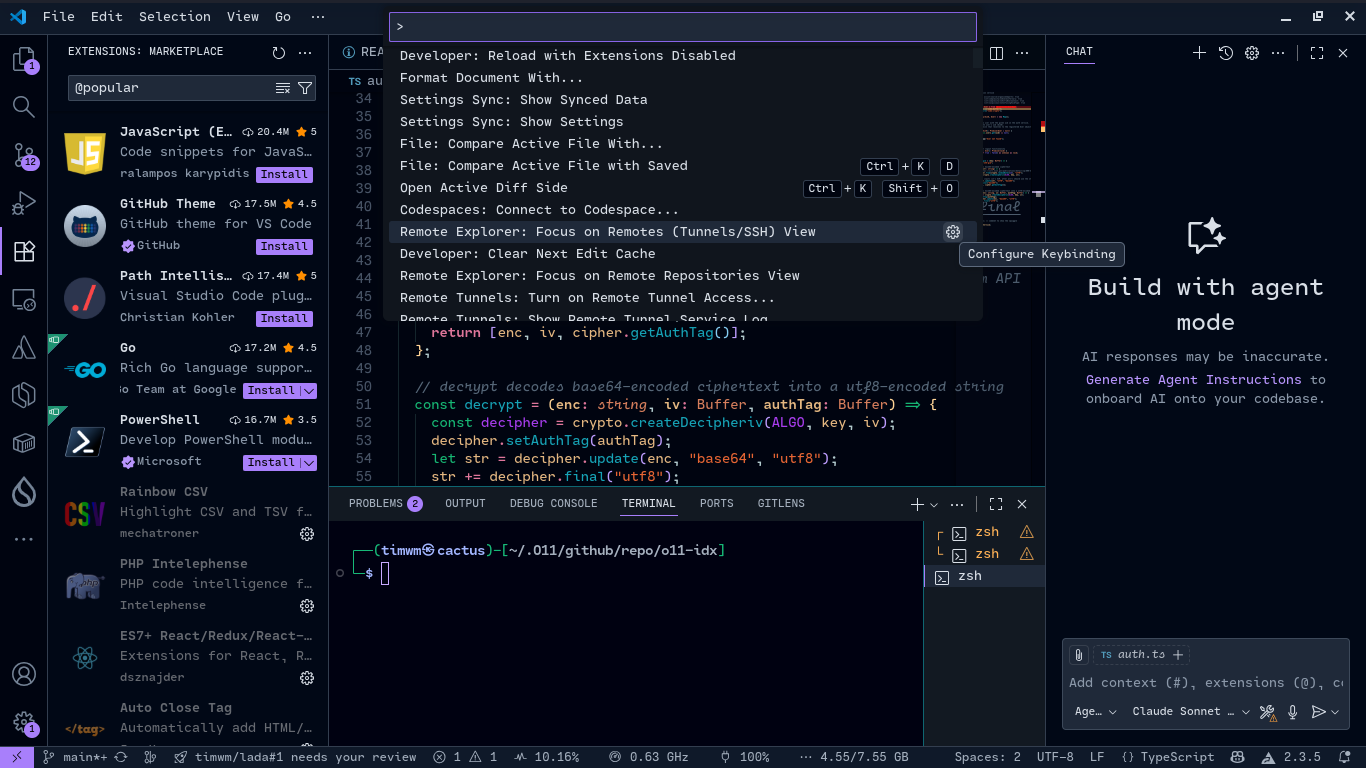
🚀 Installation
Via VS Code Marketplace
- Open Extensions sidebar panel in VS Code (
Ctrl+Shift+X/Cmd+Shift+X) - Search for "O11 IDX"
- Click Install
- Click Reload to reload VS Code
- Go to File > Preferences > Color Theme (or
Ctrl+K Ctrl+T/Cmd+K Cmd+T) - Select O11 IDX
Via Command Line
code --install-extension timwm.o11-idx
Manual Installation
- Download the
.vsixfile from GitHub Releases - Open VS Code
- Go to Extensions view
- Click on the
...menu at the top - Select Install from VSIX...
- Choose the downloaded file
🎨 Color Palette
| Color | Hex | Usage |
|---|---|---|
 | #a87ffb | Primary accent, activity bar border |
 | #85cdf1 | Strings (HTML/XML), properties |
 | #77d5a3 | Strings, regex, tags |
 | #bd9cfe | Entities, brackets |
 | #fd8da3 | Keywords, storage |
 | #ffd395 | Variables, brackets |
 | #92a9ff | Constants, support types |
 | #d9dfe7 | Editor foreground, text |
 | #7f8d9f | Comments |
 | #171f2b | Editor background |
 | #10151d | Sidebar background |
⚙️ Configuration
Recommended Font Settings
For the best experience with O11 IDX, I consider using these font settings:
{
  "editor.fontFamily": "'Cartograph CF', 'JetBrains Mono', 'Fira Code', Inconsolata, 'Source Code Pro Medium', 'Droid Sans Mono', monospace",
  "editor.fontLigatures": true,
}
Recommended Extensions (Optional)
Note: These extensions are optional but can enhance your experience with the O11 IDX theme.
- Bracket Pair Colorizer - Enhanced bracket highlighting
- Better Comments - Improved comment styling
- Indent Rainbow - Colorful indentation guides
- Material Icon Theme - Icons that complement the theme
🔧 Customization
You can customize the theme colors in your settings.json:
{
  "workbench.colorCustomizations": {
    "[O11 IDX]": {
      "editor.background": "#171f2b",
      // Add your custom colors here
    }
  },
  "editor.tokenColorCustomizations": {
    "[O11 IDX]": {
      "comments": "#7F8D9F",
      // Customize syntax colors here
    }
  }
  // ...
}
🤝 Contributing
We love contributions! This project includes automated contributor recognition in release notes.
Release Contributors
Each release automatically includes a contributors section that recognizes everyone who contributed. The project uses a custom script to:
- Extract contributors between releases
- Display commit counts per contributor
- Include GitHub profiles and avatars
- Notify contributors when their work is released
See the scripts/ directory for more information about the release workflow.
How to Contribute
- Fork the repository
- Create your feature branch (
git checkout -b feature/amazing-feature) - Commit your changes using conventional commits (
git commit -m 'feat: add amazing feature') - Push to the branch (
git push origin feature/amazing-feature) - Open a Pull Request
Your contribution will be automatically recognized in the next release! 🎉
🐛 Issues & Suggestions
Found a bug or have a suggestion? Please open an issue on GitHub Issues.
📝 Changelog
See CHANGELOG.md for a detailed history of changes.
📄 License
This theme is licensed under the GPL-2.0 license.
💖 Support
If you enjoy this theme, please consider:
- ⭐ Starring the repository
- 📢 Sharing it with others
- 🐛 Reporting bugs or suggesting improvements
🙏 Acknowledgments
- Inspired by Google IDX
- Built with love for the VS Code community
Made with ❤️ by timwm
Happy Coding! 🚀