selectline-statusbar
March 7, 2017 · View on GitHub
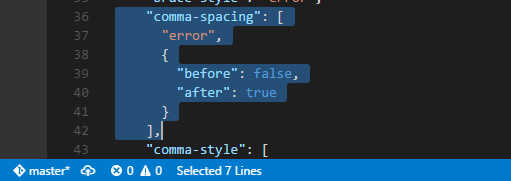
Displays selected lines count in status bar.
Usage
When you selected more 2 lines, selected lines count will be displayed in status bar.
Configurations
You can change the display in the following steps.
- File > Preferences > User Setting (or Workspace Setting)
- Add/Modify the these key-value.
Format
| name | type | default |
|---|---|---|
selectline.displayFormat | string | Selected %d Lines |
- Display format of selected lines.
- The format can be use https://nodejs.org/api/util.html#util_util_format_format.
- Argument into display format is line count only.
- You can display with octicon like
$(three-bars) Selected line: %d.
Alignment
| name | type | default |
|---|---|---|
selectline.alignment | string (left or right) | left |
- Show on the left or right in the status bar.
Statusbar priority
| name | type | default |
|---|---|---|
selectline.statusbarPriority | number | 100 |
- The priority of display in the status bar. Higher value means shown the left.
Change log
- 0.0.2 (2017-3-7): Add an icon and some configurations
- 0.0.1 (2016-10-6): Initial release
License
Please see LICENSE.