TurboStream Terminal UI
January 29, 2026 · View on GitHub

Keyboard-driven terminal interface for real-time data streaming with AI
A beautiful terminal UI built with Bubble Tea for monitoring high-velocity data streams and analyzing them with LLMs in real-time.
Quick Start Video
📹 Coming Soon: Watch our TUI demo and setup guide on YouTube
Get Started in 3 Steps
1. Start the Backend
The TUI connects to the TurboStream backend. Start it first:
# Clone and run the backend
git clone https://github.com/turboline-ai/turbostream.git
cd turbostream
cp .env.local.example .env.local
# Edit .env.local with your MongoDB and LLM credentials
go run ./cmd/server
Backend runs at http://localhost:7210 by default.
2. Clone & Run the TUI
git clone https://github.com/turboline-ai/turbostream-tui.git
cd turbostream-tui
go run .
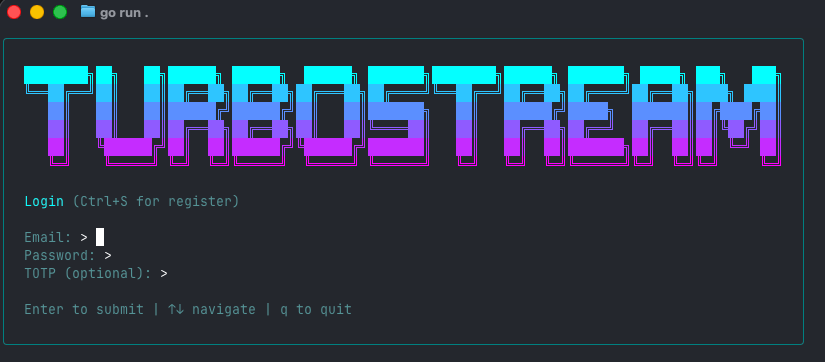
3. Login & Start Monitoring
Enter your credentials (from backend user registration) and start streaming! 🚀
Features
Real-Time Streaming
- WebSocket connection with automatic reconnection
- Token-by-token LLM response streaming
- Live feed data monitoring
- Sub-second latency
Observability Dashboard
Press d to toggle the dashboard:
📹 Coming Soon: Watch the dashboard tour video
Panels:
- Stream Health - Connection status, throughput, reconnections
- LLM Context - Memory usage, context size, eviction stats
- Payload Stats - Size distribution, averages, histograms
- LLM Performance - Token counts, TTFT, generation time
Visualization:
- Sparkline charts for real-time metric trends
- 60-second rolling windows
- Color-coded indicators (green = good, red = issues)
For detailed metric definitions: DASHBOARD_METRICS_REVIEW.md
Feed Management
- Browse available feeds
- Subscribe/unsubscribe in real-time
- Monitor multiple feeds simultaneously
- Custom AI prompts per feed
Key Bindings
| Key | Action |
|---|---|
Enter | Submit / Execute action |
d | Toggle dashboard view |
q | Quit application |
↑/↓ | Navigate feed list |
c | Reconnect WebSocket |
Tab | Cycle through inputs |
Esc | Go back / Cancel |
📹 Coming Soon: Watch the keyboard shortcuts tutorial
Configuration
Environment Variables
| Variable | Description | Default |
|---|---|---|
TURBOSTREAM_BACKEND_URL | Backend REST API URL | http://localhost:7210 |
TURBOSTREAM_WEBSOCKET_URL | WebSocket endpoint | ws://localhost:7210/ws |
TURBOSTREAM_TOKEN | Pre-configured JWT token | None |
TURBOSTREAM_EMAIL | Pre-fill login email | None |
Example:
export TURBOSTREAM_BACKEND_URL=https://your-backend.railway.app
export TURBOSTREAM_WEBSOCKET_URL=wss://your-backend.railway.app/ws
go run .
Screenshots
Main Feed View
Observability Dashboard
📹 Coming Soon: Dashboard walkthrough video
Development
Prerequisites
- Go 1.24+
- Running TurboStream backend
Build from Source
# Clone
git clone https://github.com/turboline-ai/turbostream-tui.git
cd turbostream-tui

# Install dependencies
go mod download

# Build
go build -o turbostream-tui .

# Run
./turbostream-tui
Project Structure
turbostream-tui/
├── main.go              # Main application entry
├── ws.go                # WebSocket handling
├── pkg/
│   └── api/             # Backend API client
└── README.md
Running Tests
go test ./...
Troubleshooting
Can't Connect to Backend
Error: Connection refused or Failed to connect
Fix:
- Check backend is running:
curl http://localhost:7210/health - Verify
TURBOSTREAM_BACKEND_URLis correct - Check firewall settings
WebSocket Disconnects
Error: WebSocket connection closed
Fix:
- Press
cto reconnect manually - Check backend logs for errors
- Verify network stability
Authentication Failed
Error: Invalid token or Auth failed
Fix:
- Register a user on the backend first
- Use correct email/password
- Check JWT token hasn't expired (7 days)
Need more help? GitHub Issues
Resources
- 🏠 TurboStream Backend: github.com/turboline-ai/turbostream
- 📚 API Documentation: turboline.ai/docs/api
- 📖 Dashboard Metrics: DASHBOARD_METRICS_REVIEW.md
- 💬 Discussions: GitHub Discussions
- 🐛 Report Issues: GitHub Issues
- 📺 Video Tutorials: YouTube
Contributing
We welcome contributions!
Quick Start:
- Fork the repository
- Create a feature branch:
git checkout -b feature/my-feature - Make your changes
- Run tests:
go test ./... - Format code:
go fmt ./... - Submit a pull request
Code Style:
- Use
gofmtfor formatting - Follow existing patterns
- Keep functions focused and documented
- Test your changes with the backend
License
Licensed under the Mozilla Public License 2.0 (MPL-2.0).
See LICENSE for details.
Built with Bubble Tea 🫧
Made with ❤️ by Turboline AI
Copyright 2024-2025 Turboline AI. All rights reserved.