README.md
April 6, 2026 · View on GitHub





Run AI coding agents in autonomous loops — fresh context each iteration, PRD-tracked progress, automatic quality gates.
Based on Geoffrey Huntley's Ralph Wiggum technique
The Problem
AI coding agents struggle with long tasks:
- Context rot — agent gets confused after 10+ iterations
- Goal drift — agent forgets the spec and solves the wrong problem
- No quality signal — agent says "done" but tests still fail
- Token waste — you re-explain the same context every time
The Solution
- Fresh context per iteration — Each cycle reads PRD + progress from disk, zero degradation even after 20+ iterations
- PRD-linked progress tracking — Stories are tracked in
prd.jsonwith pass/fail state, not "I think I'm done" - Quality scoring with keep/discard — Autoresearch-inspired refinement loop measures quality (0-100) and reverts regressions
- Universal stop hook — One Node.js hook works across Claude Code, Codex CLI, and Kiro CLI
Quick Start
npm install -g @graypark/loophaus
loophaus install
Note:
npx @graypark/loophaus installmay fail on some npm versions due to a bin resolution cache bug. Use the global install above for reliable setup.
The installer auto-detects your host (Claude Code, Codex CLI, or Kiro CLI) and sets up everything — stop hook, commands, and skills.
Then in your AI coding session:
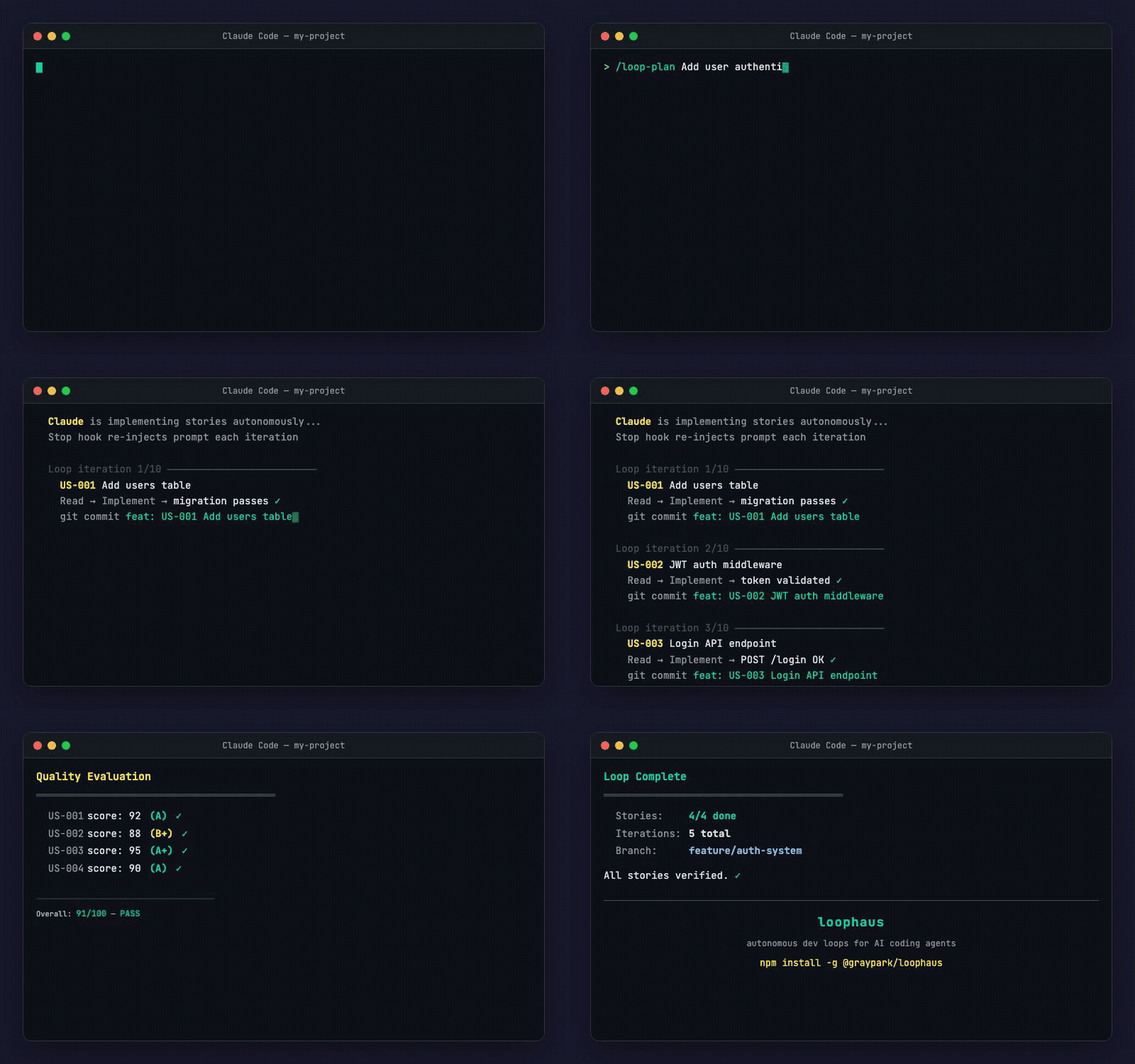
/loop-plan Add user authentication with JWT, bcrypt, and login UI
That's it. The interview generates a PRD, activates the loop, and starts implementing story by story.
Safety
- Every iteration creates a git checkpoint — atomic revert anytime
- Max iterations limit (default 20, configurable)
- Quality threshold = circuit breaker — score < 80 triggers refine or stop
- Cost tracking with policy enforcement (max $5, max 30 min)
loophaus cleanfor data lifecycle management
Why not just script this?
- Fresh context isolation — no degradation after 20 iterations; each cycle starts from disk, not from a decaying conversation
- PRD-linked progress tracking — structured
prd.jsonwith pass/fail per story, not "I think I'm done" - Quality scoring with keep/discard — autoresearch pattern: measure, keep improvements, revert regressions
How it works
An AI agent works on a task in a continuous loop. Each iteration starts with fresh context — reading the PRD and progress files to decide what to do next. The agent implements one story, commits, updates progress, and exits. The stop hook intercepts the exit and re-injects the prompt. Repeat until all stories pass.
                    ┌──────────────────────┐
                    │      /loop-plan      │
                    │   Describe your task  │
                    └──────────┬───────────┘
                               │
                    ┌──────────▼───────────┐
                    │  Generate prd.json   │
                    │  + progress.txt      │
                    └──────────┬───────────┘
                               │
              ┌────────────────▼────────────────┐
              │           /loop                 │
              │                                 │
              │  1. Read prd.json + progress    │
              │  2. Pick next story (passes=false)│
              │  3. Implement + verify          │
              │  4. Evaluate (score 0-100)      │
              │  5. Refine loop (keep/discard)  │
              │  6. Commit + update progress    │
              │  7. Exit attempt                │
              │         │                       │
              │    Stop Hook intercepts         │
              │    Re-injects prompt            │
              │         │                       │
              │    Back to step 1 ──────────────┘
              │                                 │
              │  All stories pass?              │
              │  → <promise>COMPLETE</promise>  │
              │                                 │
              │  /loop-pulse → check status     │
              │  /loop-stop  → cancel anytime   │
              └─────────────────────────────────┘
Commands
| Command | Description |
|---|---|
/loop-plan | Interactive interview — asks targeted questions, generates PRD, activates loop |
/loop | Start iterative dev loop directly (when you already have a PRD or custom prompt) |
/loop-stop | Stop the active loop immediately |
/loop-pulse | Check current loop status, iteration count, and progress |
Quality Loop (v3.4.0+)
loophaus v3.4.0 introduces the Quality Loop — inspired by karpathy/autoresearch's experiment-measure-keep/discard pattern.
Instead of simply marking a story as "done" when tests pass, /loop-plan now measures quality (0-100) and iteratively refines until the score meets the threshold.
Phase 4: Implement
     ↓
Phase 5: Evaluate (score 0-100)
     ↓           ↑
Phase 6: Refine Loop
  score improved? → keep (commit)
  score declined? → discard (git reset)
  max attempts reached? → move on
     ↓
Phase 7: Report (with quality scores)
| autoresearch | loophaus |
|---|---|
val_bpb | quality score (weighted: tests, typecheck, lint, verify, diff, custom) |
results.tsv | .loophaus/results.tsv |
| keep → advance | score improved → commit |
| discard → revert | score declined → git reset --hard |
| NEVER STOP | max 3 attempts per story (configurable) |
Configuration
{
  "qualityThreshold": 80,
  "maxRefineAttempts": 3,
  "qualityConfig": {
    "weights": { "tests": 30, "typecheck": 25, "lint": 15, "verify": 15, "diff": 10, "custom": 5 }
  }
}
Platform Support
| Claude Code | Codex CLI | Kiro CLI | |
|---|---|---|---|
| Stop Hook | Node.js | Node.js | Node.js |
| Install target | Plugin cache | hooks.json | agents/ + steering/ |
| Commands | /reload-plugins | native | steering manual mode |
| Multi-agent | Agent tool | subprocesses | steering agents |
All three platforms share the same core engine (core/engine.ts) and state store (store/state-store.ts). Platform-specific adapters handle the differences.
Native Windows is supported for install, upgrade, and /loop initialization via PowerShell or CMD. Git Bash and WSL are optional, not required.
Installation
Global install (recommended)
npm install -g @graypark/loophaus
loophaus install
On Windows, ensure your global npm bin directory (typically %AppData%\npm) is on PATH.
Via npx
npx @graypark/loophaus install
npxmay fail on some npm versions due to a bin resolution cache bug. If it does, use the global install above.
Specify host
loophaus install --host claude-code
loophaus install --host codex-cli
loophaus install --host kiro-cli
Flags
| Flag | Description |
|---|---|
--force | Overwrite existing installation |
--dry-run | Preview changes without writing files |
--local | Install to project directory instead of global (Codex CLI only) |
CLI
loophaus ships a standalone CLI for management tasks:
loophaus install          # Install to detected host
loophaus status           # Show current loop state and active host
loophaus stats            # Iteration history and completion metrics
loophaus quality          # Run quality scoring on current stories
loophaus demo             # Run interactive demo
loophaus config           # Show/edit configuration
loophaus update-check     # Check for new versions
loophaus upgrade          # Upgrade to latest version
loophaus uninstall        # Clean removal from all hosts
Architecture
loophaus/
├── bin/
│   ├── loophaus.ts               # CLI entry point
│   ├── install.ts                # Cross-platform installer
│   └── uninstall.ts              # Clean uninstaller
├── core/
│   ├── types.ts                  # Shared TypeScript interfaces
│   ├── engine.ts                 # Core loop engine (shared)
│   ├── event-logger.ts           # Iteration event tracking
│   ├── quality-scorer.ts         # Quality scoring (score, evaluate, log)
│   ├── refine-loop.ts            # Keep/discard refinement logic
│   ├── validate.ts               # PRD + state schema validation
│   ├── policy.ts                 # Loop policy evaluation
│   ├── cost-tracker.ts           # Token cost estimation
│   ├── trace-analyzer.ts         # Trace analysis + comparison
│   ├── worktree.ts               # Git worktree lifecycle
│   ├── merge-strategy.ts         # Parallel merge strategies
│   ├── parallel-runner.ts        # Multi-worktree orchestration
│   ├── session.ts                # Checkpoint / session management
│   └── loop-registry.ts          # Multi-loop registry
├── store/
│   └── state-store.ts            # Loop state persistence
├── lib/
│   ├── paths.ts                  # Cross-platform path resolution
│   └── stop-hook-core.ts         # Testable hook logic
├── platforms/
│   ├── claude-code/installer.mjs # Plugin cache installer
│   ├── codex-cli/installer.mjs   # hooks.json installer
│   └── kiro-cli/installer.mjs    # agents/ + steering/ installer
├── hooks/
│   └── stop-hook.mjs             # Universal stop hook (Node.js)
├── commands/                     # Slash command definitions
├── skills/                       # Platform-specific skill definitions
├── .claude-plugin/
│   └── plugin.json               # Claude Code marketplace manifest
├── dist/                         # Compiled output (tsc)
└── tests/                        # 359 test cases (vitest)
PRD Format
loophaus uses a prd.json format:
{
  "project": "MyApp",
  "branchName": "feature/auth-system",
  "description": "JWT authentication with login UI",
  "userStories": [
    {
      "id": "US-001",
      "title": "Add users table with password hash",
      "description": "As a developer, I need user storage for auth",
      "acceptanceCriteria": [
        "Users table with email, password_hash columns",
        "Migration runs successfully",
        "Typecheck passes"
      ],
      "priority": 1,
      "passes": false,
      "notes": ""
    }
  ]
}
Each story is sized to complete in one iteration (one context window). Dependencies are ordered by priority. The loop engine picks the next story where passes is false and works on it until verification succeeds.
Update
loophaus upgrade
Manual upgrade also works:
npm install -g @graypark/loophaus@latest
loophaus install --force
Uninstall
loophaus uninstall
npm uninstall -g @graypark/loophaus
Development
git clone https://github.com/vcz-Gray/loophaus.git
cd loophaus
npm install
npm test               # 359 tests
npm run typecheck      # TypeScript strict mode
npm run build          # Compile to dist/
npx vitest             # watch mode
License
MIT
Built for Claude Code, Codex CLI, and Kiro CLI