README.md
July 28, 2026 · View on GitHub
 WinGet Releaser (GitHub Action)





)
Publish new releases of your application to the Windows Package Manager easily.

Creating WinGet manifests and submitting them at WinGet Community Repository for every release of your application can be tedious and error-prone.
WinGet Releaser allows you to automate this process, with pull requests that are trusted amongst the community, often expediting the amount of time it takes for a submission to be reviewed and published to WinGet.
Getting Started 🚀
Important
At least one version of your package should already be present in the Windows Package Manager Community Repository. The action will use that version as a base to create manifests for new versions of the package.
-
You will need to create a classic Personal Access Token (PAT) with
public_reposcope. New fine-grained PATs aren't supported by the action. Review https://github.com/vedantmgoyal9/winget-releaser/issues/172 for information. -
Fork microsoft/winget-pkgs under the same account/organization as the project's repository. If you are forking winget-pkgs on a different account (e.g. bot/personal account), you can use the
fork-userinput to specify the username of the account where the fork is present. -
Add the action to your workflow file (e.g.
.github/workflows/<name>.yml).
Important
The action will only work when the release is published (not a draft), because the release assets (binaries) aren't available publicly until the release is published.
Note
In case you're pinning the action to a commit hash, you'll need to update the hash frequently to get the latest features & bug fixes. Therefore, it is highly recommended to setup dependabot auto-updates for your repository. Check out keeping your actions up to date with Dependabot for guidance on how to do this. (Yes, it also supports updating actions pinned to a commit hash!)
Examples 📝
| Workflow with the minimal configuration | Workflow with a filter to only publish .exe files | Workflow to publish multiple packages | Workflow with implementation of custom package version |
|---|---|---|---|
|
|
|
|
Configuration Options ⚒️
| Option | Description | Notes |
|---|---|---|
identifier (Mandatory) | The PackageIdentifier of the app in WinGet. | Example: Microsoft.PowerToys |
version (Optional) | The PackageVersion of the application. | Default: Release tag, excluding v prefix (e.g. v1.0.0 -> 1.0.0) Example: ${{ github.event.release.tag_name }} # For tags without the 'v' prefix |
installers-regex (Optional) | A Regular Expression to match Windows installers/binaries from GitHub release artifacts. | Default: .(exe|msi|msix|appx)(bundle){0,1}$ Example: \.exe$ (All files ending with .exe) |
max-versions-to-keep (Optional) | The maximum number of versions of the package to keep in WinGet. If after the current release, the number of versions exceeds this limit, the oldest version will be deleted. | Default: 0 (unlimited) Example: 3 (latest 3 versions only) |
release-tag (Optional) | The tag of the GitHub release you want to publish to Windows Package Manager (WinGet). | Default: ${{ github.event.release.tag_name || github.ref_name }} Example: release-tag: ${{ inputs.version }} # workflow_dispatch input 'version' |
fork-user (Optional) | The GitHub user where winget-pkgs fork is present. This fork will be used to create PR at WinGet Community Repository. | Default: ${{ github.repository_owner }} # repository owner Example: dotnet-winget-bot |
token (Mandatory) | GitHub token to create PR at winget-pkgs. The token should have a public_repo scope. | Example: token: ${{ secrets.WINGET_TOKEN }} # Repository secret called 'WINGET_TOKEN' |
release-notes-url (Optional) | URL to package version's release notes. | Default: GitHub release page Example: release-notes-url: https://example.com/release-notes/${{ github.event.release.tag_name }} |
Warning
Do not directly put the token in the action. Instead, create a repository secret containing the token and use that in the workflow. Refer to using encrypted secrets in a workflow for more information.
🚀 Integrating with  - Supercharging WinGet Releaser
The action uses Komac under the hood to create manifests and publish them to the Windows Package Manager Community Repository because of its unique capability to update installer URLs with respect to architecture, installer type, scope, etc.
I'm grateful to Russell Banks, the creator of Komac, for creating such an amazing & wonderful winget manifest creator, which is the core of this action. Again, it is because of Komac that the action can now be used on any platform (Windows, Linux, macOS) and not just Windows (as it was before).
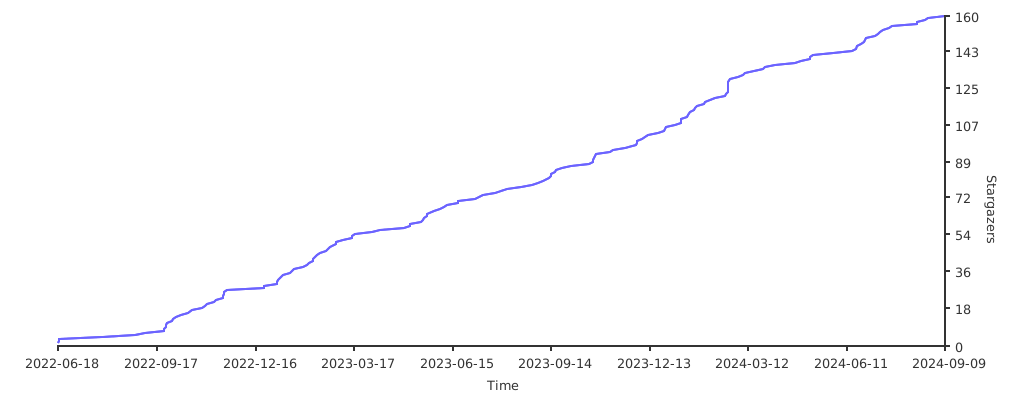
🌟 Stargazers over time 👀
Contributors ✨
Thanks goes to these wonderful people (emoji key):


This project follows the all-contributors specification. Contributions of any kind welcome!