README.md
August 14, 2026 · View on GitHub
Harness Code
A terminal-first client for the official DeepSeek Harness Runtime.
No browser. No localhost. One npm command.




English · 简体中文 · npm · Roadmap · Contributing
Important
Harness Code is an independent community project. It is not an official DeepSeek product. The agent core is composed from the official open-source DeepSeek Harness packages.
Quick start
Requires Node.js 22.19 or newer.
npm install --global harness-code
deepseek
The first launch opens a terminal-native connection wizard. Paste a DeepSeek API Key, validate it against the official API, choose a model, and start working. No environment-variable setup is required.
Why Harness Code?
The official DeepSeek Harness already provides the hard parts: the agent loop, model adapter, tools, sandboxing, sessions, compaction, skills, goals, and subagent primitives. Harness Code supplies the missing terminal-native product experience while keeping that runtime intact.
- Official runtime core — uses the published
@deepseek-ai/dsh-*packages instead of reimplementing the agent. - Actually terminal-native — ACP over local process stdio; no browser tab, Electron wrapper, HTTP server, or
localhostport. - One-command install — npm installs both the terminal client and the required official Harness runtime modules.
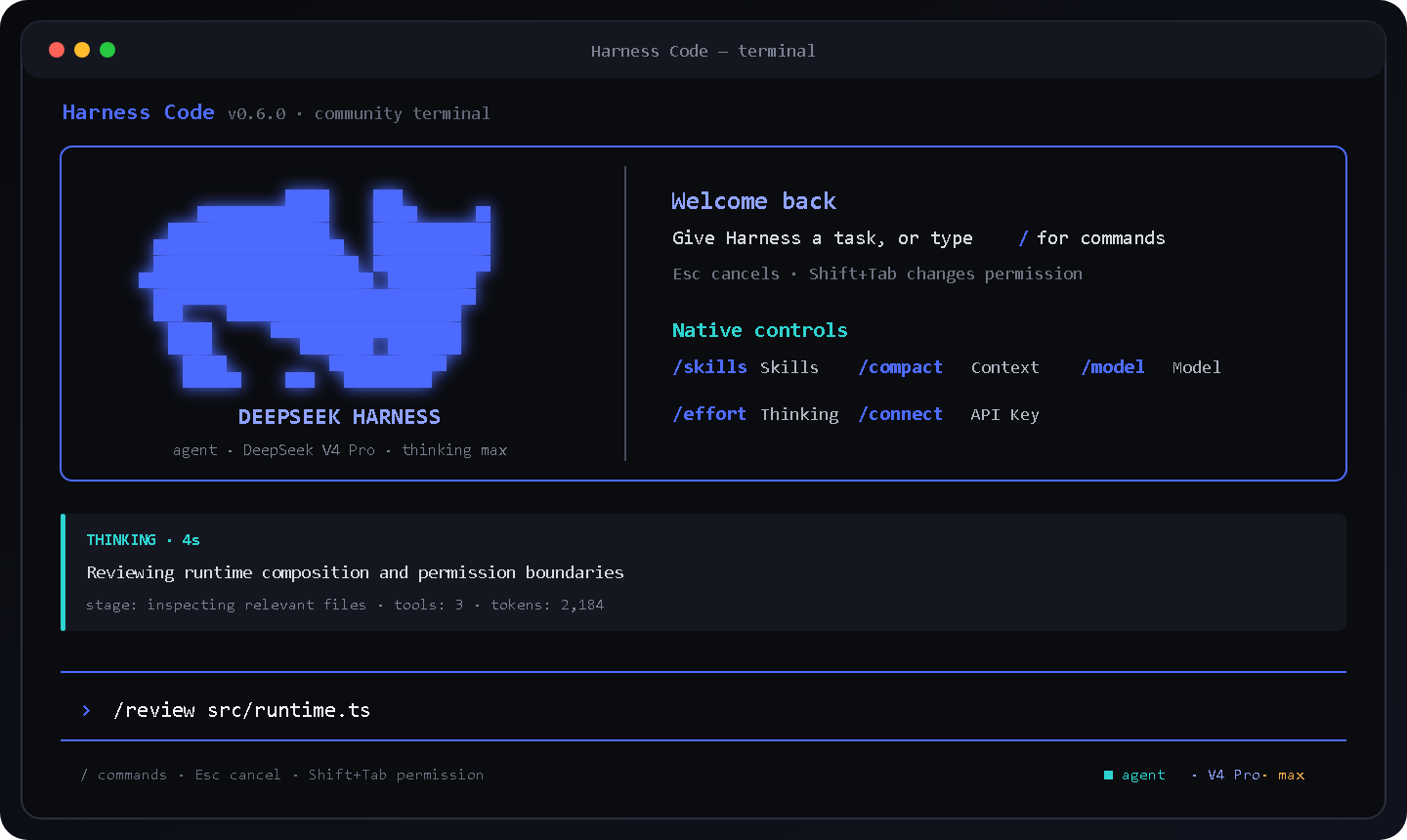
- Modern coding-agent UX — command palette, permission modes, model picker, thinking status, token usage, context compaction, and Skills.
- Secure first-run setup — validates against the official DeepSeek API and encrypts the saved key with Windows current-user DPAPI.
At a glance
| Harness Code | Official Harness Web client | Headless ACP demo | |
|---|---|---|---|
| Official Harness runtime | Yes | Yes | Yes |
| Native interactive terminal UI | Yes | No | No |
Browser or localhost required | No | Yes | No |
| Persistent command palette | Yes | Web actions | No |
| Model, effort, compaction, Skills controls | Built in | Web UI | API-level |
| Global npm installation | Yes | Yes | Developer-oriented |
How it works
your terminal
    │
    ▼
Harness Code TUI
    │  ACP JSON-RPC over stdin/stdout
    ▼
official DeepSeek Harness Runtime
    ├─ DeepSeek model adapter
    ├─ persistent agent/session loop
    ├─ filesystem + shell tools
    ├─ sandbox + human approval
    └─ compaction + workspace instructions
Everything above runs as local processes. The model adapter connects directly to https://api.deepseek.com during use.
Interactive controls
Type / to open the command center, use the arrow keys to select an action, press Tab to complete it, and press Enter to run it.
| Area | Commands |
|---|---|
| Connection and model | /connect, /model (/models), /effort |
| Session | /clear, /compact, /context, /copy, /export, /usage |
| Permissions | /mode, /permissions, /plan |
| Workspace | /skills, /reload-skills, /pwd, /diff, /init, /memory |
| Agent workflows | /review, /security-review, /test, /simplify, /explain, /fix |
| Diagnostics | /doctor, /config, /help, /exit |
Keyboard shortcuts include Esc to cancel, Shift+Tab to cycle permission modes, Alt+P to cycle models, Alt+E to change reasoning effort, and Ctrl+D to exit while idle.
Permission modes
| Mode | Harness policy | Behavior |
|---|---|---|
plan | read-only | Investigate without mutations and reject escalation requests. |
agent | workspace-write | Allow workspace edits and ask before broader effects. |
yolo | danger-full-access | Auto-approve effects; intended for disposable environments. |
Start directly in a mode:
deepseek --mode plan
deepseek --mode agent
deepseek --mode yolo
Connection management
deepseek auth login
deepseek auth status
deepseek auth logout
On Windows, the saved DeepSeek credential is encrypted for the current account with DPAPI and never written to shell history. DEEPSEEK_API_KEY and DEEPSEEK_MODEL remain available as temporary overrides for automation.
One-shot automation
deepseek -p "explain this repository"
deepseek --mode plan -p "review the authentication flow"
deepseek --json -p "summarize the public API"
Development
git clone https://github.com/withlovehub/harness-code.git
cd harness-code
npm install
npm run check
The test suite covers argument parsing, permission policy, secure credential storage, terminal commands, and package installation. CI runs on Windows and Linux with Node.js 22 and 24.
Project status
Harness Code is a functional community preview. See the roadmap, browse open issues, or start a discussion.
Current upstream transport limitations include fresh-session-only ACP startup and committed-message streaming rather than token-level private reasoning. Harness Code displays safe execution summaries and provider-reported usage without exposing or fabricating private chain-of-thought.
Contributing
Bug reports, feature proposals, documentation improvements, and focused pull requests are welcome. Start with CONTRIBUTING.md and look for good first issue.
License and attribution
Harness Code is MIT licensed. See NOTICE for upstream attribution and trademark clarification. DeepSeek and DeepSeek Harness are trademarks or projects of their respective owners.