CGE-Tools
March 6, 2026 · View on GitHub


A powerful C++ image and video processing library with OpenGL-based filters and effects, built with Qt5/Qt6 support.
Quick Links
- � Download Latest Release - Pre-built binaries for macOS / Linux / Windows
- 🚀 Quick Start Guide - Get up and running in 5 minutes
- 📖 Build Documentation - Detailed build instructions
- 📝 Modernization Log - Project upgrade details
- ⚡ Optimization Guide - Project optimizations and best practices
- 🤝 Contributing Guide - How to contribute to the project
Description
CGE (Cross-platform Graphics Effects) is a high-performance graphics processing library that provides:
- Image Filters: 70+ built-in filters for image enhancement and effects
- Animation System: Smooth animation framework for dynamic effects
- Slideshow Engine: Professional slideshow effects (Classic, Dynamic, Lovely, Memories, Party, Piano, Christmas, etc.)
- Sprite System: 2D/3D sprite rendering capabilities
- Real-time Processing: GPU-accelerated processing using OpenGL/OpenGL ES
This library is the core engine powering the mobile apps:
Features
Core Functionality
- Hardware-accelerated OpenGL rendering
- Cross-platform support (macOS, Linux, Windows)
- Qt5 (5.15+) and Qt6 integration
- Modular architecture
Filter Categories
- Basic Adjustments: Brightness, Contrast, Saturation, Exposure, Hue, etc.
- Color Effects: Color Balance, Color Level, Curves, White Balance, etc.
- Blur Effects: Gaussian Blur, Bilateral Blur, Mosaic Blur, Motion Blur, etc.
- Beauty Filters: Face Beautification, Eye Enlargement, Teeth Whitening, etc.
- Artistic Effects: Sketch, Halftone, Crosshatch, Emboss, Edge Detection, etc.
- Advanced Effects: Vignette, Tilt-shift, Haze, Lookup Tables (LUT), etc.
Building from Source
Prerequisites
- CMake 3.16 or higher
- Qt 5.15+ or Qt 6.0+
- C++11 compatible compiler
- OpenGL development libraries
- (Optional) ccache for faster compilation
Quick Build
# Using build script (recommended)
./tasks.sh --release --rebuild

# Or manually
mkdir build && cd build
cmake .. -DCMAKE_BUILD_TYPE=Release
cmake --build . -j8
macOS
# Set Qt path (if not already set)
export QTDIR=/path/to/Qt/5.15.x/macos  # or Qt/6.x.x/macos

# Build
mkdir build && cd build
cmake .. -DCMAKE_BUILD_TYPE=Release
cmake --build .
Linux
# Install dependencies (Ubuntu/Debian)
# For Qt5:
sudo apt-get install build-essential cmake qt5-qmake qt5-default qtbase5-dev libqt5opengl5-dev libglew-dev

# For Qt6:
sudo apt-get install build-essential cmake qt6-base-dev qt6-opengl-dev libglew-dev

# Build
mkdir build && cd build
cmake .. -DCMAKE_BUILD_TYPE=Release
cmake --build .
Windows
# Set Qt path (use Qt5 or Qt6 installation)
set QTDIR=C:\Qt\5.15.x\msvc2019_64
REM or
REM set QTDIR=C:\Qt\6.x.x\msvc2019_64

# Build
mkdir build && cd build
cmake .. -DCMAKE_BUILD_TYPE=Release
cmake --build .
CMake Build Options
The build system supports several options:
# Build shared library instead of static
cmake .. -DBUILD_SHARED_LIBS=ON

# Build filter generator application (requires Qt6 migration - currently experimental)
cmake .. -DBUILD_FILTER_GENERATOR=ON

# Debug build
cmake .. -DCMAKE_BUILD_TYPE=Debug

# Specify custom Qt path
cmake .. -DCMAKE_PREFIX_PATH=/path/to/Qt/6.x.x
Note: The filter generator application requires Qt6 and is disabled by default. The core CGE library is fully functional.
Project Structure
cge-tools/
├── CMakeLists.txt          # CMake build configuration
├── README.md               # This file
├── include/                # Public headers
│   └── cge/               # All library headers
│       ├── core/          # Core functionality
│       ├── filters/       # Filter implementations
│       ├── animation/     # Animation system
│       ├── sprite/        # Sprite rendering
│       └── slideshow/     # Slideshow effects
├── src/                   # Implementation files
│   ├── core/              # Core implementations
│   ├── filters/           # Filter implementations
│   ├── animation/         # Animation implementations
│   ├── sprite/            # Sprite implementations
│   ├── slideshow/         # Slideshow implementations
│   └── extend/            # Extension modules
├── tools/                 # Utility tools & pre-built binaries (legacy)
│   ├── download.sh        # Script to fetch latest release packages
│   ├── mac/               # Legacy macOS binaries (outdated)
│   ├── ubuntu/            # Legacy Linux binaries (outdated)
│   └── windows/           # Legacy Windows binaries (outdated)
└── screenshots/           # Example screenshots
Usage
Basic Usage
#include <cge/cge.h>
#include <cge/filters/cgeBrightnessAdjust.h>

// Initialize image handler
CGE::CGEImageHandler handler;
handler.initWithRawBufferData(buffer, width, height, format);

// Apply brightness filter
CGE::CGEBrightnessFilter* filter = new CGE::CGEBrightnessFilter();
filter->setIntensity(1.5f);
handler.setFilterWithConfig(filter);

// Process and get result
handler.processingFilters();
void* result = handler.getResultBuffer();
Using with Qt
#include <QImage>
#include <cge/cge.h>

QImage processImage(const QImage& input) {
    // Your processing code here
    return output;
}
Tools
Download Pre-built Binaries
Pre-built packages for all platforms are published on the GitHub Releases page.
Use the provided download script to fetch them interactively:
# Interactive menu
bash tools/download.sh

# Auto-detect platform and download matching packages
bash tools/download.sh --auto

# Download everything
bash tools/download.sh --all
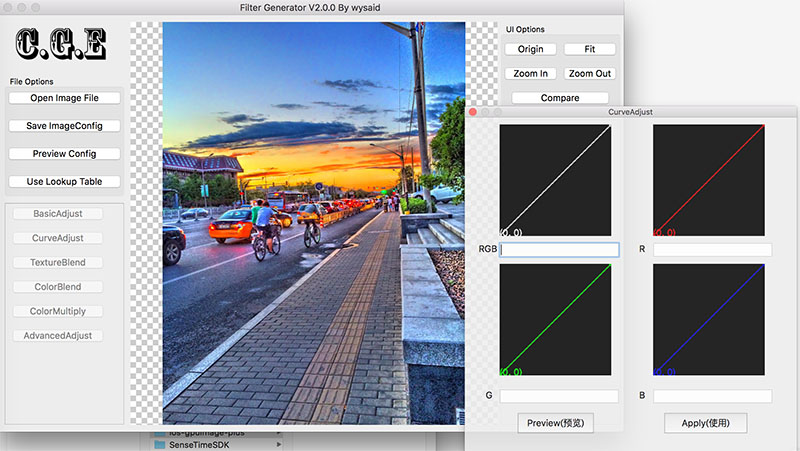
Filter Generator
A Qt6-based GUI application for creating and testing CGE filters interactively.
To build from source:
cmake .. -DBUILD_FILTER_GENERATOR=ON
cmake --build .
Checker
A tool for validating CGE rule strings to ensure filter configurations are correct.
Pre-built binaries are available on the Releases page.
Installation
After building, you can install the library:
cd build
cmake --install . --prefix /usr/local
This will install:
- Headers to
/usr/local/include/cge/ - Library to
/usr/local/lib/ - CMake config files for easy integration
Using in Your Project
With CMake
find_package(cge REQUIRED)
target_link_libraries(your_target PRIVATE CGE::cge)
Manual Integration
target_include_directories(your_target PRIVATE /path/to/cge-tools/include)
target_link_libraries(your_target PRIVATE /path/to/cge-tools/build/libcge.a Qt6::Core Qt6::OpenGL)
License
Please refer to the LICENSE file for licensing information.
Contributing
Contributions are welcome! Please feel free to submit pull requests or open issues for bugs and feature requests.
Author
Wang Yang (wysaid)
- Email: admin@wysaid.org
- GitHub: @wysaid
Related Projects
- Android GPUImage Plus - Android version with Java/Kotlin bindings
- iOS GPUImage Plus - iOS version with Objective-C/Swift bindings
Changelog
Version 2.0.0 (2026)
- CI/CD pipeline for automated releases on macOS, Linux, and Windows
- GitHub Releases with pre-built DMG / AppImage / ZIP packages
- Added
tools/download.shfor one-command package download - Filter Generator fully migrated to Qt6
- Improved documentation
Version 1.0.0 (2024)
- Open source release
- Migrated from QMake to CMake build system
- Qt6 compatibility
- Reorganized project structure
- Improved documentation
Screenshots
Support
For questions, issues, or feature requests, please open an issue on GitHub.