Save single prediction file
May 12, 2026 · View on GitHub
MECAT: A Multi-Experts Constructed Benchmark for Fine-Grained Audio Understanding Tasks
📖 Paper | 🎧 Demo | 🔊 MECAT-Caption (HF) | 🔊 MECAT-QA (HF)

Table of Contents
- 1. Introduction
- 2. Features
- 3. Data Distribution
- 4. Tasks
- 5. Example Data
- 6. Evaluation Metrics
- 7. Usage
- 8. Results
- 9. Acknowledgement
- 10. Contributing
- 11. Citation
- 12. License
1. Introduction
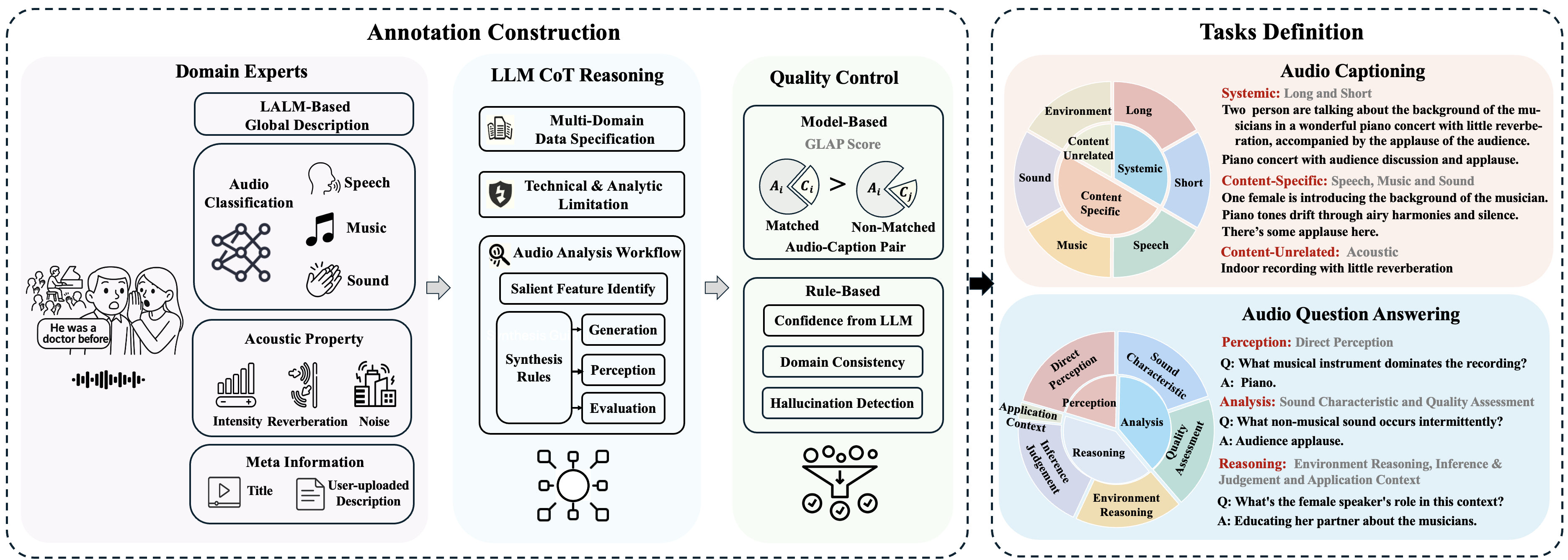
MECAT is a comprehensive benchmark constructed on large-scale data to evaluate machine understanding of audio content through two core tasks:
- Audio Captioning: Generating textual descriptions for given audio
- Audio Question Answering: Answering questions about given audio
2. Features
- Data Source:Diverse-scenario coverage via the part of ACAV100M dataset
- Processing Pipeline:
- MetaInfo: Source video metadata extraction (titles/descriptions)
- Content-Specific: Content-specific feature extraction using 10-20 dedicated models (speech/music/general audio)
- Content-Unrelated: Non-content audio analysis: quality metrics, loudness measurements, reverberation assessment
- Understanding & Genration: LLM-powered comprehension & generation with Chain-of-Thought
- Quality Control: Multi-stage verification framework
- Evluation System: Multi-perspective assessment with progressive difficulty levels
3. Data Distribution
| Data Code | Description | Audio Caption | Audio Question Answering | ||
|---|---|---|---|---|---|
| # Pairs (Train) | # Pairs (Test) | # Pairs (Train) | # Pairs (Test) | ||
| 000 | silence | 173 | 179 | 865 | 895 |
| 00A | general sound excluding speech and music | 837 | 848 | 4185 | 4240 |
| 0M0 | music | 2593 | 2593 | 12965 | 12965 |
| 0MA | music and general sound | 206 | 199 | 1030 | 995 |
| S00 | speech | 7839 | 7839 | 39195 | 39195 |
| S0A | speech and general sound | 2424 | 2439 | 12120 | 12195 |
| SM0 | speech and music | 5312 | 5312 | 26560 | 26560 |
| SMA | speech, music and general sound | 668 | 643 | 3340 | 3215 |
4. Tasks
4.1 Audio-Captioning
| Type | Subtask | Category | Level | Descrption | Evaluated Data Abbreviation | Sample |
|---|---|---|---|---|---|---|
| Systemtic | Short | 🔵 Specialized | Simplified caption over the whole audio within 15 words | 000, 00A, 0M0, 0MA S00, S0A, SM0, SMA |
20052 | |
| Long | 🔵 Specialized | Caption over the whole audio using 1-2 sentences | 000, 00A, 0M0, 0MA S00, S0A, SM0, SMA |
20052 | ||
| Content-Specific | Speech | Clean | 🟢 Basic | Caption over clean speech | S00 | 7839 |
| Mixed | 🔴 Complex | Caption over speech with music/sound interference | 0MA, S0A, SM0, SMA | 8593 | ||
| Music | Clean | 🟢 Basic | Caption over clean Music | 0M0 | 2593 | |
| Mixed | 🔴 Complex | Caption over music with speech/sound interference | 0MA, S0A, SM0, SMA | 8593 | ||
| Sound | Clear | 🟢 Basic | Caption over general sound excluding speech and music | 00A | 848 | |
| Mixed | 🔴 Complex | Caption over sound with speech/music interference | 0MA, S0A, SM0, SMA | 8593 | ||
| Content-Unrelated | Environment | 🔵 Specialized | Caption over acoustic characteristic and environment | 000, 00A, 0M0, 0MA S00, S0A, SM0, SMA |
20052 |
4.2 Audio-Question-Answering
Description
| Type | Subtask | Level | Description | Data Abbreviation | Sample |
|---|---|---|---|---|---|
| Perception | Direct_Perception | 🟢🟡 | Perceive sound types | 000, 00A, 0M0, 0MA, S00, S0A, SM0, SMA | 20624 |
| Analysis | Sound_Characteristics | 🟢🟡🟠🔴 | Analyze sound characteristics | 000, 00A, 0M0, 0MA, S00, S0A, SM0, SMA | 19767 |
| Quality_Assessment | 🟢🟡🟠🔴 | Analyze sound quality | 000, 00A, 0M0, 0MA, S00, S0A, SM0, SMA | 18942 | |
| Reasoning | Environment_Reasoning | 🟢🟡🟠🔴 | Reasoning acoustic environment | 000, 00A, 0M0, 0MA, S00, S0A, SM0, SMA | 18300 |
| Inference_Judgment | 🟢🟡🟠🔴 | Cross-modal reasoning | 000, 00A, 0M0, 0MA, S00, S0A, SM0, SMA | 19756 | |
| Application_Context | 🟢🟡🟠🔴 | Semantic understanding | 000, 00A, 0M0, 0MA, S00, S0A, SM0, SMA | 2871 |
Difficulty Distribution
| Difficulty | Symbol | Ratio (%) | Description |
|---|---|---|---|
| Basic | 🟢 | 25 | Direct descriptive questions |
| Intermediate | 🟡 | 35 | Analytical questions |
| Advanced | 🟠 | 25 | Inferential questions |
| Complex | 🔴 | 15 | Comprehensive judgment questions |
5. Example Data
The following examples are from the SMA (Speech, Music and General Sound) domain. You can listen to the audio and browse more samples across all 8 domains on the Demo Page.
5.1 Audio Captioning Example
Each audio clip has 6 caption types (short, long, speech, music, sound, environment), each with 3 paraphrased variants:
{
  "tFg4IwL09Rk_111_64000000000001_121_64": {
    "short": [
      "Electronic music with water splashing and brief speech amid static interference",
      "Dark electronic instrumental with aquatic sounds and momentary vocal utterance",
      "Water splashing noises under brooding synth music featuring short spoken phrase"
    ],
    "long": [
      "A dark electronic instrumental track with water splashing sounds and a male voice briefly speaking, accompanied by persistent background static and mid-frequency noise artifacts.",
      "Moody electronic composition blending synthesized tones with environmental water sounds and fragmented speech, degraded by audio interference",
      "Sustained static underlies a brief male utterance and aquatic noises within a dramatic electronic musical arrangement"
    ],
    "speech": [
      "Male voice briefly uttering 'We over' with cheerful vocal characteristics",
      "Short spoken phrase 'We over' delivered in an upbeat tone",
      "Fragmentary speech segment showing positive vocal affect"
    ],
    "music": [
      "Dark electronic music featuring synthesizer and guitar elements with moderate tempo",
      "Brooding instrumental track combining synthetic textures and guitar tones",
      "Dramatic electronic composition with industrial-inspired rhythmic patterns"
    ],
    "sound": [
      "Prominent water splashing sounds with intermittent static bursts",
      "Aquatic environment noises dominated by liquid movement",
      "Liquid splashing effects accompanied by electrical interference"
    ],
    "environment": [
      "Low-quality audio environment with background static and mid-range distortion",
      "Noisy recording space exhibiting persistent electrical interference",
      "Degraded acoustic conditions with broadband static artifacts"
    ],
    "domain": "SMA"
  }
}
5.2 Audio Question Answering Example
Each audio clip has 5 QA pairs spanning different cognitive categories and difficulty levels:
{
  "tFg4IwL09Rk_..._b4dfbcf5": {
    "category": "direct_perception",
    "difficulty": "basic",
    "question": "Is speech present in the audio?",
    "answer": "Yes, a male voice briefly says 'We over'",
    "domain": "SMA"
  }
}
6. Evaluation Metrics
MECAT supports multiple evaluation metrics for comprehensive assessment:
- Traditional Metrics: BLEU
- FENSE: Fluency Error-based Sentence-bert Evaluation for audio captioning
- DATE: Discriminability based Audio Task Evaluation - DATE is particularly effective for audio captioning and question-answering tasks as it considers both the quality of generated text and the model's discriminative capabilities.
7. Usage
7.1 Installation
python3 -m pip install mecat
# Or the development
# pip install git+https://github.com/xiaomi-research/mecat.git
7.2 Quick Start with Qwen2-Audio Example
This section provides a complete walkthrough of evaluating audio models using MECAT, using Qwen2-Audio as a practical example. The same approach can be adapted for other audio understanding models.
7.2.1 Preliminary Steps: Environment Setup and Model Loading
import torch
from tqdm import tqdm
from transformers import AutoProcessor, Qwen2AudioForConditionalGeneration

# Device setup
device = "cuda" if torch.cuda.is_available() else "cpu"
print(f"Using device: {device}")

# Load Qwen2-Audio model and processor
model = Qwen2AudioForConditionalGeneration.from_pretrained(
    "Qwen/Qwen2-Audio-7B",
    trust_remote_code=True,
    device_map="auto"
)
processor = AutoProcessor.from_pretrained(
    "Qwen/Qwen2-Audio-7B",
    trust_remote_code=True
)
7.2.2 Audio Caption Evaluation
Step 1: Load MECAT-Caption Dataset
from datasets import load_dataset
data = load_dataset(
    'mispeech/MECAT-Caption',
    split='test',
)
print(f"Loaded {len(data)} samples from datasets")
Step 2: Generate and Evaluate Captions
Method 1: Single Dictionary Approach (for non-instruction-following models)
Generation:
from mecat import evaluate
# Generate general predictions using a single prompt
predictions = {}

for item in tqdm(data, desc="Generating general captions"):
    key = item['__key__']
    audio = item['flac']['array']
    sampling_rate = item['flac']['sampling_rate']
    # Note: the sampling rate of audio provided by MECAT is 16kHz

    # Create general prompt for caption generation
    prompt = "<|audio_bos|><|AUDIO|><|audio_eos|>Generate the caption in English:"

    # Process inputs
    inputs = processor(
        text=prompt,
        audio=audio,
        sampling_rate=sampling_rate,
        return_tensors="pt"
    ).to(device)

    # Generate response
    with torch.no_grad():
        generated_ids = model.generate(
            **inputs,
            max_length=512,
            do_sample=False,
            temperature=0.1
        )

    # Decode response
    generated_ids = generated_ids[:, inputs.input_ids.size(1):]
    response = processor.batch_decode(
        generated_ids,
        skip_special_tokens=True,
        clean_up_tokenization_spaces=False
    )[0]
    predictions[key] = response.strip()

print(f"Generated {len(predictions)} general captions")

# Save single prediction file
import csv
with open('caption_predictions.csv', 'w', encoding='utf-8') as f:
    writer = csv.writer(f, quoting=csv.QUOTE_ALL)
    for key, value in predictions.items():
        writer.writerow([key, value])
Evaluation:
# Evaluate general predictions across all subtasks
results = evaluate(
    predicted_data=predictions,
    task='caption',
    metrics=['fense', 'date']
)

print("\nSingle Dictionary Evaluation Results:")
print(results)
Method 2: Multi-Dictionary Approach (recommended for instruction-following models)
Generation:
# Generate task-specific predictions using different prompts
task_prompts = {
    'long': "<|audio_bos|><|AUDIO|><|audio_eos|>Listen to this audio and describe it in 1-2 sentences:",
    'short': "<|audio_bos|><|AUDIO|><|audio_eos|>Listen to the audio and provide a caption for this audio within 15 words:",
    'speech': "<|audio_bos|><|AUDIO|><|audio_eos|>Listen to the audio and provide a caption describing the speech content in this audio:",
    'music': "<|audio_bos|><|AUDIO|><|audio_eos|>Listen to the audio and provide a caption for the music content in this audio:",
    'sound': "<|audio_bos|><|AUDIO|><|audio_eos|>Listen to the audio and provide a general sound excluding speech and music:",
    'environment': "<|audio_bos|><|AUDIO|><|audio_eos|>Listen to the audio and provide a caption for quality or acoustic environment for this audio:"
}

# Generate predictions for each subtask
subtask_predictions = {}

for subtask, prompt_template in task_prompts.items():
    print(f"\nGenerating {subtask} captions...")
    subtask_predictions[subtask] = {}

    for item in tqdm(data, desc=f"Generating {subtask} captions"):
        key = item['__key__']
        audio = item['flac']['array']
        sampling_rate = item['flac']['sampling_rate']

        # Process inputs with task-specific prompt
        inputs = processor(
            text=prompt_template,
            audio=audio,
            sampling_rate=sampling_rate,
            return_tensors="pt"
        ).to(device)

        # Generate response
        with torch.no_grad():
            generated_ids = model.generate(
                **inputs,
                max_length=512,
                do_sample=False,
                temperature=0.1
            )

        # Decode response
        generated_ids = generated_ids[:, inputs.input_ids.size(1):]
        response = processor.batch_decode(
            generated_ids,
            skip_special_tokens=True,
            clean_up_tokenization_spaces=False
        )[0]
        subtask_predictions[subtask][key] = response.strip()

# Save separate prediction files for each subtask
for subtask, preds in subtask_predictions.items():
    filename = f'{subtask}_caption.csv'
    with open(filename, 'w', encoding='utf-8') as f:
        writer = csv.writer(f, quoting=csv.QUOTE_ALL)
        for key, value in preds.items():
            writer.writerow([key, value])
    print(f"Saved {len(preds)} {subtask} predictions to {filename}")
Evaluation:
# Evaluate task-specific predictions for optimal performance
results_multisubtask = evaluate(
    predicted_data=subtask_predictions,
    task='caption',
    metrics=['fense', 'date']
)

print("\nMulti-Dictionary Evaluation Results:")
print(results_multisubtask)
Step 3: Expected Results
Expected Caption Evaluation Output: This result does not represent the actual performance of Qwen2-Audio-7B
   subtask     num_samples  fense  date
 content_long        20052   47.3 40.5
content_short        20052   45.8 41.0
  pure_speech         7839   30.9 28.5
 mixed_speech         8593   31.7 27.1
   pure_music         2593   42.1 50.7
  mixed_music         8593   28.3 33.1
   pure_sound          848   41.2 46.6
  mixed_sound         8593   16.2 34.1
  environment        20052   45.4 47.8
score_caption         <NA>   35.2 39.3
Note:
The formulae of score_caption:
where and were the average score of pure data and mixed data, e.g.,
7.2.3 Audio Question Answering Evaluation
Step 1: Load MECAT-QA Dataset
# Load MECAT-QA test data
qa_data = load_dataset(
    'mispeech/MECAT-QA',
    split='test',
)
print(f"Loaded {len(qa_data)} QA samples from datasets")
Step 2: Generate and Evaluate Answers
Generation:
# Generate predictions for each question-audio pair
qa_predictions = {}

for item in tqdm(qa_data, desc="Generating answers"):
    key = item['__key__']
    audio = item['flac']['array']
    sampling_rate = item['flac']['sampling_rate']
    question = item['json']['question']


    # Create prompt for QA
    prompt = f"<|audio_bos|><|AUDIO|><|audio_eos|>{question}"

    # Process inputs
    inputs = processor(
        text=prompt,
        audio=audio,
        sampling_rate=sampling_rate,
        return_tensors="pt"
    ).to(device)

    # Generate response
    with torch.no_grad():
        generated_ids = model.generate(
            **inputs,
            max_length=512,
            do_sample=False,
            temperature=0.1
        )

    # Decode response
    generated_ids = generated_ids[:, inputs.input_ids.size(1):]
    response = processor.batch_decode(
        generated_ids,
        skip_special_tokens=True,
        clean_up_tokenization_spaces=False
    )[0]

    qa_predictions[key] = response.strip()

print(f"Generated {len(qa_predictions)} answers")

# Output the results to csv files
import csv
with open('qa_predictions.csv', 'w', encoding='utf-8') as f:
    writer = csv.writer(f, quoting=csv.QUOTE_ALL)
    for key, value in qa_predictions.items():
        writer.writerow([key, value])
Evaluation:
# Evaluate using MECAT metrics
qa_results = evaluate(
    predicted_data=qa_predictions,
    task='qa',
    metrics=['fense', 'date']
)

print("\nQA Evaluation Results:")
print(qa_results)
Step 3: Expected Results
Expected QA Evaluation Output: This result does not represent the actual performance of Qwen2-Audio-7B
           subtask     num_samples fense date
    direct_perception        20624 44.0 54.0
sound_characteristics        19767 39.0 53.1
   quality_assessment        18942 18.0 17.8
environment_reasoning        18300 42.0 35.5
  inference_judgement        19756 51.0 42.0
  application_context         2871 40.0 49.9
             score_qa        <NA>  39.0 42.1
Note: the final score is the average scores of all six subtasks
7.3 Command Line Evaluation
You can also use the command line interface for evaluation:
7.3.1 Single File Evaluation
# Caption evaluation for different audio types (using single dictionary predictions)
python -m mecat.evaluate --prediction caption_predictions.csv --task caption --subtask long   --metrics fense date
python -m mecat.evaluate --prediction caption_predictions.csv --task caption --subtask short  --metrics fense date
python -m mecat.evaluate --prediction caption_predictions.csv --task caption --subtask music  --metrics fense date
python -m mecat.evaluate --prediction caption_predictions.csv --task caption --subtask speech --metrics fense date
python -m mecat.evaluate --prediction caption_predictions.csv --task caption --subtask sound  --metrics fense date
python -m mecat.evaluate --prediction caption_predictions.csv --task caption --subtask environment --metrics fense date

# Batch evaluation across all subsets (using single dictionary predictions)
python -m mecat.evaluate --prediction caption_predictions.csv --task caption --metrics fense date
7.3.2 Multi-File Evaluation (Recommended for Caption Task)
For instruction-following models that can generate task-specific captions, you can provide multiple prediction files at once to get comprehensive evaluation results across all caption subtasks:
# Evaluate multiple caption prediction files in order: long, short, speech, music, sound, environment
python -m mecat.evaluate --prediction \
    long_caption.csv \
    short_caption.csv \
    speech_caption.csv \
    music_caption.csv \
    sound_caption.csv \
    environment_caption.csv \
    --task caption --metrics fense date

# Evaluate with fewer files (will evaluate only available subtasks with warning)
python -m mecat.evaluate --prediction \
    long_caption.csv \
    short_caption.csv \
    --task caption --metrics fense date
Benefits of Multi-File Evaluation:
- ✅ Complete Coverage: Evaluates all caption subtasks with task-specific predictions
- ✅ Better Performance: Each prediction file contains responses optimized for specific caption types
- ✅ Comprehensive Results: Provides the full evaluation matrix including overall scores
- ⚠️ File Order Matters: Files are mapped to subtasks in order:
long → short → speech → music → sound → environment
7.3.3 QA Task Evaluation
# QA evaluation for different question types
python -m mecat.evaluate --prediction qa_predictions.csv --task qa --subtask direct_perception     --metrics fense date
python -m mecat.evaluate --prediction qa_predictions.csv --task qa --subtask sound_characteristics --metrics fense date
python -m mecat.evaluate --prediction qa_predictions.csv --task qa --subtask quality_assessment    --metrics fense date
python -m mecat.evaluate --prediction qa_predictions.csv --task qa --subtask environment_reasoning --metrics fense date
python -m mecat.evaluate --prediction qa_predictions.csv --task qa --subtask inference_judgement   --metrics fense date
python -m mecat.evaluate --prediction qa_predictions.csv --task qa --subtask application_context   --metrics fense date

# Batch evaluation across all subsets (recommended)
python -m mecat.evaluate --prediction qa_predictions.csv --task qa --metrics fense date
Prediction File Format:
# csv File
"audio_key_1", "Generated caption or answer text"
"audio_key_2", "Another generated response"
"audio_key_3", "More predictions..."
Important Notes:
- Audio Captioning Task
- For instruction-following models (Recommended):
- Generate 6 different prediction files using task-specific prompts (one per sub-task). Requires 6 inference passes.
- Prompts example:
- long: "Listen to this audio and describe it in 1-2 sentences"
- short: "Listen to the audio and provide a caption for this audio within 15 words"
- speech: "Listen to the audio and provide a caption describing the speech content in this audio"
- music: "Listen to the audio and provide a caption for the music content in this audio"
- sound: "Listen to the audio and provide a general sound excluding speech and music"
- environment: "Listen to the audio and provide a caption for quality or acoustic environment for this audio"
- For non-instruction-following models:
- Evaluate using a single prediction file (single inference pass).
- The same predictions will be evaluated across all subtasks.
- For instruction-following models (Recommended):
- Audio Question Answering Task:
- Evaluate all sub-tasks in a single inference pass using the standard method.
- Single prediction file is sufficient as questions are task-specific.
7.4 Direct Data Evaluation
If you have complete predicted_data and reference_data, you can directly use them for evaluation without loading from files or datasets:
Audio Captioning Task Example:
from mecat import evaluate

predicted_data = [['silence']]

reference_data = [['Extended silence with severe audio distortion and background noise.', 'Persistent quiet period containing heavy signal interference.', 'Continuous silence disrupted by pronounced technical artifacts.']]

results = evaluate(
    predicted_data=predicted_data,
    reference_data=reference_data,
    task='caption',
    metrics='bleu',
)

print(results)
Audio Question Answering Task Example:
Similarly, for QA tasks, you can also provide predicted_data and reference_data directly:
from mecat import evaluate

predicted_data = [['A woman speaking expressively and dog barks.']]

reference_data = [['A woman speaking expressively and dog barks.']]

results = evaluate(
    predicted_data=predicted_data,
    reference_data=reference_data,
    task='qa',
    metrics='bleu',
    subtask='direct_perception',
)

print(results)
This approach is useful when:
- You already have the predictions and references in memory
- You want to evaluate custom data that is not part of the MECAT dataset
- You need to quickly test evaluation metrics on specific examples
Note: Both predicted_data and reference_data should be lists of lists, where each inner list contains the predictions or references for a single sample. For reference data, multiple references per sample are supported (as shown in the caption example above).
Important: If you want to obtain results for different tasks (e.g., evaluating multiple caption subtasks or QA subtasks), it is recommended to use the methods described in sections 7.1-7.3, as they automatically select the appropriate keys for different tasks and provide comprehensive evaluation results across all subtasks.
8. Results
8.1 Audio-Captioning Task (DATE %)
Bold indicates the best performance. Models above the line are open-weight; below are proprietary/API-based.
| Type | Model | Systemic | Content-Specific | Content Unrelated | Score | ||||||
|---|---|---|---|---|---|---|---|---|---|---|---|
| Speech | Music | Sound | |||||||||
| Long | Short | Pure | Mixed | Pure | Mixed | Pure | Mixed | Env | |||
| Caption -Only | Pengi | 43.5 | 46.8 | 27.2 | 29.5 | 29.3 | 13.1 | 42.8 | 14.6 | 7.1 | 29.4 |
| EnClap | 48.6 | 53.1 | 30.2 | 31.8 | 17.9 | 15.9 | 48.8 | 15.2 | 6.8 | 31.9 | |
| LALM | Phi-4-Multimodal | 42.4 | 44.0 | 26.9 | 31.3 | 14.9 | 24.0 | 28.5 | 18.1 | 13.1 | 30.0 |
| Kimi-Audio-7B | 49.5 | 54.2 | 30.0 | 31.3 | 27.7 | 16.9 | 43.1 | 16.2 | 7.0 | 32.8 | |
| Baichuan-Audio | 42.6 | 36.5 | 46.0 | 40.4 | 21.3 | 20.7 | 44.8 | 17.7 | 15.1 | 33.7 | |
| Baichuan-Omni | 47.0 | 50.9 | 43.5 | 41.7 | 35.2 | 13.7 | 34.3 | 19.7 | 11.3 | 35.6 | |
| Mimo-Audio | 56.5 | 56.9 | 45.8 | 44.9 | 35.8 | 19.4 | 46.8 | 21.0 | 9.8 | 40.1 | |
| Audio Flamingo 3 | 52.5 | 51.5 | 49.3 | 48.8 | 40.4 | 24.8 | 50.6 | 21.9 | 11.5 | 40.4 | |
| Qwen3-Omni | 47.9 | 43.7 | 50.2 | 48.7 | 51.2 | 26.8 | 49.0 | 19.5 | 18.2 | 40.4 | |
| Step-Audio-2-mini | 55.6 | 58.7 | 44.2 | 43.6 | 35.3 | 32.0 | 42.8 | 18.9 | 16.1 | 41.5 | |
| Qwen2.5-Omni 3B | 56.4 | 55.2 | 42.5 | 41.3 | 46.6 | 29.7 | 52.9 | 23.9 | 19.4 | 42.5 | |
| Qwen2.5-Omni 7B | 61.1 | 56.5 | 39.9 | 40.9 | 32.1 | 30.9 | 50.7 | 23.8 | 17.9 | 42.6 | |
| Qwen3-Omni-Flash-1201 | 65.7 | 62.5 | 59.2 | 59.9 | 57.4 | 32.5 | 55.8 | 31.6 | 27.1 | 52.9 | |
| Gemini-2.5-Flash | 65.6 | 63.9 | 57.5 | 57.5 | 52.9 | 41.0 | 52.2 | 28.3 | 22.1 | 51.6 | |
| Gemini-2.5-Pro | 62.3 | 62.4 | 56.6 | 57.5 | 53.6 | 38.7 | 53.4 | 29.9 | 24.0 | 50.6 | |
| Gemini-3-Flash | 63.6 | 61.9 | 59.4 | 60.8 | 43.1 | 32.9 | 51.1 | 29.7 | 25.7 | 51.1 | |
| Gemini-3-Pro | 64.9 | 65.8 | 60.5 | 62.4 | 49.8 | 39.8 | 55.1 | 29.9 | 26.1 | 53.1 | |
8.2 Audio-Question-Answering (DATE %)
| Model | Perception | Analysis | Reasoning | Score | |||
|---|---|---|---|---|---|---|---|
| Direct Perception | Sound Characteristics | Quality Assessment |
Environment Reasoning | Inference & Judgment | Application Context |
||
| Kimi-Audio-7B | 45.6 | 39.2 | 18.7 | 34.6 | 48.9 | 41.2 | 38.0 |
| Baichuan-Audio | 40.7 | 45.2 | 31.0 | 35.1 | 49.0 | 46.9 | 41.3 |
| Baichuan-Omni | 43.6 | 44.7 | 33.7 | 39.9 | 49.3 | 49.1 | 43.4 |
| Phi-4-Multimodal | 48.4 | 46.3 | 34.7 | 40.2 | 49.3 | 48.7 | 44.6 |
| Mimo-Audio | 59.3 | 49.3 | 24.9 | 39.1 | 52.7 | 46.2 | 45.2 |
| Step-Audio-2-mini | 57.7 | 54.3 | 37.2 | 39.2 | 48.9 | 48.0 | 47.6 |
| Audio Flamingo 3 | 53.8 | 50.2 | 36.0 | 43.0 | 54.5 | 49.6 | 47.8 |
| Qwen2.5-Omni 3B | 55.7 | 53.2 | 38.6 | 41.1 | 51.8 | 50.8 | 48.5 |
| Qwen2.5-Omni 7B | 57.8 | 52.9 | 39.1 | 44.0 | 53.2 | 50.8 | 49.6 |
| Qwen3-Omni | 61.7 | 54.6 | 39.3 | 45.0 | 56.9 | 56.1 | 52.3 |
| Qwen3-Omni-Flash-1201 | 48.0 | 45.9 | 29.5 | 45.6 | 56.7 | 54.8 | 46.7 |
| Gemini-2.5-Flash | 56.3 | 55.3 | 37.7 | 46.8 | 58.6 | 58.0 | 52.1 |
| Gemini-2.5-Pro | 55.5 | 54.4 | 37.7 | 47.6 | 57.3 | 56.6 | 51.5 |
| Gemini-3-Flash | 54.3 | 51.1 | 34.1 | 47.2 | 57.2 | 57.0 | 51.0 |
| Gemini-3-Pro | 55.5 | 45.5 | 25.8 | 44.0 | 53.2 | 52.0 | 46.0 |
9. Acknowledgement
We have referred to the implementation of FENSE for the evaluation
10. Contributing
Yadong Niu* · Tianzi Wang* · Heinrich Dinkel · Xingwei Sun · Jiahao Zhou · Gang Li · Jiahao Mei · Jizhong Liu · Xunying Liu · Junbo Zhang · Jian Luan
*: Equal Contribution
11. Citation
@article{mecat2025,
  title={MECAT: A Multi-Experts Constructed Benchmark for Fine-Grained Audio Understanding Tasks},
  author={Niu, Yadong and Wang, Tianzi and Dinkel, Heinrich and Sun, Xingwei and Zhou, Jiahao and Li, Gang and Liu, Jizhong and Liu, Xunying and Zhang, Junbo and Luan, Jian},
  journal={arXiv preprint arXiv:2507.23511},
  year={2025}
}
12. License
The dataset of the project is from the part of ACAV100M undert the Creative Commons Attribution License 3.0 (CC BY-3.0) license.
The code of the project is under Apache License 2.0 license.