AgentTrek: Agent Trajectory Synthesis via Guiding Replay with Web Tutorials
February 21, 2025 · View on GitHub
📑 Paper | 🌐 Project Page | 💾 AgentTrek Browser-use Trajectories | 💾 AgentTrek-1.0-32B
intruduction
AgentTrek is a cost-efficient and scalable framework that synthesizes high-quality agent trajectories by guiding replay with web tutorials. These collected trajectories significantly enhance agent performance.
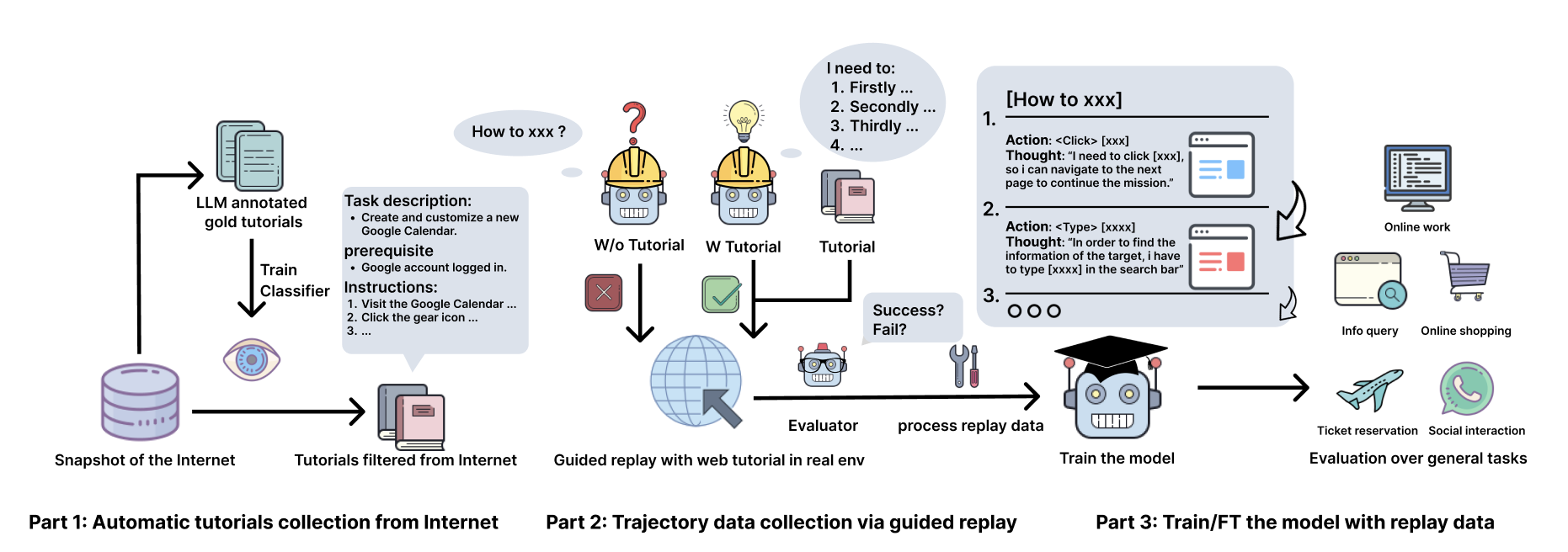
Key Features & Contributions
- 🔄 Scalable Data Synthesis Pipeline: Cost-efficient and scalable pipeline to synthesize high-quality agent trajectories.
- 📊 Comprehensive Dataset: Largest-scale dataset of browseruse agent trajectories with multimodal grounding and reasoning.
- 🤖 Capable Brouwseruse Agent: Fully autonomous browseruse agent capable for performing general tasks.
BrowserGym LeaderBoard 🌐 Browsergym LeaderBoard
| Agent | WebArena | WorkArena-L1 | WorkArena-L2 | WorkArena-L3 | MiniWoB |
|---|---|---|---|---|---|
| Claude-3.5-Sonnet | 36.20 | 56.40 | 39.10 | 0.40 | 69.80 |
| GPT-4o | 31.40 | 45.50 | 8.50 | 0.00 | 63.80 |
| GPT-o1-mini | 28.60 | 56.70 | 14.90 | 0.00 | 67.80 |
| Llama-3.1-405b | 24.00 | 43.30 | 7.20 | 0.00 | 64.60 |
| AgentTrek-32b💫 | 22.40 | 38.29 | 2.98 | 0.00 | 60.00 |
| Llama-3.1-70b | 18.40 | 27.90 | 2.10 | 0.00 | 57.60 |
| GPT-4o-mini | 17.40 | 27.00 | 1.30 | 0.00 | 56.60 |
Our Browseruse agent demonstrate exceptional performance in real-world online scenarios:
Getting Started
Installation
- Clone the repository:
git clone git@github.com:xlang-ai/AgentTrek.git
cd agenttrek
- Create and activate a conda environment:
conda create -n agenttrek python=3.10
conda activate agenttrek
- Install PyTorch and dependencies:
pip install -e .
Data Preparation
Training
Model Checkpoints
- AgentTrek-7B: cooking🧑🍳
- AgentTrek-32B: model
- AgentTrek-72B: cooking🧑🍳
Evaluation
MiniWob++ Evaluation
-
Configure your evaluation settings:
- Open
scripts/run_webarena.sh - Set the
OPENAI_API_KEYvariable to your own openai api key - Set the
AGENTLAB_EXP_ROOTvariable to specify the path for the results - Set the
MINIWOB_URLvariable to your Miniwob URL - Set the
OPENAI_BASE_URLvariable to specify your model base url
- Open
-
Start inference:
bash scripts/run_miniwob.sh
WebArena Evaluation
-
Configure your evaluation settings:
- Open
scripts/run_webarena.sh - Set the
OPENAI_API_KEYvariable to your own OpenAI API key - Set the
AGENTLAB_EXP_ROOTvariable to specify the path for the results - Set the following URL variables for the relevant platforms:
BASE_URL: Specify the base URL for your WebArena instanceWA_SHOPPING: URL for the Shopping benchmarkWA_SHOPPING_ADMIN: URL for the Shopping Admin benchmarkWA_REDDIT: URL for the Reddit benchmarkWA_GITLAB: URL for the GitLab benchmarkWA_WIKIPEDIA: URL for the Wikipedia benchmarkWA_MAP: URL for the Map benchmarkWA_HOMEPAGE: URL for the Homepage benchmark
- Set the
OPENAI_BASE_URLvariable to specify your model base URL
- Open
-
Start inference:
bash scripts/run_webarena.sh