Welcome to DeepfakeHTTP Cheatsheet!

Table of Contents
Hello, World!
-
Prepare file
dump.txt:
GET /api/customer/123 HTTP/1.1

HTTP/1.1 200 OK
Content-Type: application/json

{
    "id": 123,
    "fname": "John",
    "lname": "Doe",
    "email": ["john@example.com", "johndoe@example.com"]
}
-
Start server:
java -jar df.jar --dump dump.txt
-
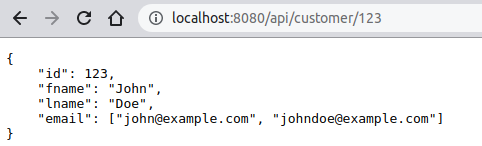
Navigate to:
http://localhost:8080/api/customer/123
-
Get response:
{
    "id": 123,
    "fname": "John",
    "lname": "Doe",
    "email": ["john@example.com", "johndoe@example.com"]
}
![]()
⚡️ Hacks and Tips:
- DeepfakeHTTP also supports
HEAD, POST, PUT, DELETE etc. methods
- Don't miss a single carriage return between headers and body!
💡 See Also:
|
# Client request
GET /api/customer/123 HTTP/1.1

.
# Server response
HTTP/1.1 200 OK
Content-Type: application/json

{
    "id": 123,
    "fname": "John",
    "lname": "Doe",
    "email": ["john@example.com", "johndoe@example.com"]
}
.
# Some comments at the end (ater "." character)
# More comments...
![]()
⚡️ Hacks and Tips:
- Comments are not part of output.
- Comment your dums with
# character.
- Only single lines comments are supported.
- If you need comment after the body, use period (full stop) character
. to mark end of body.
- Don't miss a single carriage return between headers and body!
💡 See Also:
|
-
Prepare file
dump.txt:
GET /form1.html HTTP/1.1

.
# Fake HTML file :)
HTTP/1.1 200 OK

<!DOCTYPE html>
<html lang="en">
<body>
    <form action="/action_page.php" method="POST">
        <label for="fname">First name:</label><input type="text" name="fname"><br>
        <br>
        <label for="lname">Last name: </label><input type="text" name="lname"><br>
        <br>
        <input type="submit" value="Submit">
    </form>
</body>
</html>

POST /action_page.php HTTP/1.1
Content-Type: application/x-www-form-urlencoded

.
# Fake PHP response :)
HTTP/1.1 200 OK
Content-Type: text/html

<!DOCTYPE html>
<html lang="en">
<body>
    Hello ${request.parameters.fname[0]} ${request.parameters.lname[0]}!
</body>
</html>
-
Start server:
java -jar df.jar --dump dump.txt
-
Navigate to:
http://localhost:8080/form1.html
-
Fill in input fields. Eg.: John Doe
-
Get response:
Hello John Doe!
![]()
⚡️ Hacks and Tips:
- DeepfakeHTTP supports
GET, HEAD, POST, PUT, DELETE etc. methods
- Don't miss a single carriage return between headers and body!
💡 See Also:
|
-
Prepare file
dump.txt:
GET /form2.html HTTP/1.1

HTTP/1.1 200 OK

<!DOCTYPE html>
<html lang="en">
<body>
    <form action="/action_page2.php" method="POST">
        <label for="fname">First name:</label><input type="text" name="fname" value="John"><br>
        <br>
        <label for="lname">Last name: </label><input type="text" name="lname" value="Doe"><br>
        <p>
        Only the first name <i>John</i> and the last name <i>Doe</i> are supported.
        <br>
        Expected result is: <strong>Hello John Doe!</strong>,<br>
        or HTTP status <strong><code>404 Not found</code></strong><br>
        when first name is not <i>John</i> or last name is not <i>Doe</i>.
        </p>
        <input type="submit" value="Submit">
    </form>
</body>
</html>

POST /action_page2.php HTTP/1.1
Content-Type: application/x-www-form-urlencoded

fname=John&lname=Doe

HTTP/1.1 200 OK
Content-Type: text/html

<!DOCTYPE html>
<body>
    Hello ${request.parameters.fname[0]} ${request.parameters.lname[0]}!
</body>
</html>
-
Start server:
java -jar df.jar --dump dump.txt
-
Navigate to:
http://localhost:8080/form2.html
-
Fill in input fields. Eg.: John Doe
-
Expected response:
Hello John Doe!
-
Fill in input fields. Eg.: Lora Corban
-
Expected result:
Request failed with status: 404 Not found
![]()
⚡️ Hacks and Tips:
- DeepfakeHTTP supports
GET, HEAD, POST, PUT, DELETE etc. methods
- Don't miss a single carriage return between headers and body!
💡 See Also:
|
-
Prepare file
dump.txt:
GET /api/customer/5 HTTP/1.1
Accept-Language: ru;*

HTTP/1.1 200 OK
Content-Type: application/json

{
    "id": 5,
    "name": "Джон Доу"
}

GET /api/customer/5 HTTP/1.1

HTTP/1.1 200 OK
Content-Type: application/json

{
    "id": 5,
    "name": "John Doe"
}
-
Start server:
java -jar df.jar --dump dump.txt
-
Navigate to:
http://localhost:8080/api/customer/5
-
Expected result:
{
    "id": 5,
    "name": "John Doe"
}
- Change browser's preferred language to Russian
-
Navigate to:
http://localhost:8080/api/customer/5
-
Expected result:
{
    "id": 5,
    "name": "Джон Доу"
}
![]()
⚡️ Hacks and Tips:
- If headers was provided in the request, they will be included in match algorithm
- If body was provided in the request, it will be included in match algorithm
- DeepfakeHTTP supports wildcards (
* and ?) in request query string and headers
- Esacape character for wildcards is
/
- DeepfakeHTTP supports OpenAPI-styled parameters in path
- DeepfakeHTTP supports templates in request line, headers and body
💡 See Also:
|
Request parameters in template
-
Prepare file
dump.txt:
GET /api/customers/{id}/profile?mode=* HTTP/1.1

HTTP/1.1 200 OK
Content-Type: application/json

{
    "id": "${request.parameters.id[0]}",
    "mode": "${request.parameters.mode[0]}",
    "fname": "John",
    "lname": "Doe"
}
-
Start server:
java -jar df.jar --dump dump.txt
-
Navigate to:
http://localhost:8080/api/customers/123/profile?mode=open
-
Get response:
{
    "id": "123",
    "mode": "open",
    "fname": "John",
    "lname": "Doe"
}
![]()
⚡️ Hacks and Tips:
- Parameters are always treated as strings.
- Multivalued query parameters:
?mode=open&mode=tmp ➞ ${request.parameters.mode[1]} ➞ tmp.
- Multivalued path parameters:
/{id}/car/{id} ➞ /123/car/tesla ➞ ${request.parameters.id[1]} ➞ tesla.
- Don't miss a single carriage return between headers and body!
💡 See Also:
|
Multivalued request parameters
-
Prepare file
dump.txt:
GET /api/customers/{id}/profile/{id}/info?mode=open&mode=* HTTP/1.1

HTTP/1.1 200 OK
Content-Type: application/json

{
    "id1": "${request.parameters.id[0]}",
    "id2": "${request.parameters.id[1]}",
    "mode1": "${request.parameters.mode[0]}",
    "mode2": "${request.parameters.mode[1]}",
    "name": "John Doe"
}
-
Start server:
java -jar df.jar --dump dump.txt
-
Navigate to:
http://localhost:8080/api/customers/123/profile/abc/info?mode=open&mode=tmp
-
Get response:
{
    "id1": "123",
    "id2": "abc",
    "mode1": "open",
    "mode2": "tmp",
    "name": "John Doe"
}
![]()
⚡️ Hacks and Tips:
- Parameters are always treated as strings.
- Query parameters can contain wildcards
*, ?: ?mode=*&virus=covid-?? ➞ ?mode=open&virus=covid-19.
- Don't miss a single carriage return between headers and body!
💡 See Also:
|
OpenAPI-styled parameters in path
-
Prepare file
dump.txt:
GET /api/customers/{id}/profile HTTP/1.1

HTTP/1.1 200 OK
Content-Type: application/json

{
    "id": "${request.parameters.id[0]}",
    "fname": "John",
    "lname": "Doe"
}
-
Start server:
java -jar df.jar --dump dump.txt
-
Navigate to:
http://localhost:8080/api/customers/123/profile
-
Get response:
{
    "id": "123",
    "fname": "John",
    "lname": "Doe"
}
![]()
⚡️ Hacks and Tips:
- Parameters are always treated as strings.
- Multivalued path parameters:
/{id}/car/{id} ➞ /123/car/tesla ➞ ${request.parameters.id[1]} ➞ tesla.
- Query parameters also supported:
?mode=open ➞ ${request.parameters.mode[0]} ➞ open.
- Don't miss a single carriage return between headers and body!
💡 See Also:
|
External data and request parameters in template
-
Prepare external data file
customers.json:
[
    {"fname": "John", "lname": "Doe", "email": ["john@example.com", "johndoe@example.com"]},
    {"fname": "Lora", "lname": "Corban", "email": ["lora@example.com", "loracorban@example.com"]},
    {"fname": "Ted", "lname": "Brown", "email": ["tedbrown@example.com"]}
]
-
Prepare file
dump.txt:
GET /api/customers/{id}/profile?mode=* HTTP/1.1

HTTP/1.1 200 OK
Content-Type: application/json

{
    "id": "${request.parameters.id[0]}",
    "mode": "${request.parameters.mode[0]}",
    "fname": "${data.customers[1].fname}",
    "lname": "${data.customers[1].lname}"
}
-
Start server:
java -jar df.jar --dump dump.txt --db customers.json
-
Navigate to:
http://localhost:8080/api/customers/123/profile?mode=open
-
Get response:
{
    "id": "123",
    "mode": "open",
    "fname": "Lora",
    "lname": "Corban"
}
![]()
⚡️ Hacks and Tips:
- Parameters are always treated as strings.
- The data file can be organized as an object or an array.
- You can select a random record from the data file.
- DeepfakeHTTP supports JSON, YAML and CSV data files.
- By default, data files are watched for changes. Use
--no-watch option to disable watching.
- Don't miss a single carriage return between headers and body!
💡 See Also:
|
Random data in template
-
Prepare external data file
customers.json:
[
    {"fname": "John", "lname": "Doe", "email": ["john@example.com", "johndoe@example.com"]},
    {"fname": "Lora", "lname": "Corban", "email": ["lora@example.com", "loracorban@example.com"]},
    {"fname": "Ted", "lname": "Brown", "email": ["tedbrown@example.com"]}
]
-
Prepare file
dump.txt:
GET /api/customers/{id}/profile HTTP/1.1

HTTP/1.1 200 OK
Content-Type: application/json

{
    "id": "${request.parameters.id[0]}",
    "name": "${random(data.customers).fname + ' ' + random(data.customers).lname}"
}
-
Start server:
java -jar df.jar --dump dump.txt --db customers.json
-
Navigate to:
http://localhost:8080/api/customers/123/profile
-
Get response:
{
    "id": "123",
    "name": "Ted Brown"
}
![]()
⚡️ Hacks and Tips:
- The data file can be organized as an object or an array.
- You can select record from the data file by index.
- DeepfakeHTTP supports JSON, YAML and CSV data files.
- By default, data files are watched for changes. Use
--no-watch option to disable watching.
- Don't miss a single carriage return between headers and body!
💡 See Also:
|
Provide favicon as binary data
-
Prepare file
dump.txt:
GET /favicon.ico HTTP/1.1

HTTP/1.1 200 OK
X-Content-Source: data:image/vnd.microsoft.icon;base64,AAABAAEAEBAAAAEAGABoAwAAFgAAACgAAAAQAA
 AAIAAAAAEAGAAAAAAAAAMAABILAAASCwAAAAAAAAAAAAASVuwSVuwSVuwSVuwAif8Aif8Aif8A
 if8Aif8Aif8Aif8Aif8SVuwSVuwSVuwSVuwSVuwSVuwAif8Aif8Aif8Aif8Aif8Aif8Aif8Aif
 8Aif8Aif8Aif8Aif8SVuwSVuwSVuwAif8Aif8Aif8Aif8Aif8Aif8Aif8Aif8Aif8Aif8Aif8A
 if8Aif8Aif8SVuwSVuwAif8Aif8Aif8Aif8Aif8Aif8Aif8Aif8Aif8Aif8Aif8Aif8Aif8Aif
 8SVuwAif8Aif8Aif8Aif8Aif8AAwYAAwYAAwYAAwYAAwYAAwYAif8Aif8Aif8Aif8Aif8Aif8A
 if8Aif8Aif8AAwYAAwYAif8Aif8Aif8Aif8AAwYAAwYAif8Aif8Aif8Aif8Aif8Aif8Aif8Aif
 8Aif8Aif8Aif8Aif8Aif8Aif8Aif8Aif8Aif8Aif8Aif8Aif8Aif8Aif8Aif8Aif8Aif8Aif8A
 if8Aif8Aif8Aif8Aif8Aif8Aif8Aif8Aif8Aif8Aif8Aif8Aif8Aif8Aif8Aif8Aif8Aif8Aif
 8Aif8Aif8Aif8Aif8Aif8Aif8Aif8Aif8Aif8Aif8Aif8Aif8Aif8Aif8Aif8Aif8Aif8Aif8A
 if8Aif8Aif8Aif8Aif8Aif8Aif8AAwYAif8AAwYAAwYAif8Aif8Aif8AAwYAAwYAif8Aif8AAw
 YAif8Aif8Aif8Aif8Aif8AAwYAAwYAif8Aif8Aif8Aif8Aif8AAwYAAwYAAwYAif8Aif8Aif8S
 VuwAif8Aif8Aif8Aif8Aif8Aif8Aif8Aif8Aif8Aif8Aif8Aif8Aif8Aif8SVuwSVuwAif8Aif
 8Aif8Aif8Aif8Aif8Aif8Aif8Aif8Aif8Aif8Aif8Aif8Aif8SVuwSVuwSVuwAif8Aif8Aif8A
 if8Aif8Aif8Aif8Aif8Aif8Aif8Aif8Aif8SVuwSVuwSVuwSVuwSVuwSVuwAif8Aif8Aif8Aif
 8Aif8Aif8Aif8Aif8SVuwSVuwSVuwSVuzwDwAAwAMAAIABAACAAQAAAAAAAAAAAAAAAAAAAAAA
 AAAAAAAAAAAAAAAAAAAAAACAAQAAgAEAAMADAADwDwAA
-
Start server:
java -jar df.jar --dump dump.txt
-
Navigate to:
http://localhost:8080
-
Get response:
The  favicon is displayed next to the title of the web page in the browser tab. favicon is displayed next to the title of the web page in the browser tab.
![]()
⚡️ Hacks and Tips:
- Serve any media type by using
X-Content-Source response header.
- With
X-Content-Source response header you can use also http://, https://, file://, and data:// URLs.
- Don't miss a single carriage return between headers and body!
💡 See Also:
|
Response with binary data
-
Prepare file
dump.txt:
GET /Albert_Einstein.jpeg HTTP/1.1

HTTP/1.1 200 OK
Content-Type: image/jpeg
X-Content-Source: data:image/jpeg;base64,/9j/4AAQSkZJRgABAQEAZABkAAD/2wBDAAMCAgICAgMCAgIDAwMDB
 AYEBAQEBAgGBgUGCQgKCgkICQkKDA8MCgsOCwkJDRENDg8QEBEQCgwSExIQEw8QEBD/2wBDAQMDA
 wQDBAgEBAgQCwkLEBAQEBAQEBAQEBAQEBAQEBAQEBAQEBAQEBAQEBAQEBAQEBAQEBAQEBAQEBAQE
 BAQEBD/wgARCABkAGQDASIAAhEBAxEB/8QAHAAAAQQDAQAAAAAAAAAAAAAABwADBQYCBAgB/8QAG
 AEAAwEBAAAAAAAAAAAAAAAAAAECAwT/2gAMAwEAAhADEAAAAQc28x055ZuyQoi/2nep0jfskWwfV
 YwD2CqR7eGL2U2krSxlLbG6VRP0ayelplnK4qmX6s0hI3fG9Z5G0LrTcKdXilTk5SrJqruRhDZLO
 sdEfM5X7YOfDZa3G/ZRHLQ4Pouc1BZLFu5NZMONj9d2UtdcdKaTJVpiBnoVIvayHowqz0nG6mVkQ
 LzPqZuKgZktjoBoJxYH5+uyksI26hhhz0/F88+y99MKVr4ymmnM9C8xW+gueOnfQrI00Occnkx76
 ljvN2Wk+o5UR+SUNplJBSj0tAbpLMc8SCzYpazDpKT/xAAmEAACAwACAgEEAgMAAAAAAAACAwEEB
 QAGERIUEBMVMQciISRB/9oACAEBAAEFAiiPp6zPPSZX8N0jioOmAZoq4eNognQU9An7CTHeOEwp4
 JT4Lx5/fFyE8Qn2Z+LqSheZYlEZ1mpCrLK6zRXYGlmkIHM+eD+iKOePflasisvr/WlmpGOpQxn+J
 POjmhmrMW53xz0KUfHvVyq2eD+lrmw32qpigQjb6nq5FgS9RJ9mpV58ypcC159rySbFWvA0OyJhF
 uY8SPPuiEEQCOVjo2b+I7FzmU/jXl362XPF9f6e59+Yrcen2VaAox9uswjbHpI/ryREJBN6i5q8u
 h9/8t0i39nO2btuZl7o1nw63UbYKDZeGvW2ZG43bSuSiPHB8exEXnrXXyt1NzPDPyaoli49fPp6i
 G9YBYqrOz12dL/L7LdWyFiWHuZTxHkzM8iJ9eqW2OyexXa2R2PX08e7SwGjQseQle2yGVrJm2r1o
 c+pm38uuOb2arWqWLyYTb/U/cIh69pfjopfAupFGdXeL4jmXcOYvlAZxLj4PbtkKAq3lsX2ztFO6
 1lk2s/7zps13zqddtZO4GdYUV9uhSuZLnhzZn1xO2XU51YjI5hrPSSIuLWZCQ+pcwrkU9DR0As71
 uP9/FqP09HYrH6927dXzbDntsu8fRCJbKxgBsL4I8IeZ+ky5Uxal3szhpV6M9w/kJa7jGMcz6JTL
 ShawA3/ANj8mXrHJHnj1LD7Ztwvf7ZuX1+sc9Y56xz15VSAi3+qoXB8/8QAGREAAwEBAQAAAAAAA
 AAAAAAAARARACAw/9oACAEDAQE/AfAaY6YcXVBxR11DkB3x/8QAHBEAAgMBAQEBAAAAAAAAAAAAA
 AECEBEhMRJB/9oACAECAQE/ATDEqaNr0fEa2JmjWOoypR6ZU4729aPURk36PhumX8n6SkfRrMESk
 bUUarl5Sv8A/8QAOxAAAgECAwQHBgQEBwAAAAAAAQIDABEEEiETMUFRBRAiMkJSYRQVI3GBkTOhs
 cEkQ2KCIFNUktLh8P/aAAgBAQAGPwLRjW81v1pRm3Vm/epJ11ZezEeCOfEedFNkMRi955Jf9/Wm2
 0MEAI7O2xWVj8hQjxMQI4OGDZf7hvqxNWvWprfWtW5Vv7Q+1BT+lKkEI2rjMxrIq/7aYwsyOfEaM
 E8KNm/mZdad8Li0JtZl0F/pRnihyxDfbUL/ANVbrNWUa1tcRllnbSOM90f1N6ChK+ZydSbWzfKrC
 JgTyYUFBkNhzFZ7sLcxei+hDcRxNZ8o7POmxmHAH+dGdFcc/Q08DeE/l17PQX8RNgvqaIgi2igd9
 tCaZsW+QJa5Olr0uGw+OhZ92VSb/nQtxNGTESxR24ubVtcNPE63y5opBvq4Ojbz/wAqL7xlpmntk
 3Vs98Y0X0/8Kt1Ovn0vUOHzaZgWrHGY2w0bgt2uQr+FC/Da+7u+opMVA4ZOBFSe1wLKAcxz7qZMP
 LFLM3aybXT6CoIbFQ3Y11pUS99d9ApCxkPZOm+rOlnQd1h4ayEWI6iaGduyG1+1T5Z9kJpgWI3kc
 hUp6Iw5jwSDLD2to0h4XuePHgK6QbN8KTFOYB4VXjb60HXHRwxTNs+7mMY5nnWIwOHh22GjY5MRL
 oz24hhprUTysWkgyknzVHGx0J++lMhlszbr0JVQCUbwNx9RyPpW08XmGn0Iq1Fj3aaS9QYw9xkKE
 WpkgyiSciGCNNCzHjWHwVh8Hv8A9XOl2wIY6o9XGGhc+i2v+1NtkI2i6kHT7VExbRNflSQ7wylkZ
 dcg83yoYPEhM7aiSPjrb71cp+Itmv5hxrU69R0051g+jIPxGXX5V0bBiY7wYfWWbgWbS39v717Jh
 TneQW7C5iPoKfAQyNisOYxNa1mjO61juNCWNw6ML3qQLTC9szFftSYthkdkbUrvWwFr/Ove2GPx2
 dOww7pHYdPTQ/lWA2vdMmR77jcC9TRruVyBVwa7TE1h8ZH/AKdVPp2qkOJWPFlymh1u59KzKyQoE
 CiOAWXXjpSx4eUCa+Z835Xp8NI5YMSVFtAeIFTSsN16VzYBuzc8LmsJgvaIssC27OuZdLWqOXpMx
 7OO0zup1ktqulYbEtiVZRacRrqS1t3pwppCBdjfriixQzQZ/Z51v4X7p+9e7MPjZNlJHt018N6v7
 0lVTGARSYbATmSSTweWo4+kEdZVjMzk6dnhUmIPFbheZO6oeh01mSIbT5nfV2Ym2mprZ7RsvK+lD
 M17VcLR6l2jWim+E/pfcfobV0Lj3e3tWCkw8mvj5feth/LEuVvpqak6UxMbbOR9oB5h4fpW3X8WU
 LhrfM0vRuGG1fD2fLwz+HN+tPPPIXkc3Zjx6/SsosKv1+7JH+NC/tGEc+cb1+tZJMJPhY2P8TK6Z
 bJ5V5k0Fw0EccCr+lGDoYiWSIFRL4EbmOZppZXLu5uzE6k9duHGsgG6t9XJ6wVJBGtDC+0AoByr3
 ZNjCsFrsE0L/M/4SAN1XHi1okk76//EACYQAQACAgIBBAIDAQEAAAAAAAEAESExQVFhcYGRobHwE
 MHh0fH/2gAIAQEAAT8h2qF5ngzdRui9Ki6nNEvl5lIci1j+0NakPdiekzUxWoWuZZrvtCLiiJPLb
 j3hnHh06HCemWXpk5jGmU2D/ACElq8dxpUvCbnqVwmOzm6y9yC4y0aqVSe3Fj/rHUDoveVvuWY03
 cj0iBraWfgfeJzTtyOT9VqWKcmIMN+6fPQXeMFypAPKHKfRzgh1kWfgGsQy6jOCfEDcCX/VCCzHd
 L3rMNpg+LovV+tR6GbmnHruVeDd6xMnp+yXW8GPY/ECfmhPm1pI34CLQ01tzsOvDmB0GK3K3o2Z4
 9YTC3e8ObOfUlcdlyxArGQi31lDYQXT0w78VG6DXSC1wDD6zHRNuet9n4qOE078FYu/evcnEkv5N
 4zyYVPHnI9ncRU5PRfoXklwThe9RlCSwvQL6wEtCZa+LZxuMYdRFjMG8cVX/IuIbrY8BVRwSGy2D
 FvLj5uYzsVvb/5DFrVw3EmEjUW33mWqk4hWAQfV6lqdEXOP8QyR8GxfqYvoloTNuh13F3oBcUCg8
 eh6GVRlQTbEaS5O44yvC8iqUNsHtOV35tMfvvA4YimuQv4hcA1Tt6jn5VP9v2rEOABYDo/QfMSyM
 jMUtHXfUeY3Zb5YOQ5Z1HPP2+0R8VgQUpM0F5lFgo4bXkMozTQz6POIZS/H9l0b6jjvDBprw9Jgp
 TZceiDNBE4GLBu0QmDS7A+Dj5JellPC9I/eYHYcsR3wRS3KWwOTj8N5uexFhUHADj1TJENGDzsY9
 g6kFlgPg3iUNgAcI8ypF0vKVLDFYeLReL5ptRPIdDzC9FPcTYOVWO7RAo0Q9gev5mVvNnA4ltoEd
 kVS+wF4hVmlrd7C+JZyEUhFZ063KqdGE8nP/MTBSKk+TeZfBAE+mHZ7zE4o3qOumydsz6F78Qobi
 ybAnYH3KGGqI1kHx3wzJSvFs10C+XDLVhrHLEylTOBmFr4HCr8xBbwzI4HzcbO/mtrdX195gGiCj
 jzf+wrHJw0xvttqKixRj9RqUv3ZhP2MLKQCxoNEDR6m+kvzUAeCatr7lQYQ1oK7w/sj2g+OtlKv7
 JQBdKxKomU/Ms2GPLqHpPmMI4xpaf4Lh/hWdR9Bw5ojZps5TH+F3dfuWLA8VfzHtpqcrCTErgPuF
 PjfvEIvtNxXZtFWcZnE/wAtAQtvctrwlxFg6LjBoXJW1YEqBwNdiesOYVzEMF9RIVvXBCAeYKhQC
 ORigZqvLvZLNaeeOtyeNfweZhVzK2FswSMz4mJhyUStnlP/2gAMAwEAAgADAAAAEPH7HDtDglbzS
 fD2KaVMl8qjVlcT86XJLnfzs8xN/ZTn/wCPx78L/8QAHBEBAQEBAQEAAwAAAAAAAAAAAQARECExI
 EFx/9oACAEDAQE/ELb70J+8GsCA2Ny+LN4Xz7HiUln29njCQHke2WjhfzCpDOIb39jLxx5Zv4s8/
 8QAHBEBAAMBAQEBAQAAAAAAAAAAAQARITEQQVFh/9oACAECAQE/EGF58MNlekbPlD2dh5GvZSrl4
 RiEo4nYl/yOhvJpTKFe+CuEaBFcMZiwqSuH7KQjTR9mdWJRlaRPQ2XzDsfx7BCjsamTst1iDGPZx
 f751DkOT//EACMQAQEAAwEAAwACAwEBAAAAAAERACExQVFhcYGhkdHwwbH/2gAIAQEAAT8QOuygL
 u/WTQZdHYxKcC37fz7wMKovTef4n+MYJYUEN9/X+8N2qUliWyIvhp7jxpYaxVW+ig/AXeE1VWW9V
 SPghLMaM7pD0LAqj0RDBU/qmVsT6mCnq6OLLQ+CzC9Tfy4xTWLI+/jAGSlU19z41i4VlW2w1wv7c
 c2XeK/42OMzNJLt4ch87UxSRxdCdFNTf0RPjOreqSVAF20PlZ3GWhUTr1b/AJWuPK0CjdiiJ8De9
 8y1NB39Dcon5tbPMJXLS91cZ7vLDP8AgYJ4UWr37PnOodQEXW1x7xeaLQuiRQV/Jkj5gVd1Eb6ty
 B/BfV8an+XPcNAJWRdP/c8+TAfqzw3H7MtnZoKHo6T4a52ZvngmffeAmh3R09HHTwEZQOoVrSWt7
 g+hctFRSviifXuN0caMEP1hfTXSBJjC2vZyrhc/X0PCQWk4EsaY2oYSEDaquwPaDEpAKjnYDM9E/
 MdN4tHQeM3gS5JP4VR3c/M1maChsLjGxVM7ANf/AKdCEHO0iMtTbbsYvrfmLOg6LckbR0q78Ewb6
 YrMkHpSDdEPjGZBCLi8wR/bcD4RyWhYT5hfrFulEaUcX2q7+bmrvPUyV1FFfkwz51RHiK718ZfGG
 lDuvzfOawypEaqNWsTZT7yk3awa6f0CbIOOEUBk0pNwLXuzuOgEJQdwZ37zIHbEOxpNUNxf4y3KG
 qiNd04fOYK6CvJ8fX+8QS6ZkosWrP5P/bwwN4PQ2nzxgHQuWvQ3RsTRWe9Texwe0ChG0OFtdY9iN
 vkYHCeYaWJPdPwSgdP94U+cISH0yTsgk3jP4lCd0TdQFeVw7adWAoFREVfxi50wtHRvbqn9dxeRL
 UeqPEexBJiZ1Lhp9L1mW7MtTSI6R+MNlCQ+zj/P+MbIL08kU/kS4OAwFIV58umADeF/Ihi2g3CU3
 HCgOtXkB119+LcoQ0VDkRhFoN806w5FQF3dCfkDFZc2iJaJWF9Ir077irUAyJ6v179uIlZB2myQQ
 8UwyRWUmwfYNukg7mB20R7ximqa7STzKWS0G9h/qY4gx0Hk+frH/IIGMdFf5w3wi+umzhIaz5hG0
 nbxDfV/DCZ9CNESK9KgmzEIFBjIhAFGCv5w10EIagfx9/MIGVx0I81ZTGJAJtGDHz7cmAg3a4NCQ
 UofVxPFm1Lti1nHyG4HO1BcI+w2L4zZWzhVpX3AyvQQSNxB8FI/GvPcAGLX9kyI71r7MLAq1ZqkB
 EVAMNrpNvAHydJAaq9cXBlHB8ZtAtHqpEncKzaw5quLN3tHxmvscAgISdXFjVGTQ34BT4rG0ufki
 dX2jxhLcM0LQH+yULug0ZiCgsXyU0hVp0GNdo4pS6/o/vPgNOA9kwsgoaJIPRKXEfOOFLtNWPyDa
 HS5Db4YDkgmnPUXKmsMBtVV5Yq203lE8J2HQVX0CfmVoL+OgAeqB+4gSSWhqFP2vnWNGy0TQFVAN
 B8YHLuyX9kx1Cdrw4Y4EtAsWBiknunIqYCJ8kNH6nanKzZQYaa2QY/Dv4wVGsCV2pL1/hrmPBiNE
 d3UMC2pJe4wAPCCLQ7OPwMqp2IlzV77naFguUbuYSq/ReBo8yHvDAk3grR6U2vPzBi71RsBsFMAY
 VIC4aw5jVFQTfZkKoCxNjeD0fD5x1QLPIMekoJTrDTmWDMlrwDTy7cirMRF5h9DcnbrEE1aYVDar
 7iromL6jhhKUFZ9Y4lCHVV4TxCOVqzEDB/8PrEK6kGtnhkyVyuXCt8h1FEfETGbq3hfVDdychWLF
 StP5R8hx1FQ5DBu7PzB6OOMKh0xNLpFtQO/m4lxoBNDfPTGFGikeGf/2Q==
-
Start server:
java -jar df.jar --dump dump.txt
-
Navigate to:
http://localhost:8080/Albert_Einstein.jpeg
-
Get response:

![]()
⚡️ Hacks and Tips:
- Serve any media type by using
X-Content-Source response header.
- With
X-Content-Source response header you can use also http://, https://, file://, and data:// URLs.
💡 See Also:
|
Generate PDF document and populate it with request parameters
-
Prepare file
dump.txt:
GET /customers/{id}/purchases/{date}/report?format=pdf HTTP/1.1

HTTP/1.1 200 OK
Content-Type: application/pdf

%PDF-1.3
1 0 obj
<<
/Type /Catalog
/Outlines 2 0 R
/Pages 3 0 R
>>
endobj

2 0 obj
<<
/Type /Outlines
/Count 0
>>
endobj

3 0 obj
<<
/Type /Pages
/Count 2
/Kids [ 4 0 R 6 0 R ]
>>
endobj

4 0 obj
<<
/Type /Page
/Parent 3 0 R
/Resources <<
/Font <<
/F1 9 0 R
>>
/ProcSet 8 0 R
>>
/MediaBox [0 0 612.0000 792.0000]
/Contents 5 0 R
>>
endobj

5 0 obj
<< /Length 1074 >>
stream
2 J
BT
0 0 0 rg
/F1 0027 Tf
57.3750 722.2800 Td
( Customer ID: ${request.parameters.id[0]}) Tj
ET
BT
/F1 0010 Tf
69.2500 688.6080 Td
( Date: ${request.parameters.date[0]} ) Tj
ET
BT
/F1 0010 Tf
69.2500 664.7040 Td
( Lorem ipsum dolor sit amet consectetur adipiscing elit sed do eiusmod tempor incididunt ut labore ) Tj
ET
BT
/F1 0010 Tf
69.2500 652.7520 Td
( et dolore magna aliq ua. Ut enim ad minim veniam quis nostrud exercitation ullamco laboris nisi. ) Tj
ET
endstream
endobj

6 0 obj
<<
/Type /Page
/Parent 3 0 R
/Resources <<
/Font <<
/F1 9 0 R
>>
/ProcSet 8 0 R
>>
/MediaBox [0 0 612.0000 792.0000]
/Contents 7 0 R
>>
endobj

7 0 obj
<< /Length 676 >>
stream
2 J
BT
0 0 0 rg
/F1 0027 Tf
57.3750 722.2800 Td
( Customer ID: ${request.parameters.id[0]}) Tj
ET
BT
/F1 0010 Tf
69.2500 688.6080 Td
( Date: ${request.parameters.date[0]} ) Tj
ET
BT
/F1 0010 Tf
69.2500 664.7040 Td
( More text... ) Tj
ET
endstream
endobj

8 0 obj
[/PDF /Text]
endobj

9 0 obj
<<
/Type /Font
/Subtype /Type1
/Name /F1
/BaseFont /Helvetica
/Encoding /WinAnsiEncoding
>>
endobj

10 0 obj
<<
/Creator (DeepfakeHTTP \(https://github.com/xnbox/DeepfakeHTTP))
/Producer (DeepfakeHTTP)
/CreationDate (D:20210925043107)
>>
endobj

xref
0 11
0000000000 65535 f
0000000019 00000 n
0000000093 00000 n
0000000147 00000 n
0000000222 00000 n
0000000390 00000 n
0000001522 00000 n
0000001690 00000 n
0000002423 00000 n
0000002456 00000 n
0000002574 00000 n

trailer
<<
/Size 11
/Root 1 0 R
/Info 10 0 R
>>

startxref
2714
%%EOF
-
Start server:
java -jar df.jar --dump dump.txt
-
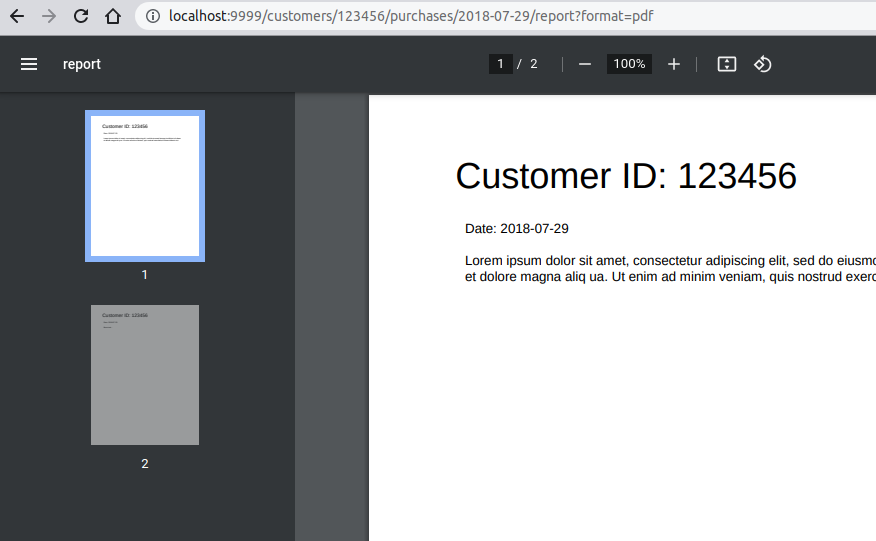
Navigate to:
http://localhost:8080/customers/123456/purchases/2018-07-29/report?format=pdf
-
Get response:
-
View generated document
![]()
⚡️ Hacks and Tips:
- Parameters are always treated as strings.
- Serve any media type by using
X-Content-Source response header.
- With
X-Content-Source response header you can use also http://, https://, file://, and data:// URLs.
💡 See Also:
|
Generate OpenAPI JSON/YAML spec from dump
-
Prepare file
dump.txt:
GET /api/customers/{id}/profile?mode=* HTTP/1.1
X-OpenAPI-Summary: Customer profile
X-OpenAPI-Description: Customer profile info
X-OpenAPI-Tags: Customers, Info

HTTP/1.1 200 OK
Content-Type: application/json

{
    "id": "${request.parameters.id[0]}",
    "mode": "${request.parameters.mode[0]}",
    "fname": "John",
    "lname": "Doe"
}
-
Print OpenAPI spec JSON to stdout:
java -jar df.jar --print-openapi --openapi-title 'Acme-CRM REST API v1.2.3' --dump dump.txt
![]()
⚡️ Hacks and Tips:
- Use
--format yaml option to print OpenAPI spec in YAML format.
- Use
--no-color option to disable ANSI colors.
- Use
--openapi-path <path> option to serve built-in OpenAPI client.
|
Basic Authentication
-
Prepare file
dump.txt:
GET /auth HTTP/1.1
Authorization: Basic QWxhZGRpbjpvcGVuIHNlc2FtZQ==

HTTP/1.1 200 OK
Content-Type: text/html

<!DOCTYPE html>
<html lang="en">
<body>
    Hello Aladdin!
</body>
</html>

GET /auth HTTP/1.1

HTTP/1.1 401 Unauthorized
WWW-Authenticate: Basic realm="Aladdin's secret page"
-
Start server:
java -jar df.jar --dump dump.txt
-
Navigate to:
http://localhost:8080/auth
-
In browser's authentication dialog type:
User: Aladdin
Password: open sesame
|
-
Get response:
Hello Aladdin!
![]()
⚡️ Hacks and Tips:
- Don't miss a single carriage return between headers and body!
|
Couldn't find an example for your use case? Create a new issue!