Initialize the PCF8591
November 7, 2023 · View on GitHub


www.mischianti.org
MicroPython Library to use i2c analog IC with arduino and esp8266. Can read analog value and write analog value with only 2 wire (perfect for ESP-01).
Changelog
- 07/11/2023: v0.0.3 Fix on read when write is active and running #Forum
- 16/05/2023: v0.0.2 Minor fix on read and write #Forum
- 18/04/2023: v0.0.1 Initial commit of stable version.
I try to simplify the use of this IC, with a minimal set of operation.
Installation
To install the library execute the following command:
pip install pcf8591-library
Constructor: Pass the address of I2C
from PCF8591 import PCF8591
from machine import I2C, Pin

# Initialize the I2C bus
i2c = I2C(0, scl=Pin(22), sda=Pin(21))

# Initialize the PCF8591
pcf8591 = PCF8591(0x48, i2c)
if pcf8591.begin():
    print("PCF8591 found")
or
from PCF8591 import PCF8591

pcf8591 = PCF8591(0x48, sda=21, scl=22)
if pcf8591.begin():
    print("PCF8591 found")
To read all analog input in one
# Main loop
while True:
    # Read all analog input channels
    ain0, ain1, ain2, ain3 = pcf8591.analog_read_all()

    # Print the results
    print("AIN0:", ain0, "AIN1:", ain1, "AIN2:", ain2, "AIN3:", ain3)

    # Wait for 1 second
    utime.sleep(1)
If you want to read a single input:
print("AIN0 ", pcf8591.analog_read(PCF8591.AIN0))
print("AIN1 ", pcf8591.analog_read(PCF8591.AIN1))
print("AIN2 ", pcf8591.analog_read(PCF8591.AIN2))
print("AIN3 ", pcf8591.analog_read(PCF8591.AIN3))
If you want to write a value:
pcf8591.analog_write(255)
utime.sleep(1)
pcf8591.analog_write(128)
utime.sleep(1)
pcf8591.analog_write(0)
You can also read and write voltage
pcf8591.voltage_write(3.3)
utime.sleep(1)
pcf8591.voltage_write(1.65)
utime.sleep(1)
pcf8591.voltage_write(0)
or
print("AIN0 ", pcf8591.voltage_read(PCF8591.AIN0))
print("AIN1 ", pcf8591.voltage_read(PCF8591.AIN1))
print("AIN2 ", pcf8591.voltage_read(PCF8591.AIN2))
print("AIN3 ", pcf8591.voltage_read(PCF8591.AIN3))
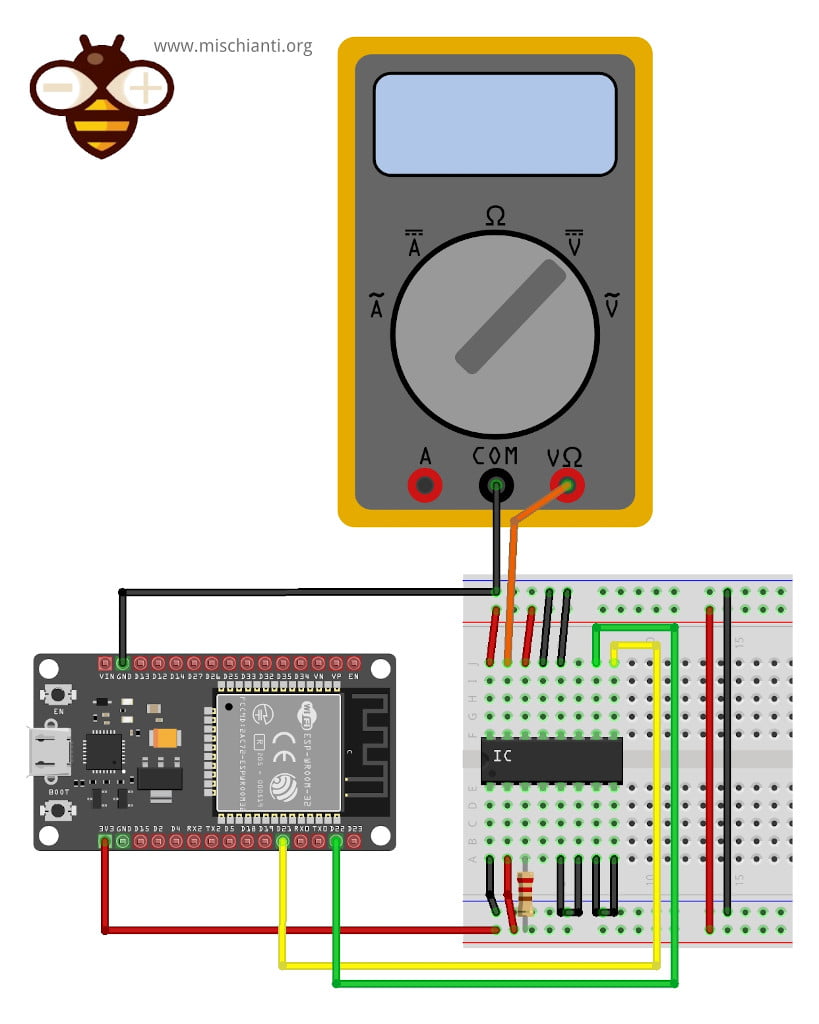
For the examples I use this wire schema on breadboard: