HEARTS: Health Reasoning over Time Series
March 13, 2026 · View on GitHub
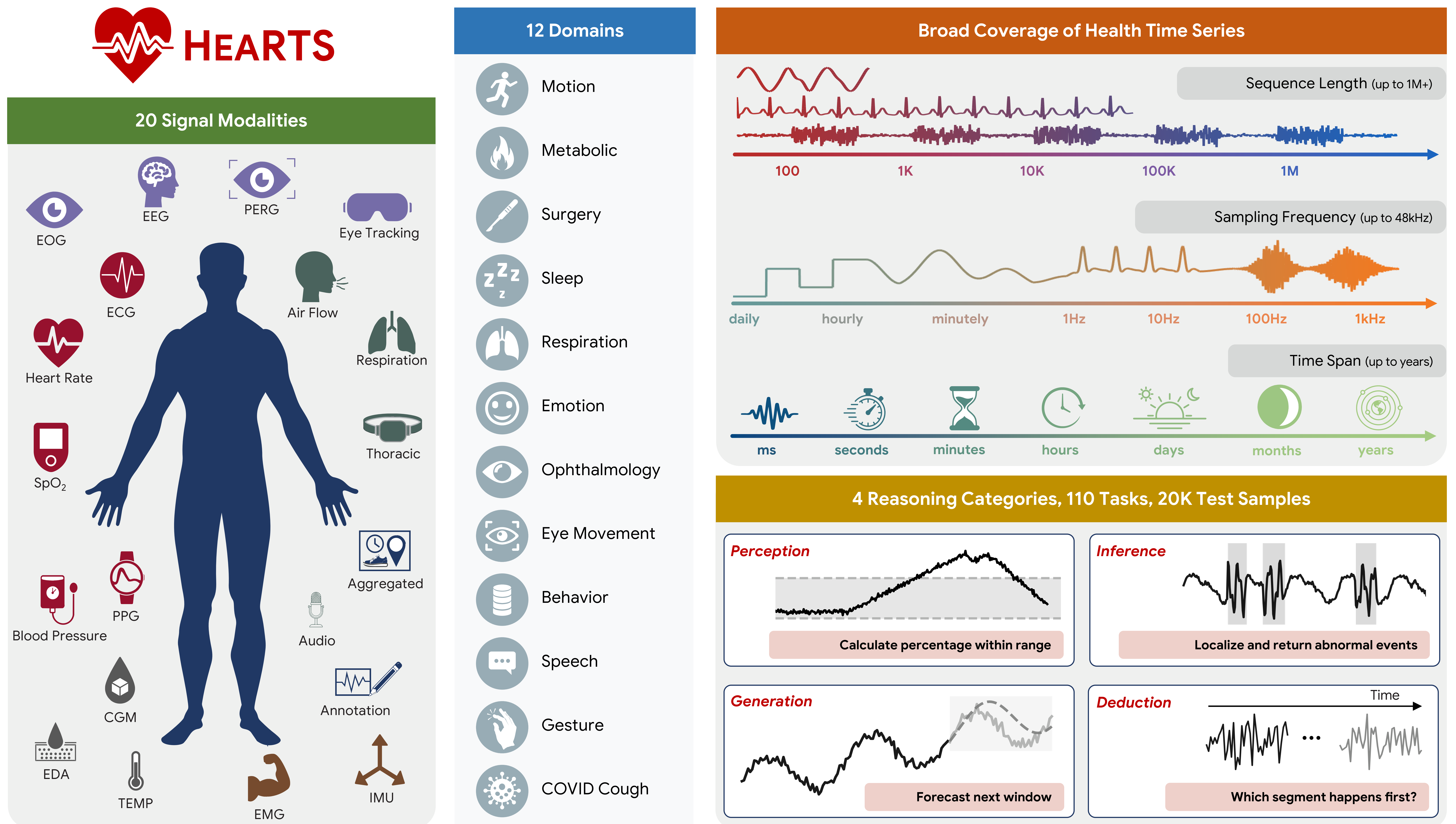
HEARTS (Health Reasoning over Time Series) is a benchmark and evaluation framework for testing how well LLM agents reason over real-world health time-series data.
📄 Paper | 🌐 Website | 🤗 Data | 🏃 Quickstart | ⚙️ Configuration | 🧪 Experiments | 🕵️ Agents | 📚 Citation
🔬 Overview
HEARTS goes beyond narrow forecasting and simple QA by evaluating four hierarchical capabilities:
- Perception: signal-level measurement and feature extraction
- Inference: event localization, physiological classification, and subject-level profiling
- Generation: forecasting, imputation, and cross-modal translation
- Deduction: temporal ordering and longitudinal trajectory analysis
📏 Benchmark at a glance
| Item | Count |
|---|---|
| Datasets | 16 |
| Health domains | 12 |
| Signal modalities | 20 |
| Tasks | 110 |
| Test samples | 20,226 |
Domains include motion, metabolic health, surgery, sleep, respiration, emotion, ophthalmology, eye movement, behavior, speech, gesture, and COVID cough.
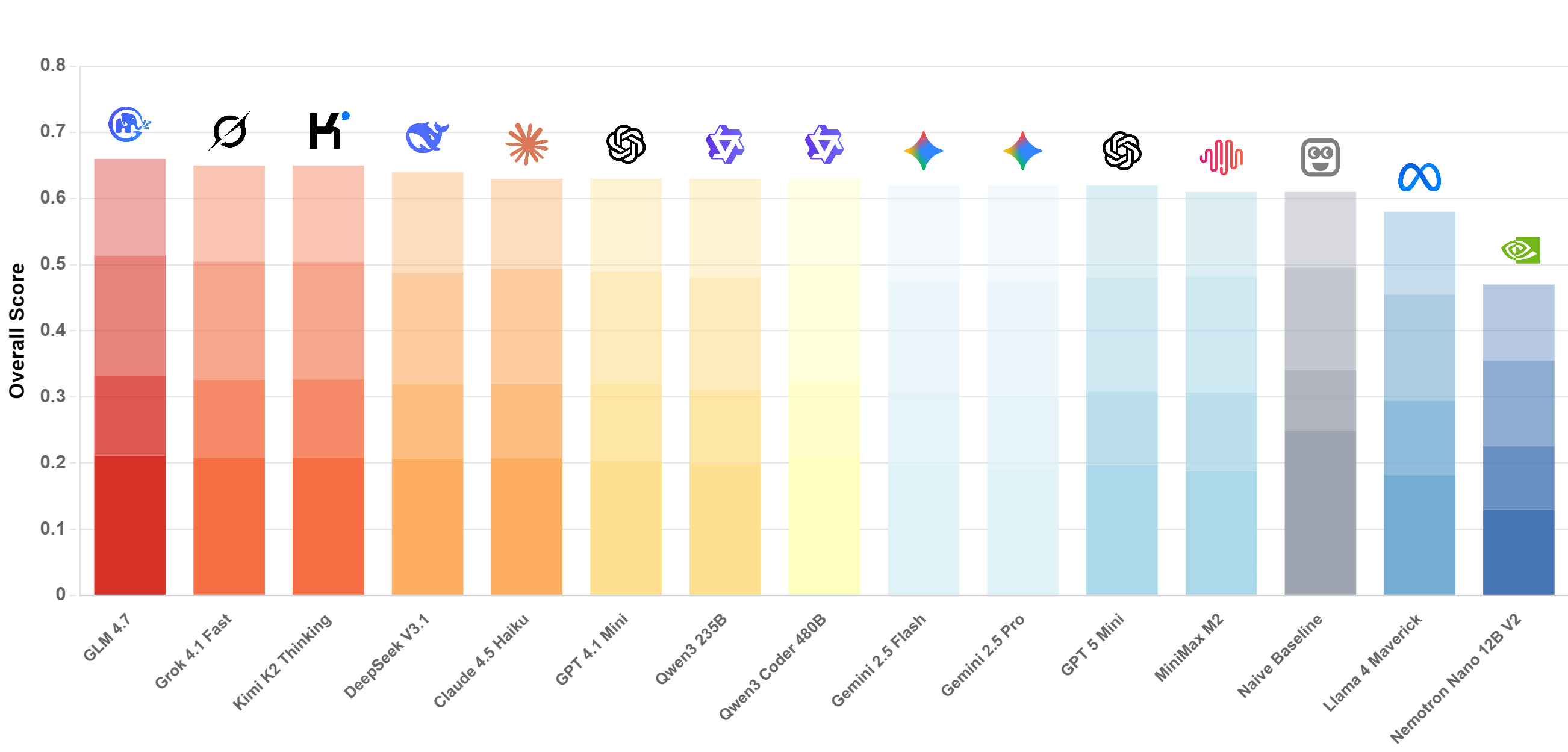
🏆 Current Leaderboard
📚 Table of contents
- HEARTS: Health Reasoning over Time Series
🫀 Why HEARTS
Health time-series reasoning is hard because data vary dramatically across:
- modality (ECG, EEG, PPG, EMG, audio, eye tracking, CGM, etc.)
- frequency (daily aggregates to 48 kHz)
- sequence length (tens of points to 1M+)
- time span (seconds to years)
HEARTS is designed to evaluate this full range in a single unified setting.
🔍 Key findings
- LLMs underperform specialized time-series models on many health reasoning tasks. And performance on HEARTS is only weakly correlated with broad "general reasoning" indices.
- Models often rely on low-complexity heuristics (copying/interpolation/rule shortcuts) instead of deep temporal reasoning.
- Performance degrades with longer sequences and higher sampling frequencies, with a shared, model-agnostic difficulty ordering across domains and input modalities.
- Models in the same family show similar performance patterns, suggesting scaling alone is not sufficient.
- The input format of time-series (text/image/raw file) mainly shifts absolute performance, while relative task difficulty remains consistent across formats.
🚀 Features
- Modular architecture: experiments (
exp/), agents (agents/), and shared utilities (utils/). - Diverse datasets: supports multiple healthcare datasets (e.g., SHHS, Capture24, VitalDB, Bridge2AI Voice).
- Task variety: Perception, Inference, Generation, and Deduction tasks.
- Agent flexibility: built-in support for different agent architectures (e.g., CodeAct).
- Model support: interfaces for major LLM providers (OpenAI, AWS Bedrock, Google Gemini, XAI).
- Reproducibility: "frozen" experiment execution on fixed test cases for consistent benchmarking.
🛠️ Installation
This project uses uv for dependency management.
Requirements: Python >=3.11.
1) Install uv
curl -LsSf https://astral.sh/uv/install.sh | sh
2) Sync dependencies
uv sync
3) Configure model provider credentials
Create a .env file (API keys are read from environment variables).
cp .env.example .env
On Windows PowerShell:
copy .env.example .env
Then edit .env and set at least one provider key (examples in .env.example).
🏃 Quickstart
The primary entry point for running fixed experiments is run_exp_freeze.py. It executes a set of pre-defined ("fixed") test cases to ensure reproducibility.
Fixed test case layout
Provide a directory containing fixed test cases (pickles) laid out as:
Fixed test cases can be downloaded from https://huggingface.co/datasets/yang-ai-lab/HEARTS (extract locally and point --fix-test-cases-dir to the extracted root).
fix_test_cases_dir/{dataset}/{task}/{index}.pkl
Run
uv run run_exp_freeze.py --fix-test-cases-dir /path/to/test_cases
Tip: use --dry-run to validate your setup without calling a model.
⚙️ Configuration
You can configure an experiment using config.yaml and/or command-line arguments. The repository includes an example at config.yaml.example.
Example config.yaml:
dataset_name: cgmacros
task:
  name: cgm_stat_calculation
  params:
    example_param: value
num_test: 50
model_name: gpt-4.1-mini
agent:
  name: codeact
  params:
    verbose: true
fix_test_cases_dir: /path/to/fixed_cases  # can also be set via CLI
result_dir: results/
Common command-line overrides (these take precedence over config.yaml):
--task: task name--dataset-name: dataset name--num-test: number of test cases to run--model-name: model identifier (e.g.,gpt-4.1,gemini-3-pro-preview)--result-dir: directory to save results--logs-dir: directory to save agent logs--n-jobs: number of concurrent jobs (default: 2)--dry-run: run without calling the model
📊 Results and logs
Experiment results and agent execution logs are saved automatically.
Results:
- JSON files written to
result_dir(default:results/) - filename format:
{dataset}_{task}_{agent}_{timestamp}.json - each file contains per-test-case entries (e.g.,
query_id,subject_id,GT,solution) plus a final entry with computedmetricsand the fullconfig
Logs (agent state):
- pickles written to
logs/{task}/{query_id}.pkl - include conversation history, code execution, and intermediate state; useful for debugging and analysis
📂 Project structure
.
├── agents/                 # agent implementations
│   ├── base/               # abstract base class for agents
│   ├── codeact/            # CodeAct agent implementation
├── exp/                    # experiment definitions (datasets & tasks)
│   ├── base/               # base experiment classes
│   ├── templates/          # task templates (classification, forecasting, etc.)
│   ├── {dataset_name}/     # dataset-specific experiment implementations
│   └── utils/              # experiment registry and utilities
├── utils/                  # core utilities
│   ├── exp.py              # experiment runner logic
│   ├── model_enums.py      # supported model definitions
│   ├── metric.py           # evaluation metrics
│   └── ...
├── run_exp_freeze.py       # main execution script for frozen experiments
├── .env.example            # environment variable template for API keys
├── config.yaml.example     # example configuration file
└── pyproject.toml          # project dependencies and metadata
🧪 Experiments
Experiments are defined in exp/{dataset_name}/{task}.py.
For details on adding new experiments, see exp/README.md.
Examples of included datasets:
cgmacros: Continuous Glucose Monitoring (CGM) analysis tasks
🕵️ Agents
Agents are defined in agents/{agent_name}/. For details on implementing new agents, see agents/README.md.
Available agents:
- CodeAct: uses executable code to interact with data and solve tasks
🤝 Contributing
- Follow
exp/README.mdto add new experiments. - Follow
agents/README.mdto add new agents. - Run
uv syncto keep dependencies up to date.
📚 Citation
If you use HEARTS in your research, please cite:
@article{hearts2026,
  title={HEARTS: Benchmarking LLM Reasoning on Health Time Series},
  author={Sirui Li and Shuhan Xiao and Mihir Joshi and Ahmed Metwally and Daniel McDuff and Wei Wang and Yuzhe Yang},
  journal={arXiv preprint arXiv:2603.06638},
  year={2026}
}