Data Engine for 4D Scenes
July 12, 2026 · View on GitHub
This repository provides the source code of the UE5-based data engine used in the paper OmniX: Any-view and Any-time 4D Reconstruction via Feed-forward Trajectory Fields.
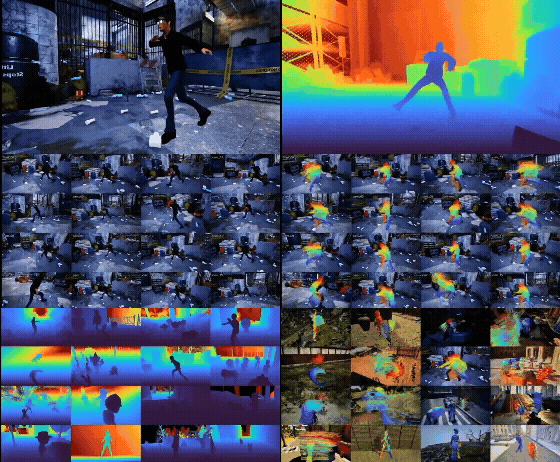
Overview
This data engine supports:
- Automatic dynamic scene construction from static environments and dynamic objects
- Multi-camera setup and synchronized rendering
- Headless rendering on Linux GPU servers
- Export of rendered images, depth maps, and foreground masks, along with per-vertex trajectories and face topology of dynamic objects
- Estimation of dense trajectories for foreground objects from vertex trajectories and face topology
- Visualization tools for sanity checks
1. Unreal Engine Installation
System Requirements
This project is designed for Linux platforms with NVIDIA GPUs. Please visit the official Linux development guide to check minimum requirements.
Recommended GPUs (Vulkan-compatible driver required):
- NVIDIA RTX 4090 / RTX 5090
- NVIDIA T4
- NVIDIA L20 / L40
- Other Vulkan-capable NVIDIA GPUs
Note: We recommend first setting up the project on a server with a physical display attached. After verifying the setup, rendering can be launched in headless mode.
Install Unreal Engine 5
We use a precompiled build, Linux_Unreal_Engine_5.4.4.zip, please download and unzip it.
2. Prepare the Unreal Project
Please create a new C++ project named MyRenderProject. Since the following example relies on StarterContent, we recommend enabling the "Starter Content" option during project creation.
Next, download the prepared assets for this example
here, and copy the Plugins folder from this repository into your project directory.
Please organize your project structure as follows:
MyRenderProject/
├── .vscode/
├── Binaries/
├── Config/
├── Content/
│   ├── Animation/            # 🪄  [Extracted] Dynamic object animations
│   ├── Collections/          # Created by default
│   ├── CustomTemplates/      # 🪄  [Extracted] Prepared templates
│   ├── Developers/           # Created by default
│   └── StarterContent/       # Created by default (highly recommended)
├── MyRenderProject/          # C++ source-related folder
├── Plugins/                  # 🪄  [Extracted] Copy from repo
│   ├── BoundingBoxTool/
│   ├── SceneSetup/
│   └── VertexTracker/
├── Saved/
├── Source/                   # C++ source code folder
├── Makefile
├── MyRenderProject.code-workspace
└── MyRenderProject.uproject  # 🪄  [Extracted] (Or ensure the required plugins are enabled in your own .uproject)
Next, build the project using the Unreal Build Tool. You can run the following bash script to compile the Editor target on Linux:
#!/bin/bash
# Set your Unreal Engine installation directory
UE_ENGINE_DIR="/path/to/Unreal/Engine" # e.g., /home/user/ue/Unreal_Engine_5.4

# Set the path to your .uproject file
PROJECT_PATH="/path/to/MyRenderProject/MyRenderProject.uproject"

# Execute the build script
"$UE_ENGINE_DIR/Engine/Build/BatchFiles/Linux/Build.sh" \
    MyRenderProjectEditor \
    Linux \
    Development \
    -Project="$PROJECT_PATH"
3. Code Organization
Download the bounding box annotations for the prepared dynamic object assets here, and copy the object_data folder into the ue_code directory of this repository.
Ensure the ue_code folder structure is organized as follows:
ue_code/
├── construct_scene/
├── scene_setup/
├── object_data/              # Downloaded annotation data
├── tools/
├── create_movie_render_queue.py
├── render_single_scene.sh
└── update_json.py
Before running the renderer, open render_single_scene.sh and update the path variables to match your local environment:
# Example configuration in render_single_scene.sh
UE_CMD_PATH="/home/user/ue/Unreal_Engine_5.4.4/Engine/Binaries/Linux/UnrealEditor-Cmd"
UE_PROJECT_NAME="MyRenderProject"
UE_PROJECT_FOLDER="/home/user/ue/project_pool/$UE_PROJECT_NAME"
4. Run the Code
Use the following command:
cd ue_code
bash render_single_scene.sh
The output folder render_output is under ue_code with structure as follows:
render_output/
└── DEBUG/
    ├── SEQUENCE_00000000/
    │   ├── images/
    │   │   ├── -0004.exr          # Negative indices represent the warm-up/static phase
    │   │   ├── -0003.exr          # (rendering the static scene before dynamic objects are instantiated)
    │   │   ├── -0002.exr
    │   │   ├── -0001.exr
    │   │   ├── 0000.exr           # Non-negative indices represent the active simulation phase
    │   │   └── 0001.exr
    │   ├── vertex_data/
    │   │   ├── frame_0000.bin     # Exported mesh vertex positions per active frame
    │   │   └── frame_0001.bin
    │   ├── faces.bin              # Mesh topology (triangle face indices, constant across frames)
    │   └── sequence_00000000.json # Sequence metadata (camera trajectory, etc.)
    │
    ├── SEQUENCE_00000001/
    └── SEQUENCE_00000002/
5. Tools
5.1 Animation Bounding Box
You can get the bounding box used in this project (for example, what you extracted from the step2) by running tools/get_anim_bbox.py in UE Project, or run in headless mode,
# Path to UnrealEditor-Cmd
# Example: /home/user/UnrealEngine/Engine/Binaries/Linux/UnrealEditor-Cmd
UE_CMD_PATH="/path/to/UnrealEditor-Cmd"

# Path to the .uproject file
UE_PROJECT_PATH="/path/to/project.uproject"

# Output folder for exported bounding box JSON files
# Example: /home/user/ue/code/ue_code/object_data/collected_bbox_info
OUTPUT_FOLDER="/path/to/output/folder"

# Animation sequence path inside UE
# Example: /Game/Animation/golden_retriever_dog/Anjiing2_Anim
ANIM_SEQUENCE_PATH="/Game/Animation/golden_retriever_dog/Anjiing2_Anim"

OUTPUT_FOLDER=$OUTPUT_FOLDER \
ANIM_SEQUENCE_PATH=$ANIM_SEQUENCE_PATH \
$UE_CMD_PATH "$UE_PROJECT_PATH" \
    -run=pythonscript -script="/path/to/get_anim_bbox.py" \
    -NoVerifyGC -unattended -crashreports -ABSLOG \
    -ddc=InstalledNoZenLocalFallback -NoDDCWorker -NoZen \
    -DerivedDataCacheDir="/tmp/ue_ddc"
5.2 Visualization
Use the following script to visualize the rendered multi-camera outputs as world-space point clouds:
python tools/check_multicam_world_ply.py \
  --sequence_path /path/to/SEQUENCE_00000000 \
  --frame_id 0 \
  --camera_ids 0-15 \
  --out_dir /tmp/ue_multicam_check \
  --stride 2
5.3 Dense Trajectory
Use the following script to compute dense foreground-object trajectories from a source frame to a target frame:
python tools/compute_foreground_motion.py \
  --sequence_path /path/to/SEQUENCE_00000000 \
  --start_frame 0 \
  --target_frame 10 \
  --camera_id 0 \
  --out_dir /tmp/fg_motion_check \
  --stride 1
6. Acknowledgements
This project is built on top of Unreal Engine 5. We thank the UE community and related open-source projects, for example, MatrixCity, for their tools and resources.
7. Citation
If you find this repository useful, please consider citing:
@inproceedings{jiang2026omnix,
  title     = {OmniX: Any-view and Any-time 4D Reconstruction via Feed-forward Trajectory Fields},
  author    = {Jiang, Yanqin and Wang, Tengfei and Wang, Zhengwei and Cao, Chenjie and Wu, Junta and Luo, Wenhan and Hu, Weiming and Gao, Jin and Guo, Chunchao},
  booktitle = {Proceedings of the European Conference on Computer Vision (ECCV)},
  year      = {2026}
}