md2cv for Visual Studio Code
February 13, 2026 · View on GitHub
Convert Markdown into a formatted CV/Resume or Japanese rirekisho (履歴書) / shokumu-keirekisho (職務経歴書) directly in VS Code.
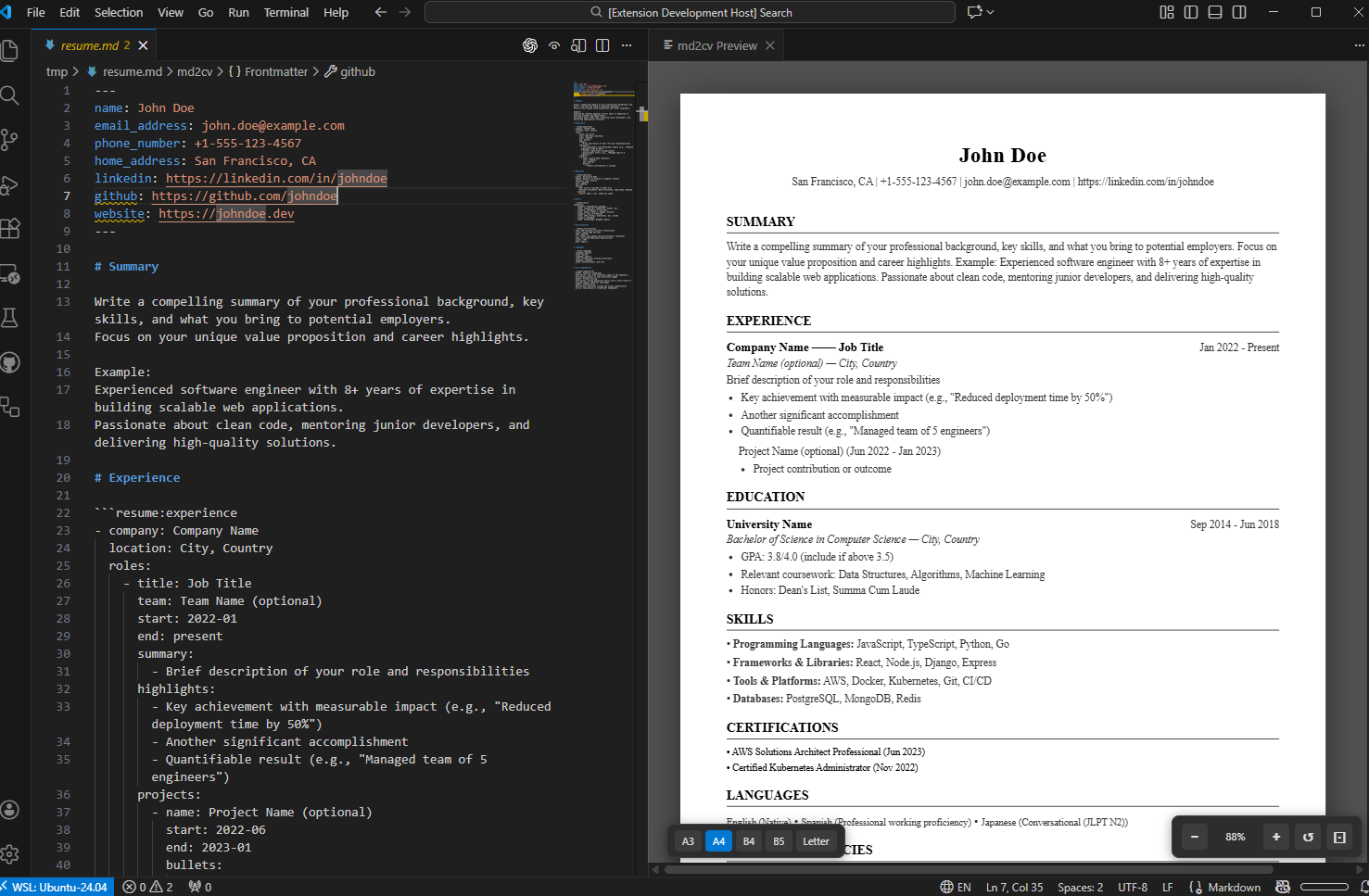
Features
- Markdown to CV conversion: Generate formatted documents from simple Markdown
- Multiple formats: Western-style CV, Japanese rirekisho (履歴書), and shokumu-keirekisho (職務経歴書)
- Template generation: Starter templates for each format
- IntelliSense: Auto-completion for sections and fields
- Improved experience section: Roles are now grouped by company for better readability
Quick Start
- Run
md2cv: Generate Templatefrom the Command Palette to insert a starter template (it will create a new file if needed) - Open the preview from the Command Palette (
md2cv: Open Preview) or click the preview button in the editor title - Fill in the template and customize your content
Templates and Supported Formats
Templates provide:
- A ready-to-edit structure for each format
- YAML frontmatter for basic profile fields
- Guided section blocks for experience, education, and skills
Western-style CV
Standard resume format with sections for summary, experience, education, skills, and more.
Japanese Rirekisho
Traditional Japanese resume format with photo, personal information, and structured sections.
Japanese Shokumu-keirekisho
Detailed work history document commonly used in Japan.
Markdown Format
Write your CV using standard Markdown with YAML frontmatter for personal information:
---
name: John Doe
email_address: john@example.com
phone_number: +1-234-567-8900
---
Use structured code blocks for sections:
# Experience

```resume:experience
- company: TechCorp
  roles:
    - title: Senior Engineer
      start: 2020-01
      end: present
      highlights:
        - Led backend development
        - Mentored junior developers
```
For detailed Markdown format documentation, see the md2cv documentation.
Settings
| Setting | Default | Description |
|---|---|---|
md2cv.defaultFormat | cv | Default CV format (cv, rirekisho, shokumukeirekisho, both) |
md2cv.defaultPaperSize | a4 | Default paper size (a3, a4, b4, b5, letter) |
md2cv.marginMm | 30 | Page margins in mm (single value or {top, right, bottom, left}) |
md2cv.previewUpdateDelay | 300 | Preview update delay in milliseconds |
md2cv.enableSyncScroll | true | Enable synchronized scrolling |
md2cv.templateLanguage | en | Template language (en, ja) |
md2cv.includeTemplateComments | true | Include explanatory comments in templates |
md2cv.defaultLanguage | auto | CV language (auto, en, ja) |
Commands
| Command | Keybinding | Description |
|---|---|---|
md2cv: Open Preview | Cmd+Shift+V / Ctrl+Shift+V | Open CV preview |
md2cv: Export PDF | Cmd+Alt+E / Ctrl+Alt+E | Export to PDF |
md2cv: Change Format | Cmd+Alt+F / Ctrl+Alt+F | Switch between CV formats |
md2cv: Change Paper Size | Cmd+Alt+P / Ctrl+Alt+P | Change paper size |
md2cv: Generate Template | Cmd+Alt+T / Ctrl+Alt+T | Generate CV template |
md2cv: Toggle Sync Scroll | Cmd+Alt+S / Ctrl+Alt+S | Toggle sync scrolling |
md2cv: Switch Language | Cmd+Alt+L / Ctrl+Alt+L | Switch CV language |
Requirements
- VS Code 1.90.0 or higher
- For PDF export: Chrome or Chromium (the extension will auto-detect your system browser, or use its bundled version)
Related Projects
- md2cv - CLI tool for generating CVs from Markdown
- md2cv-examples - Example CV templates
License
This project is licensed under the GNU General Public License v3.0 (GPL-3.0). This means you are free to use, modify, and distribute this software, provided that any derivative works are also distributed under the same license. For more details, see the LICENSE file.