README.md
July 18, 2025 · View on GitHub
 ❮ Zi ❯ - F-Sy-H
Feature-rich Syntax Highlighting for Zsh
《❔ Ask a Question 》 《💡 Search Wiki 》 《💜 Join 》 《🌐 Localize 》






Related
Installation
Manual
Clone the Repository.
git clone https://github.com/z-shell/F-Sy-H ~/path/to/f-sy-hAnd add the following to your `zshrc` file.
source ~/path/to/f-sy-h/F-Sy-H.plugin.zshZi
Add the following to your `zshrc` file.
zi light z-shell/F-Sy-HHere's an example of how to load the plugin together with a few other popular ones with the use of turbo mode
i.e.: speeding up the Zsh startup by loading the plugin right after the first prompt, in background:
zi wait lucid for \
  atinit"ZI[COMPINIT_OPTS]=-C; zicompinit; zicdreplay" \
     z-shell/F-Sy-H \
  blockf \
     zsh-users/zsh-completions \
  atload"!_zsh_autosuggest_start" \
     zsh-users/zsh-autosuggestions
Zinit
Add the following to your `zshrc` file.
zinit light z-shell/F-Sy-HAntigen
Add the following to your `zshrc` file.
antigen bundle z-shell/F-Sy-H --branch=mainZgen
Add the following to your .zshrc file in the same place you're doing your other zgen load calls in.
zgen load z-shell/F-Sy-H . mainOh-My-Zsh
Clone the Repository.
git clone https://github.com/z-shell/F-Sy-H.git \
  ${ZSH_CUSTOM:-$HOME/.oh-my-zsh/custom}/plugins/F-Sy-H
And add F-Sy-H to your plugin list.
Features
Themes
Switch themes via fast-theme {theme-name}.
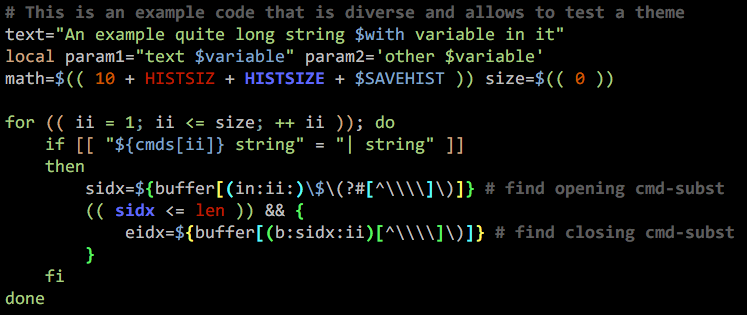
Run fast-theme -t {theme-name} option to obtain the snippet above.
Run fast-theme -l to list available themes.
Variables
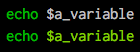
Compared to the project zsh-users/zsh-syntax-highlighting (the
upper line):

Brackets

Conditions
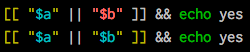
Comparing to the project zsh-users/zsh-syntax-highlighting (the
upper line):
Strings
Exact highlighting that recognizes quotes.

here-strings

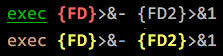
exec descriptor-variables
Comparing to the project upper line):
for-loops and alternate syntax (brace {`/`} blocks)

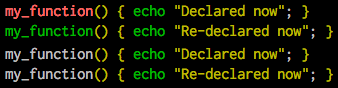
Function definitions
Comparing to the project zsh-users/zsh-syntax-highlighting (the
upper 2 lines):
Recursive eval and $( ) highlighting
Comparing to the project zsh-users/zsh-syntax-highlighting (the
upper line):

Chroma functions
Highlighting that is specific for a given command.

The chromas that are enabled by default can be found here.
Math-mode highlighting

Zcalc highlighting

Performance
Performance differences can be observed in this Asciinema recording,where a `10 kB` function is being edited.

Credits



