Restart Claude Code to activate the plugin
July 23, 2026 · View on GitHub
 memsearch
Cross-platform semantic memory for AI coding agents.












📰 What's New
- Skills from memory — MemSearch now distills the workflows you repeat into reusable, installable agent skills (a third "procedural memory" layer) and keeps them up to date in the background. See Skills from Memory.
- Advanced memory maintenance — optional background tasks keep durable
PROJECT.mdandUSER.mdnotes current across sessions. See Advanced Memory Maintenance.
Why memsearch?
- 🌐 All Platforms, One Memory — memories flow across Claude Code, OpenClaw, OpenCode, and Codex CLI. A conversation in one agent becomes searchable context in all others — no extra setup
- 👥 For Agent Users, install a plugin and get persistent memory with zero effort; for Agent Developers, use the full CLI and Python API to build memory and harness engineering into your own agents
- 📄 Markdown is the source of truth — inspired by OpenClaw. Your memories are just
.mdfiles — human-readable, editable, version-controllable. Milvus is a "shadow index": a derived, rebuildable cache - 🔍 Progressive retrieval, hybrid search, smart dedup, live sync — 3-layer recall (search → expand → transcript); dense vector + BM25 sparse + RRF reranking; SHA-256 content hashing skips unchanged content; file watcher auto-indexes in real time
🧑💻 For Agent Users
Pick your platform, install the plugin, and you're done. Each plugin captures conversations automatically and provides semantic recall with zero configuration.
For Claude Code Users
# Install
/plugin marketplace add zilliztech/memsearch
/plugin install memsearch
# Restart Claude Code to activate the plugin
After restarting, just chat with Claude Code as usual. The plugin captures every conversation turn automatically.
Verify it's working — after a few conversations, check your memory files:
ls .memsearch/memory/          # you should see daily .md files
cat .memsearch/memory/$(date +%Y-%m-%d).md
Recall memories — two ways to trigger:
/memory-recall what did we discuss about Redis?
Or just ask naturally — Claude auto-invokes the skill when it senses the question needs history:
We discussed Redis caching before, what was the TTL we chose?
For Codex CLI Users
# Install
git clone --depth 1 https://github.com/zilliztech/memsearch.git
bash memsearch/plugins/codex/scripts/install.sh
codex --yolo  # needed for ONNX model network access
After installing, chat as usual. Hooks capture and summarize each turn.
Verify it's working:
ls .memsearch/memory/
Recall memories — use the skill:
$memory-recall what did we discuss about deployment?
For OpenClaw Users
# Install from ClawHub
openclaw plugins install --force clawhub:memsearch
openclaw config set plugins.entries.memsearch.hooks.allowConversationAccess true
openclaw config set plugins.entries.memsearch.hooks.allowPromptInjection true
openclaw gateway restart
After installing, chat in TUI as usual. The plugin captures each turn automatically.
Verify it's working — memory files are stored in your agent's workspace:
# For the main agent:
ls ~/.openclaw/workspace/.memsearch/memory/
# For other agents (e.g. work):
ls ~/.openclaw/workspace-work/.memsearch/memory/
Recall memories — two ways to trigger:
/memory-recall what was the batch size limit we set?
Or just ask naturally — the LLM auto-invokes memory tools when it senses the question needs history:
We discussed batch size limits before, what did we decide?
For OpenCode Users
// In ~/.config/opencode/opencode.json
{ "plugin": ["@zilliz/memsearch-opencode"] }
After installing, chat in TUI as usual. A background daemon captures conversations.
Verify it's working:
ls .memsearch/memory/ # daily .md files appear after a few conversations
Recall memories — two ways to trigger:
/memory-recall what did we discuss about authentication?
Or just ask naturally — the LLM auto-invokes memory tools when it senses the question needs history:
We discussed the authentication flow before, what was the approach?
⚙️ Configuration (all platforms)
All plugins share the same memsearch backend. Configure once, works everywhere.
Embedding
Defaults to ONNX bge-m3 — runs locally on CPU, no API key, no cost. On first launch the model (~558 MB) is downloaded from HuggingFace Hub.
memsearch config set embedding.provider onnx     # default — local, free
memsearch config set embedding.provider openai   # needs OPENAI_API_KEY
memsearch config set embedding.provider ollama   # local, any model
All providers and models: Configuration — Embedding Provider
Milvus Backend
Just change milvus_uri (and optionally milvus_token) to switch between deployment modes:
Milvus Lite (default) — zero config, single file. Great for getting started:
# Works out of the box, no setup needed
memsearch config get milvus.uri   # → ~/.memsearch/milvus.db
⭐ Zilliz Cloud (recommended) — fully managed, free tier available — sign up 👇:
memsearch config set milvus.uri "https://in03-xxx.api.gcp-us-west1.zillizcloud.com"
memsearch config set milvus.token "your-api-key"
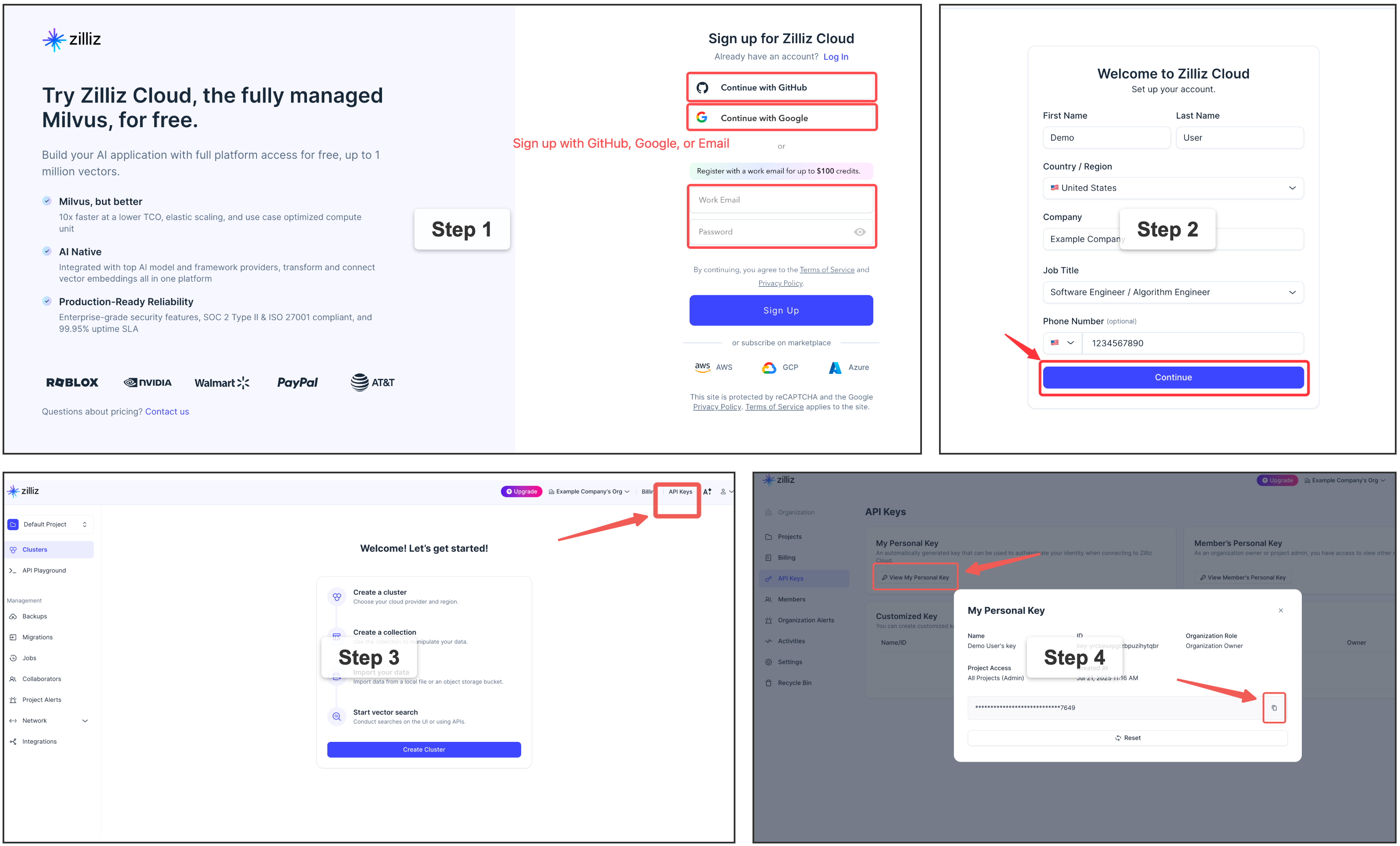
⭐ Sign up for a free Zilliz Cloud cluster
You can sign up on Zilliz Cloud to get a free cluster and API key.
Self-hosted Milvus Server (Docker) — for advanced users
For multi-user or team environments with a dedicated Milvus instance. Requires Docker. See the official installation guide.
memsearch config set milvus.uri http://localhost:19530
📖 Full configuration guide: Configuration · Platform comparison
Capture Summarization Routing
Each plugin keeps its native capture summarizer unless you override it explicitly:
memsearch config set plugins.codex.summarize.model gpt-5.1-codex-mini
memsearch config set plugins.opencode.summarize.model anthropic/claude-haiku
Advanced users can route plugin summarization through a memsearch-managed API provider:
memsearch config set llm.providers.openai.type openai
memsearch config set llm.providers.openai.model gpt-5-mini
memsearch config set llm.providers.openai.api_key env:OPENAI_API_KEY
memsearch config set plugins.codex.summarize.provider openai
Leave plugins.<platform>.summarize.provider empty or set it to native to preserve the default behavior. Plugin-specific summarize settings do not fall back to llm.model.
You can also disable automatic capture globally for a platform while keeping the plugin installed:
memsearch config set plugins.codex.summarize.enabled false
Advanced Memory Maintenance
Your agent can keep two higher-level notes current in the background: PROJECT.md — durable project state (active threads, decisions, risks, next steps) — and USER.md — your reusable preferences, working style, and recurring goals. They refresh after a session only when the journals changed and a minimum interval has passed, and they are off by default.
Turn them on by asking your agent — "enable MemSearch's PROJECT.md and USER.md maintenance" — and it configures them through the memory-config skill, which can also choose the model/provider, the interval, and custom prompts, or diagnose the current setup. Prefer editing files? The settings live under [plugins.<agent>.project_review] and [plugins.<agent>.user_profile] in your MemSearch config (both read .memsearch/memory and write .memsearch/PROJECT.md / .memsearch/USER.md by default).
If a background maintenance task seems silent, check .memsearch/.maintenance-state.json or ask the memory-config skill to inspect it; failed runs record last_error and retry on the next due run because failed input digests are not marked successful.
Skills from Memory
Beyond the episodic journals and the semantic PROJECT.md / USER.md notes, MemSearch grows a third memory layer — procedural memory: your agent turns the workflows you repeat into reusable, installable skills. You drive it entirely through your agent, in natural language — nothing to memorize:
- "Make a skill out of what we just did." — the agent drafts a skill from the session (reading the original transcript so the steps are exact, not guessed), saves it as a candidate, and offers to install it.
- "What skill candidates do I have? Install the deploy one." — the agent lists candidates and installs the one you pick into its own skill directory, where it becomes a real
/-command.
Under the hood, candidates live in a git-tracked .memsearch/skill-candidates/ store — diffable and revertible, and inert until you install one (that step is always yours). An optional background pass can also mine recurring workflows from your history on its own. Distilled skills follow the Agent Skills open standard, so one capture is portable across Claude Code, Codex, OpenCode, and others.
Turning it on is also just a sentence: ask your agent "enable MemSearch skill distillation" (or "make it more eager") and it configures things through the memory-config skill — it's off by default. Prefer editing files? The same settings live under [plugins.<agent>.memory_to_skill] in your MemSearch config. Full guide: Skills from Memory.
What can you use it for?
- Resume debugging threads — ask how a similar Redis, Docker, database, or deployment issue was fixed last time.
- Recover decision rationale — find why the project chose one architecture, library, migration path, or API design over another.
- Trace feature history — understand how a feature evolved across sessions, including the files changed and tradeoffs discussed.
- Do code archaeology — ask when and why a module, config, or workflow was changed before touching it again.
- Find the right session to resume — ask which previous conversation covered a topic, recover the relevant context, and continue from there.
- Carry context across agents — keep Claude Code, Codex CLI, OpenClaw, and OpenCode working from the same project memory.
🛠️ For Agent Developers
Beyond ready-to-use plugins, memsearch provides a complete CLI and Python API for building memory into your own agents. Whether you're adding persistent context to a custom agent, building a memory-augmented RAG pipeline, or doing harness engineering — the same core engine that powers the plugins is available as a library.
🏗️ Architecture Overview
┌──────────────────────────────────────────────────────────────┐
│ 🧑💻 For Agent Users (Plugins) │
│ ┌──────────┐ ┌──────────┐ ┌──────────┐ ┌────────┐ ┌──────┐ │
│ │ Claude │ │ OpenClaw │ │ OpenCode │ │ Codex │ │ Your │ │
│ │ Code │ │ Plugin │ │ Plugin │ │ Plugin │ │ App │ │
│ └────┬─────┘ └────┬─────┘ └────┬─────┘ └───┬────┘ └──┬───┘ │
│ └─────────────┴────────────┴───────────┴────────┘ │
├────────────────────────────┬─────────────────────────────────┤
│ 🛠️ For Agent Developers │ Build your own with ↓ │
│ ┌─────────────────────────┴──────────────────────────────┐ │
│ │ memsearch CLI / Python API │ │
│ │ index · search · expand · watch · compact │ │
│ └─────────────────────────┬──────────────────────────────┘ │
│ ┌─────────────────────────┴──────────────────────────────┐ │
│ │ Core: Chunker → Embedder → Milvus │ │
│ │ Hybrid Search (BM25 + Dense + RRF) │ │
│ └────────────────────────────────────────────────────────┘ │
├──────────────────────────────────────────────────────────────┤
│ 📄 Markdown Files (Source of Truth) │
│ memory/2026-03-27.md · memory/2026-03-26.md · ... │
└──────────────────────────────────────────────────────────────┘
Plugins sit on top of the CLI/API layer. The API handles indexing, searching, and Milvus sync. Markdown files are always the source of truth — Milvus is a rebuildable shadow index. Everything below the plugin layer is what you use as an agent developer.
How Plugins Work (Claude Code as example)
Capture — after each conversation turn:
User asks question → Agent responds → Stop hook fires
                                          │
                     ┌────────────────────┘
                     ▼
              Parse last turn
                     │
                     ▼
         LLM summarizes (haiku)
         "- User asked about X."
         "- Claude did Y."
                     │
                     ▼
         Append to memory/2026-03-27.md
         with <!-- session:UUID --> anchor
                     │
                     ▼
         memsearch index → Milvus
Recall — 3-layer progressive search:
User: "What did we discuss about batch size?"
                     │
                     ▼
  L1  memsearch search "batch size"    → ranked chunks
                     │ (need more?)
                     ▼
  L2  memsearch expand <chunk_hash>    → full .md section
                     │ (need original?)
                     ▼
  L3  parse-transcript <session.jsonl> → raw dialogue
📄 Markdown as Source of Truth
  Plugins append ──→  .md files  ←── human editable
                          │
                          ▼
                  memsearch watch (live watcher)
                          │
                  detects file change
                          │
                          ▼
                  re-chunk changed .md
                          │
                  hash each chunk (SHA-256)
                          │
              ┌───────────┴───────────┐
              ▼                       ▼
       hash unchanged?          hash is new/changed?
       → skip (no API call)     → embed → upsert to Milvus
              │                       │
              └───────────┬───────────┘
                          ▼
                ┌──────────────────┐
                │  Milvus (shadow) │
                │  always in sync  │
                │  rebuildable     │
                └──────────────────┘
📦 Installation
# Install as a global CLI tool — recommended when you mainly use the
# `memsearch` command or any of the agent plugins (Claude Code, Codex,
# OpenClaw, OpenCode), which all shell out to the CLI.
uv tool install memsearch       # via uv
pipx install memsearch          # via pipx
pip install memsearch           # plain pip

# Install as a project dependency — use this if you want to import
# `memsearch` from your own Python code (e.g. via the MemSearch class).
uv add memsearch                # via uv, adds to pyproject.toml
pip install memsearch           # into an activated venv
Optional embedding providers
# As a CLI tool (recommended — local ONNX, no API key)
uv tool install "memsearch[onnx]"
pipx install "memsearch[onnx]"
pip install "memsearch[onnx]"

# As a project dependency
uv add "memsearch[onnx]"

# Other options: [openai], [google], [voyage], [jina], [mistral], [ollama], [local], [all]
🐍 Python API — Give Your Agent Memory
from memsearch import MemSearch

mem = MemSearch(paths=["./memory"])

await mem.index()                                      # index markdown files
results = await mem.search("Redis config", top_k=3)    # semantic search
scoped = await mem.search("pricing", top_k=3, source_prefix="./memory/product")
print(results[0]["content"], results[0]["score"])       # content + similarity
Full example — agent with memory (OpenAI) — click to expand
import asyncio
from datetime import date
from pathlib import Path
from openai import OpenAI
from memsearch import MemSearch

MEMORY_DIR = "./memory"
llm = OpenAI()                                        # your LLM client
mem = MemSearch(paths=[MEMORY_DIR])                    # memsearch handles the rest

def save_memory(content: str):
    """Append a note to today's memory log (OpenClaw-style daily markdown)."""
    p = Path(MEMORY_DIR) / f"{date.today()}.md"
    p.parent.mkdir(parents=True, exist_ok=True)
    with open(p, "a") as f:
        f.write(f"\n{content}\n")

async def agent_chat(user_input: str) -> str:
    # 1. Recall — search past memories for relevant context
    memories = await mem.search(user_input, top_k=3)
    context = "\n".join(f"- {m['content'][:200]}" for m in memories)

    # 2. Think — call LLM with memory context
    resp = llm.chat.completions.create(
        model="gpt-5-mini",
        messages=[
            {"role": "system", "content": f"You have these memories:\n{context}"},
            {"role": "user", "content": user_input},
        ],
    )
    answer = resp.choices[0].message.content

    # 3. Remember — save this exchange and index it
    save_memory(f"## {user_input}\n{answer}")
    await mem.index()

    return answer

async def main():
    # Seed some knowledge
    save_memory("## Team\n- Alice: frontend lead\n- Bob: backend lead")
    save_memory("## Decision\nWe chose Redis for caching over Memcached.")
    await mem.index()  # or mem.watch() to auto-index in the background

    # Agent can now recall those memories
    print(await agent_chat("Who is our frontend lead?"))
    print(await agent_chat("What caching solution did we pick?"))

asyncio.run(main())
Anthropic Claude example — click to expand
pip install memsearch anthropic
import asyncio
from datetime import date
from pathlib import Path
from anthropic import Anthropic
from memsearch import MemSearch

MEMORY_DIR = "./memory"
llm = Anthropic()
mem = MemSearch(paths=[MEMORY_DIR])

def save_memory(content: str):
    p = Path(MEMORY_DIR) / f"{date.today()}.md"
    p.parent.mkdir(parents=True, exist_ok=True)
    with open(p, "a") as f:
        f.write(f"\n{content}\n")

async def agent_chat(user_input: str) -> str:
    # 1. Recall
    memories = await mem.search(user_input, top_k=3)
    context = "\n".join(f"- {m['content'][:200]}" for m in memories)

    # 2. Think — call Claude with memory context
    resp = llm.messages.create(
        model="claude-sonnet-4-6",
        max_tokens=1024,
        system=f"You have these memories:\n{context}",
        messages=[{"role": "user", "content": user_input}],
    )
    answer = resp.content[0].text

    # 3. Remember
    save_memory(f"## {user_input}\n{answer}")
    await mem.index()
    return answer

async def main():
    save_memory("## Team\n- Alice: frontend lead\n- Bob: backend lead")
    await mem.index()
    print(await agent_chat("Who is our frontend lead?"))

asyncio.run(main())
Ollama (fully local, no API key) — click to expand
pip install "memsearch[ollama]"
ollama pull nomic-embed-text          # embedding model
ollama pull llama3.2                  # chat model
import asyncio
from datetime import date
from pathlib import Path
from ollama import chat
from memsearch import MemSearch

MEMORY_DIR = "./memory"
mem = MemSearch(paths=[MEMORY_DIR], embedding_provider="ollama")

def save_memory(content: str):
    p = Path(MEMORY_DIR) / f"{date.today()}.md"
    p.parent.mkdir(parents=True, exist_ok=True)
    with open(p, "a") as f:
        f.write(f"\n{content}\n")

async def agent_chat(user_input: str) -> str:
    # 1. Recall
    memories = await mem.search(user_input, top_k=3)
    context = "\n".join(f"- {m['content'][:200]}" for m in memories)

    # 2. Think — call Ollama locally
    resp = chat(
        model="llama3.2",
        messages=[
            {"role": "system", "content": f"You have these memories:\n{context}"},
            {"role": "user", "content": user_input},
        ],
    )
    answer = resp.message.content

    # 3. Remember
    save_memory(f"## {user_input}\n{answer}")
    await mem.index()
    return answer

async def main():
    save_memory("## Team\n- Alice: frontend lead\n- Bob: backend lead")
    await mem.index()
    print(await agent_chat("Who is our frontend lead?"))

asyncio.run(main())
📖 Full Python API reference: Python API docs
⌨️ CLI Usage
Setup:
memsearch config init                              # interactive setup wizard
memsearch config set embedding.provider onnx       # switch embedding provider
memsearch config set milvus.uri http://localhost:19530  # switch Milvus backend
Index & Search:
memsearch index ./memory/                          # index markdown files
memsearch index ./memory/ ./notes/ --force         # re-embed everything
memsearch index . --ignore-file .gitignore         # opt in to repository ignore rules
memsearch search "Redis caching"                   # hybrid search (BM25 + vector)
memsearch search "auth flow" --top-k 10 --json-output  # JSON for scripting
memsearch expand <chunk_hash>                      # show full section around a chunk
Live Sync & Maintenance:
memsearch watch ./memory/                          # live file watcher (auto-index on change)
memsearch compact                                  # LLM-powered chunk summarization
memsearch stats                                    # show indexed chunk count
memsearch reset --yes                              # drop all indexed data and rebuild
📖 Full CLI reference with all flags: CLI docs
⚙️ Configuration
Embedding and Milvus backend settings → Configuration (all platforms)
Settings priority: Built-in defaults → ~/.memsearch/config.toml → .memsearch.toml → CLI flags.
📖 Full config guide: Configuration
🔗 Links
- 📖 Documentation — full guides, API reference, and architecture details
- 🔌 Platform Plugins — Claude Code, OpenClaw, OpenCode, Codex CLI
- 💡 Design Philosophy — why markdown, why Milvus, competitor comparison
- 🦞 OpenClaw — the memory architecture that inspired memsearch
- 🗄️ Milvus | Zilliz Cloud — the vector database powering memsearch
🤝 Contributing
Bug reports, feature requests, and pull requests are welcome! See the Contributing Guide for development setup, testing, and plugin development instructions. For questions and discussions, join us on Discord.