Contributing
December 23, 2025 · View on GitHub
Contributions are always welcome. Feel free to ask @zloirock if you have some questions.
I want to help with code, but I don't know how
There is always some "help wanted" issues. You can look at them first. Sure, other help is also required - you could ask @zloirock about it or open issues if you have some ideas.
How to add a new polyfill
- The polyfill implementation should be added to the
packages/core-js/modulesdirectory. - The polyfill should properly work in ES3 and all possible engines. If in some engines it cannot be implemented (for example, it strictly requires more modern ES or unavailable platform features), it should not break any other
core-jsfeatures or application in any way. - Avoid possible observing / breakage polyfills via patching built-ins at runtime: cache all global built-ins in the polyfills code and don't call prototype methods from instances.
- Shared helpers should be added to the
packages/core-js/internalsdirectory. Reuse already existing helpers. - Avoid direct import from
/modules/path in/internals|modules/since it will break optimizations via Babel /swc. Specify such dependencies in/es|stable|actual/full/entries and use something likeinternals/get-built-inhelpers. - For export the polyfill, in all common cases use
internals/exporthelper. Use something else only if this helper is not applicable - for example, if you want to polyfill accessors. - If the code of the pure version implementation should significantly differ from the global version (that's not a frequent situation, in most cases
internals/is-pureconstant is enough), you can add it topackages/core-js-pure/overridedirectory. The rest parts ofcore-js-purewill be copied fromcore-jspackage. - Add the feature detection of the polyfill to
tests/compat/tests.js, add the compatibility data topackages/core-js-compat/src/data.mjs, how to do it see below, and the name of the polyfill module topackages/core-js-compat/src/modules-by-versions.mjs(this data is also used for getting the default list of polyfills at bundling and generation indexes). - Add it to entry points where it's required: directories
packages/core-js/es,packages/core-js/stable,packages/core-js/actual,packages/core-js/full,packages/core-js/proposals,packages/core-js/stageandpackages/core-js/web. - Add unit tests to
tests/unit-globalandtests/unit-pure. - Add tests of entry points to
tests/entries/unit.mjs. - Make sure that you are following our coding style and all tests are passed.
- Document it in site documentation and CHANGELOG.md.
A simple example of adding a new polyfill.
How to update core-js-compat data
For updating core-js-compat data:
- If you want to add a new data for a browser, run in this browser
tests/compat/index.html(tests and results for the actual release are available athttp://zloirock.github.io/core-js/master/compat) and you will see whatcore-jsmodules are required for this browser.
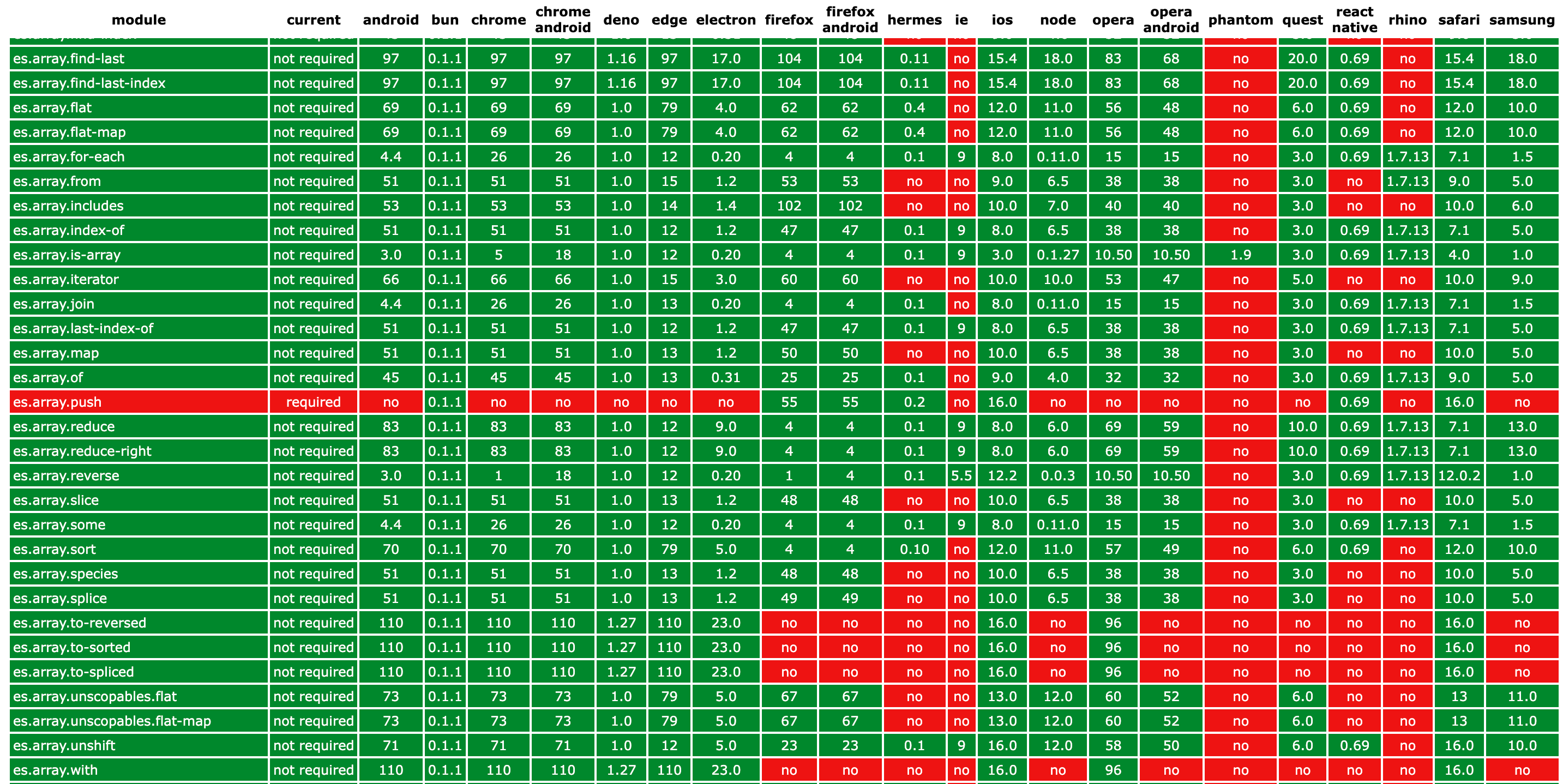
- If you want to add new data for NodeJS, run
npm run compat-nodewith the installed required NodeJS version and you will see the results in the console. Usenpm run compat-node jsonif you want to get the result as JSON. - If you want to add new data for Deno, run
npm run compat-denowith the installed required Deno version and you will see the results in the console. Usenpm run compat-deno jsonif you want to get the result as JSON. - If you want to add new data for Bun, run
npm run compat-bunwith the installed required Bun version and you will see the results in the console. - If you want to add new data for Rhino, run
npm run compat-rhino YOUR_PATH_TO_RHINOand you will see the results in the console. - If you want to add new data for Hermes (incl. shipped with React Native), run
npm run compat-hermes YOUR_PATH_TO_HERMESand you will see the results in the console. - After getting this data, add it to
packages/core-js-compat/src/data.mjs. - If you want to add new mapping (for example, to add a new iOS Safari version based on Safari or NodeJS based on Chrome), add it to
packages/core-js-compat/src/mapping.mjs.
| engine | how to run tests | base data inherits from | mandatory check | mapping for a new version |
|---|---|---|---|---|
android | browser runner | chrome, chrome-android | ||
bun | bun runner | safari (only ES) | required | |
chrome | browser runner | required | ||
chrome-android | browser runner | chrome | ||
deno | deno runner | chrome (only ES) | non-ES features | required |
edge | browser runner | ie, chrome | required (<= 18) | |
electron | browser runner | chrome | required | |
firefox | browser runner | required | ||
firefox-android | browser runner | firefox | ||
hermes | hermes runner | required | ||
ie | browser runner | required | ||
ios | browser runner | safari | if inconsistent (!= safari) | |
node | node runner | chrome (only ES) | non-ES features | required |
opera | browser runner | chrome | if inconsistent (!= chrome - 16) | |
opera-android | browser runner | opera, chrome-android | required | |
phantom | browser runner | safari | ||
quest | browser runner | chrome-android | required | |
react-native | hermes runner | hermes | required | |
rhino | rhino runner | required | ||
safari | browser runner | required | ||
samsung | browser runner | chrome-android | required |
If you have no access to all required browsers / versions of browsers, use Sauce Labs, BrowserStack or Cloud Browser.
Style and standards
The coding style should follow our eslint.config.js. You can test it by calling npm run lint. Different places have different syntax and standard library limitations:
- Polyfill implementations should use only ES3 syntax and standard library, they should not use other polyfills from the global scope.
- Unit tests should use the modern syntax with our minimalistic Babel config. Unit tests for the pure version should not use any modern standard library features.
- Tools, scripts and tests, performed in NodeJS, should use only the syntax and the standard library available in NodeJS 8.
File names should be in the kebab-case. Name of polyfill modules should follow the naming convention namespace.subnamespace-where-required.feature-name, for example, esnext.set.intersection. The top-level namespace should be es for stable ECMAScript features, esnext for ECMAScript proposals and web for other web standards.
Testing
Before testing, you should prepare monorepo and install dependencies:
npm run prepare-monorepo
You can run the most tests by
npm t
You can run parts of the test case separately:
- Linting:
npm run lint - Unit test case in Karma (modern Chromium, Firefox, WebKit (Playwright), ancient WebKit (PhantomJS), IE11 (if available)):
npx run-s prepare bundle test-unit-karma - Unit test case in NodeJS:
npx run-s prepare bundle test-unit-node - Unit test case in Bun:
npx run-s prepare bundle test-unit-bun - Test262 test case (it's not included to the default tests):
npx run-s prepare bundle-package test262 - Promises/A+ and ES6
Promisetest cases:npx run-s prepare test-promises - ECMAScript
Observabletest case:npx run-s prepare test-observables - CommonJS entry points tests:
npx run-s prepare test-entries core-js-compattools tests:npx run-s prepare test-compat-toolscore-js-buildertests:npx run-s prepare test-builder- If you want to run tests in a certain browser, at first, you should build packages and test bundles:
npx run-s prepare bundle - For running the global version of the unit test case, use this file:
tests/unit-browser/global.html - For running the pure version of the unit test case, use this file:
tests/unit-browser/pure.html