Sowbot (ROS 2 stack)
July 30, 2026 · View on GitHub
An open-source, containerised ROS2 Jazzy stack for autonomous agricultural robotics. This repository provides the drivers and orchestration for the Sowbot platform, featuring RTK-GNSS localisation and ESP32-based hardware control.
Development is led by the Agroecology Lab building on the core developed by Zauberzeug.
Reference open hardware stack(s) under development at Sowbot.co.uk
Quick start Collaborators welcome. See CONTRIBUTING.md.
Contact: sowbot.co.uk
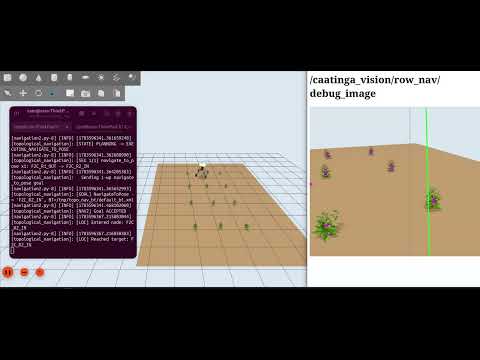
Milestone — multi-row mission following validated in Gazebo:
Sowbot Roadmap
| # | Feature | Description | Status | TRL | Phase |
|---|---|---|---|---|---|
| FOUNDATION | 2025 | ||||
| F1 | Containerised deployment | Full ROS 2 Jazzy stack managed via Docker and manage.py. Live volume mapping to /workspace. Build, full-build, and +sim build modes. | Done | 6 | 2025 |
| F2 | Stable device addressing | fixusb.py with Jetson/generic architecture detection, kernel low_latency mode, and udev symlink generation. Writes .env consumed by all launch files. Note: run_neo() never calls fixusb.py so .env is not written for neo-only runs. | Done | 6 | 2025 |
| F3 | Teleop dashboard | NiceGUI web cockpit on :80. Three-tab interface: Nav (joystick, e-stop, topo map, node-drop, track mode), Mission (fields2cover corner entry, F2C row plan generator, reorderable mission queue), System (telemetry, safety indicators, GPS leaflet map). | Done | 6 | 2025 |
| F4 | ublox DGNSS driver | Dual F9P moving-base configuration with dynamic port assignment via fixusb.py. | Done | 6 | 2026 |
| F5 | Diagnostics TUI | agbot-diagnostic.py terminal status view of all hardware topics. Run inside container via login.sh. | Done | 6 | 2025 |
| MVP FIELD | 2026 | ||||
| M1 | Agri Open Core platform integration | Demonstrates AOC platform abstraction on affordable ARM hardware accessible to smallholders. | Done | 3 | 2026 |
| M2 | Topological navigation + Nav2 | LCAS topological_navigation (aoc_refactor branch) building in Dockerfile. RViz visualisation confirmed working. Self-contained navigation2.py with A* route planning, explicit state machine, and row_traversal / NavigateToPose / goal_align edge actions. fake_nav2_server with /limbic_row_follow stub enables full pipeline testing in sim. sim_nav.launch.py now routes through real Nav2. Multi-row mission following (entry/exit node pairs across boustrophedon rows) validated end-to-end in Gazebo. Pending: Jazzy field validation on hardware. | ~85% Done | 4 | 2026 |
| M2a | fusioncore Nav2 bridge | fusioncore_node launched via devkit.launch.py. Nav2 topic remapping shim wired. Pending: end-to-end test on live hardware. | ~75% Done | 4 | 2026 |
| M3 | Open-field row-crop scenario | Live node-drop in UI. F2C row plan generator implemented in ui_node.py (corners → swaths → topo rows via _run_f2c()). YAML written to /workspace/maps/, switch_topological_map with fallback. Topo map auto-generated at container start. Multi-row traversal across generated swaths confirmed in sim. Pending: tmap2 authoring from real field survey; F2C obstacle costmap integration. | ~70% Done | 4 | 2026 |
| M4 | RTK-GNSS localisation | Full pipeline implemented: dual F9P, shims, UKF fusion, NTRIP. Lever-arm offsets in fusioncore.yaml are zeroed placeholders (commented # measured TODOs). Pending: antenna lever-arm measurement, live hardware test. | ~75% Done | 3 | 2026 |
| M5 | Dual-SBC ROS 2 stack | manage.py detects crossover interface, builds CYCLONEDDS_URI peer config and injects into Docker. neo.launch.py and devkit.launch.py finalised for Limbic+Neo split. DDS peer path is the active one. | ~90% Done | 3 | 2026 |
| M6 | Gazebo simulation | sowbot_sim.launch.py + sim_nav.launch.py fully restructured. kill_fake_nav2_on_clock implemented. use_sim_time=True now threaded through topo stack. Multi-row mission following demonstrated end-to-end (see video above). | Done | 4 | 2026 |
| M7 | Sentor safety monitoring | sowbot_monitor.yaml fully authored (e-stop, bumpers, battery, camera, odom, neo_vision heartbeat, node monitors). sentor_node.py wired into devkit.launch.py. Pending: smoke-test on live hardware; battery voltage cutoff needs field confirmation (# TODO: CONFIRM in YAML). | ~75% Done | 3 | 2026 |
| M8 | Visual crop-row navigation | sowbot_row_follow package implemented. ExG+Otsu, visual servo, limbic_row_follow_node.py as Nav2 action server. Cancel and heartbeat-loss safety. TSM row-swap hold with 6-second debounce implemented. Camera calibration params required before field use. Pending: camera calibration, field test. | ~75% Done | 3 | 2026 |
| PRODUCTION | ~2027 | ||||
| P1 | STM32H7 + copper-rs MCU | Replace ESP32/Lizard DSL with STM32H745 running copper-rs statically-scheduled Rust firmware. Hard real-time motor PID, hardware safety interlocks. | Research | 2 | 2027 |
| P2 | CANopen bus | ISO 11898 FDCAN at 500 kbit/s / 2 Mbit/s. lely-core CANopen master on T527 native M_CAN. DSP402 drive profile. | Research | 2 | 2027 |
| P3 | RT kernel + core isolation | PREEMPT_RT on Limbic T527. isolcpus=4-7, RTK EKF on core 2 (SCHED_FIFO 60), AOC nav on cores 4-6, watchdog on core 5. GbE/CAN IRQ pinned to core 0. | Planned | 2 | 2027 |
| P4 | ROFS image | Read-only rootfs — Ubuntu Noble minimal or Yocto with RT kernel, pre-built LCAS topo nav, Nav2, rmw_zenoh_cpp. Immutable field deployment. | Research | 1 | 2027 |
| END-EFFECTORS | TBD | ||||
| E1 | Delta weeding module | Open-Weeding-Delta precision mechanical weeding. CANopen actuator node on delta controller. | Research | 1 | TBD |
| E2 | LASER weeding module | Laudando LASER integration. Requires E-Stop interlocking with CANopen safety chain. | Research | 1 | TBD |
| DATASETS & COLLABORATION | Ongoing | ||||
| D1 | UK open-field dataset | Field imagery and GNSS logs from UK agroecological farm conditions. CC licence. | Planned | 2 | 2026 |
| D2 | Caatinga biome dataset | Semi-arid row-crop imagery from caatingarobotics. Validated on T527 AIPU. | Active | 5 | 2026 |
TRL = Technology Readiness Level (1–9, ESA/NASA scale): 1–2 concept/formulation, 3 proof of concept, 4 validated in lab/simulation, 5 validated in relevant (non-lab) environment, 6 demonstrated in relevant environment, 7 operational prototype, 8 qualified system, 9 field-proven. Self-assessed per feature, not a formal review — adjust as needed.
Collaboration
This project is built on and aims to maintain upstream compatibility with zauberzeug/feldfreund_devkit_ros.
High Level navigation is developed from the work of Lincoln Centre for Autonomous Systems (LCAS) as part of the Agri-OpenCore open ROS 2 ecosystem for agricultural robotic
Simulation configuration is partially derived from work by caatingarobotics,
Rewrite-from-Scratch Cost Estimate
Estimate for reimplementing the full stack pulled in by feldfreund_devkit_ros/docker/Dockerfile (caatinga-dev), instead of building on ROS 2 Jazzy + Nav2 + third-party packages.
Foundational infra
| Component | Rewrite hrs |
|---|---|
| ROS 2 core + Nav2 | 120,000–250,000 |
Packages pulled in & developed in house
| Package | What it does | Rewrite hrs |
|---|---|---|
Gazebo Harmonic (INSTALL_SIM) | Physics engine + rendering + SDF | 15,000–70,000 |
topological_navigation (LCAS) | Topo-nav stack | 4,000–8,000 |
| Fields2Cover | Coverage path planning | 2,500–5,000 |
| YOLOX | Real-time object detector arch | 4,000–10,000 |
| NiceGUI (web cockpit) | Web UI framework | 4,000–8,000 |
ublox_dgnss | RTK GNSS driver | 1,200–2,500 |
septentrio_gnss_driver | RTK GNSS driver | 1,200–2,500 |
vision_opencv (cv_bridge, image_geometry) | ROS↔OpenCV bridge | 1,000–2,500 |
fusioncore | UKF GNSS/IMU fusion | 800–2,000 |
| Lizard | ESP32 firmware bridge | 800–1,500 |
virtual_maize_field | Gazebo row-crop world gen | 400–1,200 |
| Forest3D | Procedural terrain gen | 400–1,200 |
sentor, mongodb_store, ros2graph_explorer, ros2grapher | Monitoring/dev-tool glue | 600–1,800 |
sowbot_row_follow TSM vision pipeline | Line fitting, ExG masking, multi-row detection, gating | 800–1,800 |
sowbot_row_follow state machine + action server | FOLLOW_ROW transitions, control loop integration | 550–1,300 |
sowbot_row_follow field tuning/debugging | Reaching current maturity | 400–1,000 |
Subtotal, non-core: ~37,750–120,100 hrs
Total
~157,750–370,100 engineering hours (≈76–183 person-years)
Excludes OpenCV, GDAL, Boost, Eigen, PyTorch — rewriting those too pushes this into the millions of hours and isn't a serious option.
At a $120/hr fully-loaded US engineering rate, that's ≈$18.9M–$44.4M.
⚠️ CRITICAL SAFETY WARNING:
This software is under active development and may be broken at any given moment. For a stable reference implementation see the upstream Zauberzeug project.
THIS SOFTWARE COULD CONTROL PHYSICAL HARDWARE CAPABLE OF PRODUCING SIGNIFICANT KINETIC FORCE.
- EXPERIMENTAL STATUS: This branch ('sowbot') contains experimental code generated and refined with AI assistance. It has NOT undergone full-scale field validation.
- STATUTORY NOTICE (UK): Usage of this software is at the user's sole risk. While standard open-source licenses apply, users are reminded that operating agricultural robotics requires a professional duty of care.
- MANDATORY HARDWARE SAFETY: Under no circumstances should this software be used to control a robot of any size without a independent, hard-wired, physical Emergency Stop (E-Stop) system. Software-based stops (such as /estop/soft) are NOT a substitute for Category 0 or 1 hardware safety stops.
- NO LIABILITY: To the extent permitted by the laws of England and Wales, the contributors exclude all liability for property damage, crop loss, or indirect consequential damages.
Health Warning
This repo may contain traces of LLM slop, We've done our best to mitigate this. If you are allergic to slop, please help us refactor.
Quick Start
0. Install dependencies
Linux
Mac
Windows?
1. Clone the Repository
Open a terminal on your host machine and download the workspace:
git clone -b caatinga-dev https://github.com/Agroecology-Lab/feldfreund_devkit_ros.git
cd feldfreund_devkit_ros
2. Build & Launch
Use the management script to build the ROS 2 workspace and launch the robot stack. This script automatically handles hardware discovery and port permissions:
./manage.py full-build
xhost +local:docker
./manage.py
Access http://localhost to access the WebUI
Linux
If you're getting this error:
docker: Error response from daemon: could not select device driver "" with capabilities: [[gpu]]
You'll need to install the Nvidia Container runtime.
Gazebo
If you'd like to use Gazebo then add a +sim argument to your build instruction
./manage.py full-build +sim
xhost +local:docker
./manage.py
Management & Tools
manage.py
The primary entry point for the system. While it runs the full stack by default, it supports several optional arguments for development:
| Command | Logic / Argument | Resulting Action |
|---|---|---|
./manage.py | (No arguments) | Runs run_runtime() immediately using live volumes. |
./manage.py build | build | local-only, fully cached including external clones |
./manage.py build +pull | build | Re-clones the 9 external repos, keeps apt/pip/local layers cached |
./manage.py build +pull +sim | build | Same, plus INSTALL_SIM=true |
./manage.py full-build | full-build | Runs run_build(full=True). Cleans system & Re-installs all system dependencies. |
./manage.py neo | neo | Runs neo. Runs only the line following code for the second 'neo'(cortex) perception SBC. Then check http://localhost:8080 |
./manage.py neo-tsm | neo-tsm | Runs neo-tsm. Runs experimental line following informed by Vision based Crop Row Navigation under Varying Field Conditions in Arable Fields - Rajitha de Silva1, Grzegorz Cielniak2 and Junfeng Gao. Then check http://localhost:8080 |
./manage.py pull-caatinga | pulls & builds vision pipeline | Requires the container to already be running |
One-command sim launch (TMuLE)
Whilst you can launch Gazebo and other tools from the webui, some may prefer the terminal, this makes terminal use a bit easier.
TMuLE brings the whole row-following sim up in a single tmux session — one window per process — instead of running the three launch steps by hand in separate terminals:
tmule -c tmule/row_follow_sim.yaml launch
tmux attach -t row_follow_sim
That starts ./manage.py --sim (nav stack + Nav2 + UI), Gazebo (sowbot_sim.launch.py) and the crop-row CV node (crop_row_nav.launch.py), each in its own tmux window. launch returns immediately and leaves the session detached, so attach to watch the panes come up (and to type the nav_stack sudo password).
Stop the stack with tmule -c tmule/row_follow_sim.yaml stop; re-attach later with tmux attach -t row_follow_sim.
If a runtime container is already running, the
nav_stackwindow will fail on adocker runname collision. Eitherdocker stop sowbot_runtimefirst, or launch just the windows that reuse the container:tmule -c tmule/row_follow_sim.yaml launch -w gazebo.
tmux basics
The stack runs in a detached tmux session named row_follow_sim, so closing your terminal does not kill it — detaching is not stopping. The session holds one window per sub-system (plus a stray 0: bash that tmux always creates):
0: bash 1: nav_stack 2: gazebo 3: crop_row
Every shortcut starts with the prefix Ctrl-b — press and release it, then the next key:
| Keys | Resulting Action |
|---|---|
Ctrl-b d | Detach — leaves the whole stack running in the background |
Ctrl-b w | Interactive window picker (easiest way to move around) |
Ctrl-b 1 / 2 / 3 | Jump straight to nav_stack / gazebo / crop_row |
Ctrl-b n / p | Next / previous window |
Ctrl-b [ | Scroll back through ROS log output — arrows/PgUp, q to exit |
Ctrl-b z | Zoom the current pane fullscreen (press again to unzoom) |
Ctrl-b ? | List every binding |
tmux ls                              # list sessions
tmux attach -t row_follow_sim        # attach
tmux kill-session -t row_follow_sim  # nuke the session
Scrolling back (Ctrl-b [) is the one you'll reach for most — it's how you read ROS output that has already scrolled past. For mouse-wheel scrolling instead, add set -g mouse on to ~/.tmux.conf.
Scenario configs live in tmule/ — see tmule/README.md to tweak launch arguments or add your own scenario.
Interactive Shell
To enter the running container for debugging or manual ROS 2 commands:
./login.sh
Diagnostics
If hardware is connected but topics are not flowing, run the diagnostic tool from inside the container:
After running ./login.sh
python3 agbot-diagnostic.py
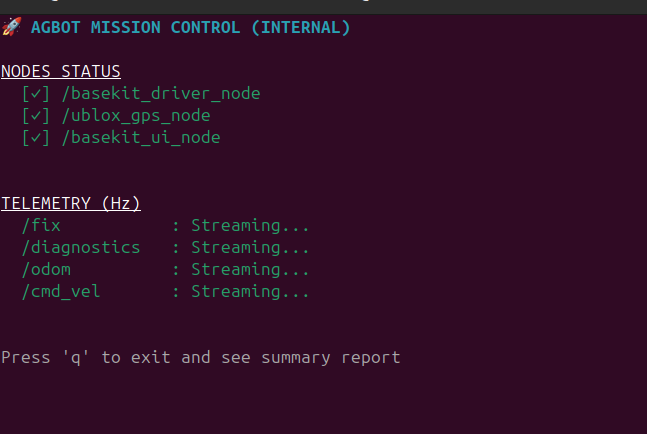
You can also make it verbose with:
python3 agbot-diagnostic.py full
Sketch of MVP 2026 architecture
1. The Lizard Brain (RT Microcontroller)
- Hardware: ESP32 MCU.
- Software: Lizard DSL.
- Role: Hard Real-Time Execution.
- Function: Motor PID control and physical safety (bumpers/cliffs).
- I/O: 3.3V UART receiving via the
teleop_lizardROS 2 bridge.
2. The Limbic System (Executive)
- Hardware: Avaota A1 #1 (Allwinner T527).
- Software: ROS 2 Jazzy +
topological_navigation(AOC branch). - Role: Navigation Executive.
- Function: Runs the Topological Navigation stack. UBLOX sensors Manages the move_base sequence and Action on Condition (AOC) logic.
- I/O: Connects to u-blox via USB/UART using
ublox_dgnssnode. Translates graph goals into velocity commands for the Lizard Brain.
<1GbE interconnect between 2&3>
3. The Neo (Perception)
-
Hardware: Avaota A1 #2 (Allwinner T527 + NPU).
-
Software: Dockerised ROS 2 Jazzy.
-
Role: Asynchronous Perception.
-
Function: NPU-accelerated inference (YOLO/Object tracking) and sensor fusion.
-
Connectivity: Native Zenoh integration via
rmw_zenoh_cpp. Publishes environment states and "Conditions" to the Zenoh network.|
Sketch of possible eventual ~2027 architecture
1. The Lizard Brain (Hardware Abstraction)
- Hardware: STM32 H7 MCU.
- Software: copper-rs.
- Role: Hard Real-Time Execution.
- Function: Manages motor PID loops and hardware-level safety interlocks.
- I/O: Canbus
2. The Limbic System (Executive)
- Hardware: Avaota A1 #1 (Allwinner T527).
- Software: RT kernel, Buildroot
copper-rs - Role: Deterministic Executive.
- Function: UBLOX sensors, Executes Action on Condition (AOC) logic for topological navigation.
- Data Entry: Directly consumes Zenoh keys from the Neo board to trigger mission state transitions and motion planning.
| Core(s) | Role | Allocation Strategy |
|---|---|---|
| Core 0 | OS / I/O | Handles kernel house-keeping, SSH, and the 1GbE driver interrupts. |
| Core 1 | Zenoh / Neo-link | Dedicated to the Zenoh router and serializing incoming "Nice-to-Have" data. |
| Cores 2-6 | The Pilot (Nav) | This is where the RTK EKF, Path Planner, and Task Graph live. |
| Core 7 | The Bridge (Lizard) | Dedicated to SocketCAN and the high-frequency heartbeat to the STM32 (Lizard). |
<1GbE interconnect between 2&3>
3. The Neo (Perception)
- Hardware: Avaota A1 #2 (Allwinner T527 + NPU).
- Software: Dockerised ROS 2 Jazzy & Dockerised CV packages
- Role: Asynchronous Perception.
- Function: NPU-accelerated inference (YOLO/Object tracking) and sensor fusion.
- Connectivity: Native Zenoh integration via
rmw_zenoh_cpp. Publishes environment states and "Conditions" to the Zenoh network.
Licenses & papers
Sowbot / feldfreund_devkit_ros — Dependency Licence Audit
| Component | Source | Licence | Commercial use | Academic Paper | Notes |
|---|---|---|---|---|---|
| feldfreund_devkit_ros (root) | your repo | MIT (©Zauberzeug GmbH & Agroecology Lab) | ✅ | None (Local Project) | Derivative of upstream field-friend; retain Zauberzeug notice |
| devkit_driver | local | MIT (©ATB) | ✅ | None (Utility Driver) | Retain ATB copyright notice |
| devkit_ui | local | MIT (©Agroecology Lab) | ✅ | None (UI Extension) | |
| devkit_bringup | local | MIT | ✅ | None (Config/Launch) | Corrected from proprietary |
| sowbot_row_follow | caatingarobotics | BSD-2-Clause | ✅ | de Silva et al., 2024 | LICENSE file fixed to match header/metadata; updated to use the Transition State Model (TSM) for visual crop row navigation; ©PRBonn + ©Agroecology Lab |
| caatingarobotics (devkit_simulation, caatinga_nav, caatinga_vision) | github.com/samuk | Apache-2.0 | ✅ | None (Fork Infrastructure) | Your fork (row_follow is the BSD-2 exception, above) |
| topological_navigation | LCAS (aoc_refactor) | Apache-2.0 (©LCAS) | ✅ | Fentanes et al., 2015 | High-level planner; derived from the EU STRANDS long-term autonomy project framework |
| fusioncore | manankharwar | Apache-2.0 | ✅ | Kharwar, 2026 | GNSS fusion; patched in-build; retain NOTICE if present |
| Forest3D | unitsSpaceLab | GPL (©UNITS Space Lab) | Do not ship in final product | Cottiga,S., Bourr, K., & Seriani, S. (2026) | Sim-only — 3D forestry /agriculture simulation environment |
| ublox_dgnss | aussierobots | Apache-2.0 | ✅ | None (Hardware Driver) | GNSS driver |
| sentor | LCAS (fork of francescodelduchetto/sentor) | MIT | ✅ | None (Monitoring Tool) | Topic- and node-monitoring health node |
| ros2graph_explorer | nilseuropa | BSD-3-Clause | ✅ | None (Debug Tool) | Dev/debug graph inspector |
| Fields2Cover v2.0.0 | Fields2Cover | BSD-3-Clause | ✅ | Mier et al., 2023 | Built from source; pulls OR-tools (Apache-2.0) + GDAL (MIT) |
| lizard | Agroecology-Lab | MIT (©Zauberzeug GmbH) | ✅ | None (Firmware Tool) | ESP32 tooling; retain Zauberzeug notice |
| YOLOX 0.3.0 + yolox_nano weights | Megvii | Apache-2.0 | ✅ | Ge et al., 2021 | Confirm weights terms for commercial use |
| PyTorch (CPU) | Meta | BSD-3-Clause | ✅ | Paszke et al., 2019 | Core machine learning runtime engine |
===============================================================
Feldfreund DevKit ROS
(Below from original Zauberzeug forked repo)
Feldfreund DevKit ROS is a comprehensive ROS2 package that handles the communication and configuration of various Feldfreund components:
- Communication with Lizard (ESP32) to control the Feldfreund
- GNSS positioning system
- Camera systems (USB and AXIS cameras)
- Example UI to control the robot
All launch files and configuration files (except for the UI) are stored in the devkit_bringup package.
Components
DevKit driver
The DevKit driver (based on ATB Potsdam's field_friend_driver) manages the communication with the ESP32 microcontroller running Lizard firmware - a domain-specific language for defining hardware behavior on embedded systems.
The package provides:
config/devkit.liz: Basic Lizard configuration for DevKit robotconfig/devkit.yaml: Corresponding ROS2 driver configuration
Available ROS2 topics:
/cmd_vel(geometry_msgs/Twist): Control robot movement/odom(nav_msgs/Odometry): Robot odometry data/battery_state(sensor_msgs/BatteryState): Battery status information/bumper/front_top(std_msgs/Bool): Front top bumper state/bumper/front_bottom(std_msgs/Bool): Front bottom bumper state/bumper/back(std_msgs/Bool): Back bumper state/estop/soft(std_msgs/Bool): Software emergency stop control/estop/front(std_msgs/Bool): Hardware front emergency stop state/estop/back(std_msgs/Bool): Hardware back emergency stop state/configure(std_msgs/Empty): Trigger loading of the Lizard configuration file
Camera System
The camera system supports both USB cameras and AXIS cameras, managed through a unified launch system in camera_system.launch.py that handles USB cameras, AXIS cameras, and the Foxglove Bridge for remote viewing.
The USB camera system provides video streaming through ROS2 topics using the usb_cam ROS2 package. Camera parameters can be configured through config/camera.yaml.
The AXIS camera system integrates with the ROS2 AXIS camera driver to support multiple IP cameras with individual streams. Each camera can be configured through config/axis_camera.yaml, with credentials managed through config/secrets.yaml (template provided in config/secrets.yaml.template). The cameras' authentication mode (basic or digest) might need to be configured - see AXIS Camera Authentication section for details.
The visualization system integrates with Foxglove Studio for remote camera viewing, supporting compressed image transport. The Foxglove Bridge is accessible via WebSocket connection on port 8765.
GNSS System
The GNSS system uses the Septentrio GNSS driver with the default config/gnss.yaml configuration. Available topics:
/pvtgeodetic: Position, velocity, and time in geodetic coordinates/poscovgeodetic: Position covariance in geodetic coordinates/velcovgeodetic: Velocity covariance in geodetic coordinates/atteuler: Attitude in Euler angles/attcoveuler: Attitude covariance/gpsfix: Detailed GPS fix information including satellites and quality/aimplusstatus: AIM+ status information
DevKit UI
The example UI provides a robot control interface built with NiceGUI, featuring a joystick control similar to turtlesim. It gives you access to and visualization of all topics made available by the DevKit driver, including:
- Robot movement control through a joystick interface
- Real-time visualization of GNSS data
- Monitoring of safety systems (bumpers, emergency stops)
- Software emergency stop control
The interface is accessible through a web browser at http://<ROBOT-IP>:80 when the robot is running.

Docker Setup
Using Docker Compose
- Build and run the container:
cd docker
docker-compose up --build
- Run in detached mode:
docker-compose up -d
- Attach to running container:
docker-compose exec devkit bash
- Stop containers:
docker-compose down
The Docker setup includes:
- All necessary ROS2 packages
- Lizard communication tools
- Camera drivers
- GNSS drivers
Connect to UI
To access the user interface (UI), follow these steps:
-
Connect to the Robot's Wi-Fi: Join the robot's WLAN network.
-
Open the UI in your browser: Navigate to:
http://<ROBOT-IP>:80(Replace
<ROBOT-IP>with the actual IP address once you have it.)
Launch Files
The system can be started using different launch files:
devkit.launch.py: Launches all componentsdevkit_nocams.launch.py: Launches all components without the camerasdevkit_driver.launch.py: Launches only Feldfreund DevKit drivercamera_system.launch.py: Launches complete camera system (USB + AXIS) and Foxglove Bridgeusb_camera.launch.py: Launches USB camera onlyaxis_cameras.launch.py: Launches AXIS cameras onlygnss.launch.py: Launches GNSS systemui.launch.py: Launches the example UI node
To launch the complete system:
ros2 launch devkit_bringup devkit.launch.py
AXIS Camera Authentication
The AXIS cameras can be configured to use either digest or basic authentication. To check and configure the authentication mode:
- Check current authentication settings:
curl --digest -u root:pw "http://192.168.42.3/axis-cgi/admin/param.cgi?action=list&group=Network.HTTP" | cat
- Switch authentication mode (e.g., from digest to basic):
curl --digest -u root:pw "http://192.168.42.3/axis-cgi/admin/param.cgi?action=update&Network.HTTP.AuthenticationPolicy=basic" | cat
Replace root:pw with your camera's credentials and 192.168.42.3 with your camera's IP address. The authentication mode can be set to either basic or digest. Note that you should always use the --digest flag in these commands even when switching to basic auth, as the camera's current setting might be using digest authentication.
Quickstart guide
1. Clone the Repository
git clone https://github.com/zauberzeug/devkit_ros.git
cd devkit_ros
2. Validate Configuration
Before building, check and adjust if needed:
-
ROS2 Configuration (
devkit_bringup/config/devkit.yaml):- Verify
serial_portmatches your setup (default: "/dev/ttyTHS0") - Check
flash_parametersfor your hardware (default: "-j orin --nand")
- Verify
-
Lizard Configuration (
devkit_bringup/config/devkit.liz):- Verify motor configuration matches your hardware
- Check pin assignments for bumpers and emergency stops
- Adjust any other hardware-specific settings
3. Build with Docker
./docker.sh u
4. Send Lizard Configuration
Once the system is running:
- Use the "Send Lizard Config" button in the UI
- Or use the
/configuretopic in ROS2
5. Ready to Go
Check the UI at http://<ROBOT-IP>:80 to control and monitor your robot.
Future features
This repository is still work in progress. Please feel free to contribute or reach out to us, if you need any unimplemented feature.
- Complete tf2 frames
- Handle camera calibrations
- Robot visualization