🎉 What's New
August 10, 2026 · View on GitHub










📚 Documents: musicdl.readthedocs.io
🎧 Live Demo · MusicSquare (音乐广场)

🛠 Source Code (MusicSquare)
MusicSquare is a browser-based music playground — search, play, and download tracks directly in your browser.
⚠️ For learning and testing only: please respect copyright and the terms of each music platform.
学习收获更多有趣的内容, 欢迎关注微信公众号:Charles的皮卡丘
🎉 What's New
- 2026-08-10: Released musicdl v2.13.6 — perform routine updates and maintenance for the common music clients, this update fixes two common music clients.
- 2026-08-09: Released musicdl v2.13.5 — perform monthly maintenance checks on third-party music clients, fixing numerous bugs and restoring all broken clients; remove the FLMP3 music client and introduce the new XMFWAV music client; add support for three music platforms with clearly copyrighted content.
- 2026-07-26: Released musicdl v2.13.4 — fix potential bugs in playlist parsing for several music clients; add and fix several third-party parsing APIs for the Deezer, Tidal, and Qobuz music clients.
🎵 Introduction
A lightweight music downloader built entirely in pure Python, designed for simplicity, clarity, and ease of use. It is suitable for personal listening workflows, collection management, and academic or educational purposes such as music information retrieval, data collection, and reproducible research. With a clean codebase and minimal dependencies, the project is easy to use, extend, and study. If you find this project useful, please consider giving it a ⭐ star to support ongoing development, help more people discover it, and stay updated with future improvements.
⚠️ Disclaimer
This repository is provided solely for educational and research purposes. Commercial use is prohibited. The software only interacts with publicly accessible web endpoints and does not host, store, mirror, or distribute any copyrighted or proprietary content. No executables are distributed with this repository. Redistribution, resale, or bundling of this software (or any derivative packaged distribution) without explicit permission is strictly prohibited. Access to paid, subscription, or otherwise restricted content must be obtained through authorized channels (e.g., purchase or subscription via the relevant service). Use of this software to circumvent paywalls, DRM, licensing restrictions, or other access controls is strictly prohibited. If you are a copyright or rights holder and believe that this repository infringes your rights, please contact me with sufficient detail (e.g., relevant URLs and proof of ownership), and I will promptly investigate and take appropriate action, which may include removal of the referenced material.
🎧 Supported Music Client
🧪 Playground
Here are some projects built on top of musicdl,
| Project (EN) | Project (CN) | WeChat Article | Project Location |
|---|---|---|---|
| Modern Web Music Player (Claude.ai) | 现代化Web音乐播放器 (Claude.ai) | click | claudeai-modern-web-music-player |
| Music downloader GUI | 音乐下载器GUI界面 | click | musicdlgui |
| Singer lyrics analysis | 歌手歌词分析 | click | singerlyricsanalysis |
| Lyric-based song snippet retrieval | 歌词获取歌曲片段 | click | searchlyrics |
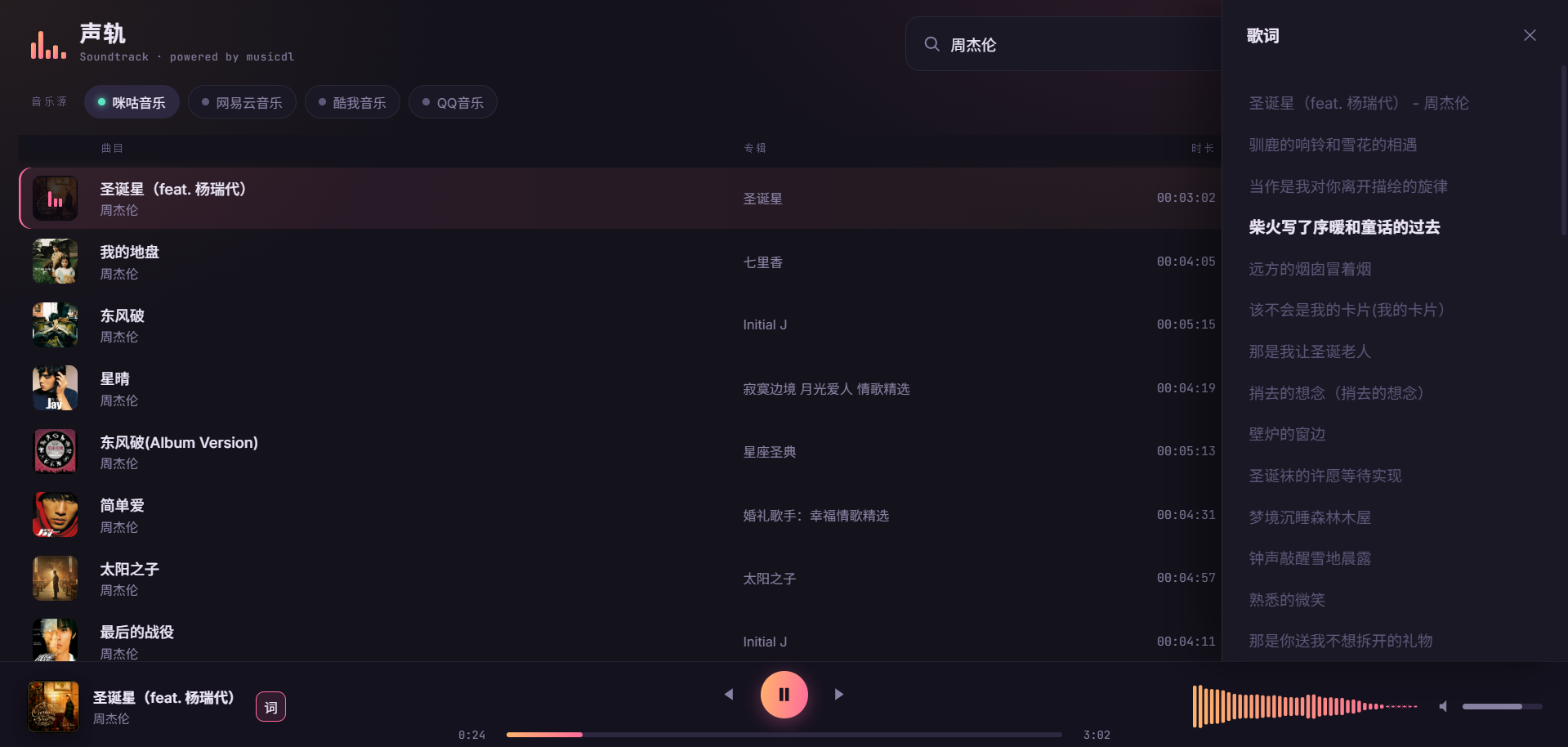
For example, the Modern Web Music Player (Claude.ai) looks/works like this,
📦 Install
You have three installation methods to choose from,
# from pip
pip install musicdl
# from github repo method-1
pip install git+https://github.com/CharlesPikachu/musicdl.git@master
# from github repo method-2
git clone https://github.com/CharlesPikachu/musicdl.git
cd musicdl
python setup.py install
Certain music clients supported by musicdl require extra CLI tools to function correctly, mainly to decrypt encrypted search and download requests, as well as protected audio files. These tools include:
-
FFmpeg is a cross-platform command-line tool for processing audio and video. The official FFmpeg site provides source code and links to ready-to-use builds for different platforms.
Required By:
Install Guidance:
- Windows: Download a build from the official site, extract it, and add the "bin" directory to your
PATH. - macOS:
brew install ffmpeg - Ubuntu / Debian:
sudo apt install ffmpeg
Verify that the installation was successful:
ffmpeg -versionIf version information is shown, FFmpeg was installed successfully.
- Windows: Download a build from the official site, extract it, and add the "bin" directory to your
-
Node.js is a cross-platform JavaScript runtime used to run JavaScript outside the browser.
Required By:
Install Guidance:
- Windows: Download and install it from the official Node.js site.
- macOS: Download and install it from the official Node.js site.
- Linux: Follow the installation guidance on the official Node.js site.
Verify that the installation was successful:
node -v
npm -v
If both commands print version information, Node.js was installed successfully.
-
N_m3u8DL-RE is a cross-platform stream downloader for MPD, M3U8, and ISM.
Required By:
Install Guidance:
- Windows: Download a prebuilt binary from the official Releases page.
- macOS: Download a prebuilt binary from the official Releases page.
- Linux: Download a prebuilt binary from the official Releases page.
- Arch Linux:
yay -Syu n-m3u8dl-re-binoryay -Syu n-m3u8dl-re-git
Verify that the installation was successful:
N_m3u8DL-RE --versionIf version information is shown, N_m3u8DL-RE was installed successfully.
-
Bento4 is a full-featured MP4 and MPEG-DASH toolkit. In this setup, its mp4decrypt tool is required by amdecrypt and N_m3u8DL-RE.
Required By:
Install Guidance:
- Windows: Download the binaries from the official Bento4 downloads page.
- macOS: Download the binaries from the official Bento4 downloads page, or install with
brew install bento4. - Linux: Download the binaries from the official Bento4 downloads page.
Verify that the installation was successful:
mp4decryptIf usage or version information is shown, Bento4 was installed successfully.
-
amdecrypt is a command-line tool for decrypting Apple Music songs in conjunction with a wrapper server.
Required By:
Install Guidance:
- Prerequisite: Make sure Bento4 is installed first, and mp4decrypt is available in your
PATH. - Windows: Download the binary from the musicdl clitools release, extract it, and add it to your
PATH. - macOS: Download the binary from the musicdl clitools release, extract it, and add it to your
PATH. - Linux: Download the binary from the musicdl clitools release, extract it, and add it to your
PATH.
Verify that the installation was successful:
python -c "import shutil; print(shutil.which('amdecrypt'))"If the command prints the full path of
amdecryptwithout an error, amdecrypt was installed successfully. - Prerequisite: Make sure Bento4 is installed first, and mp4decrypt is available in your
🚀 Quick Start
This guide explains the most common ways to use musicdl in both the command line and Python. It is written for practical, day-to-day usage, so the focus is on the workflows most users need first: searching songs, choosing music sources, downloading playlists, saving files to custom folders, and passing cookies or request settings when needed.
Typical Usage
(1) Run Musicdl in Interactive Mode
The quickest way to verify that musicdl is installed correctly is to start the interactive terminal UI.
from musicdl import musicdl

music_client = musicdl.MusicClient(
    music_sources=['MiguMusicClient', 'NeteaseMusicClient', 'QQMusicClient', 'KuwoMusicClient', 'QianqianMusicClient']
)
music_client.startcmdui()
Equivalent command-line usage:
musicdl -m MiguMusicClient,NeteaseMusicClient,QQMusicClient,KuwoMusicClient,QianqianMusicClient
By default, musicdl uses five Mainland China sources for search and download:
MiguMusicClient, NeteaseMusicClient, QQMusicClient, KuwoMusicClient, QianqianMusicClient
If you want overseas sources, specify them explicitly each time, for example:
musicdl -m QobuzMusicClient,JamendoMusicClient,YouTubeMusicClient
If you already know where a song is likely to be available, it is usually better to search a small number of sources:
musicdl -m NeteaseMusicClient,QQMusicClient
Interactive selection keys:
↑/↓: move cursorSpace: toggle selectiona: select alli: invert selectionEnter: confirm and downloadEscorq: cancel selectionr: restart the programqat the main prompt: exit
The demonstration is as follows:


(2) Search Directly from The Command Line
Use -k / --keyword when you already know the query text.
This still opens the selection UI before downloading.
musicdl -k "Jay Chou"
Use a specific set of sources if needed:
musicdl -k "Jay Chou" -m NeteaseMusicClient,QQMusicClient
(3) Parse and Download A Playlist
Use -p / --playlist-url to parse a supported playlist URL and download all recognized tracks.
musicdl -p "https://music.163.com/#/playlist?id=3039971654" -m NeteaseMusicClient
In Python:
from musicdl import musicdl

music_client = musicdl.MusicClient(music_sources=['NeteaseMusicClient'])
song_infos = music_client.parseplaylist("https://music.163.com/#/playlist?id=7583298906")
music_client.download(song_infos=song_infos)
Note:
--keywordand--playlist-urlcannot be used at the same time.
CLI Help
You can always inspect the full command-line interface with:
musicdl --help
Show CLI help output
Usage: musicdl [OPTIONS]

Options:
  --version                       Show the version and exit.
  -k, --keyword TEXT              The keywords for the music search. If left
                                  empty, an interactive terminal will open
                                  automatically.
  -p, --playlist-url, --playlist_url TEXT
                                  Given a playlist URL, e.g., "https://music.1
                                  63.com/#/playlist?id=7583298906", musicdl
                                  automatically parses the playlist and
                                  downloads all tracks in it.
  -m, --music-sources, --music_sources TEXT
                                  The music search and download sources.
                                  [default: MiguMusicClient,NeteaseMusicClient
                                  ,QQMusicClient,KuwoMusicClient,QianqianMusic
                                  Client]
  -i, --init-music-clients-cfg, --init_music_clients_cfg TEXT
                                  Config such as `work_dir` for each music
                                  client as a JSON string.
  -r, --requests-overrides, --requests_overrides TEXT
                                  Requests.get / Requests.post kwargs such as
                                  `headers` and `proxies` for each music
                                  client as a JSON string.
  -c, --clients-threadings, --clients_threadings TEXT
                                  Number of threads used for each music client
                                  as a JSON string.
  -s, --search-rules, --search_rules TEXT
                                  Search rules for each music client as a JSON
                                  string.
  --help                          Show this message and exit.
Common Configuration
(1) Save Files to Custom Folders
Python:
from musicdl import musicdl

init_music_clients_cfg = {
    'MiguMusicClient': {'work_dir': 'migu'},
    'NeteaseMusicClient': {'work_dir': 'netease'},
    'QQMusicClient': {'work_dir': 'qq'},
}

music_client = musicdl.MusicClient(
    music_sources=['MiguMusicClient', 'NeteaseMusicClient', 'QQMusicClient'],
    init_music_clients_cfg=init_music_clients_cfg,
)
music_client.startcmdui()
Command line:
musicdl -m MiguMusicClient,NeteaseMusicClient,QQMusicClient \
  -i '{"MiguMusicClient": {"work_dir": "migu"}, "NeteaseMusicClient": {"work_dir": "netease"}, "QQMusicClient": {"work_dir": "qq"}}'
(2) Pass Cookies for VIP or Logged-in Access
If a source works better when logged in, provide cookies from that platform's web session, e.g., QQMusicClient:
from musicdl import musicdl

your_vip_cookies_with_str_or_dict_format = ""

init_music_clients_cfg = {
    'QQMusicClient': {
        'default_search_cookies': your_vip_cookies_with_str_or_dict_format,
        'default_download_cookies': your_vip_cookies_with_str_or_dict_format,
    }
}

music_client = musicdl.MusicClient(
    music_sources=['NeteaseMusicClient', 'QQMusicClient'],
    init_music_clients_cfg=init_music_clients_cfg,
)
music_client.startcmdui()
Command line:
musicdl -m NeteaseMusicClient,QQMusicClient \
  -i '{"QQMusicClient": {"default_search_cookies": "YOUR_COOKIES", "default_download_cookies": "YOUR_COOKIES"}}'
(3) Increase The Number of Search Results from One Source
from musicdl import musicdl

init_music_clients_cfg = {
    'QQMusicClient': {'search_size_per_source': 20}
}

music_client = musicdl.MusicClient(
    music_sources=['NeteaseMusicClient', 'QQMusicClient'],
    init_music_clients_cfg=init_music_clients_cfg,
)
music_client.startcmdui()
Equivalent command:
musicdl -m NeteaseMusicClient,QQMusicClient \
  -i '{"QQMusicClient": {"search_size_per_source": 20}}'
(4) Use Free Proxies Automatically
If you want to use the pyfreeproxy library to fetch free proxies automatically:
from musicdl import musicdl

init_music_clients_cfg = {
    'NeteaseMusicClient': {
        'search_size_per_source': 1000,
        'auto_set_proxies': True,
        'freeproxy_settings': {
            'proxy_sources': ["ProxyScrapeProxiedSession", "ProxylistProxiedSession"],
            'init_proxied_session_cfg': {
                'max_pages': 2,
                'filter_rule': {
                    'country_code': ["CN"],
                    'anonymity': ["elite"],
                    'protocol': ["http", "https"],
                },
            },
            'disable_print': True,
            'max_tries': 20,
        },
    }
}

music_client = musicdl.MusicClient(
    music_sources=['NeteaseMusicClient'],
    init_music_clients_cfg=init_music_clients_cfg,
)
music_client.startcmdui()
Command line:
musicdl -m NeteaseMusicClient \
  -i '{"NeteaseMusicClient": {"search_size_per_source": 1000, "auto_set_proxies": true, "freeproxy_settings": {"proxy_sources": ["ProxyScrapeProxiedSession", "ProxylistProxiedSession"], "init_proxied_session_cfg": {"max_pages": 2, "filter_rule": {"country_code": ["CN"], "anonymity": ["elite"], "protocol": ["http", "https"]}}, "disable_print": true, "max_tries": 20}}}'
(5) Override Request Settings Per Source
Use requests_overrides when you need to pass extra request options such as proxies, timeout, or verify.
from musicdl import musicdl

requests_overrides = {
    'NeteaseMusicClient': {
        'timeout': (10, 30),
        'verify': False,
        'headers': {'User-Agent': 'Mozilla/5.0'},
    }
}

music_client = musicdl.MusicClient(
    music_sources=['NeteaseMusicClient'],
    requests_overrides=requests_overrides,
)

search_results = music_client.search(keyword='tail ring')
music_client.download(song_infos=search_results)
Command line:
musicdl -k "tail ring" -m NeteaseMusicClient \
  -r '{"NeteaseMusicClient": {"timeout": [10, 30], "verify": false, "headers": {"User-Agent": "Mozilla/5.0"}}}'
(6) Pass Source-Specific Search Rules
Use search_rules when a source supports extra search options.
Behavior is implementation-specific.
from musicdl import musicdl

search_rules = {
    'FiveSingMusicClient': {
        'sort': 1,
        'filter': 0,
        'type': 0,
    }
}

music_client = musicdl.MusicClient(
    music_sources=['FiveSingMusicClient'],
    search_rules=search_rules,
)
music_client.startcmdui()
Command line:
musicdl -m FiveSingMusicClient \
  -s '{"FiveSingMusicClient": {"sort": 1, "filter": 0, "type": 0}}'
(7) Adjust Thread Counts Per Source
from musicdl import musicdl

clients_threadings = {
    'NeteaseMusicClient': 8,
    'QQMusicClient': 4,
}

music_client = musicdl.MusicClient(
    music_sources=['NeteaseMusicClient', 'QQMusicClient'],
    clients_threadings=clients_threadings,
)
music_client.startcmdui()
Command line:
musicdl -m NeteaseMusicClient,QQMusicClient \
  -c '{"NeteaseMusicClient": 8, "QQMusicClient": 4}'
Separate Search and Download
You can call .search() and .download() separately to inspect intermediate results or build custom workflows.
from musicdl import musicdl

music_client = musicdl.MusicClient(music_sources=['NeteaseMusicClient'])

search_results = music_client.search(keyword='尾戒')
print(search_results)

song_infos = []
for song_infos_per_source in search_results.values():
    song_infos.extend(song_infos_per_source)

music_client.download(song_infos=song_infos)
Secondary Development
You can also bypass the unified MusicClient and use a specific client directly.
For example:
from musicdl.modules.sources import NeteaseMusicClient

netease_music_client = NeteaseMusicClient()

search_results = netease_music_client.search(keyword='那些年')
print(search_results)

netease_music_client.download(song_infos=search_results)
To inspect all registered client classes:
from musicdl.modules import MusicClientBuilder

print(MusicClientBuilder.REGISTERED_MODULES)
Download Playlist Items
From musicdl v2.9.0 onward, support for playlist parsing and downloading is being added gradually, now including,
AppleMusicClient,      DeezerMusicClient,       FiveSingMusicClient,    JamendoMusicClient,      JooxMusicClient,
KuwoMusicClient,       KugouMusicClient,        MiguMusicClient,        NeteaseMusicClient,      QQMusicClient,
QianqianMusicClient,   QobuzMusicClient,        SoundCloudMusicClient,  StreetVoiceMusicClient,  SodaMusicClient,
SpotifyMusicClient,    TIDALMusicClient,        FMAMusicClient,         JioSaavnMusicClient,     BodianMusicClient,
SunoMusicClient,       MOOVMusicClient,         AudiusMusicClient,      CCMixterMusicClient,
You can download a supported playlist directly from the terminal:
# Parse and Download Apple Music Playlist
# >>> not use wrapper
musicdl -p "https://music.apple.com/cn/playlist/%E5%8D%81%E5%A4%A7%E4%B8%93%E8%BE%91/pl.u-mJy81mECzBL49zM" -m AppleMusicClient -i "{'AppleMusicClient': {'default_parse_cookies': your_vip_cookies_with_str_or_dict_format}}"
# >>> use wrapper
musicdl -p "https://music.apple.com/cn/playlist/%E5%8D%81%E5%A4%A7%E4%B8%93%E8%BE%91/pl.u-mJy81mECzBL49zM" -m AppleMusicClient -i "{'AppleMusicClient': {'use_wrapper': True, 'wrapper_account_url': 'http://127.0.0.1:30020/', 'wrapper_decrypt_ip': '127.0.0.1:10020'}}"
# Parse and Download Audius Music Playlist
musicdl -p "https://audius.co/audiusplaylists/playlist/audius-weekly-6044" -m AudiusMusicClient
# Parse and Download Bodian Music Playlist
musicdl -p "https://h5app.kuwo.cn/m/bodian/collection.html?uid=1798690&playlistId=1669719&source=5&ownerId=1798690" -m BodianMusicClient
# Parse and Download ccMixter Music Playlist
musicdl -p "https://ccmixter.org/playlist/browse/56358" -m CCMixterMusicClient
# Parse and Download Deezer Music Playlist
musicdl -p "https://www.deezer.com/us/playlist/4697225044" -m DeezerMusicClient
# Parse and Download 5SING Music Playlist
musicdl -p "https://5sing.kugou.com/yeluoluo/dj/631b3fa72418b11003089b8d.html" -m FiveSingMusicClient
# Parse and Download FMA Music Playlist
musicdl -p "https://freemusicarchive.org/member/Creative_Commons/cc-20th-anniversary-open-mix" -m FMAMusicClient -i "{'FMAMusicClient': {'default_parse_cookies': your_vip_cookies_with_str_or_dict_format}}"
# Parse and Download Jamendo Music Playlist
musicdl -p "https://www.jamendo.com/playlist/500544876/best-of-february-2020" -m JamendoMusicClient
# Parse and Download Joox Music Playlist
musicdl -p "https://www.joox.com/hk/playlist/MqgK_LYD3Sb3I9Iziq+8NA==" -m JooxMusicClient
# Parse and Download JioSaavn Music Playlist
musicdl -p "https://www.jiosaavn.com/featured/world-music-day-telugu/3sLj61YBHdI_" -m JioSaavnMusicClient
# Parse and Download Kuwo Music Playlist
musicdl -p "https://www.kuwo.cn/playlist_detail/2358858706" -m KuwoMusicClient
# Parse and Download Kugou Music Playlist
musicdl -p "https://www.kugou.com/yy/special/single/3280341.html" -m KugouMusicClient
# Parse and Download Migu Music Playlist
musicdl -p "https://music.migu.cn/v5/#/playlist?playlistId=228114498&playlistType=ordinary" -m MiguMusicClient
# Parse and Download MOOV Music Playlist
musicdl -p "https://moov.hk/?utm_source=ios&utm_medium=copylink&utm_campaign=sharing_UPL-6742190#/playlist/PP1000000965" -m MOOVMusicClient -i "{'MOOVMusicClient': {'default_parse_cookies': your_vip_cookies_with_str_or_dict_format}}"
# Parse and Download NetEase Music Playlist
musicdl -p "https://music.163.com/#/playlist?id=3039971654" -m NeteaseMusicClient
# Parse and Download QQ Music Playlist
musicdl -p "https://y.qq.com/n/ryqq_v2/playlist/8740590963" -m QQMusicClient
# Parse and Download QianQian Music Playlist
musicdl -p "https://music.91q.com/songlist/295893" -m QianqianMusicClient
# Parse and Download Qobuz Music Playlist
musicdl -p "https://open.qobuz.com/playlist/22318381" -m QobuzMusicClient
# Parse and Download StreetVoice Music Playlist
musicdl -p "https://www.streetvoice.cn/morgan22/playlists/436444/" -m StreetVoiceMusicClient
# Parse and Download SoundCloud Music Playlist
musicdl -p "https://soundcloud.com/pandadub/sets/the-lost-ship" -m SoundCloudMusicClient
# Parse and Download Soda Music Playlist
musicdl -p "https://qishui.douyin.com/s/iHFSgNKw/" -m SodaMusicClient
# Parse and Download Spotify Music Playlist
musicdl -p "https://open.spotify.com/playlist/37i9dQZF1E8NWHOpySOxQd" -m SpotifyMusicClient
# Parse and Download Suno Music Playlist
musicdl -p "https://suno.com/playlist/71f56f55-93a8-4c93-830d-6762853cc862" -m SunoMusicClient
# Parse and Download TIDAL Music Playlist
musicdl -p "https://tidal.com/playlist/a94e7dce-da66-413d-81a5-990328afa3c9" -m TIDALMusicClient -i "{'TIDALMusicClient': {'default_parse_cookies': your_vip_cookies_with_str_or_dict_format}}"
Alternatively, in Python:
from musicdl import musicdl

init_music_clients_cfg = {
    'NeteaseMusicClient': {'default_parse_cookies': YOUR_VIP_COOKIES}
}

music_client = musicdl.MusicClient(
    music_sources=['NeteaseMusicClient'],
    init_music_clients_cfg=init_music_clients_cfg,
)

song_infos = music_client.parseplaylist("https://music.163.com/#/playlist?id=7583298906")
music_client.download(song_infos=song_infos)
WhisperLRC
On some music platforms, it is not possible to obtain lyric files directly, for example XimalayaMusicClient, LizhiMusicClient, LRTSMusicClient, QingtingMusicClient and MituMusicClient.
To handle this, musicdl provides a faster-whisper-based interface that can generate lyrics automatically.
Generate lyrics from a local file:
from musicdl.modules import WhisperLRC

your_local_music_file_path = 'xxx.flac'
print(WhisperLRC(model_size_or_path='base').fromfilepath(your_local_music_file_path))
Available model_size_or_path values:
tiny, tiny.en, base, base.en, small, small.en, distil-small.en, medium, medium.en, distil-medium.en, large-v1, large-v2, large-v3, large, distil-large-v2, distil-large-v3, large-v3-turbo, turbo
In general, larger models generate better lyrics but take longer to run.
Use the environment variable ENABLE_WHISPERLRC=True to toggle on-the-fly lyric generation for all music downloads.
For example:
export ENABLE_WHISPERLRC=True
This is usually not recommended for normal downloading workflows, because it can make one run take a very long time unless you keep search_size_per_source=1 and use a very small Whisper model such as tiny.
You can also generate lyrics from a direct audio URL:
from musicdl.modules import WhisperLRC

music_link = ''
print(WhisperLRC(model_size_or_path='base').fromurl(music_link))
Scenarios Where Quark Netdisk Login Cookies Are Required
Some websites share high-quality or lossless music through Quark Netdisk links, for example:
MituMusicClient, GequbaoMusicClient, YinyuedaoMusicClient, BuguyyMusicClient
If you want to download high-quality or lossless files from these sources, provide the cookies from your logged-in Quark Netdisk web session.
from musicdl import musicdl

init_music_clients_cfg = {
    'YinyuedaoMusicClient': {'quark_parser_config': {'cookies': your_cookies_with_str_or_dict_format}},
    'GequbaoMusicClient': {'quark_parser_config': {'cookies': your_cookies_with_str_or_dict_format}},
    'MituMusicClient': {'quark_parser_config': {'cookies': your_cookies_with_str_or_dict_format}},
    'BuguyyMusicClient': {'quark_parser_config': {'cookies': your_cookies_with_str_or_dict_format}},
}

music_client = musicdl.MusicClient(
    music_sources=['MituMusicClient', 'YinyuedaoMusicClient', 'GequbaoMusicClient', 'BuguyyMusicClient'],
    init_music_clients_cfg=init_music_clients_cfg,
)
music_client.startcmdui()
Please note:
- musicdl does not provide any speed-limit bypass for Quark Netdisk.
- If the cookies belong to a non-VIP Quark account, the download speed may be only a few hundred KB/s.
- Quark may first save the file into your own account before downloading it.
- If your Quark storage is insufficient, the download may fail.
Common Issues and Solutions (FAQ)
How to Parse New Kugou Web Playlist URLs?
If you have a new playlist link, for example,
https://www.kugou.com/songlist/gcid_3zs9qlpmzdz003/,
you need to manually extract the special ID via your browser.
- Open the playlist link in your browser and make sure you are logged into Kugou Music.
- Open Developer Tools (
F12) and inspect the returned HTML page in the Network panel. - Search for the keyword
"specialid". - The number immediately after it is the special ID.
- Construct a new URL in the form:
https://www.kugou.com/yy/special/single/{YOUR_SPECIAL_ID}.html - Use that new URL as the playlist input for musicdl.
Why is The Downloaded Apple Music Playlist Incomplete?
musicdl currently only supports parsing Apple Music playlists with a maximum of 300 tracks.
If your playlist exceeds this limit, split it into several smaller playlists and download them separately.
For more details, please refer to the official documentation.
⭐ Recommended Projects
| Project | ⭐ Stars | 📦 Version | ⏱ Last Update | 🛠 Repository |
|---|---|---|---|---|
| 🎵 Musicdl 轻量级无损音乐下载器 |  | |  | 🛠 Repository |
| 🎬 Videodl 轻量级高清无水印视频下载器 |  |  |  | 🛠 Repository |
| 🖼️ Imagedl 轻量级海量图片搜索下载器 |  |  |  | 🛠 Repository |
| 🖼️ Paperdl 轻量级学术论文搜索下载器 |  |  |  | 🛠 Repository |
| 🌐 FreeProxy 全球海量高质量免费代理采集器 |  |  |  | 🛠 Repository |
| 🌐 MusicSquare 简易音乐搜索下载和播放网页 |  | |  | 🛠 Repository |
| 🌐 ZHIHU://VERSE Zhihu CLI 驱动的交互式知乎实验场 |  |  |  | 🛠 Repository |
| 🌐 FreeGPTHub 真正免费的GPT统一接口 |  |  |  | 🛠 Repository |
📚 Citation
If you use this project in your research, please cite the repository.
@misc{musicdl2020,
    author = {Zhenchao Jin},
    title = {Musicdl: A lightweight music downloader written in pure python},
    year = {2020},
    publisher = {GitHub},
    journal = {GitHub repository},
    howpublished = {\url{https://github.com/CharlesPikachu/musicdl}},
}
🌟 Star History
☕ Appreciation (赞赏 / 打赏)
| WeChat Appreciation QR Code (微信赞赏码) | Alipay Appreciation QR Code (支付宝赞赏码) |
|---|---|
 |  |
📢 WeChat Official Account (微信公众号):
Charles的皮卡丘 (Charles_pikachu)