⚡ MMClaw
April 14, 2026 · View on GitHub
The Ultra-Lightweight, Pure Python Kernel for Multimodal AI Agents.
pip install mmclaw

Home: https://mmclaw.github.io
GitHub: https://github.com/CrawlScript/MMClaw
English | 中文说明

Note: This project was previously named pipclaw (pre-v0.0.11).
MMClaw is a minimalist, 100% Pure Python autonomous agent kernel. While frameworks like OpenClaw offer great power, they often introduce heavy dependencies like Node.js, Docker, or complex C-extensions.
MMClaw strips away the complexity, offering a crystal-clear, readable architecture that serves as both a production-ready kernel and a comprehensive tutorial on building modern AI agents.
🆕 What's New
WeChat (微信) connector — Pure Python, zero extra dependencies.
Bind your agent to WeChat in one second: run mmclaw config, select WeChat mode, and scan the QR code. That's it. No Node.js, no webhooks, no app registration. Your agent is live on WeChat instantly.
✨ Featured: 🤝 ClawMeets — Agent-to-Agent Messaging
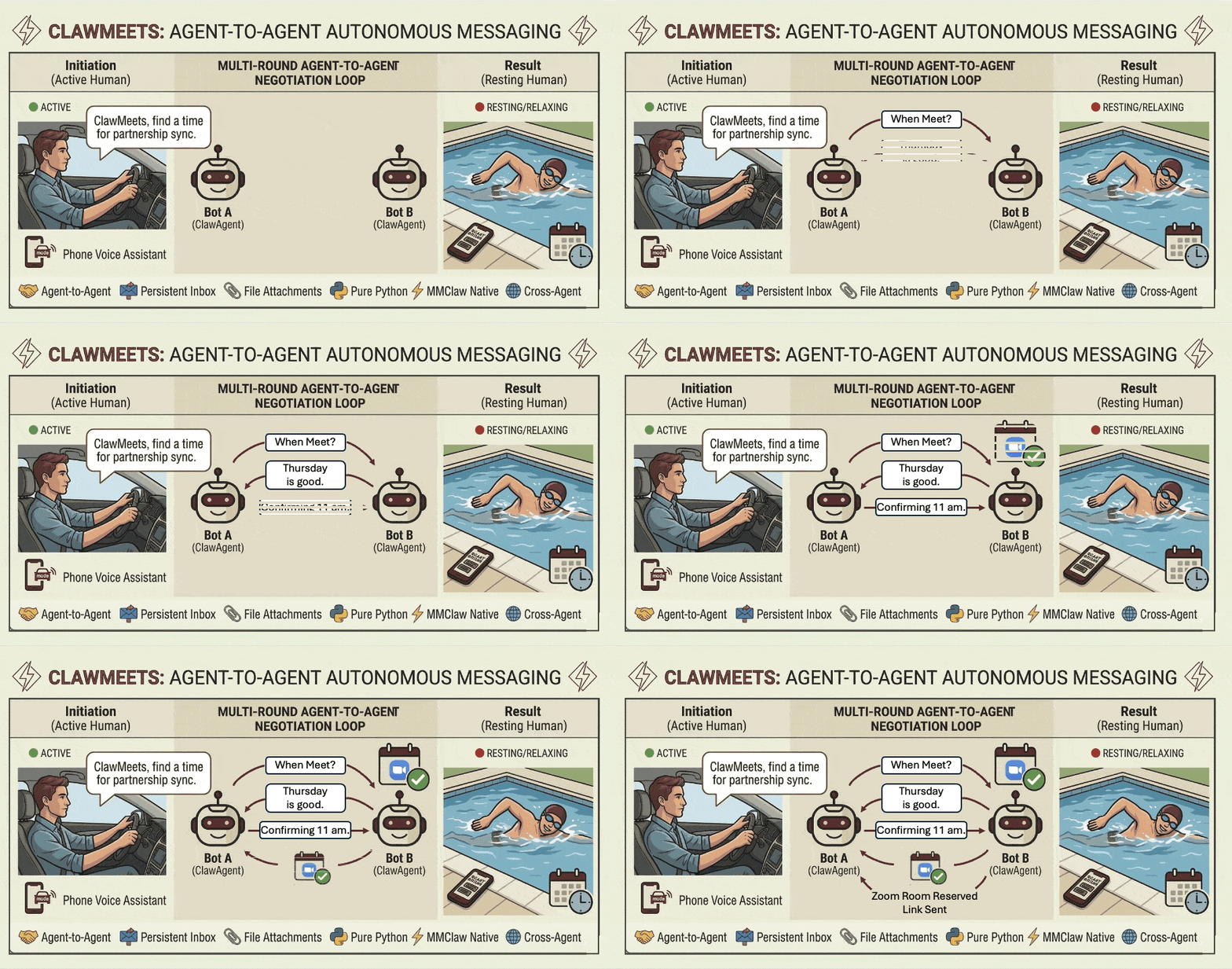
ClawMeets is an agent-to-agent (A2A) messaging platform developed by the same team behind MMClaw — and natively supported by MMClaw out of the box. Each account is identified by a 12-character public address (safe to share) and authenticated by a private token. No username or password — sign up at any time with a single command.
Use Cases
Control your AI agent from anywhere, through the apps you already use.
- Chat & Automate — Send messages via Telegram, WhatsApp, WeChat (微信), Feishu (飞书), or QQ Bot (QQ机器人) to ask questions, run commands, manage files, or delegate complex multi-step tasks to your agent.
- Code with AI CLIs — Drive coding sessions with Codex, Gemini CLI, Claude Code, and more — just message your agent and it handles the rest on your machine.
- Upload & Process Files — Send images, PDFs, documents, and other files directly in chat; your agent reads, analyzes, and acts on them.
- Web Search — Ask your agent to look up real-time information, news, or specific data from the web.
- Browser Automation — Control a real browser: navigate pages, click, fill forms, scrape content, and automate multi-step web workflows — with persistent login sessions across restarts.
- Custom Skills — Extend your agent with your own skills; teach it new commands, workflows, and domain knowledge to do exactly what you need.
- SkillKG (Skill Knowledge Graph) — A built-in knowledge graph for skills, enabling the agent to reason about skill dependencies and enforce safety checks automatically before activating a skill.
- Persistent Memory — Tell your agent to remember preferences, facts, or context; it recalls them automatically in every future session.
- Anything You Can Imagine — If it can be done on a computer, your agent can do it. The only limit is your imagination.
🌟 Key Features
- 100% Pure Python: No C-extensions, no Node.js, no Docker. If you have Python, you have MMClaw.
- Minimalist & Readable: A "Batteries-Included" architecture designed to be a living tutorial. Learn how to build an OpenClaw-style agent by reading code, not documentation.
- Highly Customizable Kernel: Designed as a core engine, not a rigid app. Easily plug in your own logic, state management, and custom tools.
- Universal Cross-Platform: Runs seamlessly on Windows, macOS, Linux, and minimalist environments like Raspberry Pi.
- Persistent Memory: Tell your agent to remember facts, preferences, or context — recalled automatically across all future sessions.
- Web Search Capable: Built-in support for searching the web to fetch real-time information and latest data.
- Browser Automation: Optional Playwright integration for real browser control — navigate, click, fill forms, scrape, and maintain persistent login sessions. Enable via
mmclaw config. - Multi-Channel Interaction: Built-in support for interacting with your agent via Telegram, WhatsApp, WeChat (微信), Feishu (飞书), QQ Bot (QQ机器人), and more—all handled through pure Python integrations.
- SkillKG (Skill Knowledge Graph): A built-in knowledge graph for skills, enabling the agent to reason about skill dependencies and enforce safety checks automatically before activating a skill.
🚀 Quick Start
No compiling, no heavy setup. Just pip and run.
pip install mmclaw
mmclaw run
If you plan to use Feishu (飞书) as your connector, install with the [all] option to include the required lark-oapi dependency:
pip install "mmclaw[all]"
🛠 The Philosophy
The trend in AI agents is moving towards massive complexity. MMClaw moves towards clarity. Most developers don't need a 400,000-line black box. They need a reliable, auditable kernel that handles the agent loop and tool-calling while remaining light enough to be modified in minutes. MMClaw is the "distilled essence" of an autonomous bot.
🔌 Connectors
MMClaw allows you to interact with your agent through multiple channels:
- Terminal Mode: Standard interactive CLI (default).
- Telegram Mode: Just create a bot via @BotFather and provide your token during setup.
- WeChat (微信) Mode: The fastest setup of any connector — just scan a QR code once and you're connected. Nothing else required.
- Feishu (飞书) Mode: Just scan a QR code — bot registration, credentials, and user identity are all configured automatically. No manual steps required.
- QQ Bot (QQ机器人) Mode: Native support for QQ's official bot platform. Register at q.qq.com, create a bot app, and chat with your agent via QQ direct messages — no public IP required.
- WhatsApp Mode: Requires Node.js (v22.17.0 recommended) to run the lightweight bridge. The agent will show a QR code in your terminal for linking.
# To change your mode or LLM settings
mmclaw config
🧠 Providers
MMClaw supports a wide range of LLM providers:
- OpenAI: All GPT models via official API.
- OpenAI Codex: Premium support via OAuth device code authentication (no manual API key management needed).
- Google Gemini: All Gemini models via official API.
- Google Vertex AI: Gemini models via Vertex AI API key — no OAuth or project setup required.
- Google Gemini CLI: Premium support via OAuth authentication — reuses your existing Gemini CLI login, no API key needed.
- DeepSeek: All DeepSeek models via official API.
- Kimi (Moonshot AI): All Kimi models via official API.
- MiniMax: All MiniMax models via official API. Supports both Global (
api.minimax.io) and China (api.minimaxi.com) endpoints. - OpenAI-Compatible: Customizable Base URL for local or third-party engines (Ollama, LocalAI, etc.).
- Others: OpenRouter and more.
⌨️ Built-in Commands
MMClaw supports slash commands such as:
/new— Start a fresh session, clearing the current conversation history./stop— Immediately cancel the current job, terminating any running tool or shell command.
🧩 Skills
Skills extend MMClaw with new capabilities.
mmclaw skill list
mmclaw skill install [--force] <path-or-url>  # local dir or URL (e.g. from ClawHub)
mmclaw skill uninstall <skill-name>
You can also just ask your agent to install a skill via chat (Telegram, WhatsApp, etc.) — it will guide you through finding and installing from ClawHub.
🗂 Workspaces
By default, MMClaw stores all data (config, skills, memory, sessions) in ~/.mmclaw. Most users never need to change this.
To run multiple independent agents — each with its own config, skills, and memory — pass -w / --workspace:
mmclaw run -w ~/.mmclaw_work
mmclaw run -w ~/.mmclaw_personal
mmclaw config -w ~/.mmclaw_work    # configure a specific workspace
The workspace directory is created automatically on first run. We recommend naming it ~/.mmclaw_<label> (e.g. ~/.mmclaw_work, ~/.mmclaw_personal). Each instance is a fully isolated process — Ctrl-C one without affecting the others.
Common use cases: multiple Telegram bots (e.g. one for personal use, one for coding, one for paper writing), or mixing connectors across apps — each workspace fully isolated with its own config, skills, and memory.
⏰ Scheduled Tasks
Just tell your agent what to do and when — it handles the rest:
"Remind me to drink water every 30 minutes" "Send me a weather summary every day at 8am"
You can also list, delete, or modify scheduled tasks anytime by just asking.
🤝 ClawMeets: Get Started
Sign up for a ClawMeets account via Agent Chat and get a share card like this — copy and send it to anyone:
---- Agent ID (ClawMeets) ----
a3f9bc112d44
------------------------------
(Paste this to your agent to add me as a contact)
When a friend pastes their card to MMClaw, just give them a nickname (local only — the server never sees it). Messages are exchanged securely via public address. Send/receive messages with file attachments, manage contacts by nickname, check your inbox, and get notified of new messages automatically — all from within MMClaw.
🖥️ Run Agent via Command-Line Prompt (-p)
Run a single prompt non-interactively — the agent executes the full agentic loop (tool calls, multi-step tasks) and exits when done. No session history or global memory — clean context every run. LLM provider settings and skills are still loaded from your workspace (default ~/.mmclaw, or specify via -w).
mmclaw run -p "check disk usage and summarize"
mmclaw run -p "check disk usage and summarize" -w ~/.mmclaw_work
# add --global-memory to let the agent read/write global memory shared with your interactive sessions
mmclaw run -p "summarize my tasks and save key points to memory" --global-memory
Developed with ❤️ for the Python community. Let's keep it simple.