README.md
September 9, 2025 · View on GitHub
Gruvbox GTK Theme






A GTK theme based on the colours of Sainnhe's great theme: Gruvbox Material for Neovim
the VinceLiuice's Awesome GTK Themes and the creativity of Gusbemacbe's: Suru Plus Icon Theme.
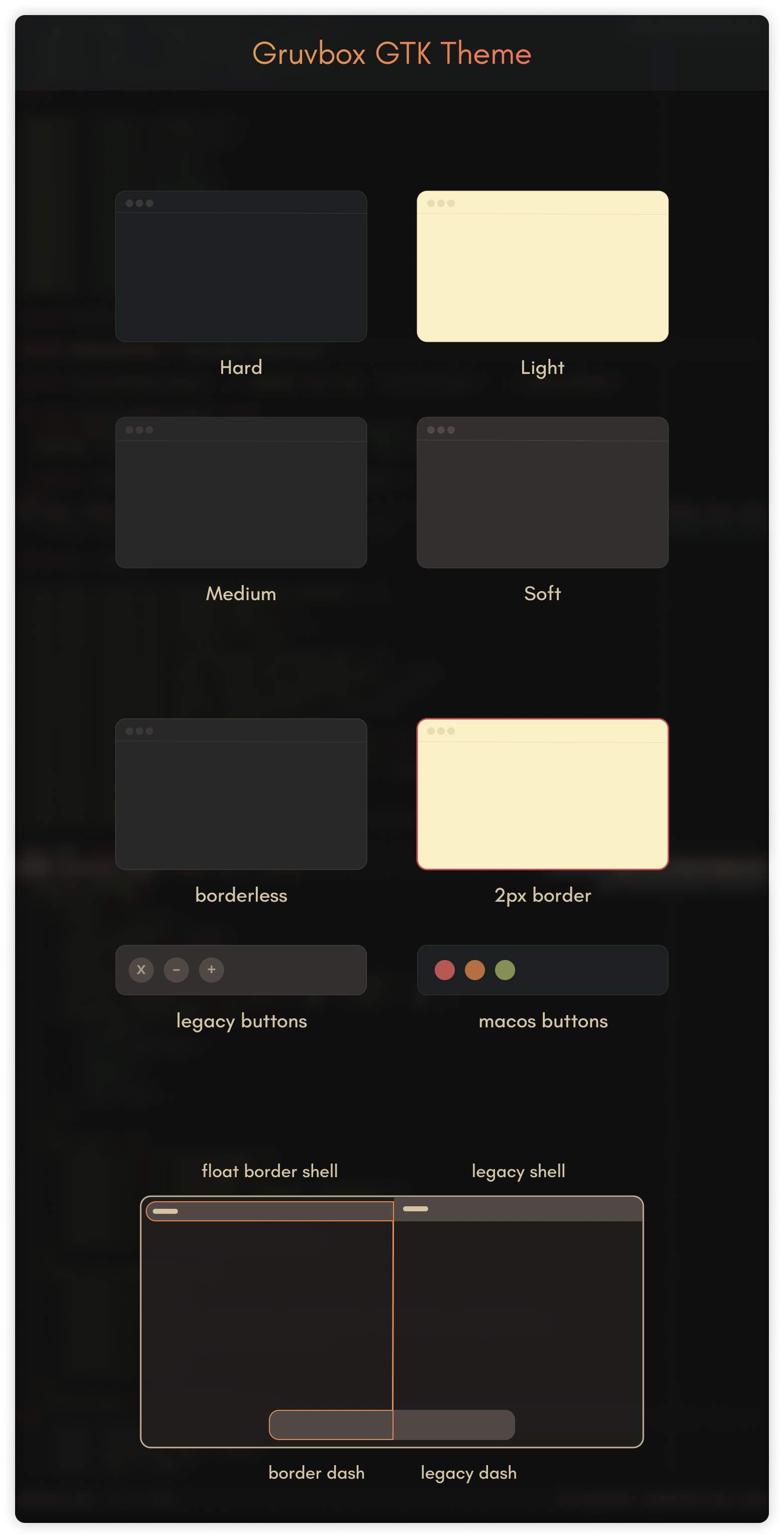
Note
The theme is more focused on the Gnome Desktop, but supports Cinnamon, XFCE, Mate, etc. with generic styles. It's great to combine in your TWMs like: XmonadWM, AwesomeWM, BSPWM, etc...
⚙️ Requirements
Before installing the themes, make sure to install the following necessary packages:
sassc murrine-engine and gnome-themes-extra packages for the correct rendering of themes.
Here are some commands to install on some distributions.
- On Fedora run:
sudo dnf install gtk-murrine-engine
- On OpenSUSE run:
sudo zypper install gtk2-engine-murrine
- On Arch run:
sudo pacman -S gtk-engine-murrine
- On Debian and derivatives run:
sudo apt install gtk2-engines-murrine
📁 Manual Installation
- Download the themes packs and extract them
- Move the extracted files to the following paths:
- For GTK3:
~/.themesIn this path you must move the entire theme folder. - For GTK4:
~/.config/gtk-4.0The files to move to this path can be found inside the theme directory in thegtk-4.0folder, copy only theassets,gtk.cssandgtk-dark.cssfiles or create a symlinks.
- For GTK3:
🔨 Applying the Theme
- For GTK3, apply themes from Gnome Tweaks, Refine or Tuner
- For GTK4 applications it is only necessary to have moved the
assets,gtk.cssandgtk-dark.cssfiles to the~/.config/gtk-4.0path, and if you notice that the theme has not been applied, just close and reopen the application.
📦 Flatpak Compatibility
- Override flatpak themes to
~/.themes:
sudo flatpak override --filesystem=$HOME/.themes
- Override flatpak icons to
~/.icons:
sudo flatpak override --filesystem=$HOME/.icons
- Override flatpak themes to
~/.config/gtk-4.0locally:
flatpak override --user --filesystem=xdg-config/gtk-4.0
- Override flatpak themes to
~/.config/gtk-4.0globally:
sudo flatpak override --filesystem=xdg-config/gtk-4.0
Tip
💡 Use stylepak for easier Flatpak theming.
🛠 CLI Installation
Run the following command in the terminal for a general installation
./install.sh
The
./install.shallows some specific options like:
./install.sh --tweaks medium macos outline float -t green -l
To customise the name of the theme, you can use the
-nparameter, e.g.
./install.sh -n "Gruvbox-Float-Border" --tweaks outline float
Tip
🧾 For more information, run: ./install.sh --help
Options
-d, --dest DIR          Specify destination directory (Default: ~/.themes)

-n, --name NAME         Specify theme name (Default: Gruvbox)

-t, --theme VARIANT...  Specify theme accent color variant(s) [default|green|grey|orange|pink|purple|red|teal|yellow|all] (Default: blue)

-c, --color VARIANT...  Specify color variant(s) [light|dark] (Default: All variants)

-s, --size VARIANT...   Specify size variant [standard|compact] (Default: standard variant)

-l, --libadwaita        Link installed gtk-4.0 theme to config folder for all libadwaita app use this theme

-r, --remove,

-u, --uninstall         Uninstall/Remove installed themes or links

--tweaks                Specify versions for tweaks
                        1. [medium|soft]  Medium|Soft ColorSchemes version
                        2. black          Blackness color version
                        3. float          Floating gnome-shell panel style
                        4. outline        Windows with 2px outline style

-h, --help              Show help
🔠 Abbreviation Cheat Sheet
This is just to clarify doubts about the abbreviations of the Themes
| Abbreviation example | Explanation of abbreviations |
|---|---|
| Theme-Name-B-MB | Bordered Theme and window macOS Buttons |
| Theme-Name-B-LB | Bordered Theme and window Legacy Buttons |
| Theme-Name-B-GS | Floating and Bordered Theme for Gnome Shell |
| Theme-Name-BL-MB | Borderless Theme and window macOS Buttons |
| Theme-Name-BL-LB | Borderless Theme and window Legacy Buttons |
| Theme-Name-BL-GS | Borderless Theme decoration for Gnome Shell |
🔗 More Neovim-Inspired GTK Themes
| Neovim Colorschemes for GTK | GitHub | Pling |
|---|---|---|
| Catppuccin GTK Theme | Source | Package |
| Everforest GTK Theme | Source | Package |
| Gruvbox GTK Theme | Source | Package |
| Kanagawa GTK Theme | Source | Package |
| Material GTK Theme | Source | Package |
| Nightfox GTK Theme | Source | Package |
| Osaka GTK Theme | Source | Package |
| Rose Pine GTK Theme | Source | Package |
| Tokyonight GTK Theme | Source | Package |
Acknowledgements to
Thanks to @telometto for the alternative to the application of themes in Flatpak.
Thanks to @f1yn for the solution to the active and inactive borders in the new version of Cinnamon.
Thanks to @eeeXun for the hint to solve the bug in Mate Desktop window control buttons.
Thanks to @Icy-Thought,@D3vil0p3r and to those who have packaged these themes for NIX and AUR.
