pubtab
March 19, 2026 · View on GitHub





Convert Excel tables to publication-ready LaTeX (and back) with stable roundtrip behavior.
Highlights
- Roundtrip Consistency — Designed for
tex -> xlsx -> texworkflows with minimal structural drift. - Multiple TeX Backends — Supports both classic
tabularexport andtabularray/tblroutput. - All-Sheets by Default —
xlsx2texexports every sheet as*_sheetNN.texwhen--sheetis not set. - Style Fidelity — Preserves merged cells, colors, rich text, rotation, and common table semantics.
- Publication Preview — Generate PNG/PDF directly from
.texvia one CLI entry. - Overleaf-Ready Output — Generated
.texstarts with commented\usepackage{...}hints.
Recent News
- 2026-03-18:
tabularraybackend support and README refresh — addedtabularrayas an alternative TeX backend forxlsx2tex, updated theme/backend resolution sothree_linecan be used consistently across render and preview, replaced placeholder usage paths with real repo examples underexamples/, documented GitHub dev installation, and removed the repository test directory from the tracked tree. - 2026-03-06: Preview dependency recovery and resizebox controls — improved TinyTeX / missing-package recovery in preview, and added
resizebox-related CLI switches for more reliable wide-table export. - 2026-03-05: PyPI-safe README cleanup and release prep — switched README links to PyPI-safe forms and prepared the 1.0.1 release workflow.
Examples
Showcase
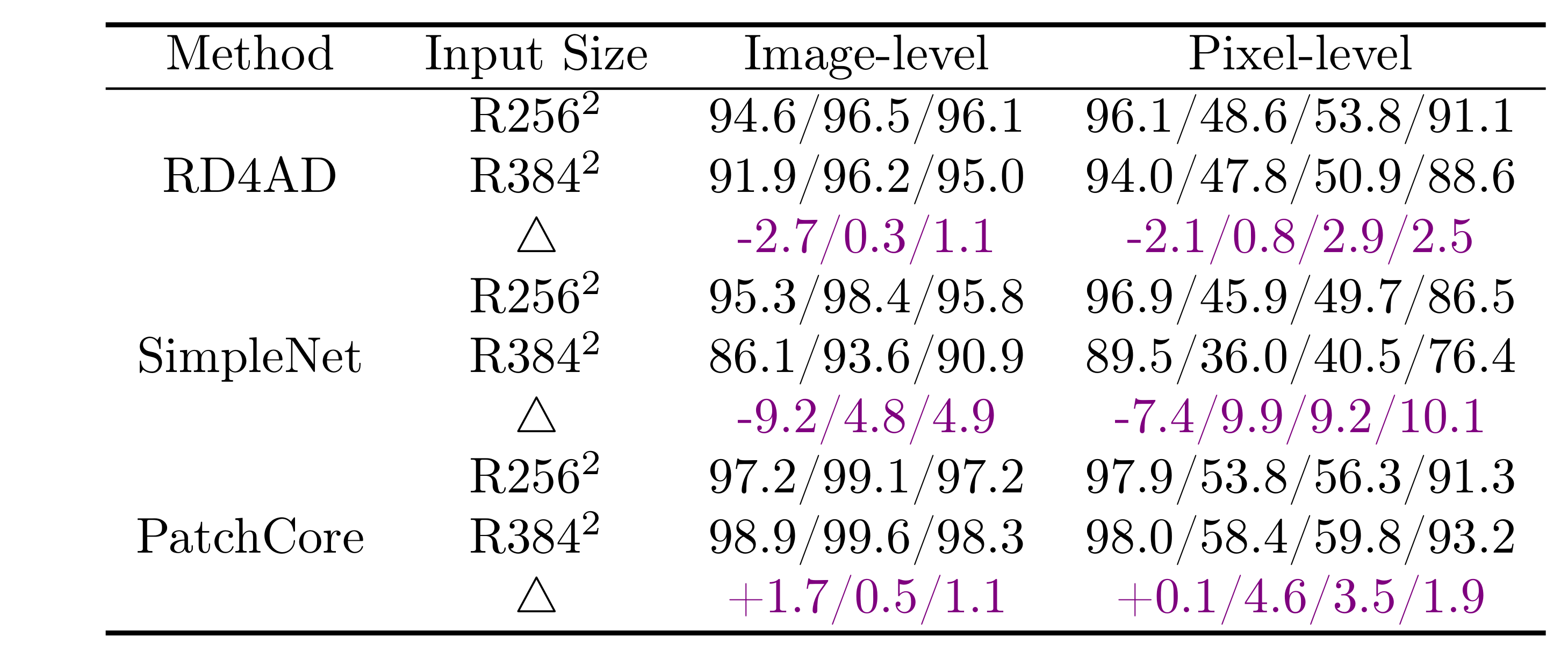
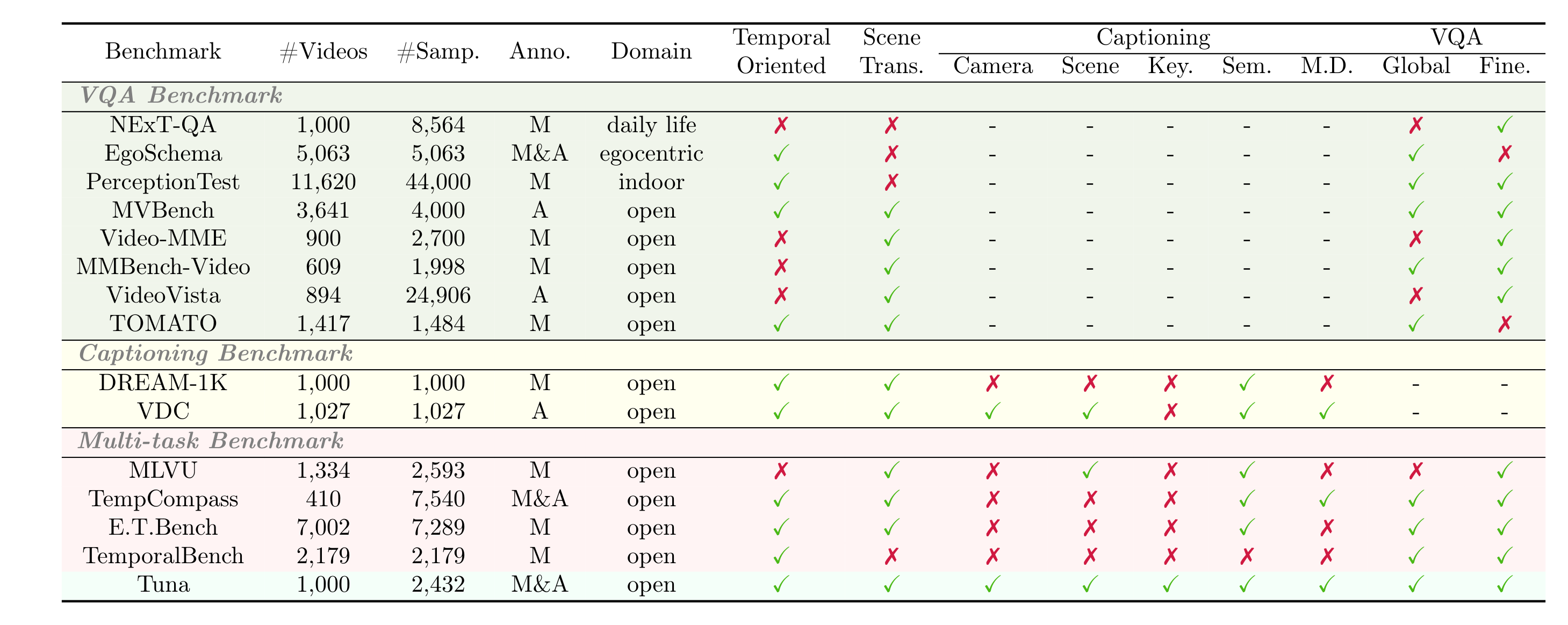
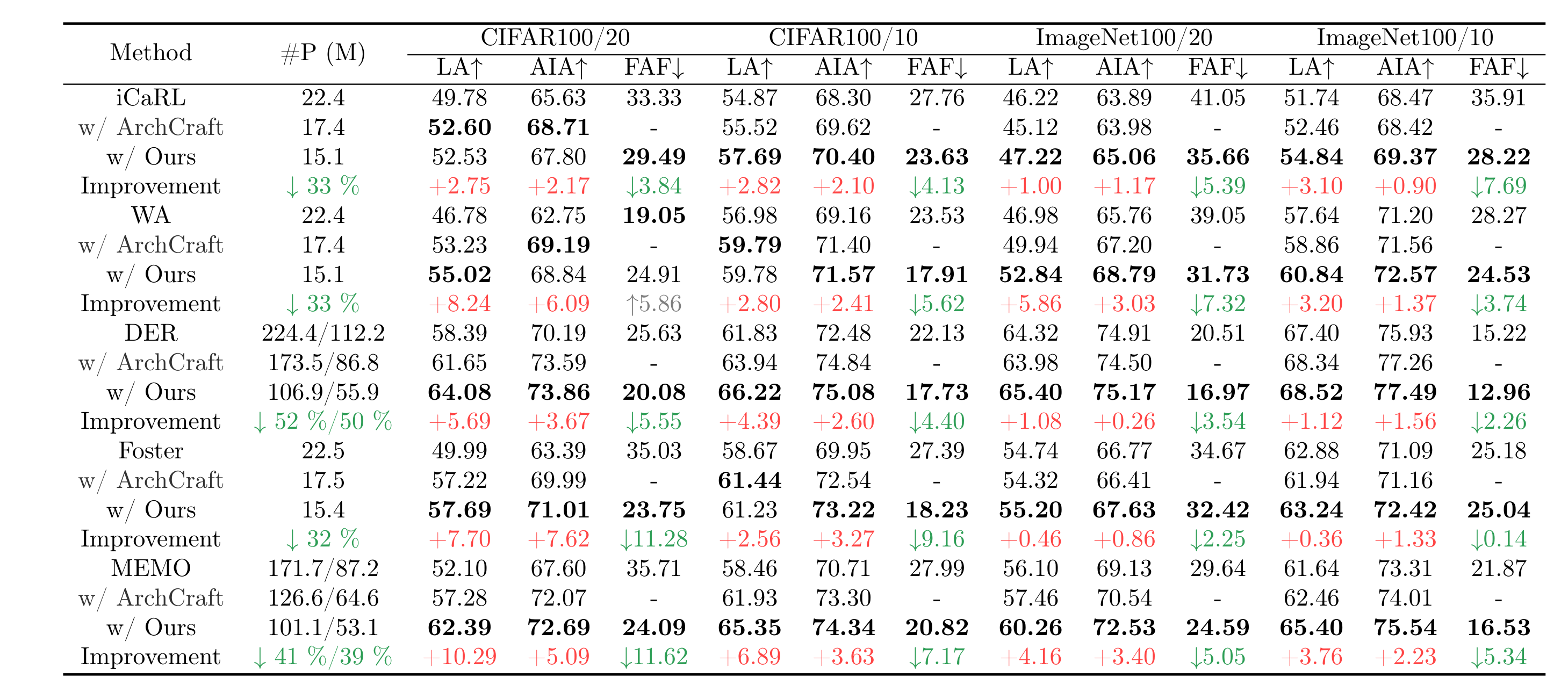
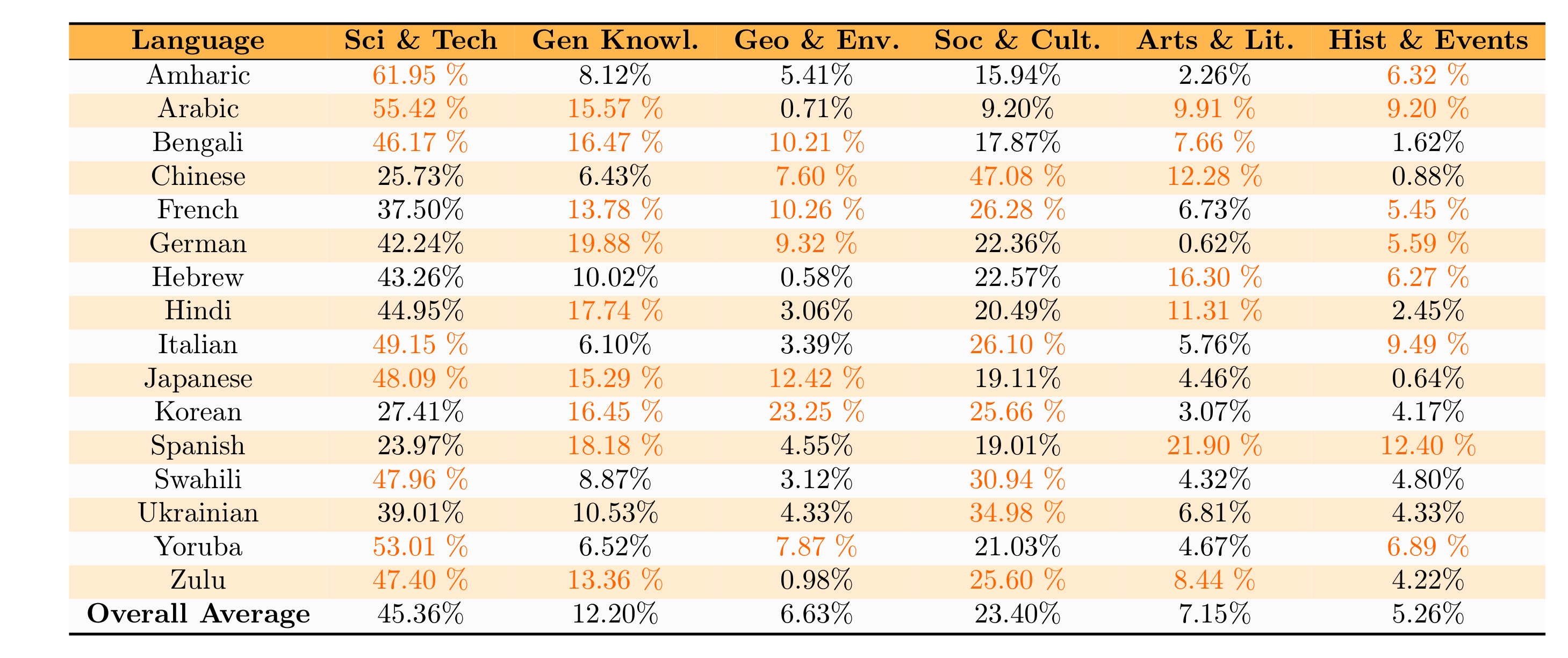
Full Gallery (11 examples)
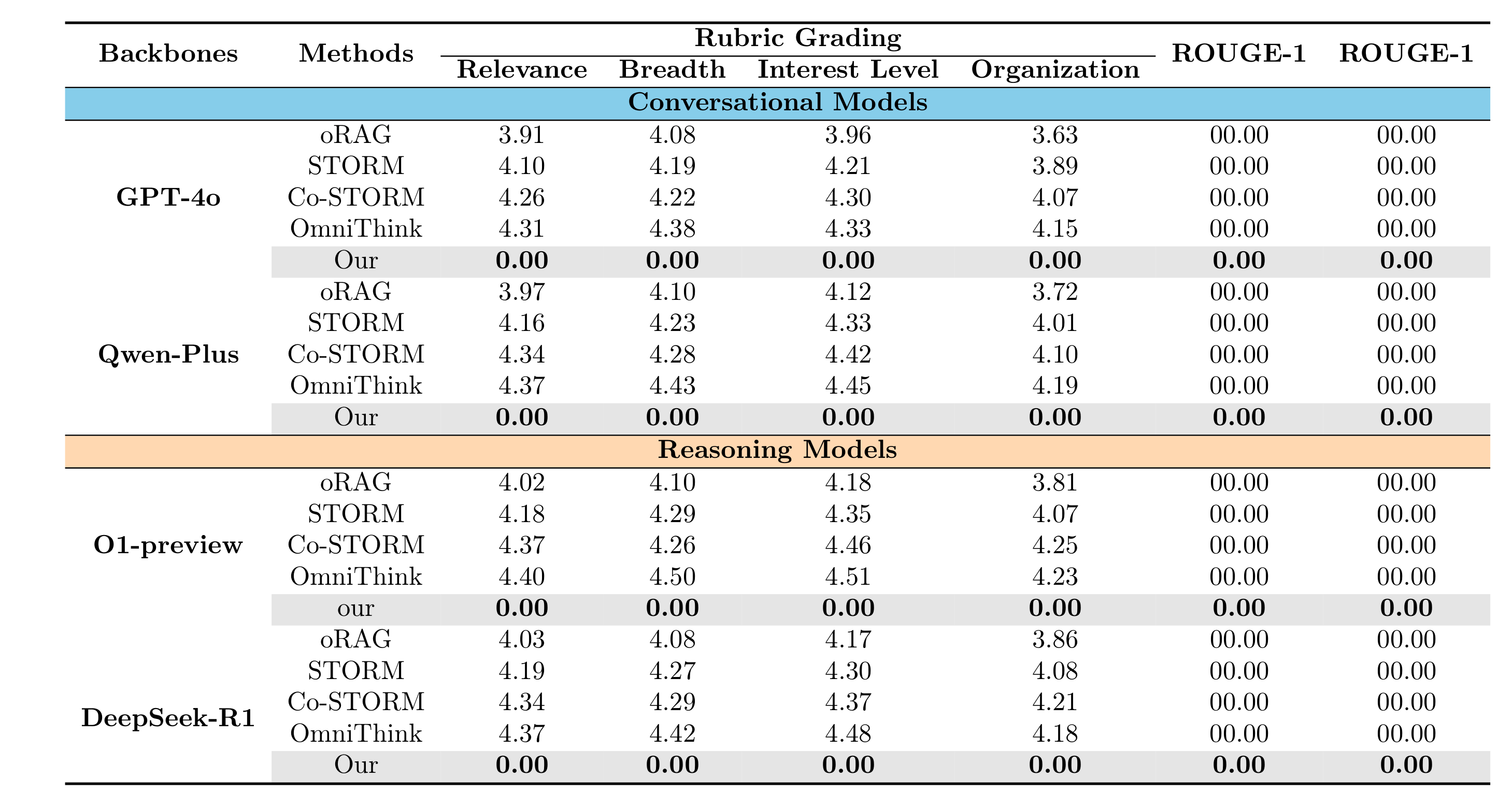
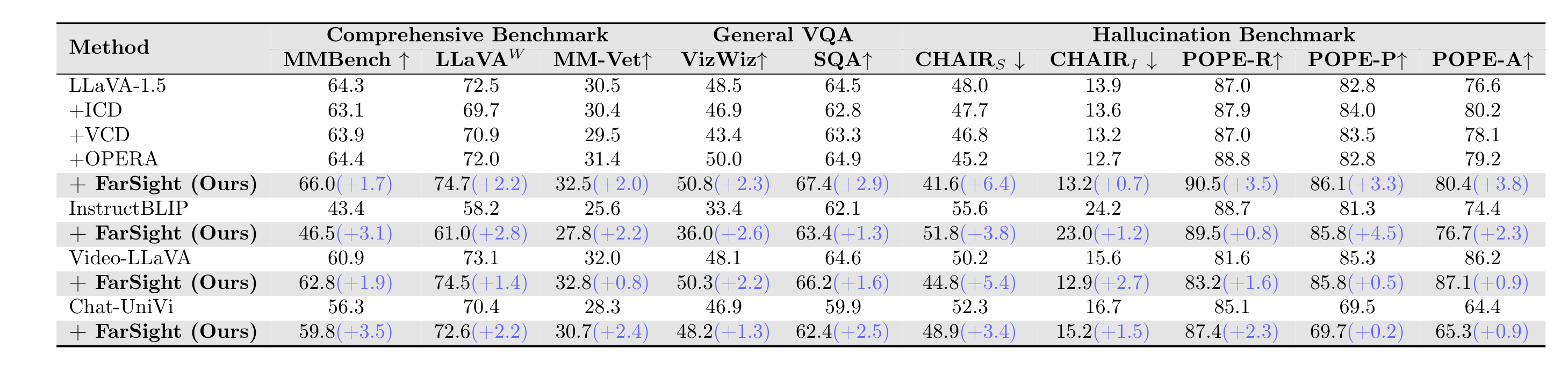
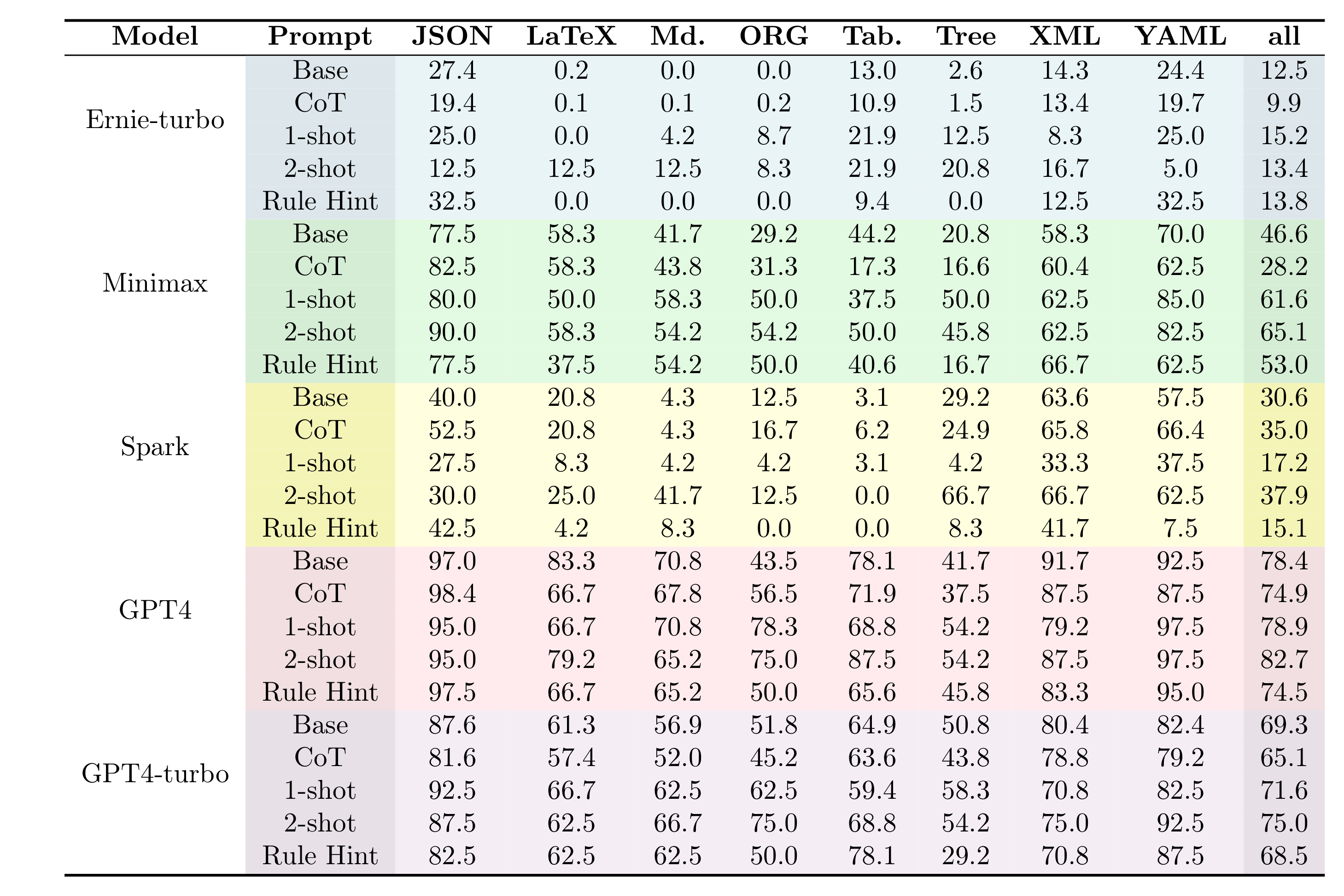
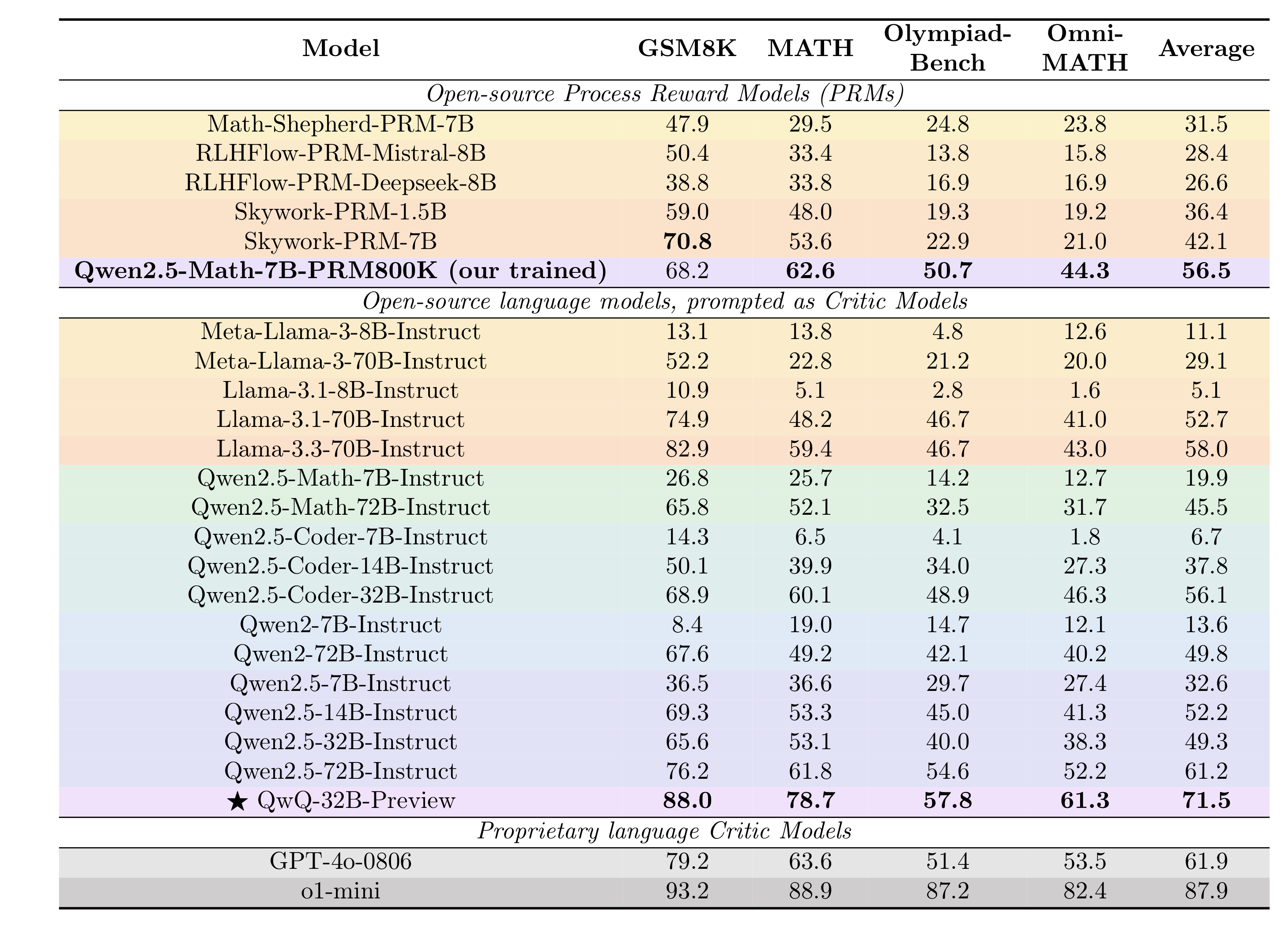
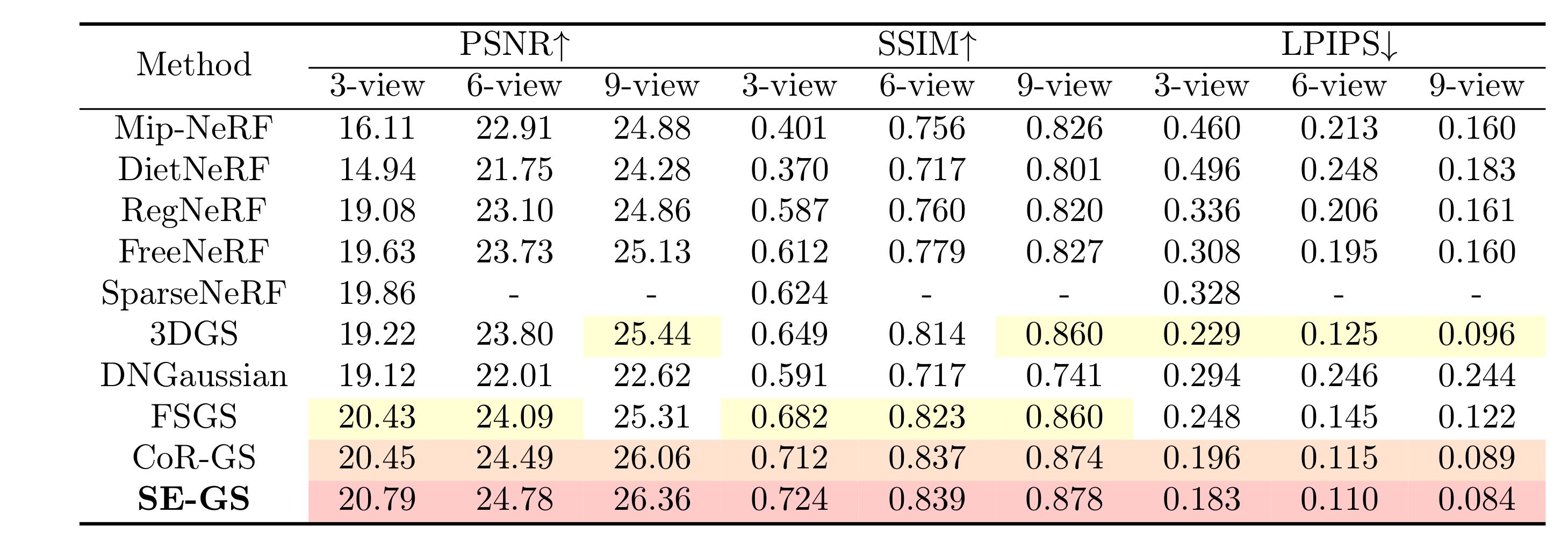
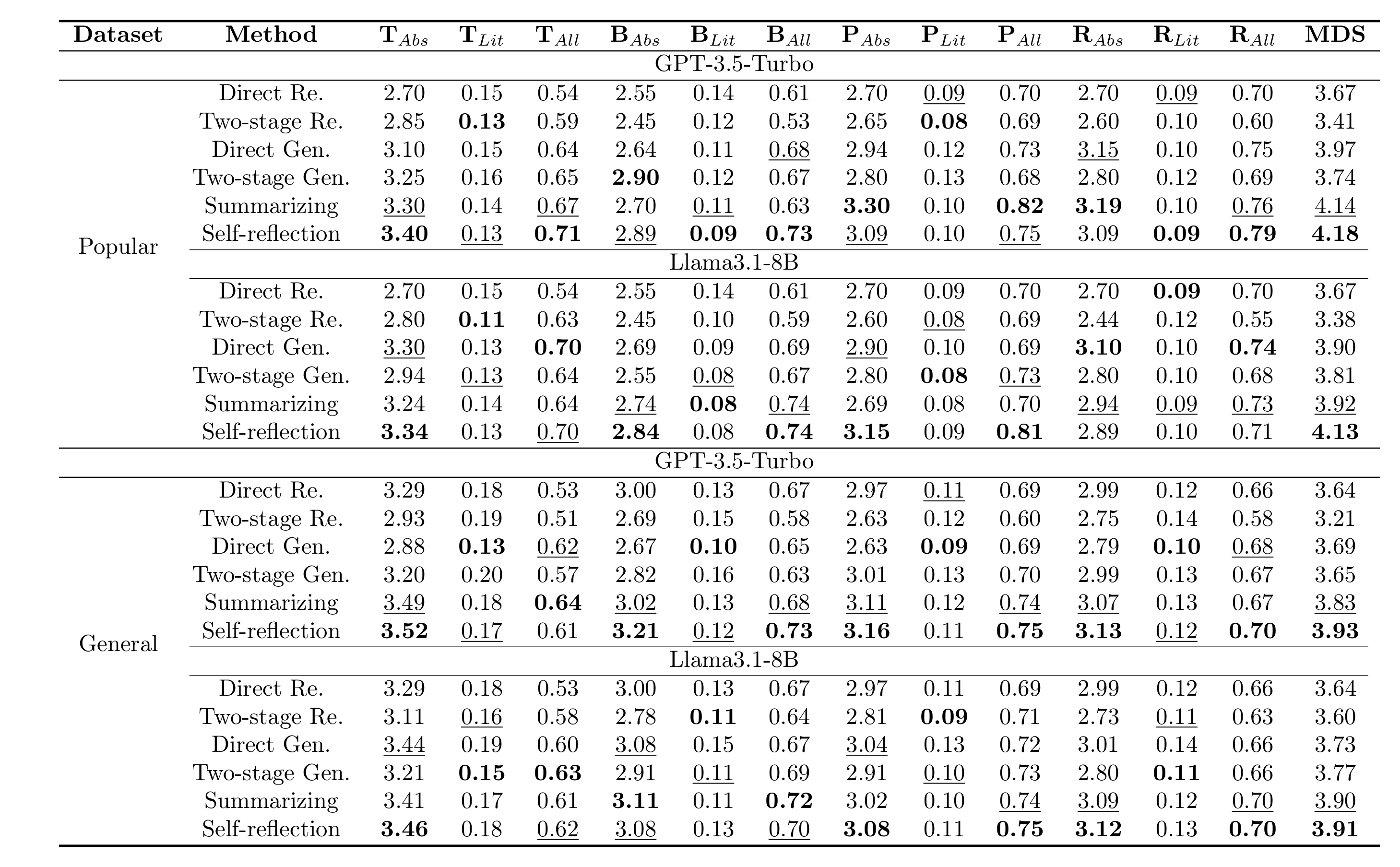
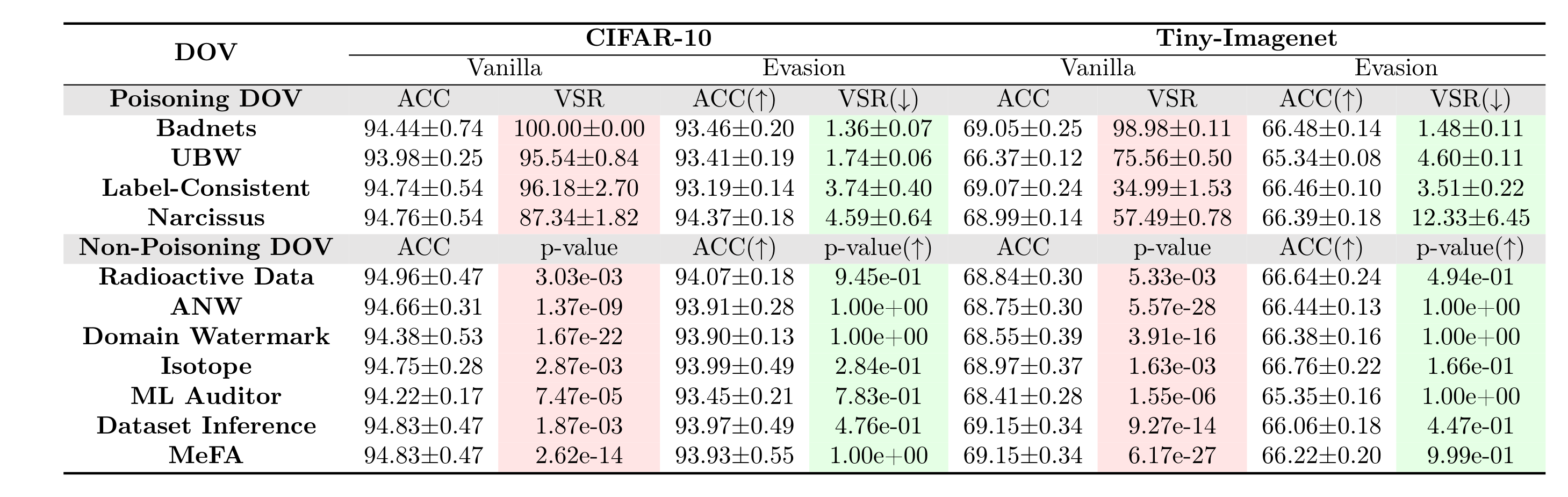
Example A: Excel -> LaTeX
pubtab xlsx2tex ./examples/table4.xlsx -o ./out/table4.tex
Output file:
./out/table4.tex
Example B: LaTeX -> Excel (roundtrip from the generated sample)
pubtab tex2xlsx ./out/table4.tex -o ./out/table4_roundtrip.xlsx
Example C: LaTeX -> PNG / PDF preview
pubtab preview ./out/table4.tex -o ./out/table4.png --dpi 300
pubtab preview ./out/table4.tex --format pdf -o ./out/table4.pdf
Example D: Excel -> tabularray (tblr)
pubtab xlsx2tex ./examples/table4.xlsx -o ./out/table4_tblr.tex \
  --theme three_line \
  --latex-backend tabularray

# Preview the generated tabularray tex file
pubtab preview ./out/table4_tblr.tex -o ./out/table4_tblr.png \
  --theme three_line --latex-backend tabularray --dpi 300
Generated .tex header includes package hints (comments only):
% Theme package hints for this table (add in your preamble):
% \usepackage{booktabs}
% \usepackage{multirow}
% \usepackage[table]{xcolor}
Quick Start
pip install pubtab
Stable release on PyPI: pubtab on PyPI
Install the current GitHub development version:
pip install "git+https://github.com/Galaxy-Dawn/pubtab.git"
CLI Quick Start
# 1) Excel -> LaTeX
pubtab xlsx2tex table.xlsx -o table.tex

# 2) LaTeX -> Excel
pubtab tex2xlsx table.tex -o table.xlsx

# 3) Preview
pubtab preview table.tex -o table.png --dpi 300

# 4) Native batch pipeline (directory input)
pubtab tex2xlsx ./tables_tex -o ./out/xlsx
pubtab xlsx2tex ./out/xlsx -o ./out/tex
pubtab preview ./out/tex -o ./out/png --format png --dpi 300
Python Quick Start
import pubtab

# Excel -> LaTeX
pubtab.xlsx2tex("table.xlsx", output="table.tex", theme="three_line")

# Excel -> tabularray
pubtab.xlsx2tex(
    "table.xlsx",
    output="table_tblr.tex",
    theme="three_line",
    latex_backend="tabularray",
)

# LaTeX -> Excel
pubtab.tex_to_excel("table.tex", "table.xlsx")

# Preview (.png by default)
pubtab.preview("table.tex", dpi=300)

# Native batch pipeline (directory input)
pubtab.tex_to_excel("tables_tex", "out/xlsx")
pubtab.xlsx2tex("out/xlsx", output="out/tex")
pubtab.preview("out/tex", output="out/png", format="png", dpi=300)
Parameter Guide
pubtab xlsx2tex
| Parameter | Type / Values | Default | Description | Typical Use |
|---|---|---|---|---|
INPUT_FILE | path (file or directory) | required | Source .xlsx / .xls file, or a directory containing them | Main input / batch conversion |
-o, --output | path | required | Output .tex path or output directory; when INPUT_FILE is a directory, this must be a directory | Set destination |
-c, --config | path | none | YAML config file | Team presets |
--sheet | sheet name / 0-based index | all sheets | Export only one sheet | Single-sheet export |
--theme | string | three_line | Style theme used for rendering | Switch visual style |
--caption | string | none | Table caption | Paper-ready table |
--label | string | none | LaTeX label | Cross-reference |
--header-rows | int | auto | Number of header rows | Override detection |
--span-columns | flag | false | Use table* | Two-column papers |
--preview | flag | false | Generate PNG preview(s) | Fast visual check |
--position | string | htbp | Float position | Layout tuning |
--font-size | string | theme default | Set table font size | Compact layout |
--resizebox | string | none | Wrap with \resizebox{...}{!}{...} | Wide tables |
--with-resizebox | flag | false | Enable \resizebox wrapper | Force width control |
--without-resizebox | flag | false | Disable \resizebox wrapper | Keep raw tabular width |
--resizebox-width | string | \linewidth | Width used by --with-resizebox | Custom scaling |
--col-spec | string | auto | Explicit tabular col spec | Manual alignment |
--dpi | int | 300 | Preview DPI (--preview) | Sharper PNG |
--header-sep | string | auto | Custom separator under header | Custom rule line |
--upright-scripts | flag | false | Render sub/superscript as upright \mathrm{} | Typographic preference |
--latex-backend | tabular / tabularray | tabular | TeX backend used for rendering | Switch between tabular and tblr |
pubtab tex2xlsx
| Parameter | Type / Values | Default | Description | Typical Use |
|---|---|---|---|---|
INPUT_FILE | path (file or directory) | required | Source .tex file, or a directory containing .tex files | Main input / batch conversion |
-o, --output | path | required | Output .xlsx path or output directory; when INPUT_FILE is a directory, this must be a directory | Export workbook |
pubtab preview
| Parameter | Type / Values | Default | Description | Typical Use |
|---|---|---|---|---|
TEX_FILE | path (file or directory) | required | Input .tex file, or a directory containing .tex files | Main input / batch conversion |
-o, --output | path | auto by extension | Output file path or output directory; when TEX_FILE is a directory, this must be a directory | Set output name |
--theme | string | three_line | Style theme used for preview document assembly | Match render style |
--latex-backend | tabular / tabularray | auto | TeX backend used for preview document assembly | Override or auto-detect tblr |
--dpi | int | 300 | PNG resolution | Image quality |
--format | png / pdf | png | Output format | PDF for paper assets |
--preamble | string | none | Extra LaTeX preamble commands | Custom macros |
Common Command Recipes
# Export all sheets (default)
pubtab xlsx2tex report.xlsx -o out/report.tex

# Export a specific sheet only
pubtab xlsx2tex report.xlsx -o out/report.tex --sheet "Main"

# Two-column table + preview
pubtab xlsx2tex report.xlsx -o out/report.tex --span-columns --preview --dpi 300

# Export with the tabularray backend
pubtab xlsx2tex report.xlsx -o out/report_tblr.tex --latex-backend tabularray

# Preview a generated tabularray table
pubtab preview out/report_tblr.tex -o out/report_tblr.png --theme three_line --latex-backend tabularray --dpi 300
Features by Workflow
1) Excel -> LaTeX
- Reads
.xlsx(openpyxl) and.xls(xlrd), then renders via Jinja2 themes. - Preserves rich formatting: merged cells, colors, bold/italic/underline, rotation, diagbox, and multi-line cells.
- Applies table-level logic: header rule generation, section/group separators, and trailing-empty-column trimming.
- Supports all-sheet export by default and deterministic
*_sheetNNfile naming.
2) LaTeX -> Excel
- Parses multiple tables from one
.texfile and writes each table to separate worksheet(s). - Handles commands including
\multicolumn,\multirow,\textcolor,\cellcolor,\rowcolor,\diagbox, and\rotatebox. - Expands macros (
\newcommand/\renewcommand) and resolves\definecolorvariants. - Improves robustness for row/cell splitting around escaped separators and nested wrappers.
3) Preview Pipeline
pubtab previewcompiles.texto PNG/PDF using available local LaTeX tooling.- If system
pdflatexis unavailable, TinyTeX auto-install can bootstrap compilation. - On missing
.styerrors, pubtab can parse the missing package, runtlmgr install <package>, and retry compile automatically. - TinyTeX download uses cert-friendly SSL handling and now provides actionable hints for certificate failures.
- PNG conversion works out of the box after
pip install pubtab(bundledpdf2image+ PyMuPDF backends).
Configuration
Use a YAML file to define repeatable defaults. CLI arguments always take precedence over config values.
theme: three_line
latex_backend: tabularray
caption: "Experimental Results"
label: "tab:results"
header_rows: 2
sheet: null
span_columns: false
position: htbp
font_size: footnotesize
resizebox: null
col_spec: null
header_sep: null
preview: false
dpi: 300
spacing:
  tabcolsep: "4pt"
  arraystretch: "1.2"
group_separators: [3, 6]
pubtab xlsx2tex table.xlsx -o output.tex -c config.yaml
Recommended backend pairing:
theme: three_line+latex_backend: tabular-> classictabulartheme: three_line+latex_backend: tabularray->three_linestyle rendered through thetabularraybackend
Theme System
pubtab uses a Jinja2-based theme system. The built-in three_line theme targets academic booktabs-style tables and can be rendered through either the classic tabular backend or the tabularray backend.
Custom theme layout:
my_theme/
├── config.yaml    # packages, spacing, font_size, caption_position
└── template.tex   # Jinja2 template
List available themes:
pubtab themes
Project Structure
View project structure
pubtab/
├── pyproject.toml
├── README.md
├── README.zh-CN.md
├── LICENSE
└── src/pubtab/
    ├── __init__.py        # Public API: xlsx2tex, preview, tex_to_excel
    ├── cli.py             # CLI (click)
    ├── models.py          # Data models
    ├── reader.py          # Excel reader (.xlsx/.xls)
    ├── renderer.py        # LaTeX renderer (Jinja2)
    ├── tex_reader.py      # LaTeX parser (tex -> TableData)
    ├── writer.py          # Excel writer
    ├── _preview.py        # PNG/PDF preview helpers
    ├── config.py          # YAML config loader
    ├── utils.py           # Escape and color helpers
    └── themes/
        └── three_line/
            ├── config.yaml
            └── template.tex
References
- Test data includes
.texfiles referenced from Azhizhi_akeyan.
Contributing
Issues and pull requests are welcome at GitHub.