Custom icon library
May 29, 2026 · View on GitHub





Wat's new
Please check the new component at https://github.com/Mariusthvdb/custom_local_icons
this repo will be archived and no longer maintained
Read this first: preferred usage and component
This repo started out with the JS script. That script requires the maintainers to edit each and every icon into it, hard coded. It is not very user friendly, and PR's are made difficult too.
We have adapted the Font awesome custom component by Thomas Loven, which has a much better user experience. With the Custom component, using customized icons is a matter of saving them in the dedicated /config/www/custom_icons folder and you're set. The icon picker in Home Assistant can list the icons using the cli: prefix instead of the core mdi: prefix.
So, our preferred method for using non mdi: icons is now via the custom_component you can find in this repo. New icons do not require PRs to the integration, just find or create your preferred .svg icons and use them as described above.
Because of that, PR's to the JS resource plugin here will no longer be merged.
(note the JS resource plugin used cil:)
Several custom made and legacy icons, and icons collected all over the internet in 1 set, UI selectable.
Upon each Material Design icons update to HA, icons tend to be deprecated, and every now and then I'd love to keep using some. Branded icons, or legacy models. In many Pr's to the main MDI library, icon designs get rejected, while still very useable. Some of these are added in this library. Several icons by the Frontend magician Matt8707 are listed, and I've also found use for the finer grained Shutter icons by g-kiss, but needed them in another format.
Structure of the file copied from the great and appreciated Hass Hue Icon repo by @arallsopp who should recieve all the credits and without whom the HA interface would not be the same ;-)
Thanks to all!
Installation
On Hacs, install as custom repository. For manual installation, add:
- url: /local/lovelace/resources/custom-icons/custom-icons.js?v=0.1.4
  type: module
to your resources file (adapt path to your own folder structure), or click

Usage
- In your entity editor, specify an icon as
cil:icon-name, to indicate the icon to be from this Custom Icon Libary. - If you set
state_color: truein your card, you'll see the icons get colorised based upon the current theme settings.
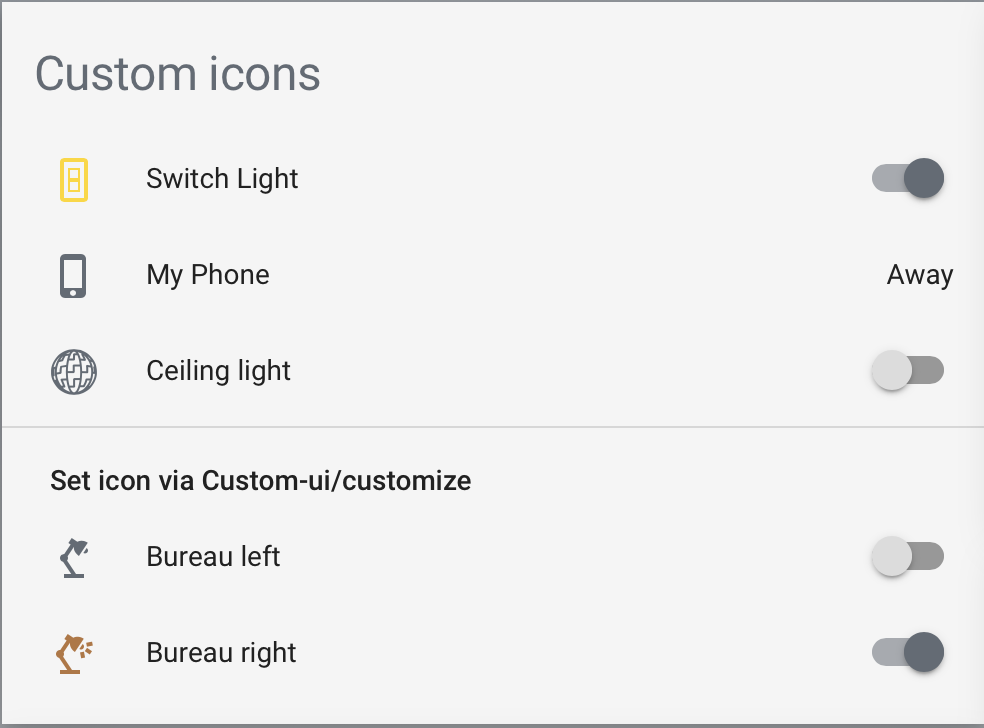
Example:
    - type: entities
      title: Custom icons
      state_color: true
      show_header_toggle: false
      entities:
        - entity: switch.tester
          name: Switch Light
          icon: cil:light-switch
        - entity: device_tracker.mijn_mobiel
          name: My Phone
          icon: cil:cellphone-iphone
        - entity: light.alarm
          name: Ceiling light
          icon: cil:ikea-death-star
        - type: section
          label: Set icon via Custom-ui/customize
        - light.bureau_left
        - light.bureau_right
Of course, you can also get crafty, using Custom-ui, and set your icons in a template:
homeassistant:
  customize:
    light.bureau_left:
      templates:
        icon: >
          return state === 'on' ? 'cil:desklamp-on' : 'mdi:desk-lamp';
Icons
Custom made and legacy
custom-icons includes legacy Mdi icons, and several special purpose icons made on request.
Icon finder
Andy created an Icon Library Cheat Sheet so you can quickly see and search which icons are available. Thanks!
Listed with icon author:
| Icon | Name | Author |
|---|---|---|
 | android-messages | Mdi |
 | apple-homepod | arallsopp |
 | apple-homepod-mini | arallsopp |
 | cellphone-iphone | Mdi |
 | cooker-hood | arallsopp |
 | cooker-hood-curve | arallsopp |
 | cooker-hood-trapezoid | arallsopp |
 | delete-alert | idevo89 |
 | delete-alert-outline | idevo89 |
 | desklamp-on | Mdi |
 | desktop-mac | Mdi |
 | desktop-mac-dashboard | Mdi |
 | dishwasher-silverware | MrGrigri |
 | docker-watchtower | Matt8707 |
 | earth-alert | MrGrigri |
 | earth-vibrate | MrGrigri |
 | eq-calibrate | Matt8707 |
 | google-home | Mdi |
 | google-home-alt | Mdi |
 | google-home-alt-off | Mdi |
 | google-home-off | Mdi |
 | hdmi-source | Matt8707 |
 | home-broken | MrGrigri |
 | home-broken-outline | MrGrigri |
 | home-climate | arallsopp |
 | home-climate-outline | arallsopp |
 | home-export-no-roof-outline | goyney |
 | home-import-no-roof-outline | goyney |
 | home-pulse | MrGrigri |
 | hue | Matt8707 |
 | ikea-death-star | arallsopp |
 | imac-alternative | Matt8707 |
 | imac-ssd | Matt8707 |
 | iphone-modern | Matt8707 |
 | laptop-chromebook | Mdi |
 | laptop-mac | Mdi |
 | laptop-windows | Mdi |
 | light-switch | arallsopp |
 | lock | Matt8707 |
 | lutron-pico | arallsopp |
 | lutron-pico-b1 | arallsopp |
 | lutron-pico-b2 | arallsopp |
 | lutron-pico-b3 | arallsopp |
 | lutron-pico-b4 | arallsopp |
 | lutron-pico-b5 | arallsopp |
 | pedestal-fan | Matt8707 |
 | roborock-filter | Matt8707 |
 | roborock-mainbrush | Matt8707 |
 | roborock-sensor | Matt8707 |
 | roborock-sidebrush | Matt8707 |
 | roborock-vacuum | Matt8707 |
 | roborock-vacuum-map | Matt8707 |
 | shutter-0 | g-kiss |
 | shutter-1 | g-kiss |
 | shutter-2 | g-kiss |
 | shutter-3 | g-kiss |
 | shutter-4 | g-kiss |
 | studio-monitor | Matt8707 |
 | sun-angle | goyney |
 | sun-angle-variant | goyney |
 | synology-nas | Matt8707 |
 | table-cylinder-lamp | GunterAV |
 | tablet-android | Mdi |
 | tablet-ipad-legacy | Mdi |
 | thermometer-empty | goyney |
 | thermometer-full | goyney |
 | tv | Matt8707 |
 | uplighter | GunterAV |
 | uplighter-2-way | GunterAV |
Icon authors
Mdi arallsopp MrGrigri idevo89 goyney g-kiss GunterAV Matt8707 tgrelka boehan
Want to join and add an icon?
Please feel free to add an icon request, and open a discussion for that, preferably with the .svg in attachment. Of course, you can also open a Pr.