FitFileViewer by Nick2bad4u / Typpi ☠️ - README
June 12, 2026 · View on GitHub















CI Badges
 🏗️
🏗️
 🪟
🪟
 📦
📦
 📚
📚
 🧹
🧹
 🛡️
🛡️
 🔍
🔍
 🔑
🔑
 👋
👋
 💤
💤
 🔄
🔄
 📊
📊
 🔑
🔑
 📝
📝
 🐧
🐧
 🍏
🍏
 🪟
🪟
 🦠
🦠
.gif?raw=true)
.gif?raw=true)
📑 Table of Contents
- Overview 📖
- Screenshots 🖼️
- Installation 🛠️
- Usage 🚀
- Changelog 📝
- Supported Builds 🏗️
- Development 👨💻
- Credits 🙏
- License 📄
📜 Overview
Open .fit files, the popular file format used for recording activity data from fitness devices such as GPS watches and cycling computers, and explore their data with ease. This standalone application offers:
- Interactive maps for visualizing activity routes. 🗺️
- Data tables for detailed insights. 📋
- Charts for analyzing trends and performance. 📈
- Ability to export data and charts in multiple formats and to Imgur. 📤
- Chart customization options for personalized views. 🎨
- Full integration with FitFileViewer.com 🌐
- Support for multiple platforms: Windows, macOS, and Linux. 🖥
Enjoy an intuitive interface designed for seamless .fit file exploration.
📸 Screenshots
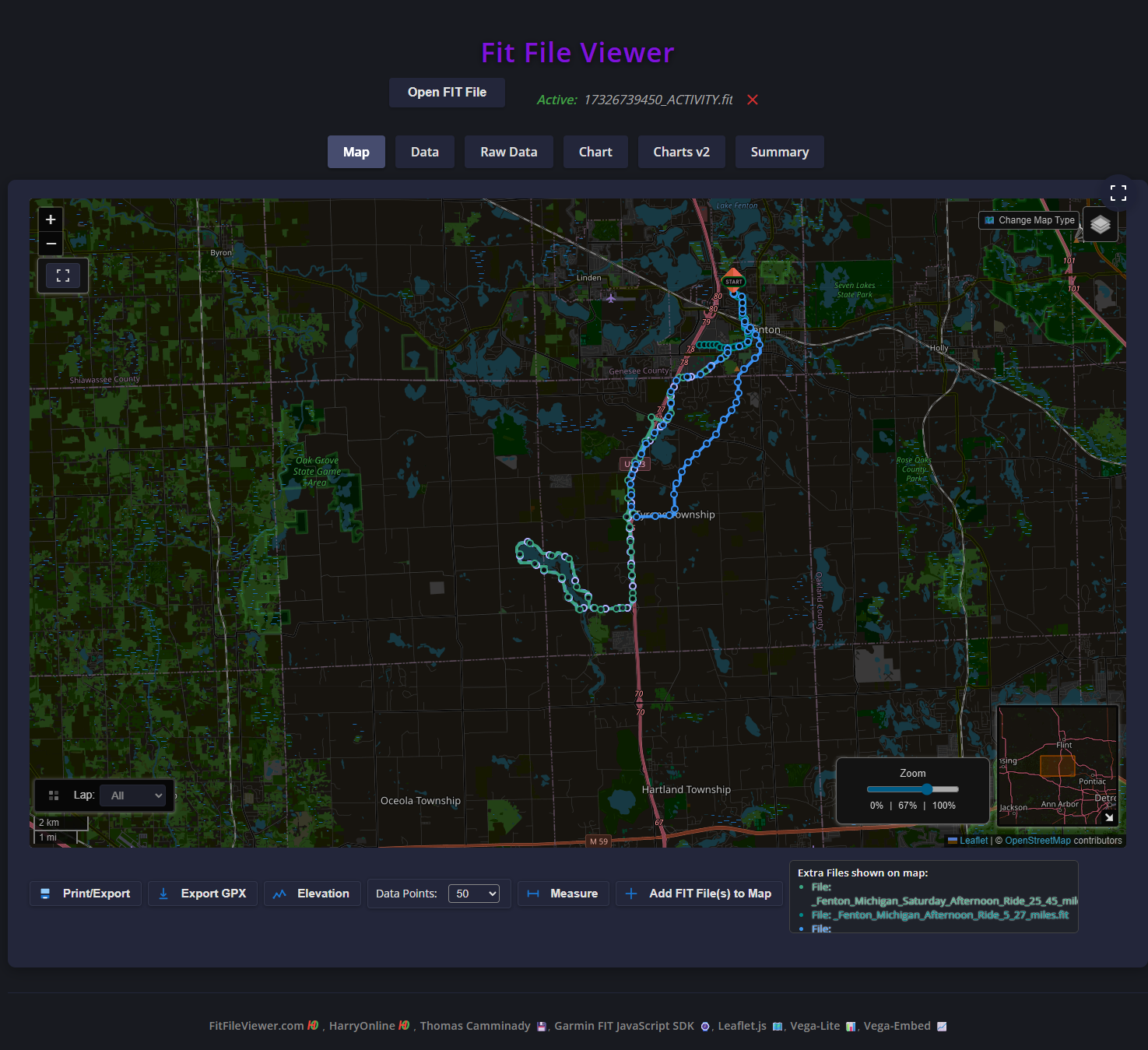 Interactive map displaying the activity route.
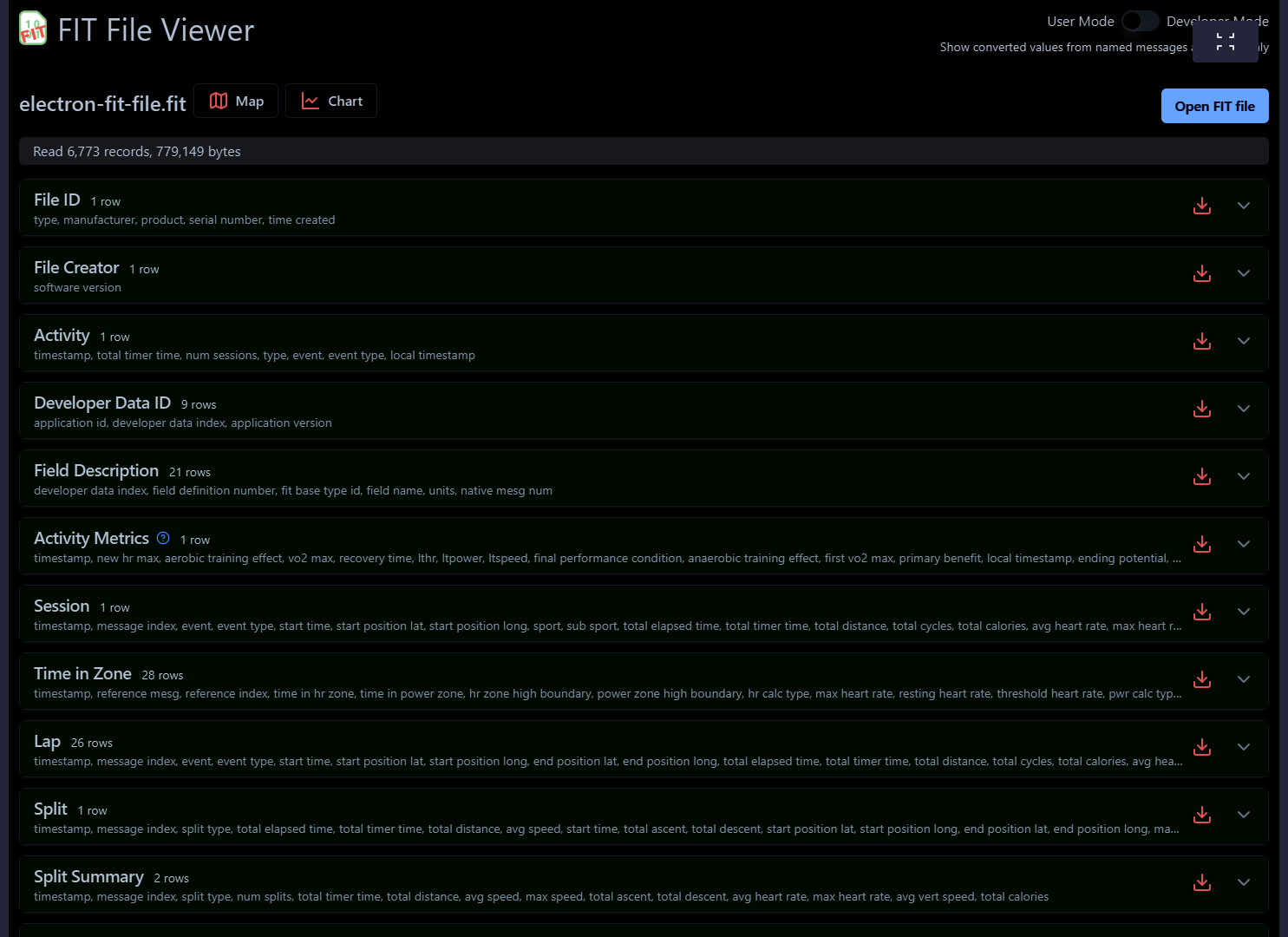 Full FitFileViewer.com Integration - Data table showing detailed activity metrics.
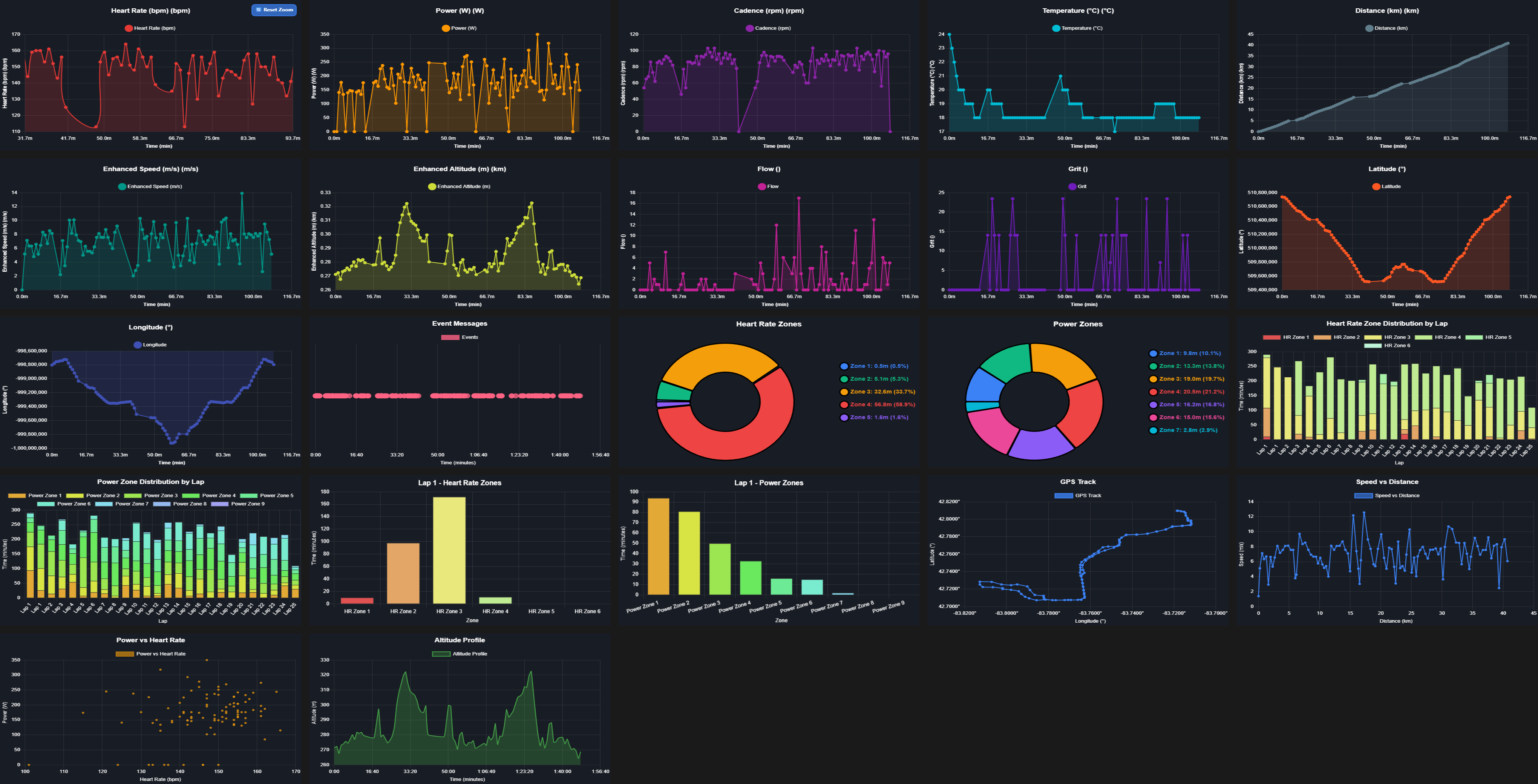 Charts visualizing trends and performance data.
🛠️ Installation
- Go to the FitFileViewer Releases Page on GitHub.
- Download the latest installer or zip for your operating system (Windows, macOS, or Linux).
- Extract the archive if needed, then run the installer or executable to launch FitFileViewer.
See the Supported Builds section below for available formats and filenames.
🚀 Usage
- Open Fit File Viewer.
- Drag and drop a
.fitfile into the app window, or use the Open FIT File button. - Browse your activity data using the interactive map, data tables, and charts.
- Use the menu to export, print, or adjust settings.
📜 Changelog
For a detailed list of changes, bug fixes, and new features, please refer to the CHANGELOG.md file in the repository.
🏗️ Supported Builds
-
The following builds are available for download. Each build is tailored for specific platforms and architectures, ensuring compatibility and optimal performance.
-
The filenames follow a consistent naming convention to indicate the platform, architecture, format, and version. Replace
X.X.Xwith the actual release version (e.g.,14.8.0).
🪟 Windows Builds
- Most Windows users should download the "Installer EXE", "MSI" or "Portable" versions
| Platform | Architecture | Format | Filename Example |
|---|---|---|---|
| :------- | :----------- | :------------ | :-------------------------------------- |
| Windows | x64 | Installer EXE | Fit-File-Viewer-nsis-x64-X.X.X.exe |
| Windows | x64 | Installer Web | Fit-File-Viewer-nsis-web-x64-X.X.X.exe |
| Windows | x64 | Installer 7z | fitfileviewer-X.X.X-x64.nsis.7z |
| Windows | x64 | Squirrel EXE | Fit-File-Viewer-squirrel-x64-X.X.X.exe |
| Windows | x64 | MSI | Fit-File-Viewer-msi-x64-X.X.X.msi |
| Windows | x64 | MSI 7z | Fit-File-Viewer-msi-x64-X.X.X.7z |
| Windows | x64 | MSI TAR.BZ2 | Fit-File-Viewer-msi-x64-X.X.X.tar.bz2 |
| Windows | x64 | MSI TAR.GZ | Fit-File-Viewer-msi-x64-X.X.X.tar.gz |
| Windows | x64 | MSI TAR.XZ | Fit-File-Viewer-msi-x64-X.X.X.tar.xz |
| Windows | x64 | MSI ZIP | Fit-File-Viewer-msi-x64-X.X.X.zip |
| Windows | x64 | Portable | Fit-File-Viewer-portable-x64-X.X.X.exe |
| Windows | ia32 / win32 | Installer EXE | Fit-File-Viewer-nsis-ia32-X.X.X.exe |
| Windows | ia32 / win32 | Installer Web | Fit-File-Viewer-nsis-web-ia32-X.X.X.exe |
| Windows | ia32 / win32 | Installer 7z | fitfileviewer-X.X.X-ia32.nsis.7z |
| Windows | ia32 / win32 | Squirrel EXE | Fit-File-Viewer-squirrel-ia32-X.X.X.exe |
| Windows | ia32 / win32 | MSI | Fit-File-Viewer-msi-ia32-X.X.X.msi |
| Windows | ia32 / win32 | MSI 7z | Fit-File-Viewer-msi-ia32-X.X.X.7z |
| Windows | ia32 / win32 | MSI TAR.BZ2 | Fit-File-Viewer-msi-ia32-X.X.X.tar.bz2 |
| Windows | ia32 / win32 | MSI TAR.GZ | Fit-File-Viewer-msi-ia32-X.X.X.tar.gz |
| Windows | ia32 / win32 | MSI TAR.XZ | Fit-File-Viewer-msi-ia32-X.X.X.tar.xz |
| Windows | ia32 / win32 | MSI ZIP | Fit-File-Viewer-msi-ia32-X.X.X.zip |
| Windows | ia32 / win32 | Portable | Fit-File-Viewer-portable-ia32-X.X.X.exe |
| Windows | Win7 (legacy) | Portable EXE | Fit-File-Viewer-win7-*.exe[.zip] |
🗂️ Update Files (Nupkg & Blockmap)
| Platform | Architecture | Format | Filename Example |
|---|---|---|---|
| :------- | :----------- | :---------------- | :------------------------------------------- |
| Windows | x64 | Blockmap | Fit-File-Viewer-nsis-x64-X.X.X.exe.blockmap |
| Windows | ia32 / win32 | Blockmap | Fit-File-Viewer-nsis-ia32-X.X.X.exe.blockmap |
| Windows | x64 | Squirrel Nupkg | fitfileviewer-X.X.X-full.nupkg |
| Windows | ia32 / win32 | Squirrel Nupkg | fitfileviewer-X.X.X-win32-full.nupkg |
| Windows | x64 | Squirrel RELEASES | RELEASES |
| Windows | ia32 / win32 | Squirrel RELEASES | RELEASES-win32 |
Note:
- Most users should download the "Installer EXE", "MSI" or "Portable" for a standard installation experience.
- "Portable" builds do not require installation--just extract and run.
- "Squirrel Nupkg/RELEASES" and "Blockmap" files are used for automatic updates and are not intended for manual installation.
- For Windows 7, use the Win7 (legacy) portable asset (
Fit-File-Viewer-win7-*.exeor.exe.zip) from the latest GitHub release. This is a carried-forward legacy snapshot, not a freshly rebuilt current-version binary.
🍏 Mac Builds
- Most Mac users should download the "DMG" or "PKG" versions
| Platform | Architecture | Format | Filename Example |
|---|---|---|---|
| :------- | :----------- | :------ | :--------------------------------------------- |
| macOS | x64 | DMG | Fit-File-Viewer-dmg-x64-X.X.X.dmg |
| macOS | x64 | PKG | Fit-File-Viewer-pkg-x64-X.X.X.pkg |
| macOS | x64 | TAR.BZ2 | Fit-File-Viewer-darwin-X.X.X.tar.bz2 |
| macOS | x64 | TAR.GZ | Fit-File-Viewer-darwin-X.X.X.tar.gz |
| macOS | x64 | TAR.XZ | Fit-File-Viewer-darwin-X.X.X.tar.xz |
| macOS | universal | DMG | Fit-File-Viewer-dmg-universal-X.X.X.dmg |
| macOS | universal | PKG | Fit-File-Viewer-pkg-universal-X.X.X.pkg |
| macOS | universal | TAR.BZ2 | Fit-File-Viewer-darwin-universal-X.X.X.tar.bz2 |
| macOS | universal | TAR.GZ | Fit-File-Viewer-darwin-universal-X.X.X.tar.gz |
| macOS | universal | TAR.XZ | Fit-File-Viewer-darwin-universal-X.X.X.tar.xz |
| macOS | universal | ZIP | Fit-File-Viewer-darwin-universal-X.X.X.zip |
| macOS | arm64 | DMG | Fit-File-Viewer-dmg-arm64-X.X.X.dmg |
| macOS | arm64 | PKG | Fit-File-Viewer-pkg-arm64-X.X.X.pkg |
| macOS | arm64 | TAR.BZ2 | Fit-File-Viewer-darwin-arm64-X.X.X.tar.bz2 |
| macOS | arm64 | TAR.GZ | Fit-File-Viewer-darwin-arm64-X.X.X.tar.gz |
| macOS | arm64 | TAR.XZ | Fit-File-Viewer-darwin-arm64-X.X.X.tar.xz |
| macOS | arm64 | ZIP | Fit-File-Viewer-darwin-arm64-X.X.X.zip |
🗂️ Update Files (Blockmap)
| Platform | Architecture | Format | Filename Example |
|---|---|---|---|
| :------- | :----------- | :----------- | :-------------------------------------------------- |
| macOS | x64 | DMG Blockmap | Fit-File-Viewer-dmg-x64-X.X.X.dmg.blockmap |
| macOS | universal | DMG Blockmap | Fit-File-Viewer-dmg-universal-X.X.X.dmg.blockmap |
| macOS | arm64 | DMG Blockmap | Fit-File-Viewer-dmg-arm64-X.X.X.dmg.blockmap |
| macOS | universal | ZIP Blockmap | Fit-File-Viewer-darwin-universal-X.X.X.zip.blockmap |
| macOS | arm64 | ZIP Blockmap | Fit-File-Viewer-darwin-arm64-X.X.X.zip.blockmap |
Note:
- "Blockmap" files are used for differential updates and are not intended for manual installation.
- Most users should download the "DMG" or "PKG" for a standard installation experience.
- "ZIP" and "TAR" archives are provided for advanced users or manual extraction.
🐧 Linux Builds
- Most Linux users should download the "AppImage" or "DEB" versions
| Platform | Architecture | Format | Filename Example |
|---|---|---|---|
| :------- | :----------- | :----------- | :--------------------------------------------- |
| Linux | x64 | AppImage | Fit-File-Viewer-appimage-x86_64-X.X.X.AppImage |
| Linux | x64 | DEB | Fit-File-Viewer-deb-amd64-X.X.X.deb |
| Linux | x64 | RPM | Fit-File-Viewer-rpm-x86_64-X.X.X.rpm |
| Linux | x64 | PACMAN | Fit-File-Viewer-pacman-x64-X.X.X.pacman |
| Linux | x64 | SNAP | Fit-File-Viewer-snap-amd64-X.X.X.snap |
| Linux | x64 | FLATPAK | FitFileViewer-vX.X.X.flatpak |
| Linux | x64 | FLATPAK ZIP | FitFileViewer-vX.X.X.flatpak.zip |
| Linux | x64 | TAR.BZ2 | Fit-File-Viewer-linux-X.X.X.tar.bz2 |
| Linux | x64 | TAR.GZ | Fit-File-Viewer-linux-X.X.X.tar.gz |
| Linux | x64 | TAR.XZ | Fit-File-Viewer-linux-X.X.X.tar.xz |
| Linux | x64 | ZIP | Fit-File-Viewer-linux-X.X.X.zip |
| Linux | x64 | APK (Alpine) | Fit-File-Viewer-apk-x64-X.X.X.apk |
| Linux | x64 | FreeBSD | Fit-File-Viewer-freebsd-x64-X.X.X.freebsd |
Note:
- The "APK" file is NOT an Android APK, but rather an Alpine Linux package.
- Replace X.X.X with the actual release version (e.g., 14.8.0)
🧑💻 Development
To set up a development environment:
# Clone the repository
git clone https://github.com/Nick2bad4u/FitFileViewer.git

# Navigate to the project directory
cd FitFileViewer

# Install dependencies
npm install

# Run the app in development mode
npm start

# To build a production release
npm run build
- For more details, see the GitHub repository.
- Issues and feature requests: GitHub Issues
🙏 Credits
This project uses the following libraries and tools:
- FitFileViewer.com

- HarryOnline
- Garmin FIT JavaScript SDK (FIT Protocol License Agreement) ⌚
- Leaflet.js (BSD-2-Clause License) 🗺️
- Vega-Lite (BSD-3-Clause License) 📊
- Vega-Embed (BSD-3-Clause License) 📈
- Chart.js (MIT License) 📉
- jQuery (MIT License) 🧑💻
- Electron (MIT License) ⚡
- Node.js (MIT License) 🖥️
- Electron Builder (MIT License) 🏗️
- GitHub Actions (MIT License) 🔧
- GitHub Pages (MIT License) 🌐
- GitHub API (MIT License) 🔌
- GitHub Copilot (MIT License) 🤖
📄 License
See LICENSE.md for details.
For more information, documentation, and updates, visit the GitHub repository. 📦
