Terraform/OpenTofu via Pull Request (tf-via-pr)
May 30, 2026 · View on GitHub





Terraform/OpenTofu via Pull Request (tf-via-pr)
What does it do? |
Who is it for? |
|---|---|
|
|
View: Usage Examples · Inputs · Outputs · Security · Changelog · License
Usage Examples
How to get started?
on:
  pull_request:
  push:
    branches: [main]

jobs:
  provision:
    runs-on: ubuntu-latest

    permissions:
      actions: read        # Required to identify workflow run.
      checks: write        # Required to add status summary.
      contents: read       # Required to checkout repository.
      pull-requests: write # Required to add PR comment.

    steps:
      - uses: actions/checkout@v6

      - uses: hashicorp/setup-terraform@v4
        with:
          terraform_wrapper: false

      # Run plan by default, or apply on merge.
      - uses: op5dev/tf-via-pr@v13
        with:
          working-directory: path/to/directory
          command: ${{ github.event_name == 'push' && 'apply' || 'plan' }}
          arg-lock: ${{ github.event_name == 'push' }}
          arg-backend-config: env/dev.tfbackend
          arg-var-file: env/dev.tfvars
          arg-workspace: dev-use1
          plan-encrypt: ${{ secrets.PASSPHRASE }}
Tip
- All supported arguments (e.g.,
-backend-config,-destroy,-parallelism, etc.) are listed below. - Environment variables can be passed in for cloud platform authentication (e.g., configure-aws-credentials for short-lived credentials via OIDC).
- Recommend setting
terraform_wrapper/tofu_wrappertofalsein order to output the detailed exit code for better error handling.
Where to find more examples?
The following workflows showcase common use cases, while a comprehensive list of inputs is documented below.
#1 example ⤴Runs on |
#2 example ⤴Runs on |
#3 example ⤴Runs on |
#4 example ⤴Runs on |
#5 example ⤴Runs on |
#6 example ⤴Runs on |
Are there online references?
- Medium - Enhance Terraform/Tofu PR Automation with GitHub Action
- Medium - Secure cloud provisioning pipeline with GitHub automation
- Medium - The Case for Terraform/Tofu Merge Queue
- Terraform Weekly - Issue #207
- Awesome OpenTofu - CI Tools
- LinkedIn - GitOps with Terraform
How does encryption work?
Before the workflow uploads the plan file as an artifact, it can be encrypted-at-rest with a passphrase using plan-encrypt input to prevent exposure of sensitive data (e.g., ${{ secrets.PASSPHRASE }}). This is done with OpenSSL's symmetric stream counter mode (256 bit AES in CTR) encryption with salt and pbkdf2.
In order to decrypt the plan file locally, use the following commands after downloading the artifact (adding a whitespace before openssl to prevent recording the command in shell history):
unzip <tfplan.zip>
openssl enc -d -aes-256-ctr -pbkdf2 -salt \
  -in   tfplan.encrypted \
  -out  tfplan.decrypted \
  -pass pass:"<passphrase>"
<tf.tool> show tfplan.decrypted
Inputs
All supported CLI argument inputs are listed below with accompanying options, while workflow configuration inputs are listed here.
Configuration
| Type | Name | Description |
|---|---|---|
| CLI | working-directory | Specify the working directory of TF code, alias of arg-chdir.Example: path/to/directory |
| CLI | command | Command to run between: plan or apply.1Example: plan |
| CLI | tool | Provisioning tool to use between: terraform or tofu.Default: terraform |
| CLI | plan-file | Supply existing plan file path instead of the auto-generated one. Example: path/to/file.tfplan |
| CLI | pr-number | Specify PR number in case of unsupported workflow trigger. Example: 123 |
| Check | format | Check format of TF code. Default: false |
| Check | validate | Check validation of TF code. Default: false |
| Check | plan-parity | Replace plan file if it matches a newly-generated one to prevent stale apply.2 Default: false |
| Security | plan-encrypt | Encrypt plan file artifact with the given input.3 Example: ${{ secrets.PASSPHRASE }} |
| Security | preserve-plan | Preserve plan file "tfplan" in the given working directory after workflow execution. Default: false |
| Security | upload-plan | Upload plan file as GitHub workflow artifact. Default: true |
| Security | retention-days | Duration after which plan file artifact will expire in days. Example: 90 |
| Security | token | Specify a GitHub token. Default: ${{ github.token }} |
| UI | expand-diff | Expand the collapsible diff section. Default: false |
| UI | expand-summary | Expand the collapsible summary section. Default: false |
| UI | comment-pr | Add a PR comment: always, on-diff, or never.4Default: always |
| UI | comment-method | PR comment by: update existing comment or recreate and delete previous one.5Default: update |
| UI | comment-pos-N | Markdown content to render at various positions in the PR comment. Example: > [!NOTE]\n> Reviewed by security. |
| UI | tag-actor | Tag the workflow triggering actor: always, on-diff, or never.4Default: always |
| UI | hide-args | Hide comma-separated list of CLI arguments from the command input.6 Default: detailed-exitcode,parallelism,lock,out,var= |
| UI | show-args | Show comma-separated list of CLI arguments in the command input.6 Default: workspace |
- Both
command: planandcommand: applyinclude:init,fmt(withformat: true),validate(withvalidate: true), andworkspace(witharg-workspace) commands rolled into it automatically.
To separately run checks and/or generate outputs only,command: initcan be used. - Originally intended for
merge_groupevent trigger,plan-parity: trueinput helps to prevent stale apply within a series of workflow runs when merging multiple PRs. - The secret string input for
plan-encryptcan be of any length, as long as it's consistent between encryption (plan) and decryption (apply). - The
on-diffoption is true when the exit code of the last TF command is non-zero (ensureterraform_wrapper/tofu_wrapperis set tofalse). - The default behavior of
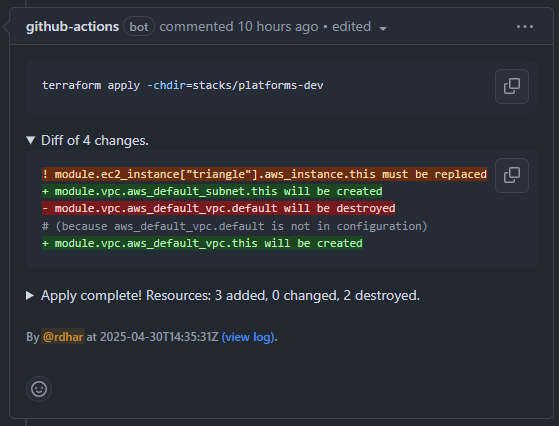
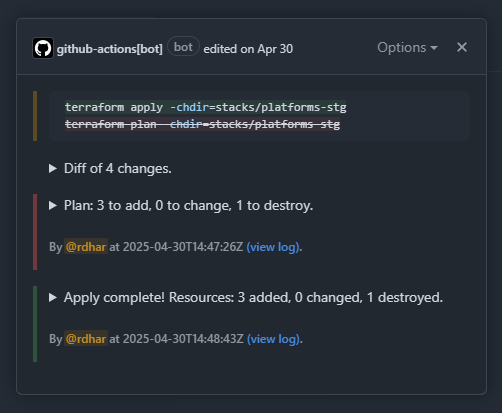
comment-methodis to update the existing PR comment with the latest plan/apply output, making it easy to track changes over time through the comment's revision history.

- It can be desirable to hide certain arguments from the last run command input to prevent exposure in the PR comment (e.g., sensitive
arg-varvalues). Conversely, it can be desirable to show other arguments even if they are not in last run command input (e.g.,arg-workspaceorarg-backend-configselection).
Arguments
Note
- Arguments are passed to the appropriate TF command(s) automatically, whether that's
fmt,init,validate,plan, orapply. - For repeated arguments like
arg-var,arg-var-file,arg-backend-config,arg-replaceandarg-target, use commas to separate multiple values (e.g.,arg-var: key1=value1,key2=value2).
Applicable to respective "plan" and "apply" command inputs (including "init").
| Name | CLI Argument |
|---|---|
arg-auto-approve | -auto-approve |
arg-backend-config | -backend-config |
arg-backend | -backend |
arg-backup | -backup |
arg-chdir | -chdirAlias: working-directory |
arg-compact-warnings | -compact-warnings |
arg-concise | -concise |
arg-destroy | -destroy |
arg-detailed-exitcode | -detailed-exitcodeDefault: true |
arg-force-copy | -force-copy |
arg-from-module | -from-module |
arg-generate-config-out | -generate-config-out |
arg-get | -get |
arg-lock-timeout | -lock-timeout |
arg-lock | -lock |
arg-lockfile | -lockfile |
arg-migrate-state | -migrate-state |
arg-parallelism | -parallelism |
arg-plugin-dir | -plugin-dir |
arg-reconfigure | -reconfigure |
arg-refresh-only | -refresh-only |
arg-refresh | -refresh |
arg-replace | -replace |
arg-state-out | -state-out |
arg-state | -state |
arg-target | -target |
arg-upgrade | -upgrade |
arg-var-file | -var-file |
arg-var | -var |
arg-workspace | -workspaceAlias: TF_WORKSPACE |
Applicable only when format: true.
| Name | CLI Argument |
|---|---|
arg-check | -checkDefault: true |
arg-diff | -diffDefault: true |
arg-list | -list |
arg-recursive | -recursiveDefault: true |
arg-write | -write |
Applicable only when validate: true.
| Name | CLI Argument |
|---|---|
arg-no-tests | -no-tests |
arg-test-directory | -test-directory |
Outputs
| Type | Name | Description |
|---|---|---|
| Artifact | plan-id | ID of the plan file artifact. |
| Artifact | plan-url | URL of the plan file artifact. |
| CLI | command | Input of the last TF command. |
| CLI | diff | Diff of changes, if present (truncated). |
| CLI | exitcode | Exit code of the last TF command. |
| CLI | result | Result of the last TF command (truncated). |
| CLI | summary | Summary of the last TF command. |
| Workflow | check-id | ID of the check run. |
| Workflow | comment-body | Body of the PR comment. |
| Workflow | comment-id | ID of the PR comment. |
| Workflow | job-id | ID of the workflow job. |
| Workflow | run-url | URL of the workflow run. |
| Workflow | identifier | Unique name of the workflow run and artifact. |
Security
View security reporting policy. This project aims to be secure by default, and it should be complemented with one's own review to ensure it meets security requirements.
Tip
- Restrict changes to certain environments with deployment protection rules.
- Integrate OpenID Connect to pass short-lived credentials as environment variables.
Changelog
View all notable changes to this project in Keep a Changelog format.
Tip
All forms of contribution are welcome and deeply appreciated for fostering open-source projects.
To-Do
- Handling of inputs which contain space(s) (e.g.,
working-directory: path to/directory). - Handling of comma-separated inputs which contain comma(s) (e.g.,
arg-var: token=1,2,3); workaround withTF_CLI_ARGSenvironment variable. - Handling of interim build artifact(s) between
planandapplycommands (e.g., zip archive); workaround witharg-auto-approve: trueso thatapplyrebuilds artifact(s) for provisioning (join discussion).