Boting
August 8, 2020 · View on GitHub
Basit ama güçlü.




Boting, PHP ile hızlı ve asenkron bot yazmanız için en iyi Telegram Bot kütüphanesi.
Özellikleri
- %100 Async (😳)
- Her zaman son BotApi'ye uygun
- Tek dosya, küçük boyut, kurması basit.
- Dosya indirme/yükleme
- Olaylar
- WebHook & GetUpdates desteği
Gereksinimler
Eğer Guzzle yükleyebiliyorsanız rahatlıkla kullanabilirsiniz.
Yükleme
Eğer Composer'e sahipseniz, çok kolay kurabilirsiniz:
composer require quiec/boting
Beta sürümünü kullanmak isterseniz:
composer require quiec/boting:dev-master
Eğer Composer yüklü değilse, bu adresten kolaylıkla yükleyebilirsiniz.
Update Alma
İki yol ile ile Update alabilirsiniz;
Webhook
Webhook yöntemi ile Update'leri alacak iseniz handler'e "true" eklemeniz yeterli.
...
$Bot->Handler("Token", true);
Get Updates
Default olarak bu yöntem kullanılmaktadır. Ekstradan bir şey eklemenize gerek yoktur.
...
$Bot->Handler("Token");
Olaylar
Boting 2.0 eklenen yeni özellikle artık kolaylık komut ekleyebilir, on ile mesaj türlerini yakalayabilirsiniz.
$bot->command
Komut, mutlaka regex olmalıdır.
Örnek (/start komutunu yakalayalım):
$Bot->command("/\/start/m", function ($Update, $Match) use ($Bot) {
    $ChatId = $Update["message"]["chat"]["id"];
    $Bot->sendMessage(["chat_id" => $ChatId, "text" => "Started bot."]);
});
Başka komut handler'i ekleyelim:
$Bot->command("/[!.\/]start/m", function ($Update, $Match) use ($Bot) {
    $ChatId = $Update["message"]["chat"]["id"];
    $Bot->sendMessage(["chat_id" => $ChatId, "text" => "Started bot."]);
});
Bot artık /start, !start, .start komutlarına da yanıt verecektir.
$bot->on
Bot belirtilen türden bir mesaj gelirse fonksiyonu çalıştıracaktır.
On'da match kullanılmamaktadır.
Örnek (fotoğraf gelirse):
$Bot->on("photo", function ($Update) use ($Bot) {
    $ChatId = $Update["message"]["chat"]["id"];
    $Bot->sendMessage(["chat_id" => $ChatId, "text" => "Fotoğraf geldi"]);
});
On Türlerine buradan bakabilirsiniz.
$bot->answer
inline_query veya callback_query yanıt vermek için answer fonksiyonunu kullanabilirsiniz.
Örnek (Inline yanıt verelim):
$Bot->answer("inline_query", function ($Update) use ($Bot) {
    $Bir = ["type" => "article", "id" => 0, "title" => "test", "input_message_content" => ["message_text" => "This bot created by Boting..."]];
    $Bot->answerInlineQuery(["inline_query_id" => $Update["inline_query"]["id"], "results" => json_encode([$Bir])]);
});
Özel Events
Hazır fonksiyonları kullanmak istemiyorsanız, kendi fonksiyonunuzu tanımlayabilirsiniz.
$Main = function ($Update) {...};
$Bot->Handler("Token", $Main);
❗️Webhook kullanacaksanız true, GetUpdates ile alacaksanız false yazın.
Örnek (/start mesajına karşılık veren bir fonksiyon):
<?php
require __DIR__ . '/vendor/autoload.php'; //We include the base of the bot.
use Boting\Boting; // We say we want to use the base.

$Bot = new Boting(); // We start the base.
$Main = function ($Update) use ($Bot) { // We create a function called Main.
    if (!empty($Update["message"])) { // We check if a message has arrived.
        $Mesaj = $Update["message"]["text"]; // We throw the message into the variable.
        $ChatId = $Update["message"]["chat"]["id"]; // We get the chat id to send messages.

        if ($Mesaj === "/start") { // We check if the message is start.
            $Bot->sendMessage(["chat_id" => $ChatId, "text" => "Bot'u başlattınız."]); // We use the sendMessage function.
        }
    }
};
$Bot->Handler("Here ur bot token", false, $Main); // We define our bot token and function.
Daha fazla örnek için bu dosyaya bir göz atın.
Komut Çağırma
Komutlar BotAPI komutları ile aynı. BotAPI komutları aynı şekilde kullanabilirsiniz. Örnek verelim mesaj göndermek istediniz, BotAPI'den gerekli parametrelere bakıyoruz.
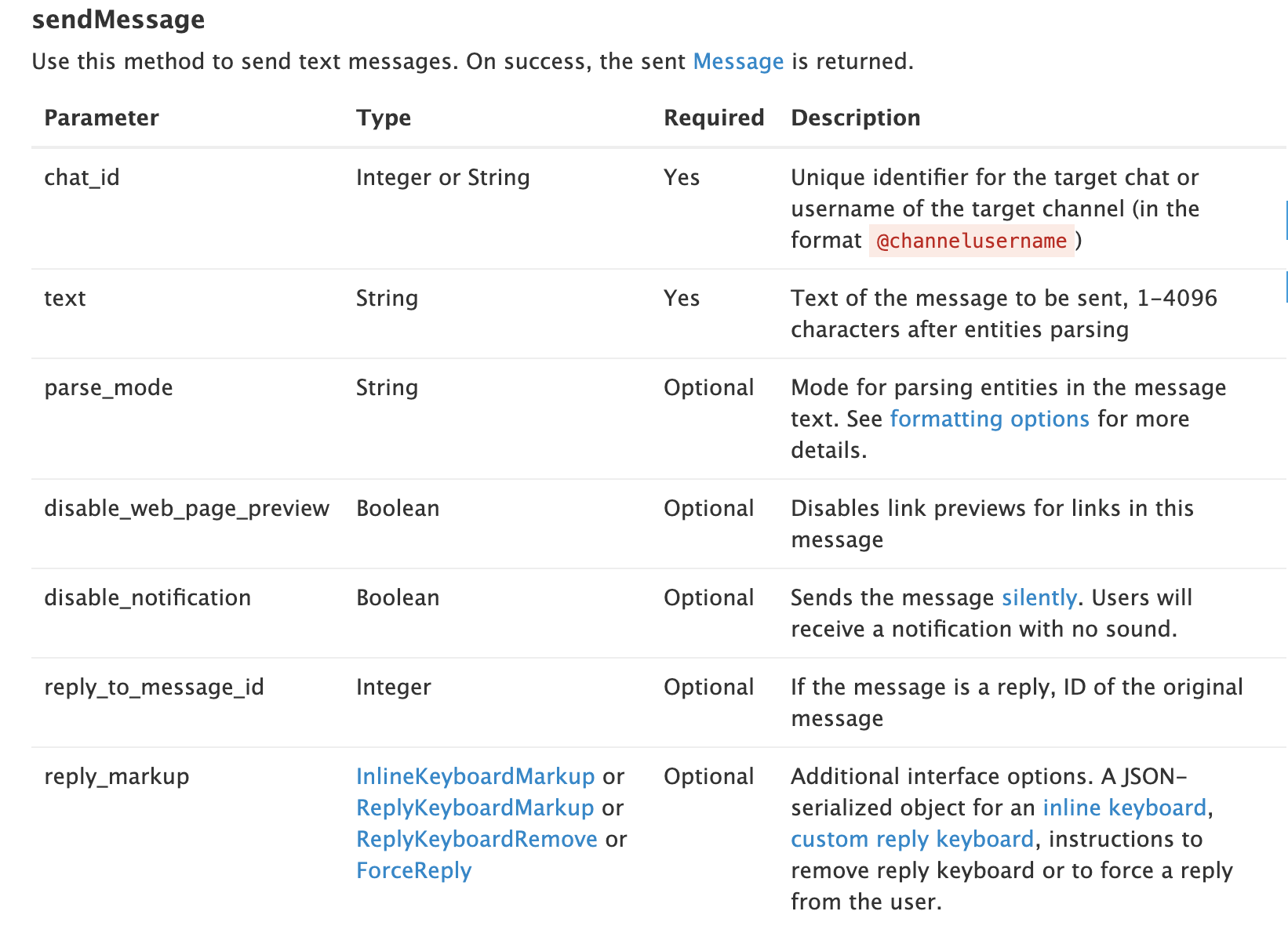
Bize chat_id ve text lazım. O zaman kodumuzu yazalım.
$Bot->sendMessage(["chat_id" => "@fusuf", "text" => "Merhaba"]);
Bu kadar.
Örnekler
Kütüphanenin kullanımı hakkında çok iyi bir örnek olarak bu dosyayı gösterebiliriz.
Ayrıca basit bir /start mesajına yanıt veren bir kod:
<?php
require __DIR__ . '/vendor/autoload.php'; //We include the base of the bot.
use Boting\Boting; // We say we want to use the base.

$Bot = new Boting(); // We start the base.
$Bot->command("/[!.\/]start/m", function ($Update, $Match) use ($Bot) {
    $ChatId = $Update["message"]["chat"]["id"];
    $Bot->sendMessage(["chat_id" => $ChatId, "text" => "Started bot."]);
});
$Bot->Handler("Here ur bot token"); // We define our bot token.
Lisans
Bu proje tamamen açık kaynaklı olup, MIT lisansı altında korunmaktadır. Lütfen LICENSE.md dosyasına bakın.
İletişim
Bana Telegram üzerinden ulaşabilirsiniz ya da Issue açabilirsiniz.