🧠 MemoryBox
March 25, 2026 · View on GitHub
Memory health CLI for Claude Code, OpenClaw, and any markdown-based AI agent.
Install once. Your agent's memory stays lean forever. Zero dependencies.







If this fixed your agent's memory bloat, a ⭐ helps others find it.
Quick Install
curl -fsSL https://raw.githubusercontent.com/Ramsbaby/openclaw-memorybox/main/install.sh | bash

⚡ Quick Start • 📊 Without vs With • 🤖 Claude Code • 💻 CLI • 📈 Results • 🔧 How It Works • 🔄 Daemon • ❓ FAQ
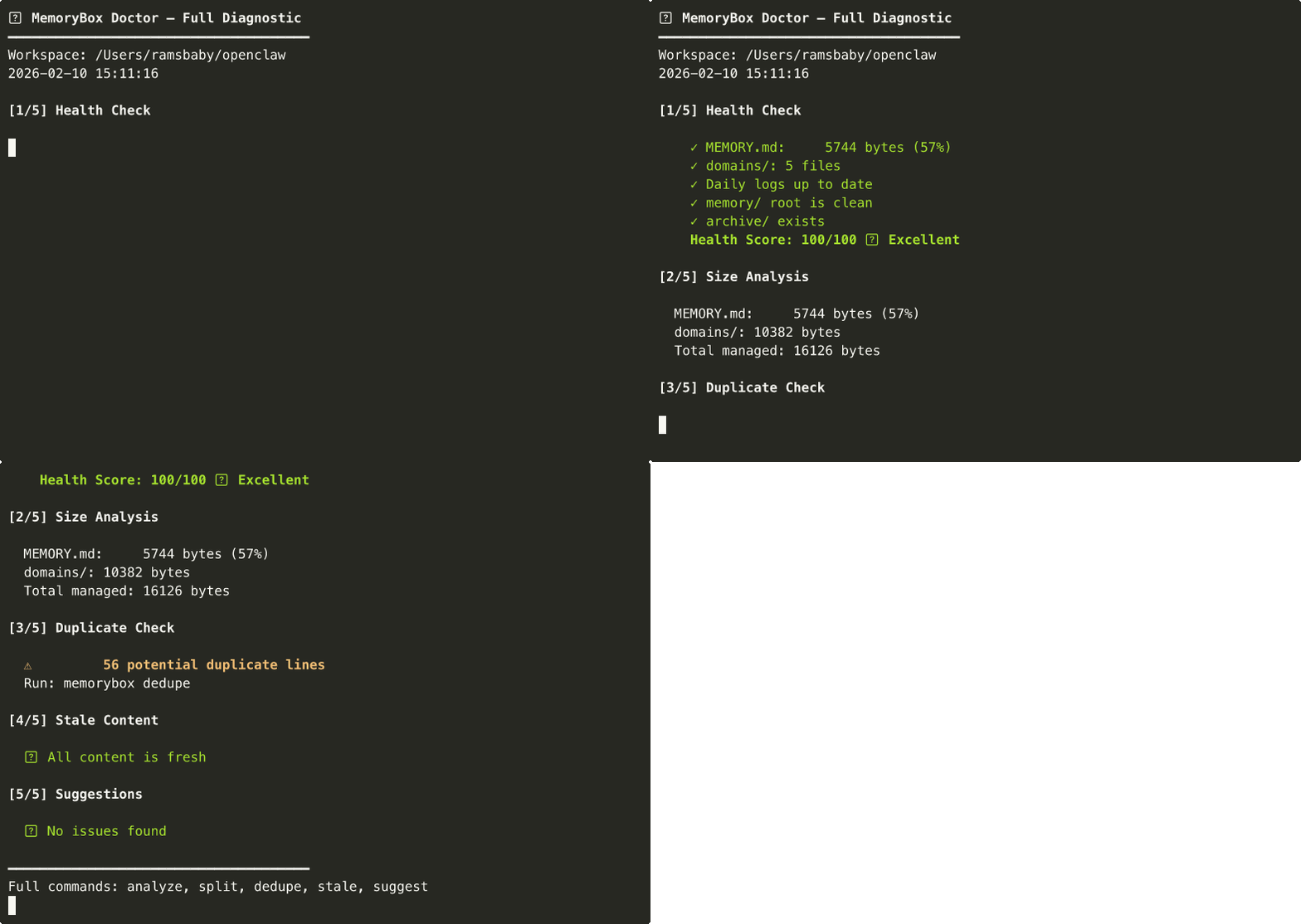
Full diagnostic in one command: health check → size analysis → duplicates → stale content → suggestions
⚡ Quick Start
3 commands. 30 seconds.
# 1. Install (one-liner)
curl -fsSL https://raw.githubusercontent.com/Ramsbaby/openclaw-memorybox/main/install.sh | bash

# 2. Diagnose
memorybox doctor ~/openclaw         # OpenClaw
memorybox doctor ~/.claude          # Claude Code

# 3. Fix (if needed)
memorybox split ~/openclaw          # interactive: move large sections to domain files
memorybox archive ~/openclaw        # move old logs to archive/
Verify install:
memorybox --version # memorybox v2.3.0
Option B: Manual install (git clone)
git clone https://github.com/Ramsbaby/openclaw-memorybox.git
cd openclaw-memorybox && chmod +x bin/memorybox
sudo ln -sf "$(pwd)/bin/memorybox" /usr/local/bin/memorybox
📊 Without vs With MemoryBox
| Without MemoryBox | With MemoryBox | |
|---|---|---|
| MEMORY.md size | Grows unbounded (20KB+) | Capped at ~3.5KB |
| Every session loads | Everything (all 20KB) | Core facts only (3.5KB) |
| Context pressure | 98% → compaction failures | 7% → comfortable headroom |
| Agent crashes | 2–3/week from context overflow | 0 |
| Setup time | — | 5 minutes, one-time |
| Maintenance | Manual or never | Automated via cron/daemon |
| Old logs | Accumulate in root | Auto-archived after 14 days |
The crash chain MemoryBox prevents:
Memory bloat → Context overflow → Compaction failure → Gateway crash
🌟 The Problem
Your AI agent's MEMORY.md grows every day. Whether you're running Claude Code, OpenClaw, or any 24/7 agent — at some point it hits 20KB+, gets loaded into every session, eats tokens, and eventually causes context overflow or crashes.
MemoryBox prevents this in 5 minutes:
memorybox doctor ~/openclaw   # diagnose
memorybox split ~/openclaw    # fix interactively
Your MEMORY.md stays lean. Your agent stays fast. Move on to things that matter.
2026 context: Personal AI agents running 24/7 locally are surging — subscription fatigue is real, and "own your AI" is the new default. Memory management is now the #1 silent bottleneck. MemoryBox solves it before it crashes you.
🔧 How It Works
MemoryBox applies a simple 3-tier pattern (inspired by Letta/MemGPT):
workspace/
├── MEMORY.md              ← Tier 1: Core facts only (≤10KB, loaded everywhere)
└── memory/
    ├── YYYY-MM-DD.md      ← Tier 1.5: Daily logs (today+yesterday, auto-loaded)
    ├── domains/           ← Tier 2: Detailed reference (searched on-demand)
    │   ├── persona.md
    │   ├── decisions.md
    │   └── ...
    ├── projects/          ← Tier 2: Per-project context
    └── archive/           ← Tier 3: Old daily logs (14+ days)
| Tier | Loaded when | Token cost |
|---|---|---|
| Tier 1 | Every session, automatically | ~3.5KB (lean!) |
| Tier 2 | On-demand via memory_search | Only when needed |
| Tier 3 | Manual reference only | ~0 |
Key insight: OpenClaw's memory_search indexes memory/**/*.md recursively. Tier 2 files are automatically searchable — zero config changes needed.

🤖 Claude Code Compatibility
MemoryBox works directly with Claude Code's CLAUDE.md / AGENTS.md workflow.
Point it at your Claude workspace:
memorybox doctor ~/.claude
Or set the workspace once:
export OPENCLAW_WORKSPACE=~/.claude
memorybox doctor    # uses ~/.claude automatically
Add to your CLAUDE.md or AGENTS.md
## Memory Health Protocol

- Check health: `memorybox health ~/.claude`
- If score < 80: run `memorybox doctor ~/.claude` and follow the suggestions
- NEVER delete files in memory/ directly — use `memorybox archive` instead
- After restructuring: memory/ is RAG-indexed on the next rag-index run
- Large MEMORY.md (≥10KB): run `memorybox split` interactively
- Search memory: `memorybox search "<query>" ~/.claude`
Claude Code + Daemon (fully automated)
# Start the health watcher before beginning a long Claude Code session
MEMORYBOX_WORKSPACE=~/.claude \
MEMORYBOX_NTFY_TOPIC=your-ntfy-topic \
bash /path/to/memorybox-watch.sh --daemon

# It runs in the background while you work.
# If memory health degrades mid-session, you get a push notification.
Auto-capture at session end (Claude Code hook)
{
  "hooks": {
    "Stop": [{"command": "bash ~/.local/share/memorybox/session-end-hook.sh"}]
  }
}
Install the hook:
mkdir -p ~/.local/share/memorybox
curl -fsSL https://raw.githubusercontent.com/Ramsbaby/openclaw-memorybox/main/scripts/session-end-hook.sh \
  -o ~/.local/share/memorybox/session-end-hook.sh
chmod +x ~/.local/share/memorybox/session-end-hook.sh
📈 Real Results
Tested on a production instance (7 Discord channels, 48 crons, running 24/7):
| Metric | Before | After | Improvement |
|---|---|---|---|
| MEMORY.md size | 20,542 bytes | 3,460 bytes | -83% |
| Context pressure | 98% (critical) | 7% (healthy) | -91% |
| Compaction frequency | Multiple per session | Rare (~weekly) | 10x fewer |
| Gateway crashes | 2-3/week | 0 | 100% stable |
memory_search | Works | Still works | No change |
| Setup time | — | 5 minutes | One-time |
Real Terminal Output
Before:
$ memorybox health ~/openclaw
━━━━━━━━━━━━━━━━━━━━━━━━━━━━━━━━━━━━━━
🏥 Health Score: 28/100 🚨 CRITICAL

  ✗ MEMORY.md over limit: 20,542 bytes (205%) 🚨
  △ 8 daily logs need archiving (>14 days)
  △ 12 potential duplicate lines

ACTION REQUIRED: Run 'memorybox doctor' for full diagnostic
━━━━━━━━━━━━━━━━━━━━━━━━━━━━━━━━━━━━━━
After (5 minutes of interactive splitting + archiving):
$ memorybox health ~/openclaw
━━━━━━━━━━━━━━━━━━━━━━━━━━━━━━━━━━━━━━
🏥 Health Score: 92/100 ✅ EXCELLENT

  ✓ MEMORY.md: 3,460 bytes (35%)
  ✓ domains/: 3 files
  ✓ Daily logs up to date
  ✓ memory/ root is clean
  ✓ archive/ exists

All systems green. No action needed.
━━━━━━━━━━━━━━━━━━━━━━━━━━━━━━━━━━━━━━
Honest note: The 83% reduction applies to MEMORY.md load — roughly 5-15% of total per-session tokens depending on conversation length. But in a 24/7 agent with 48 crons, those savings compound over thousands of sessions. More importantly, it prevents the context overflow that crashes your agent — and that's worth far more than the token savings alone.
💻 CLI Commands
memorybox doctor [path]           # Full diagnostic — start here
memorybox analyze [path]          # Section-by-section size breakdown with bar charts
memorybox split [path]            # Interactive: move large sections to domain files
memorybox health [path]           # Quick health score (0-100)
memorybox search "<query>" [path] # Search memory files for matching content
memorybox archive [path]          # Move old daily logs (14+ days) to archive/
memorybox dedupe [path]           # Find duplicate content across files
memorybox stale [path]            # Detect outdated content
memorybox suggest [path]          # Improvement recommendations
memorybox report [path]           # Before/after token savings
memorybox init [path]             # Set up 3-tier directory structure
Daemon mode (v2.2):
bash scripts/memorybox-watch.sh --daemon   # start background health watcher
bash scripts/memorybox-watch.sh --status   # check watcher status
bash scripts/memorybox-watch.sh --stop     # stop watcher
Most users only need two commands:
memorybox doctor— see what's wrongmemorybox split— fix it interactively
Options
memorybox -w ~/my-workspace doctor   # custom workspace path
memorybox -d 7 archive               # archive logs older than 7 days (default: 14)
memorybox -m 8000 health             # custom max target (default: 10KB)
🏥 Example: Doctor Output
🩺 MemoryBox Doctor — Full Diagnostic
━━━━━━━━━━━━━━━━━━━━━━━━━━━━━━━━━━━━━━
Workspace: /Users/you/openclaw
2026-02-11 17:00:00

[1/5] Health Check

    ✗ MEMORY.md over limit: 20,542 bytes (205%) 🚨
    ✓ domains/: 3 files
    △ 8 daily logs need archiving (>14 days)
    ✓ memory/ root is clean
    ✓ archive/ exists

    Health Score: 40/100 🚨 Critical

[2/5] Size Analysis

  MEMORY.md: 20,542 bytes (205%)
  domains/: 3,200 bytes
  Total managed: 23,742 bytes

[3/5] Duplicate Check

  ⚠️  2 potential duplicate lines

[4/5] Stale Content

  ⏰ 1 domain file(s) unchanged for 60+ days

[5/5] Suggestions

  📌 3 section(s) could be split to domains/
  🗄️  8 daily logs ready for archiving

━━━━━━━━━━━━━━━━━━━━━━━━━━━━━━━━━━━━━━
🔄 Daemon Mode — memorybox watch (New in v2.2)
Run MemoryBox in the background. Get alerts when your memory health drops below a threshold — before it crashes your agent.
# Start background daemon (checks every 60s, alerts when score < 80)
bash scripts/memorybox-watch.sh --daemon

# With push notifications + custom interval
MEMORYBOX_INTERVAL=120 \
MEMORYBOX_THRESHOLD=85 \
MEMORYBOX_NTFY_TOPIC=your-ntfy-topic \
bash scripts/memorybox-watch.sh --daemon

# With Discord webhook
MEMORYBOX_DISCORD_URL="https://discord.com/api/webhooks/..." \
bash scripts/memorybox-watch.sh --daemon

# Check status
bash scripts/memorybox-watch.sh --status

# Stop
bash scripts/memorybox-watch.sh --stop
What it does
- Runs
memorybox healthevery N seconds (default: 60) - Score drops below threshold → sends alert (ntfy / Discord webhook)
- Score recovers above threshold → sends recovery notification
- Logs all checks to
~/.openclaw/logs/memorybox-watch.log - State persisted to
/tmp/memorybox-watch-state.json
Configuration
| Env var | Default | Description |
|---|---|---|
MEMORYBOX_WORKSPACE | ~/openclaw | Workspace path to monitor |
MEMORYBOX_INTERVAL | 60 | Check interval in seconds |
MEMORYBOX_THRESHOLD | 80 | Alert when score drops below this |
MEMORYBOX_NTFY_TOPIC | — | ntfy.sh push topic |
MEMORYBOX_DISCORD_URL | — | Discord webhook URL |
MEMORYBOX_LOG_DIR | ~/.openclaw/logs | Log directory |
Cron alternative (simpler)
If you just want daily checks without a running daemon:
{
  "name": "Memory Health Watch",
  "schedule": "0 9 * * *",
  "prompt": "Run: memorybox health ~/openclaw. If score < 80, run memorybox doctor and report findings."
}
📦 Installation
Option A: One-line install (recommended)
curl -fsSL https://raw.githubusercontent.com/Ramsbaby/openclaw-memorybox/main/install.sh | bash
This installs the CLI to ~/.local/bin/memorybox and the Claude Code skill to ~/.claude/skills/memorybox.md.
Option B: CLI only (legacy)
curl -sSL https://raw.githubusercontent.com/Ramsbaby/openclaw-memorybox/main/bin/memorybox -o /usr/local/bin/memorybox && chmod +x /usr/local/bin/memorybox
Option C: Manual
git clone https://github.com/Ramsbaby/openclaw-memorybox.git
cd openclaw-memorybox && chmod +x bin/memorybox
sudo ln -sf "$(pwd)/bin/memorybox" /usr/local/bin/memorybox
Verify
memorybox --version   # memorybox v2.3.0
memorybox doctor ~/openclaw
🔄 What This Is (and Isn't)
MemoryBox is a maintenance tool, like df for your agent's memory.
It doesn't replace your memory system — it keeps it healthy.
| Tool | What it does | Category |
|---|---|---|
| Mem0 | Decides what to remember | 🧠 Memory engine |
| Supermemory | Cloud-based persistent recall | 🧠 Memory engine |
| QMD | Local search backend | 🔍 Search engine |
| MemoryBox | Keeps files organized & lean | 🧹 Maintenance tool |
You can use MemoryBox with all of the above, or with none of them. It only touches file structure — never configs, never plugins, never internals.
📖 Origin Story
I run an OpenClaw agent 24/7 — 7 Discord channels, 48 cron jobs. As it learned, MEMORY.md ballooned to 20KB+. Every session loaded all of it.
One day, context hit 100%. Compaction corrupted state. I tried to fix the config — and crashed the gateway.
That crash led to openclaw-self-healing (auto-recovery in ~30s). But the root cause was memory bloat. So I built MemoryBox to prevent it from happening again.
Memory bloat → Context overflow → Gateway crash
  → Built self-healing (recover from crashes)
  → Built MemoryBox (prevent the bloat)
  → Problem solved at both ends.
🤖 Teach Your Agent the 3-Tier Pattern
Add to your AGENTS.md:
## Memory Protocol
- **MEMORY.md** (≤10KB): Core facts only. Loaded everywhere — keep it lean.
- **memory/domains/*.md**: Detailed reference. Use `memory_search` to find.
- **memory/archive/**: Old logs. Rarely needed.

When MEMORY.md grows past 8KB, split large sections to domains/.
Set It and Forget It (Optional Cron)
{
  "name": "Memory Maintenance",
  "schedule": { "kind": "cron", "expr": "0 23 * * 0", "tz": "Asia/Seoul" },
  "sessionTarget": "isolated",
  "payload": {
    "kind": "agentTurn",
    "message": "Run: memorybox archive && memorybox health. Report if score < 80."
  }
}
✅ Compatibility
Works with everything:
| Plugin / Backend | Compatible | Notes |
|---|---|---|
| memory-core (default) | ✅ | No changes needed |
| Mem0 | ✅ | Different layer — no conflict |
| Supermemory | ✅ | Different layer — no conflict |
| QMD | ✅ | Indexes same files |
memory_search | ✅ | Indexes memory/**/*.md recursively |
memory_get | ✅ | Reads any memory/ file |
| Claude Code | ✅ | CLAUDE.md / AGENTS.md friendly |
Does NOT touch:
openclaw.json— no config changes- Plugin behavior — no overrides
- OpenClaw internals — files only
🌐 OpenClaw Ecosystem
| Project | Role |
|---|---|
| openclaw-memorybox ← you are here | Zero-dep memory hygiene CLI |
| openclaw-self-healing | 4-tier autonomous crash recovery — gateway back in ~30s |
| openclaw-self-evolving | AI agent that proposes its own improvements |
| jarvis | 24/7 AI ops system using Claude Max — self-healing, RAG, cron |
All MIT licensed, all battle-tested on the same 24/7 production instance.
❓ FAQ
Q: My MEMORY.md is only 5KB. Do I need this?
A: Not yet. Bookmark it for when it grows. Or run memorybox health to confirm you're fine.
Q: Will this break my existing setup? A: No. It only creates directories and moves content you approve. Backup is automatic.
Q: Does memory_search find files in subdirectories?
A: Yes. OpenClaw indexes memory/**/*.md recursively.
Q: I'm using Mem0/Supermemory. Should I also use this? A: Yes — they solve different problems. Mem0 decides what to remember. MemoryBox keeps your file structure clean so sessions load fast.
Q: Will OpenClaw updates break this? A: Unlikely. This uses standard markdown files in the standard memory directory. OpenClaw's philosophy is "files are source of truth" — that won't change.
Q: I use Claude Code, not OpenClaw. Does this work?
A: Yes. Point MEMORYBOX_WORKSPACE at ~/.claude or your project dir. See Claude Code Compatibility.
Q: How does memorybox search work?
A: It searches MEMORY.md and all memory/**/*.md files for your query (case-insensitive), showing 2 context lines around each match. Example: memorybox search "API key" ~/.claude
🤝 Contributing
PRs welcome! Areas for improvement:
- Migration script for different workspace layouts
- Automated MEMORY.md size monitoring via cron (see cron template)
- Domain file templates for common use cases
- Integration tests with memory_search
-
memorybox watch— daemon mode for continuous monitoring (added in v2.2) -
memorybox search— full-text search across memory files (added in v2.3) - Qdrant/local vector search integration for Tier 2 semantic retrieval
📜 License
MIT — Do whatever you want.
📊 Star History
Made with 🦞 by @ramsbaby
Battle-tested on a production OpenClaw instance running 24/7 with 48 crons and 7 channels.