ko.md
July 25, 2026 · View on GitHub

Mind Elixir Core


English | 中文 | Español | Français | Português | Русский | 日本語 | 한국어
Mind Elixir는 오픈 소스 JavaScript 마인드맵 코어입니다. 원하는 프론트엔드 프레임워크와 함께 사용할 수 있습니다.
특징:
- 경량화
- 고성능
- 프레임워크에 구애받지 않음
- 플러그인 지원
- 드래그 앤 드롭 / 노드 편집 플러그인 내장
- SVG / PNG / HTML 내보내기
- 노드 요약
- 대량 작업 지원
- 실행 취소 / 다시 실행
- 효율적인 단축키
- CSS 변수로 쉽게 노드 스타일링
목차
지금 시작하기
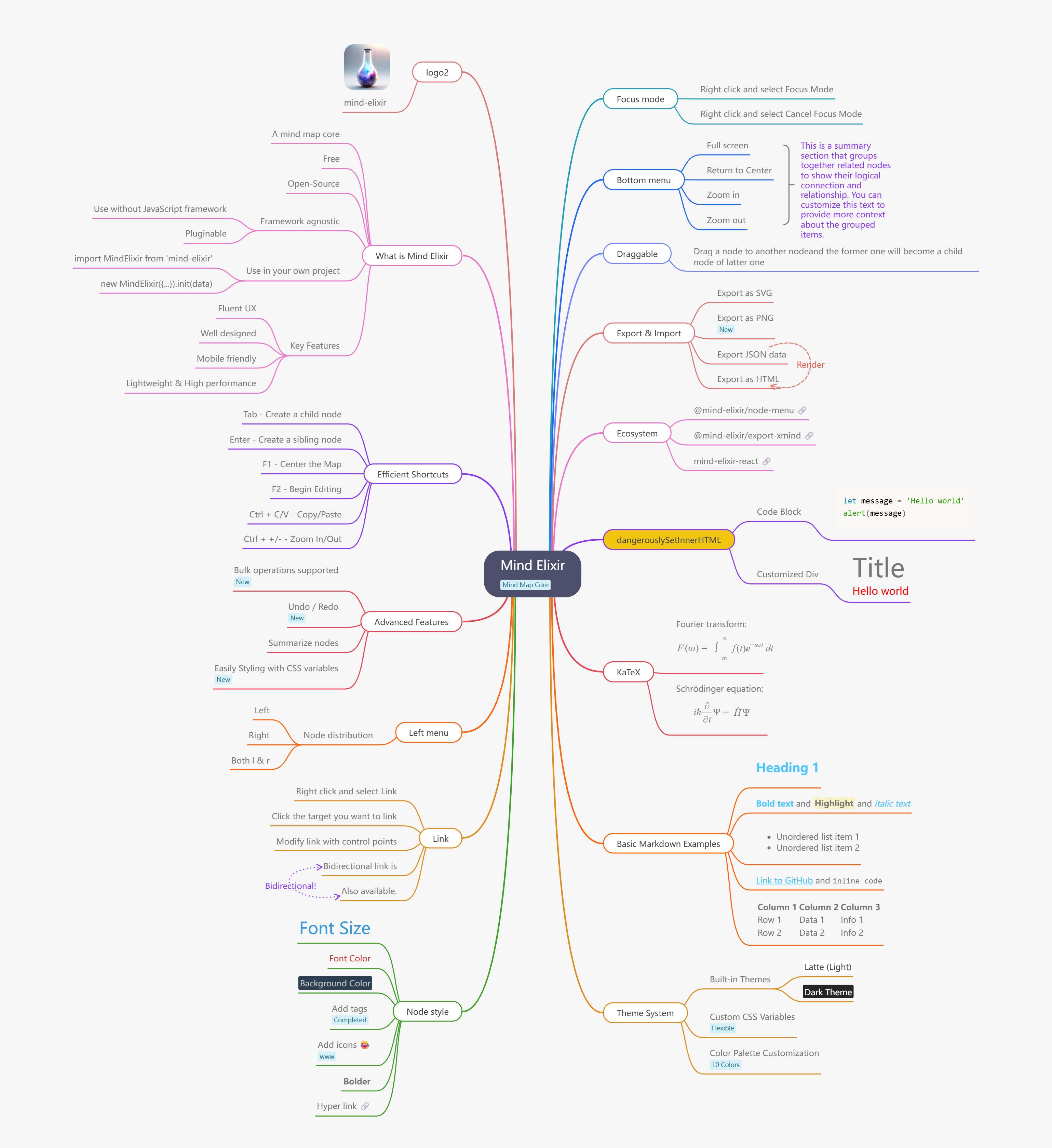
플레이그라운드
- Vanilla JS - https://codepen.io/ssshooter/pen/vEOqWjE
- React - https://codesandbox.io/p/devbox/mind-elixir-3-x-react-18-x-forked-f3mtcd
- Vue3 - https://codesandbox.io/p/sandbox/mind-elixir-3-x-vue3-lth484
문서
사용법
설치
NPM
npm i mind-elixir -S
import MindElixir from 'mind-elixir'
스크립트 태그
<script type="module" src="https://cdn.jsdelivr.net/npm/mind-elixir/dist/MindElixir.js"></script>
그리고 CSS 파일에 추가:
@import 'https://cdn.jsdelivr.net/npm/mind-elixir/dist/style.css';
초기화
<div id="map"></div>
<style>
  #map {
    height: 500px;
    width: 100%;
  }
</style>
주요 변경사항 1.0.0 버전부터 data는 options가 아닌 init()에 전달되어야 합니다.
import MindElixir from 'mind-elixir'
import { ko } from 'mind-elixir/i18n'
import example from 'mind-elixir/dist/example1'

let options = {
  el: '#map', // or HTMLDivElement
  direction: MindElixir.LEFT,
  draggable: true, // default true
  keypress: true, // default true
  overflowHidden: false, // default false
  mouseSelectionButton: 0, // 0 for left button, 2 for right button, default 0
  contextMenu: {
    locale: ko,
    focus: true,
    link: true,
    extend: [
      {
        name: 'Node edit',
        onclick: () => {
          alert('extend menu')
        },
      },
    ],
  },
  before: {
    insertSibling(el, obj) {
      return true
    },
    async addChild(el, obj) {
      await sleep()
      return true
    },
  },
}

let mind = new MindElixir(options)

mind.install(plugin) // install your plugin

// create new map data
const data = MindElixir.new('new topic')
// or `example`
// or the data return from `.getData()`
mind.init(data)

// get a node
MindElixir.E('node-id')
데이터 구조
// whole node data structure up to now
const nodeData = {
  topic: 'node topic',
  id: 'bd1c24420cd2c2f5',
  style: { fontSize: '32', color: '#3298db', background: '#ecf0f1' },
  expanded: true,
  parent: null,
  tags: ['Tag'],
  icons: ['😀'],
  hyperLink: 'https://github.com/ssshooter/mind-elixir-core',
  image: {
    url: 'https://raw.githubusercontent.com/ssshooter/mind-elixir-core/master/images/logo2.png', // required
    // you need to query the height and width of the image and calculate the appropriate value to display the image
    height: 90, // required
    width: 90, // required
  },
  children: [
    {
      topic: 'child',
      id: 'xxxx',
      // ...
    },
  ],
}
이벤트 처리
mind.bus.addListener('operation', operation => {
  console.log(operation)
  // return {
  //   name: action name,
  //   obj: target object
  // }

  // name: [insertSibling|addChild|removeNode|beginEdit|finishEdit]
  // obj: target

  // name: moveNode
  // obj: {from:target1,to:target2}
})

mind.bus.addListener('selectNodes', nodes => {
  console.log(nodes)
})

mind.bus.addListener('expandNode', node => {
  console.log('expandNode: ', node)
})
데이터 내보내기와 가져오기
// data export
const data = mind.getData() // javascript object, see src/example.js
mind.getDataString() // stringify object

// data import
// initiate
let mind = new MindElixir(options)
mind.init(data)
// data update
mind.refresh(data)
작업 가드
let mind = new MindElixir({
  // ...
  before: {
    insertSibling(el, obj) {
      console.log(el, obj)
      if (this.currentNode.nodeObj.parent.root) {
        return false
      }
      return true
    },
    async addChild(el, obj) {
      await sleep()
      if (this.currentNode.nodeObj.parent.root) {
        return false
      }
      return true
    },
  },
})
이미지로 내보내기
방법 1
const mind = {
  /** mind elixir instance */
}
const downloadPng = async () => {
  const blob = await mind.exportPng() // Get a Blob!
  if (!blob) return
  const url = URL.createObjectURL(blob)
  const a = document.createElement('a')
  a.href = url
  a.download = 'filename.png'
  a.click()
  URL.revokeObjectURL(url)
}
방법 2
Install @ssshooter/modern-screenshot, then:
import { domToPng } from '@ssshooter/modern-screenshot'

const download = async () => {
  const dataUrl = await domToPng(mind.nodes, {
    onCloneNode: node => {
      const n = node as HTMLDivElement
      n.style.position = ''
      n.style.top = ''
      n.style.left = ''
      n.style.bottom = ''
      n.style.right = ''
    },
    padding: 300,
    quality: 1,
  })
  const link = document.createElement('a')
  link.download = 'screenshot.png'
  link.href = dataUrl
  link.click()
}
테마
const options = {
  // ...
  theme: {
    name: 'Dark',
    // main lines color palette
    palette: ['#848FA0', '#748BE9', '#D2F9FE', '#4145A5', '#789AFA', '#706CF4', '#EF987F', '#775DD5', '#FCEECF', '#DA7FBC'],
    // overwrite css variables
    cssVar: {
      '--main-color': '#ffffff',
      '--main-bgcolor': '#4c4f69',
      '--color': '#cccccc',
      '--bgcolor': '#252526',
      '--panel-color': '255, 255, 255',
      '--panel-bgcolor': '45, 55, 72',
    },
    // all variables see /src/index.less
  },
  // ...
}

// ...

mind.changeTheme({
  name: 'Latte',
  palette: ['#dd7878', '#ea76cb', '#8839ef', '#e64553', '#fe640b', '#df8e1d', '#40a02b', '#209fb5', '#1e66f5', '#7287fd'],
  cssVar: {
    '--main-color': '#444446',
    '--main-bgcolor': '#ffffff',
    '--color': '#777777',
    '--bgcolor': '#f6f6f6',
  },
})
Be aware that Mind Elixir will not observe the change of prefers-color-scheme. Please change the theme manually when the scheme changes.
단축키
| 단축키 | 기능 |
|---|---|
| Enter | 형제 노드 삽입 |
| Tab | 자식 노드 삽입 |
| F1 | 맵 중앙 정렬 |
| F2 | 현재 노드 편집 시작 |
| ↑ | 이전 형제 노드 선택 |
| ↓ | 다음 형제 노드 선택 |
| ← / → | 부모 또는 첫 자식 노드 선택 |
| PageUp / Alt + ↑ | 노드 위로 이동 |
| PageDown / Alt + ↓ | 노드 아래로 이동 |
| Ctrl + ↑ | 레이아웃을 측면으로 변경 |
| Ctrl + ← | 레이아웃을 왼쪽으로 변경 |
| Ctrl + → | 레이아웃을 오른쪽으로 변경 |
| Ctrl + C | 현재 노드 복사 |
| Ctrl + V | 복사된 노드 붙여넣기 |
| Ctrl + "+" | 마인드맵 확대 |
| Ctrl + "-" | 마인드맵 축소 |
| Ctrl + 0 | 확대/축소 수준 초기화 |
생태계
- @mind-elixir/node-menu
- @mind-elixir/node-menu-neo
- @mind-elixir/export-xmind
- @mind-elixir/export-html
- mind-elixir-react
PR은 언제나 환영입니다!
개발
pnpm i
pnpm dev
Test generated files with dev.dist.ts:
pnpm build
pnpm link ./
Update docs:
# Install api-extractor
pnpm install -g @microsoft/api-extractor
# Maintain /src/docs.ts
# Generate docs
pnpm doc
pnpm doc:md
MindElixir 클래스 멤버 재생성:
MindElixir 클래스의 옵션 및 메서드 선언(src/index.ts의 // #region GENERATED 블록)은 gen-members.js가 dist/types의 컴파일된 선언으로부터 생성합니다. 이를 통해 배포되는 .d.ts와 API 문서에 완전히 확장된 시그니처가 표시됩니다. 믹스인 메서드(src/methods.ts)나 Options 인터페이스(src/types/index.ts)를 변경한 후에는 다음을 실행하세요:
pnpm tsc         # 최신 dist/types 생성
pnpm gen:members # src/index.ts의 생성 블록 재작성
src/index.ts 하단의 컴파일 타임 가드는 블록이 동기화되지 않으면 tsc를 실패시키므로, 재생성을 잊어도 바로 발견됩니다.
감사의 말
기여자
Mind Elixir에 기여해 주셔서 감사합니다! 여러분의 지원과 헌신이 이 프로젝트를 더 좋게 만들어 갑니다.