🖋️ AI Tattoo Try-On
August 2, 2026 · View on GitHub
Preview any tattoo design on your body virtually before getting inked. A production-ready, self-hostable Next.js SaaS boilerplate built for tattoo studios, artists, fashion brands, and DTC apps. A free open-source alternative to Ink Hunter, Tattoosmart, and InkAR — powered by the MuAPI AI engine.
Tech stack: Next.js 14 (App Router) · Prisma · PostgreSQL · NextAuth (Google OAuth) · Stripe · Tailwind CSS · MuAPI (nano-banana-pro-edit) · Webhook-backed async delivery Use cases: Tattoo parlor client consultations · Virtual ink placement previews · Personal body art planning · Tattoo artist portfolio marketing · Tattoo design communities · Body art e-commerce · Interactive try-on widgets

https://github.com/user-attachments/assets/9b347782-e043-4111-91c3-4a7c74c76875
Related Projects
- MuAPI image playground — Try image-editing models for virtual tattoo placement.
- MuAPI specialized apps docs — Image transformation workflows for creative tools.
🌐 Project Details
GitHub Repository: github.com/SamurAIGPT/ai-tattoo-try-on
Live Demo Preview: ai-tattoo-try-on.vercel.app
AI Tattoo Try-On is a production-ready, highly-optimized AI web application. Out of the box, it seamlessly manages User Authentication, Credits & Billing, Image Persistence, and asynchronous tattoo generation using a sleek Next.js (App Router) architecture. It empowers users, studios, and artists to render custom tattoo art realistically onto body shapes — all without permanent ink.
Why use AI Tattoo Try-On?
- Production-Ready SaaS — Complete with Google OAuth and Stripe Checkout workflows built-in.
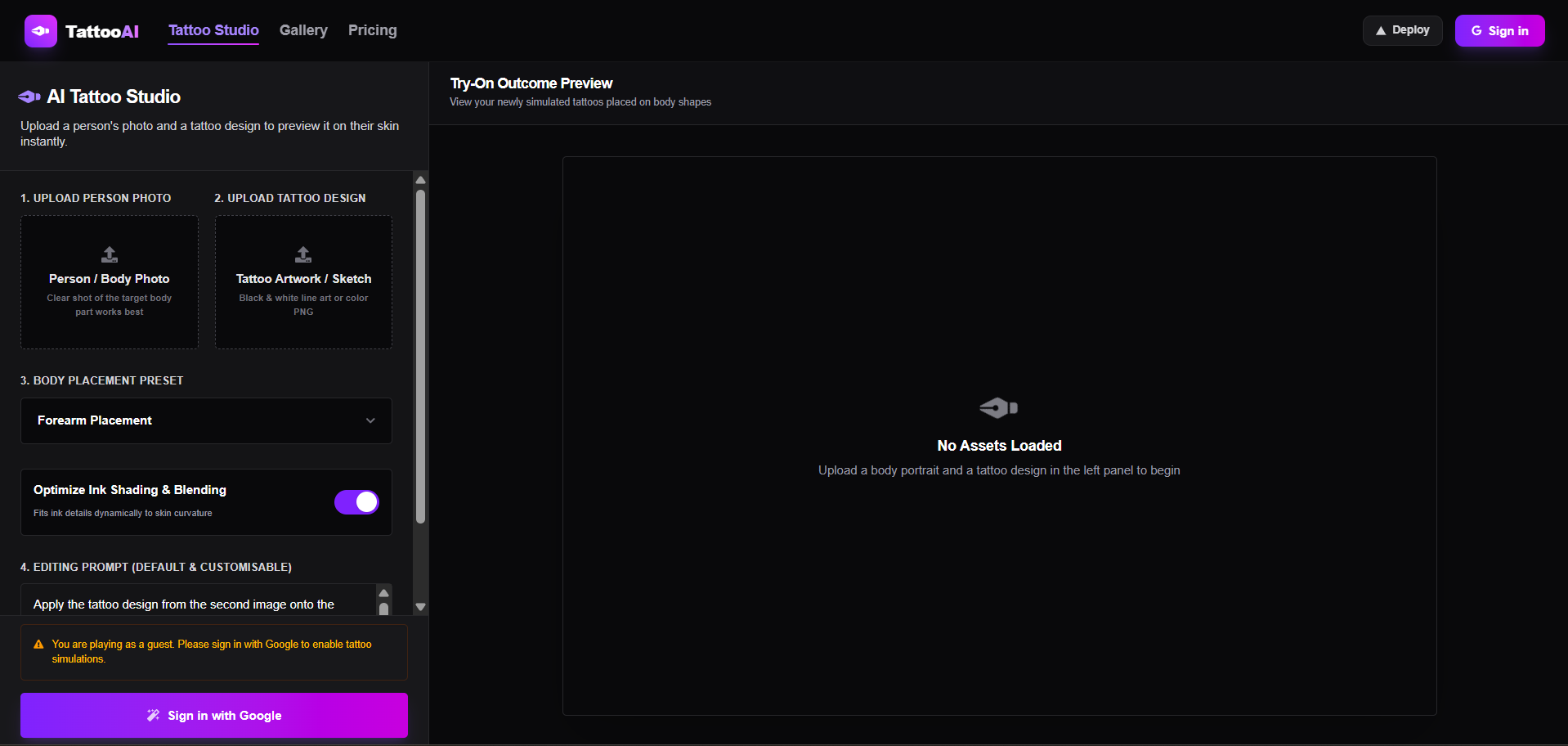
- Virtual Try-On Studio — Upload body portraits and tattoo design images, select placements, choose custom prompts, and see results instantly.
- Webhook-Backed AI Delivery — MuAPI async webhook delivers results directly into the database (
/api/webhook/muapi), keeping API routes non-blocking and preventing request timeouts. - Personal Showroom Gallery — All generated try-ons are saved to PostgreSQL. Users can review, compare, download, and delete their designs from
/gallery. - Responsive Screen-Fitting — Designed with a fluid layout that fits perfectly on all screens (mobile, tablet, desktop) using stacked adaptive grids on mobile and viewport-locked scrolling on desktop.
✨ Core Features
🎨 Virtual Try-On Studio (Main Page /)
- Dual image uploads via file picker or drag-and-drop: one for the body/person photo, and another for the tattoo design.
- Predefined parameters via Custom Select Dropdowns for target body placement presets.
- Customizable prompt styling with an Optimize Ink Shading & Blending sliding toggle switch to maintain skin realism.
- Cost: 24 credits per AI Tattoo simulation.
🖼️ Personal Showroom Gallery (/gallery)
- Visual card grid of all generated tattoo simulations.
- Cards show a thumbnail, placement used, prompt summary, creation date, and status (
processing/completed/failed). - Full-screen viewer modal with a floating overlay of the input photos for reference, along with Download HD and Delete Result actions.
💳 Stripe Credit Billing (/pricing)
- Four credit packs based on a $1 = 200 credits conversion rate:
- Basic Pack ($5 / 1,000 credits)
- Standard Pack ($10 / 2,000 credits)
- Professional Pack ($20 / 4,000 credits — Most Popular)
- Business Pack ($50 / 10,000 credits)
- No recurring subscriptions — pay once, use at your own pace.
- Credit balance is automatically topped up via Stripe webhook on checkout completion.
🔐 Google Auth + Credit Persistence
- NextAuth Google provider with Prisma adapter — user sessions, credit balances, and galleries are all persisted per account.
- Credits displayed live in the Navbar with a pulsing coin icon.
⚡ Deployment: Vercel & Production
This architecture is engineered explicitly for Vercel serverless environments.
One-Click Deploy
Live App: ai-tattoo-try-on.vercel.app
🔑 Required Environment Variables
To successfully deploy and run, you must populate the following environment variables in your Vercel project settings:
| Service | Variable | Description & Source |
|---|---|---|
| Database | DATABASE_URL | PostgreSQL connection string (Supabase or Neon) |
| NextAuth / Google | NEXTAUTH_SECRET | Secure random string generated via openssl rand -base64 32 |
NEXTAUTH_URL | Your production domain (e.g. https://my-app.vercel.app) | |
WEBHOOK_URL | Public URL for MuAPI async callbacks (same as NEXTAUTH_URL in production) | |
GOOGLE_CLIENT_ID | Get from Google Cloud Console | |
GOOGLE_CLIENT_SECRET | Get from Google Cloud Console | |
| Stripe Billing | STRIPE_SECRET_KEY | Get from Stripe Dashboard |
NEXT_PUBLIC_STRIPE_PUBLISHABLE_KEY | Get from Stripe Dashboard | |
STRIPE_WEBHOOK_SECRET | Webhook secret for resolving credit purchases | |
| AI Generation | MUAPIAPP_API_KEY | Create an account and get key from muapi.ai |
🚀 Launching on Vercel: Step-by-Step
- Database Provisioning: Create a new Postgres database (via Supabase or Neon). Retrieve the connection string (
DATABASE_URL). - Project Creation: Import your GitHub fork into the Vercel dashboard.
- Configure Environment Variables: Copy the variables above into the Vercel project settings environment tab.
- Deploy: Hit "Deploy". Vercel will automatically run the build steps (
npm run build). - Database Push: Run
npx prisma db pushto synchronize database models before launching. - Integrations Setup:
- Establish a Google Cloud OAuth app, enabling the callback URL:
https://your-app.vercel.app/api/auth/callback/google - Setup a Stripe Webhook, pointing to
https://your-app.vercel.app/api/stripe/webhookand selecting thecheckout.session.completedevent. - Register a MuAPI Webhook pointing to
https://your-app.vercel.app/api/webhook/muapito receive async generation results.
- Establish a Google Cloud OAuth app, enabling the callback URL:
🛠️ Local Development
Ready to iterate locally? Setup is straightforward.
Prerequisites
- Node.js (v18 or higher)
- A local PostgreSQL instance or a free cloud Database URL.
- ngrok (optional, for local MuAPI webhook testing)
Setup
# 1. Clone the repository
git clone https://github.com/SamurAIGPT/ai-tattoo-try-on
cd ai-tattoo-try-on

# 2. Install dependencies
npm install --legacy-peer-deps

# 3. Setup Environment
cp .env.example .env
# Open .env and insert your specific keys.

# 4. Initialize Database Schema
# Note: Because the database is shared, see the Safety Warning below!
npx prisma generate
npx prisma db push

# 5. Start the Development Server
npm run dev
The console should now be active on http://localhost:3000.
Webhook Tip: For local MuAPI webhook testing, run
ngrok http 3000and setWEBHOOK_URLto the generated HTTPS URL in your.env.
⚠️ Database Safety Warning (Shared Pool)
The workspace database is shared with other applications. Running npx prisma db push on a clean, empty schema will drop tables belonging to other applications. Always follow the Pull-Declare-Push-Cleanup sequence:
- Run
npx prisma db pullto fetch all database tables. - Declare your
TattooCreationtable and update the relations on theUsermodel. - Run
npx prisma db pushto add your changes safely. - Clean up
schema.prismato keep only NextAuth models,TattooCreation, and the updatedUserrelations. - Run
npx prisma generateto rebuild the type-safe client.
🏗️ Technical Architecture
ai-tattoo-try-on/
├── prisma/
│   └── schema.prisma           # Postgres schema (User, Account, Session, TattooCreation)
├── src/
│   ├── app/                    # Next.js App Router
│   │   ├── page.js             # Main Studio Workspace (Uploads, Presets, Custom inputs)
│   │   ├── gallery/            # Dedicated showroom gallery view grid
│   │   ├── pricing/            # 4-Plan credit pricing grid (\$1 = 200 credits)
│   │   └── api/
│   │       ├── auth/           # NextAuth handler
│   │       ├── upload/         # MuAPI file upload proxy
│   │       ├── generation/     # Credit deduction + MuAPI trigger endpoint
│   │       ├── creations/      # GET / DELETE creations history (with webhook bypass sync)
│   │       ├── webhook/muapi/  # MuAPI async webhook callback handler
│   │       └── stripe/         # Stripe checkout creation + checkout webhook
│   ├── components/
│   │   ├── Providers.jsx       # NextAuth SessionProvider wrapper
│   │   └── layout/Navbar.jsx   # Sticky header with Hamburger, Vercel Deploy & credit balance
│   └── lib/
│       ├── auth.js             # NextAuth config with Prisma adapter
│       ├── config.js           # Central config mapping Google, Stripe, MuAPI keys
│       ├── prisma.js           # Cached Prisma client singleton
│       ├── stripe.js           # Stripe instance initializer
│       └── services/
│           ├── user.js         # Credit management service (24 credits per run)
│           └── billing.js      # Stripe checkout and payment webhook parser
└── next.config.mjs             # Next.js configuration
📄 License
MIT Licensed.
AI Tattoo Try-On: A premium, high-contrast, fully responsive virtual tattoo try-on studio built for ink artists, studios, and styling creators.