Tutorial: Building an ATM state machine
May 5, 2026 · View on GitHub
Let's make a state machine for ATMs. In the process, we will use a lot
of core concepts of finite state machines and of fsl, this library's
DSL.
We're going to improve on this NCSU ATM diagram:

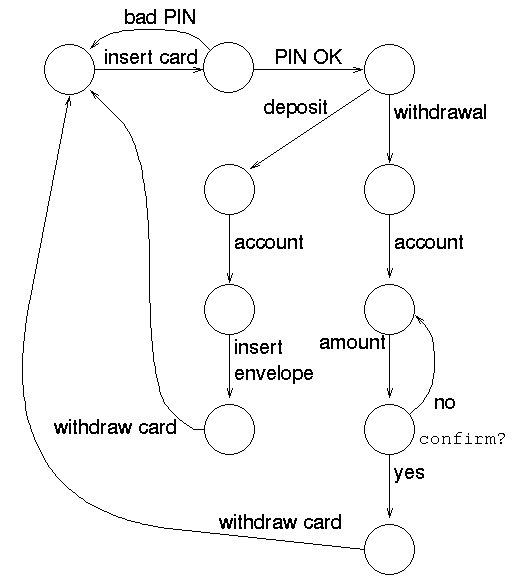
At any time, you can take the code and put it into the graph explorer to mess with it as you see fit.
0: Empty machine
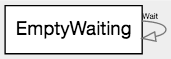
We'll start with an empty machine.
EmptyWaiting 'Wait' -> EmptyWaiting;
1: Should be able to eject cards
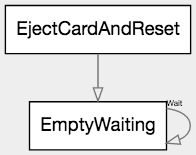
We'll add the ability to physically eject the user's card and reset to the empty and waiting state. Right now it'll dangle around un-used at the top, but later it'll become useful.
This is expressed as the path EjectCardAndReset -> EmptyWaiting;
EmptyWaiting 'Wait' -> EmptyWaiting;
EjectCardAndReset -> EmptyWaiting;
2: Should be able to insert cards
We'll add the ability to physically insert a card, next. You know, the, uh, thing ATMs are pretty much for.
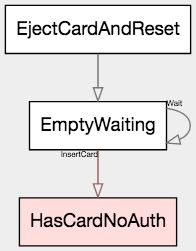
To get this, add the path leg EmptyWaiting 'InsertCard' -> HasCardNoAuth;
EmptyWaiting 'Wait' -> EmptyWaiting 'InsertCard' -> HasCardNoAuth;
EjectCardAndReset -> EmptyWaiting;
Notice that the new state, HasCardNoAuth, has been rendered red.
This is because it is terminal - there is no exit from this node
currently. (EmptyAndWaiting did not render that way because it had a
transition to itself.) That will change as we go back to adding more
nodes. terminal nodes are usually either mistakes or the last single
state of a given FSM.
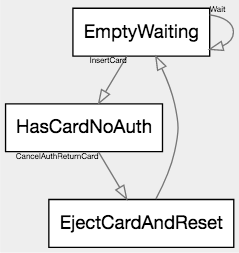
3: Should be able to cancel and recover the card
Next, we should have a cancel, because the ATM's
To that end, we add the path
HasCardNoAuth 'CancelAuthReturnCard' -> EjectCardAndReset;
EmptyWaiting 'Wait' -> EmptyWaiting 'InsertCard' -> HasCardNoAuth;

HasCardNoAuth 'CancelAuthReturnCard' -> EjectCardAndReset;

EjectCardAndReset -> EmptyWaiting;
4: Can give the wrong PIN
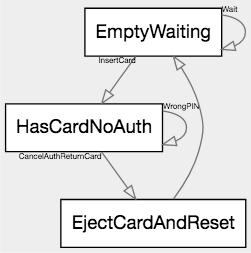
Next, let's give the ability to get the password ... wrong. 😂 Because we all know that one ATM that only has the wrong-PIN path, so, apparently that's a product to someone.
When they get the PIN wrong, they're prompted to try again (or to cancel.)
We'll add the path HasCardNoAuth 'WrongPIN' -> HasCardNoAuth;
EmptyWaiting 'Wait' -> EmptyWaiting 'InsertCard' -> HasCardNoAuth;

HasCardNoAuth 'CancelAuthReturnCard' -> EjectCardAndReset;
HasCardNoAuth 'WrongPIN' -> HasCardNoAuth;

EjectCardAndReset -> EmptyWaiting;
5: Can give the correct PIN
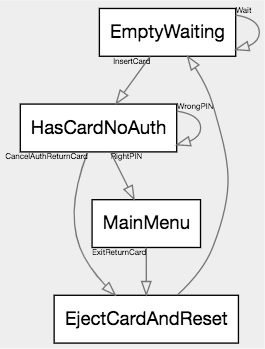
Next, let's give the ability to get the password right.
We'll add two paths. The first gets the password right:
HasCardNoAuth 'RightPIN' -> MainMenu;
The second, from our new state MainMenu, gives people the ability
to leave: MainMenu 'ExitReturnCard' -> EjectCardAndReset;
EmptyWaiting 'Wait' -> EmptyWaiting 'InsertCard' -> HasCardNoAuth;

HasCardNoAuth 'CancelAuthReturnCard' -> EjectCardAndReset;
HasCardNoAuth 'WrongPIN' -> HasCardNoAuth;
HasCardNoAuth 'RightPIN' -> MainMenu;

MainMenu 'ExitReturnCard' -> EjectCardAndReset;

EjectCardAndReset -> EmptyWaiting;
6: Can check balance from main menu
Hooray, now we're getting somewhere.
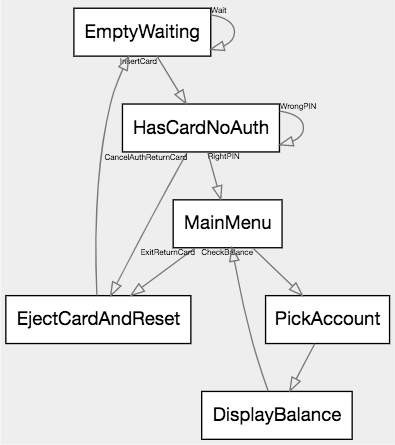
Let's add the ability to check your balance. First pick that from the main menu, then pick which account to see the balance of, then you're shown a screen with the information you requested; then go back to the main menu.
That's MainMenu 'CheckBalance' -> PickAccount -> DisplayBalance -> MainMenu;.
EmptyWaiting 'Wait' -> EmptyWaiting 'InsertCard' -> HasCardNoAuth;

HasCardNoAuth 'CancelAuthReturnCard' -> EjectCardAndReset;
HasCardNoAuth 'WrongPIN' -> HasCardNoAuth;
HasCardNoAuth 'RightPIN' -> MainMenu;

MainMenu 'ExitReturnCard' -> EjectCardAndReset;
MainMenu 'CheckBalance' -> PickAccount -> DisplayBalance -> MainMenu;

EjectCardAndReset -> EmptyWaiting;
7: Can deposit money from main menu
Let's add something difficult. Their state machine just proceeds assuming everything is okay.
To desposit money:
- Accept physical money
- If accept failed (eg door jammed,) reject physical object, go to main menu
- If accept succeeded, ask human expected value
- Pick an account this should go into
- Contact bank. Request to credit for theoretical physical money.
- Three results: yes, no, offer-after-audit.
- If no, reject physical object, go to main menu.
- If yes, consume physical object, tell user consumed, go to main menu
- If offer-after-audit, ask human what to do
- if human-yes, consume physical object, tell user consumed, go to main menu
- if human-no, reject physical object, go to main menu
Writing this out in code is not only generally longer than the text form, but also error prone and hard to maintain.
... or there's the FSM DSL, which is usually as-brief-as the text, and
frequently both briefer and more explicit.
- Rules 1-2:
MainMenu 'AcceptDeposit' -> TentativeAcceptMoney 'AcceptFail' -> RejectPhysicalMoney -> MainMenu; - Rules 3-6:
TentativeAcceptMoney 'AcceptSucceed' -> PickDepositAccount -> RequestValue 'TellBank' -> BankResponse; - Rule 7:
BankResponse 'BankNo' -> RejectPhysicalMoney; - Rule 8:
BankResponse 'BankYes' -> ConsumeMoney -> NotifyConsumed -> MainMenu; - Rules 9-10:
BankResponse 'BankAudit' -> BankAuditOffer 'HumanAcceptAudit' -> ConsumeMoney; - Rule 11:
BankAuditOffer 'HumanRejectAudit' -> RejectPhysicalMoney;
Or, as a block,
MainMenu 'AcceptDeposit' -> TentativeAcceptMoney;

TentativeAcceptMoney 'AcceptFail' -> RejectPhysicalMoney -> MainMenu;
TentativeAcceptMoney 'AcceptSucceed' -> PickDepositAccount -> RequestValue 'TellBank' -> BankResponse;

BankResponse 'BankNo'    -> RejectPhysicalMoney;
BankResponse 'BankYes'   -> ConsumeMoney -> NotifyConsumed -> MainMenu;
BankResponse 'BankAudit' -> BankAuditOffer 'HumanAcceptAudit' -> ConsumeMoney;

BankAuditOffer 'HumanRejectAudit' -> RejectPhysicalMoney;
Which leaves us with the total code
EmptyWaiting 'Wait' -> EmptyWaiting 'InsertCard' -> HasCardNoAuth;

HasCardNoAuth 'CancelAuthReturnCard' -> EjectCardAndReset;
HasCardNoAuth 'WrongPIN' -> HasCardNoAuth;
HasCardNoAuth 'RightPIN' -> MainMenu;

MainMenu 'AcceptDeposit'  -> TentativeAcceptMoney;
MainMenu 'ExitReturnCard' -> EjectCardAndReset;
MainMenu 'CheckBalance'   -> PickCheckBalanceAccount -> DisplayBalance -> MainMenu;

TentativeAcceptMoney 'AcceptFail'    -> RejectPhysicalMoney -> MainMenu;
TentativeAcceptMoney 'AcceptSucceed' -> PickDepositAccount -> RequestValue 'TellBank' -> BankResponse;

BankResponse 'BankNo'    -> RejectPhysicalMoney;
BankResponse 'BankYes'   -> ConsumeMoney -> NotifyConsumed -> MainMenu;
BankResponse 'BankAudit' -> BankAuditOffer 'HumanAcceptAudit' -> ConsumeMoney;

BankAuditOffer 'HumanRejectAudit' -> RejectPhysicalMoney;

EjectCardAndReset -> EmptyWaiting;
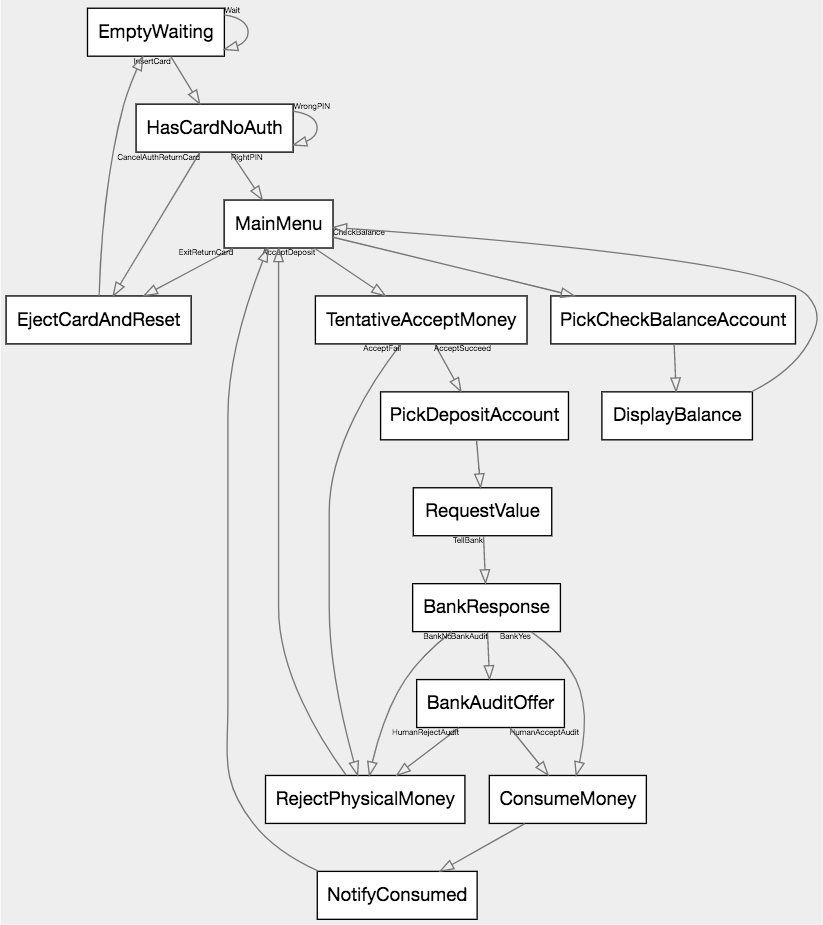
8: Can withdraw money from main menu
Let's also be able to take money from the machine. After this, we'll move on, since our example is pretty squarely made by now.
- Pick a withdrawl account, or cancel to the main menu
- Shown a balance, pick a withdrawl amount, or cancel to acct picker
- Is the withdrawl account too high? If so go to 2
- Does the machine actually have the money? If not go to 2
- Otherwise confirm intent w/ human
- Attempt to post the transaction.
- If fail, display reason and go to 1
- If succeed, dispense money and go to main menu
- Rules 1-3:
MainMenu -> PickWithdrawlAccount -> PickAmount -> AcctHasMoney? 'TooHighForAcct' -> PickWithdrawlAccount; - Rule 4:
AcctHasMoney? -> MachineHasMoney? 'MachineLowOnCash' -> PickAmount; - Rule 5:
MachineHasMoney? -> ConfirmWithdrawWithHuman 'MakeChanges' -> PickWithdrawlAmount; - Rule 6:
ConfirmWithdrawWithHuman 'PostWithdrawl' -> BankWithdrawlResponse; - Rule 7:
BankWithdrawlResponse 'WithdrawlFailure' -> WithdrawlFailureExplanation -> PickWithdrawlAccount; - Rule 8:
BankWithdrawlResponse 'WithdrawlSuccess' -> DispenseMoney -> MainMenu;
Rule 1 canceller: PickWithdrawlAccount 'CancelWithdrawl' -> MainMenu;
Rule 2 canceller: PickWithdrawlAmount 'SwitchAccounts' -> PickWithdrawlAccount;
Or as a whole, we're adding
MainMenu -> PickWithdrawlAccount -> PickAmount -> AcctHasMoney? 'TooHighForAcct' -> PickWithdrawlAccount;
AcctHasMoney? -> MachineHasMoney? 'MachineLowOnCash' -> PickAmount;
MachineHasMoney? -> ConfirmWithdrawWithHuman 'MakeChanges' -> PickWithdrawlAmount;
ConfirmWithdrawWithHuman 'PostWithdrawl' -> BankWithdrawlResponse;
BankWithdrawlResponse 'WithdrawlFailure' -> WithdrawlFailureExplanation -> PickWithdrawlAccount;
BankWithdrawlResponse 'WithdrawlSuccess' -> DispenseMoney -> MainMenu;

PickWithdrawlAccount 'CancelWithdrawl' -> MainMenu;
PickWithdrawlAmount 'SwitchAccounts' -> PickWithdrawlAccount;
Which leaves us with
EmptyWaiting 'Wait' -> EmptyWaiting 'InsertCard' -> HasCardNoAuth;

HasCardNoAuth 'CancelAuthReturnCard' -> EjectCardAndReset;
HasCardNoAuth 'WrongPIN' -> HasCardNoAuth;
HasCardNoAuth 'RightPIN' -> MainMenu;

MainMenu 'AcceptDeposit'  -> TentativeAcceptMoney;
MainMenu 'ExitReturnCard' -> EjectCardAndReset;
MainMenu 'CheckBalance'   -> PickCheckBalanceAccount -> DisplayBalance -> MainMenu;

TentativeAcceptMoney 'AcceptFail'    -> RejectPhysicalMoney -> MainMenu;
TentativeAcceptMoney 'AcceptSucceed' -> PickDepositAccount -> RequestValue 'TellBank' -> BankResponse;

BankResponse 'BankNo'    -> RejectPhysicalMoney;
BankResponse 'BankYes'   -> ConsumeMoney -> NotifyConsumed -> MainMenu;
BankResponse 'BankAudit' -> BankAuditOffer 'HumanAcceptAudit' -> ConsumeMoney;

BankAuditOffer 'HumanRejectAudit' -> RejectPhysicalMoney;

MainMenu -> PickWithdrawlAccount -> PickAmount -> AcctHasMoney? 'TooHighForAcct' -> PickWithdrawlAccount;
AcctHasMoney? -> MachineHasMoney? 'MachineLowOnCash' -> PickAmount;
MachineHasMoney? -> ConfirmWithdrawWithHuman 'MakeChanges' -> PickWithdrawlAmount;
ConfirmWithdrawWithHuman 'PostWithdrawl' -> BankWithdrawlResponse;
BankWithdrawlResponse 'WithdrawlFailure' -> WithdrawlFailureExplanation -> PickWithdrawlAccount;
BankWithdrawlResponse 'WithdrawlSuccess' -> DispenseMoney -> MainMenu;

PickWithdrawlAccount 'CancelWithdrawl' -> MainMenu;
PickWithdrawlAmount 'SwitchAccounts' -> PickWithdrawlAccount;

EjectCardAndReset -> EmptyWaiting;
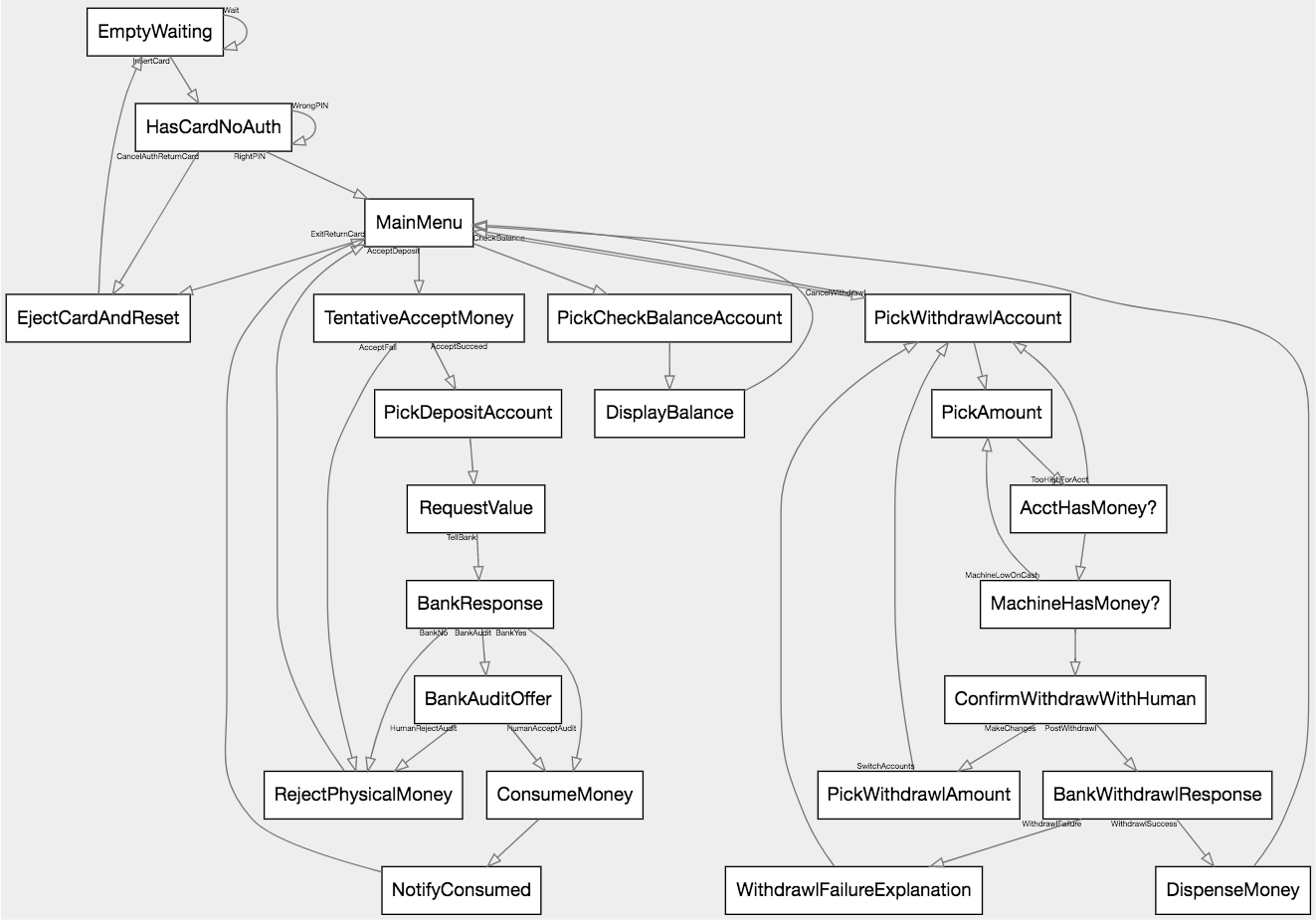
As you can see, building up even very complex state machines is actually relatively straightforward, in a short amount of time.
What's next
- Tutorial: a four-state traffic light — a shorter walkthrough that focuses on the three arrow types
- Language reference — the full DSL
- Catalog of example machines
- Generated API reference