VR HMD
December 4, 2021 · View on GitHub


VR HMD
The VR HMD is made from an HDMI display, tracker rotation, tracker positioning and VR headsets for Android smartphones.
HDMI display
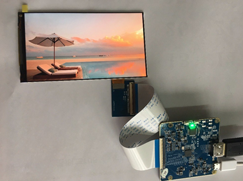
HDMI display can be found on AliExpress or Ebay. The best choice will be a 5.5 inch display, as it fits most VR headsets.
Also on sale are 6 inch displays and divided displays, I do not recommend buying them. At the moment, you can find displays with a resolution of 1920 to 1080 (Full HD), 2560 to 1440 (2K) and 3840 to 2160 (4K).
Optimal options will be buying a 2K display, the difference in price is small. The refresh rate of the displays is 60 Hz. Some displays have 50 Hz or no backlight, carefully read the description.
The display connects via HDMI 1.4 or 2.0 (see that your video card supports the correct version) and USB. Only power is supplied via USB.
Rotation tracker
The tracker rotation is the only thing to do based on Arduino. Can buy Arduino Nano . To Arduino connect a board of sensors of rotation, for example, MPU 6050 GY-521 , MPU 9250 or MPU 3200 GY-85.
Ready Arduino firmware there for MPU 6050 GY-521. It is necessary to solder according to the scheme, load libraries, unpack them into the "libraries" folder of the Arduino IDE. Put the tracker on a flat surface, flash the sketch "MPU6050_calibration.ino" and get the data for calibration. Next, you need to flash the sketch "HMD_MPU6050_DMP6.ino", writing in it the already received calibration data.

Ready Arduino firmware there for MPU 3200 GY-85, it is named Razor AHRS. Together with her there is a program for calibration and demonstration. After calibration, replace the file "Output.ino", in the folder with the firmware, with this one. Here it is important to note that there are new revisions of GY-85, which are incompatible with this firmware. The following sensors are supported by firmware: accelerometer ADXL345, gyroscope ITG-3200 and magnetometers HMC5843, HMC5883L. The calibration instructions can be found on the youtube.

For other rotation sensors, compatible firmware is also needed.
Firmware compatible with the tracker "ArduinoHMD" TrueOpenVR.
Position tracker
For good positioning need from 1 to 4 Sony Playstation 3 Eye cameras. One camera is enough for positioning near, two for 180 tracking, three for 360 tracking and four will be ideally tracked in 360 tracking.
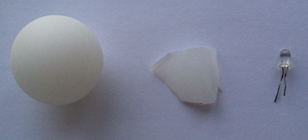
To build a tracker need to buy a ping pong ball, LED (yellow, red, green or blue) и resistor 150-220 Ohm. Setting up "PSMoveService" and demonstrating such a tracker in the beginning video. The LED is best wrapped in a white piece of plastic packaging to make the light from the LED lights in all directions.


For "PSMoveService" and virtual trackers, a simple setup is needed, more details here.
VR headset
Can be used:
- Baofeng S1, using it you have to somehow fix everything in front;
- Bobovr Z4, Z6), can put everything in it, but it's heavier and the viewing angle is smaller;
Union
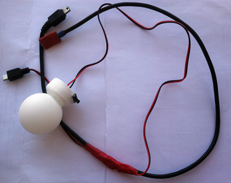
Can use only one USB power cable if you solder the wire that will split the power into the display, the tracker and the ping pong ball with the LED. On the display, a ping pong ball (through a resistor of 150-200 ohms) and Arduino power 5V is applied in parallel, that is, 5V and GND wires go to them, and data wires (Data + and Data -) go only to the Arduino tracker.