README.md
September 14, 2026 · View on GitHub





A fast library for reading, writing, and modifying STL files, powered by NumPy. Every mesh operation uses vectorized array math for speed.
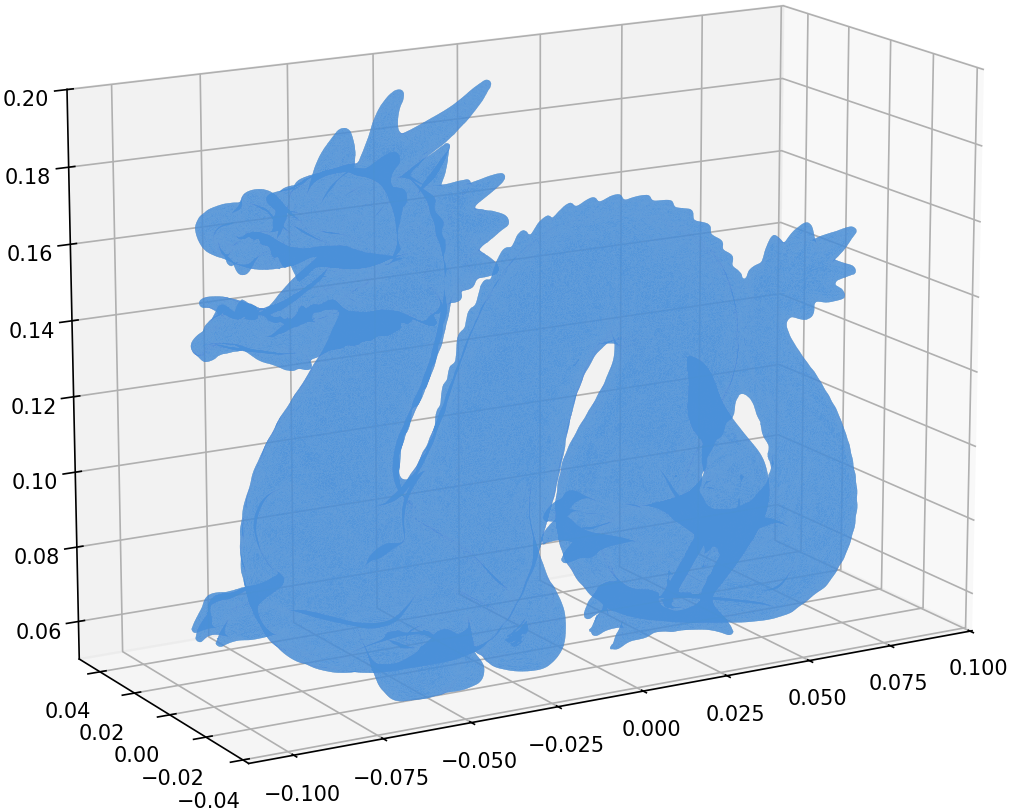
Stanford Dragon — 871,414 triangles loaded in 0.63s, rendered with matplotlib
Quick Start
pip install numpy-stl
from stl import mesh

# Load an STL file (auto-detects binary/ASCII)
your_mesh = mesh.Mesh.from_file('model.stl')

# Inspect
print(f'{len(your_mesh)} triangles')
print(f'Bounding box: {your_mesh.min_} to {your_mesh.max_}')

# Save
your_mesh.save('output.stl')
Features
- Read and write binary and ASCII STL files
- Read PLY and 3MF files (3MF is experimental, read-only)
- Mesh operations: rotate, translate, transform (4x4 matrix)
- Properties: surface area, volume, center of gravity, inertia tensor, convexity
- Combine multiple meshes by concatenating data arrays
- CLI tools:
stl,stl2ascii,stl2binfor format conversion - Fast: all operations backed by NumPy vectorized math
Supported Formats
| Format | Read | Write | Notes |
|---|---|---|---|
| STL (binary) | ✅ | ✅ | Auto-detected on load |
| STL (ASCII) | ✅ | ✅ | ~5x faster with optional speedups |
| PLY | ✅ | ✅ | Binary and ASCII; from_ply_file / save_ply |
| 3MF | ✅ | — | Experimental; from_3mf_file |
Requirements & Compatibility
- Python: 3.10+
- NumPy: 1.24+ (installed automatically)
- Platforms: Linux, macOS, Windows
- Optional:
numpy-stl[fast]for the Cython ASCII speedups (see below)
Performance / Optional Speedups
numpy-stl is fast out of the box. For even faster ASCII STL I/O, install the optional Cython speedups:
pip install numpy-stl[fast]
This installs the speedups
package, a compiled C extension for ASCII parsing. The library works
identically without it -- pure Python is the default.
Benchmark
ASCII STL read performance — ~5x faster with the speedups C extension, consistent across data sizes (median of 5 runs):
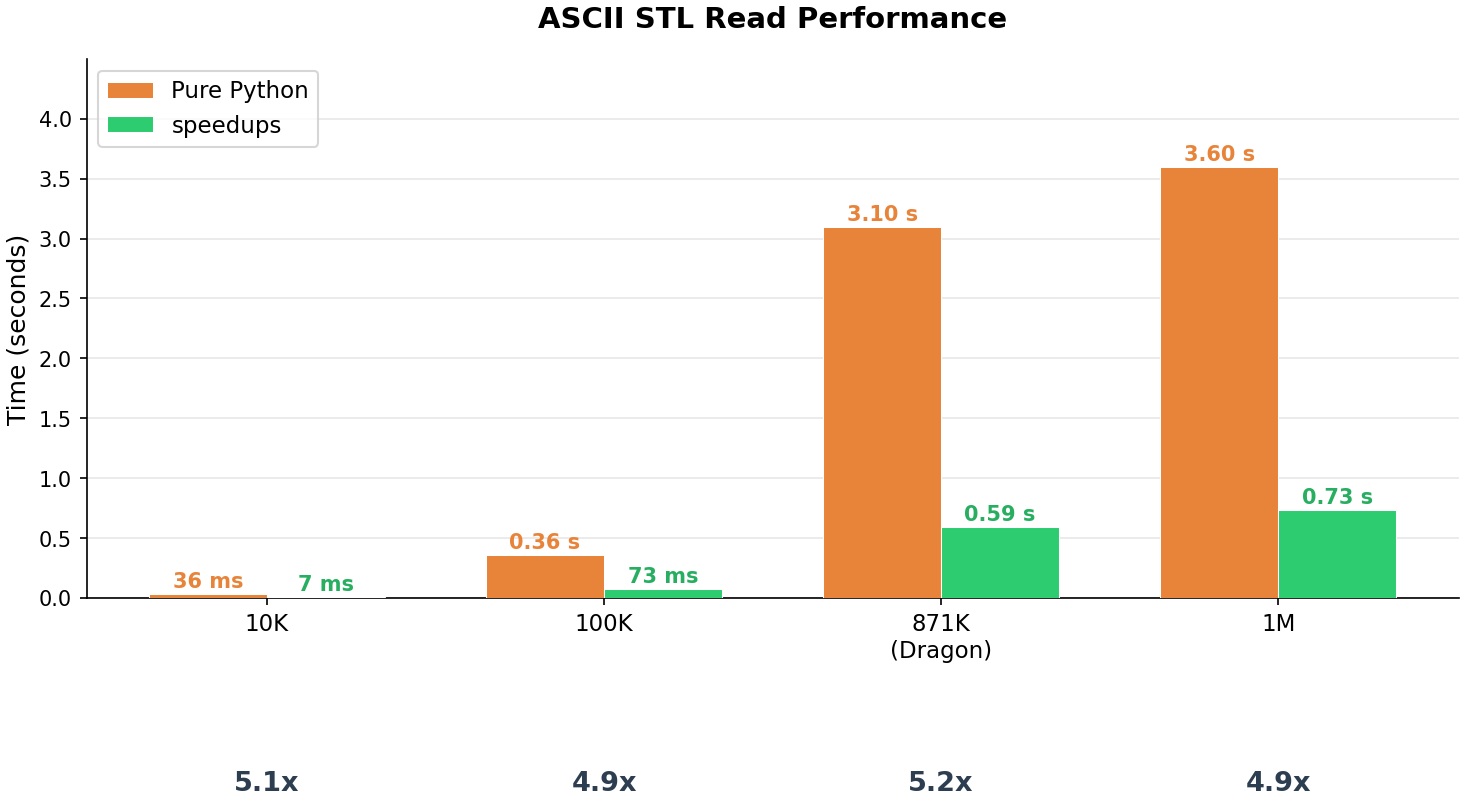
| Facets | Pure Python | Speedups | Factor |
|---|---|---|---|
| 10,000 | 36 ms | 7 ms | 5.1x |
| 100,000 | 0.36 s | 73 ms | 4.9x |
| 871,414 | 3.10 s | 0.59 s | 5.2x |
| 1,000,000 | 3.60 s | 0.73 s | 4.9x |
Note: Results will vary by hardware. Run the benchmark yourself:
python benchmarks/benchmark_ascii_read.py
Usage Examples
Creating a Mesh from Scratch
import numpy as np
from stl import mesh

# Define vertices and faces of a cube
vertices = np.array([
    [-1, -1, -1], [+1, -1, -1], [+1, +1, -1], [-1, +1, -1],
    [-1, -1, +1], [+1, -1, +1], [+1, +1, +1], [-1, +1, +1],
])
faces = np.array([
    [0, 3, 1], [1, 3, 2], [0, 4, 7], [0, 7, 3],
    [4, 5, 6], [4, 6, 7], [5, 1, 2], [5, 2, 6],
    [2, 3, 6], [3, 7, 6], [0, 1, 5], [0, 5, 4],
])

cube = mesh.Mesh(np.zeros(faces.shape[0], dtype=mesh.Mesh.dtype))
for i, f in enumerate(faces):
    for j in range(3):
        cube.vectors[i][j] = vertices[f[j], :]

cube.save('cube.stl')
Rotating and Translating
import math
from stl import mesh

m = mesh.Mesh.from_file('model.stl')
m.rotate([0, 0, 1], math.radians(90))
m.translate([10, 0, 0])
m.save('transformed.stl')
Mass Properties
from stl import mesh

m = mesh.Mesh.from_file('closed_model.stl')
volume, cog, inertia = m.get_mass_properties()
print(f'Volume: {volume:.4f}')
print(f'Center of gravity: {cog}')
Combining Meshes
import numpy as np
from stl import mesh

m1 = mesh.Mesh.from_file('part1.stl')
m2 = mesh.Mesh.from_file('part2.stl')
combined = mesh.Mesh(np.concatenate([m1.data, m2.data]))
combined.save('combined.stl')
Plotting with Matplotlib
import math
from stl import mesh
from mpl_toolkits import mplot3d
from matplotlib import pyplot

figure = pyplot.figure(figsize=(8, 6))
axes = figure.add_subplot(projection='3d')

dragon = mesh.Mesh.from_ply_file('dragon_vrip.ply')
dragon.rotate([1, 0, 0], math.radians(-90))

axes.add_collection3d(
    mplot3d.art3d.Poly3DCollection(dragon.vectors)
)

scale = dragon.points.flatten()
axes.auto_scale_xyz(scale, scale, scale)
pyplot.show()
API Cheatsheet
Assumes import math, import numpy as np, from stl import mesh, and
from stl import Mode (for the ASCII save).
| Task | Call |
|---|---|
| Load (auto-detect) | mesh.Mesh.from_file('m.stl') |
| Load PLY | mesh.Mesh.from_ply_file('m.ply') |
| Load 3MF (experimental) | list(mesh.Mesh.from_3mf_file('m.3mf')) |
| Save (auto/format) | m.save('out.stl') |
| Save as ASCII | m.save('out.stl', mode=Mode.ASCII) |
| Save PLY | m.save_ply('out.ply') |
| Rotate (axis, radians) | m.rotate([0, 0, 1], math.radians(90)) |
| Translate | m.translate([x, y, z]) |
| Transform (4x4 matrix) | m.transform(matrix) |
| Bounding box | m.min_, m.max_ |
| Mass properties | volume, cog, inertia = m.get_mass_properties() |
| With density | vol, mass, cog, inertia = m.get_mass_properties_with_density(d) |
| Combine meshes | mesh.Mesh(np.concatenate([a.data, b.data])) |
CLI Tools
# Convert ASCII to binary
stl2bin input.stl output.stl

# Convert binary to ASCII
stl2ascii input.stl output.stl

# Auto-detect and convert
stl input.stl output.stl
Documentation
Full documentation is available at numpy-stl.readthedocs.io.
Contributing
Contributions are welcome! See CONTRIBUTING.md for the development setup guide.
Links
Support
numpy-stl is maintained by Rick van Hattem in his own time. Most of that time goes on the malformed STL files that real scanners and slicers produce.
If it saved you an afternoon, a tip covers an hour of issue triage: Ko-fi or GitHub Sponsors.
If your company funds its dependencies, this package is on thanks.dev.

License
BSD-3-Clause