PeekX
November 19, 2025 · View on GitHub
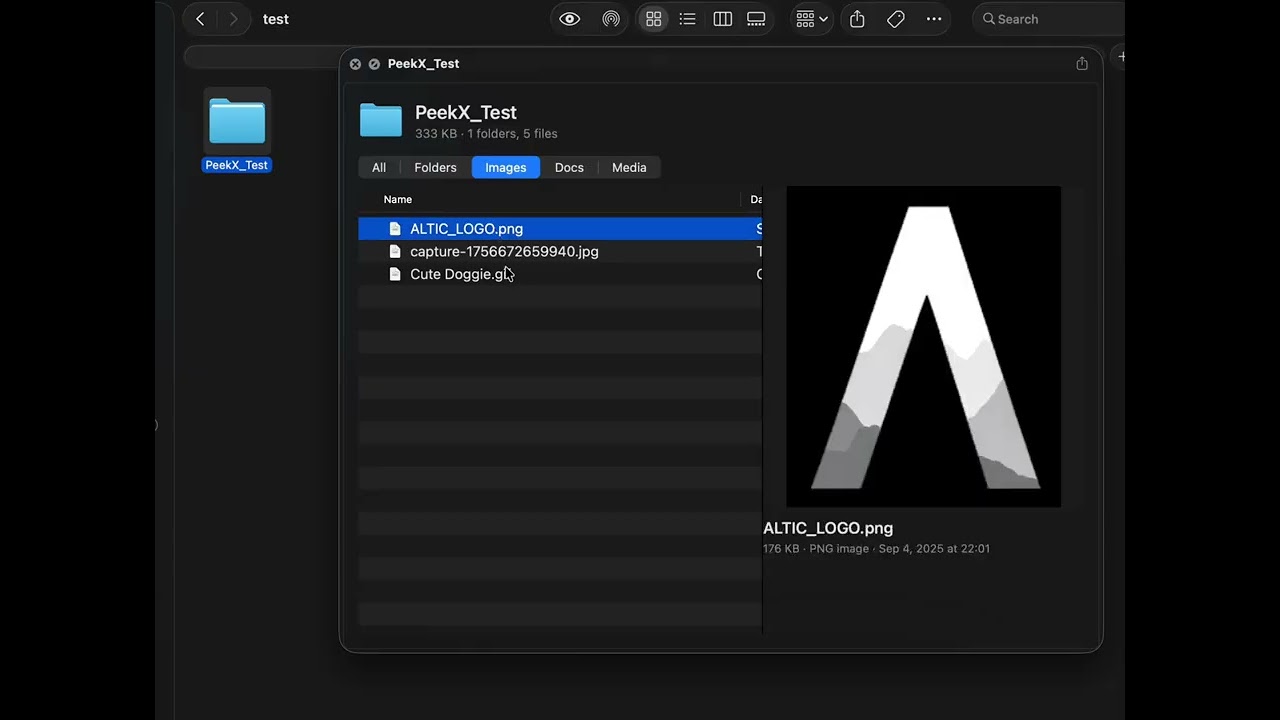
A native macOS Quick Look extension that provides instant previews of folder contents, including file counts, size statistics, and detailed folder analysis.
🎉 What's New in v1.1
- Markdown preview support - View
.mdfiles directly in Quick Look - Faster performance - Improved folder preview speed
⭐ Support This Project
If you find PeekX useful, please consider starring this repository! Unlike similar apps that cost $5-10, PeekX is completely free and open source. A star is the only payment I ask for - it helps others discover the project and motivates continued development.⭐ Star this repo • It takes just one click!
Overview
PeekX enhances the macOS Quick Look feature by allowing you to preview the contents of any folder without opening it. Simply select a folder in Finder and press Space to see a comprehensive breakdown of its contents, including file types, sizes, and structure.
📺 Demo Video
Features
- Instant Folder Preview - View folder contents directly in Quick Look
- File Statistics - See total file count, folder size, and file type breakdown
- Modern Interface - Clean, native macOS design that matches system aesthetics
- Lightweight - Minimal resource usage with fast rendering
- Sandboxed - Fully sandboxed for security and privacy
- Universal Binary - Supports both Apple Silicon and Intel Macs
Requirements
- macOS 14.0 (Sonoma) or later
- Apple Silicon or Intel processor
Installation
Option 1: Download Release (Recommended)
- Download the latest
PeekX-X.X.dmgfrom the Releases page - Open the DMG file
- Drag PeekX to your Applications folder
- Launch PeekX once to register the Quick Look extension
- The app will automatically register and quit
Option 2: Build from Source
# Clone the repository
git clone https://github.com/altic-dev/PeekX.git
cd PeekX

# Open in Xcode and build
open PeekX.xcodeproj
# Build the PeekX scheme (Cmd+B)
Usage
Once installed, using PeekX is straightforward:
- Open Finder
- Navigate to any folder
- Select the folder
- Press Space or click the Quick Look button
- View instant folder analysis and contents
The Quick Look preview will display:
- Total number of files and subfolders
- Total folder size
- Breakdown by file type
- Large file identification
- Folder structure visualization
Uninstallation
To remove PeekX:
- Quit PeekX if running
- Delete
PeekX.appfrom your Applications folder - (Optional) Reset Quick Look cache:
qlmanage -r cache
killall Finder
Development
Project Structure
PeekX/
├── PeekX/                  # Main application
│   ├── PeekXApp.swift     # App entry point
│   └── Assets.xcassets/   # App icons and resources
├── PeekXExt/              # Quick Look extension
│   ├── PreviewViewController.swift  # Main preview logic
│   └── Info.plist         # Extension configuration
└── Shared/                # Shared code between app and extension
    ├── Constants.swift
    └── SharedSettings.swift
Building
Open the project in Xcode and build the PeekX scheme. The extension will be automatically embedded in the main application bundle.
Architecture
PeekX consists of two main components:
- Main Application (PeekX.app) - A lightweight background agent that registers the Quick Look extension on launch
- Quick Look Extension (PeekXExt.appex) - The extension that handles folder preview generation
The extension uses native macOS APIs to analyze folder contents and render previews using WebKit for a modern, responsive interface.
Privacy
PeekX respects your privacy:
- Runs entirely on your Mac with no network access
- Does not collect or transmit any data
- Fully sandboxed with minimal system permissions
- Only accesses folders you explicitly view in Quick Look
Troubleshooting
Extension not showing up
If the Quick Look extension doesn't appear after installation:
- Ensure PeekX.app is in
/Applications - Launch PeekX once to register the extension
- Reset Quick Look cache:
qlmanage -r cache killall Finder - Check extension status:
pluginkit -m -v -p com.apple.quicklook.preview | grep PeekX
Permission issues
If you see permission errors, verify that:
- PeekX has necessary permissions in System Settings
- The app is properly code-signed
- You're running macOS 14.0 or later
Contributing
Contributions are welcome! Please feel free to submit issues and pull requests.
Guidelines
- Fork the repository
- Create a feature branch (
git checkout -b feature/your-feature) - Commit your changes (
git commit -am 'Add new feature') - Push to the branch (
git push origin feature/your-feature) - Create a Pull Request
Please ensure your code:
- Follows Swift style guidelines
- Includes appropriate comments
- Maintains compatibility with macOS 14.0+
- Does not introduce new dependencies without discussion
License
PeekX is licensed under the MIT License. See LICENSE for details.
Copyright (c) 2025 ALTIC
Acknowledgments
Built with:
- Swift and SwiftUI
- macOS Quick Look APIs
Support
Bug Reports
Found a bug? Please report it on GitHub Issues:
- Check existing issues first to avoid duplicates
- Include your macOS version and system information
- Provide steps to reproduce the issue
- Attach relevant logs or screenshots if possible
Feature Requests
Have an idea for a new feature? We'd love to hear it!
- Open a feature request on GitHub Issues
- Describe the feature and why it would be useful
- Include any mockups or examples if applicable
- Label your issue with "enhancement"
All feature requests are reviewed and prioritized based on community interest and feasibility.