🎨 Examples catalog
August 12, 2026 · View on GitHub
All examples live in lib/examples/.
mip.install("github:PyDevices/pydevices-examples/packages/examples.json", target="./examples")
Preferred: set PYTHONPATH/MICROPYPATH to .:lib:utils, cd lib, then run python3 examples/<name>.py (or from examples import <name> at the REPL) — see full clone.
!!! tip "Start here" New to pydevices-examples? Copy the App starter boilerplate to begin your first app, then read the pydevices_demo guide for rotation, scrolling, and buffered text.
PyScript gallery markers
Every example entry point under lib/examples/ is included in the
browser gallery by default
(scripts/gallery_generator.py):
| Entry | Kind |
|---|---|
examples/<name>.py | module (?modules=) |
examples/<name>/<name>.py | package manifest (?manifests=) |
examples/<name>/__init__.py | package manifest (if no <name>.py) |
Optional header comments (first 10 lines), one line per namespace:
# deps: palettes, lvgl
# modules: calc_engine
# manifests: alien
# gallery: featured
| Marker | Effect |
|---|---|
# deps: … | Logical packages → ?deps= via url_maker (MIP on MicroPython, micropip on Pyodide) |
# modules: … | Extra example .py stems from this site |
# manifests: … | Extra site-served packages/<name>.json demo bundles |
# gallery: featured | Pin to the top of the gallery (badge) |
# gallery: skip | Omit from the card grid |
# gallery: binaries | Omit (needs non-mip assets) |
Hinch GUI demos need no package header — fetch_ph_gui installs via color/hardware/touch setup.
rg '^# gallery:' lib/examples/
rg '^# deps:' lib/examples/
rg '^# modules:' lib/examples/
rg '^# manifests:' lib/examples/
See PyScript local development.
Canonical patterns
runtime.run_forever() with callbacks — hello.py, scroll.py, pydevices_demo.py, calc_graphics.py:
from board_config import display_drv
from app_runtime import runtime

def on_click(e):
    ...

runtime.on(runtime.events.MOUSEBUTTONDOWN, on_click)
runtime.run_forever()
Event-driven poll — eventsys_encoder_test.py:
display_drv.show()  # after initial draw
while True:
    if elist := runtime.poll():
        for e in elist:
            ...  # draw on event
            display_drv.show()
Forever LVGL / library-driven app — lv_test_timer.py: build UI then runtime.run_forever(). Kit mode keeps a small sync/async wait for LVGL click injection.
tft_config animation / one-shot — subdirectory demos alien/alien.py, tiny_toasters/tiny_toasters.py, chango/chango.py:
from app_runtime import runtime

tft.show()
runtime.run_forever()
LVGL apps — lv_test_timer.py: import display_driver, build UI, then runtime.run_forever(). See LVGL guide.
pdwidgets — widgets_clinic_queue.py and related kiosk demos: build UI, then:
import board_config
import pdwidgets as pd
from app_runtime import runtime

display = pd.Display(board_config.display_drv, runtime)
# ... widgets ...
runtime.run_forever()
Display wires into the runtime at construction. During setup bursts before
run_forever(), call pd.tick() to flush draws. See pdwidgets.
Notes
font_simpletest.py— cyclesstring_blit→per_pixel→displaybufin one run (see Font rendering patterns).nano_gui_simpletest.py/micro_gui_simpletest.py/touch_gui_simpletest.pyneed the matching Peter Hinchgui/inutils/(viafetch_ph_gui/ mip). Legend: Platforms = CPython · MCU · PyScript · Wokwi · Packages = core · utils · LVGL
Suggested learning order
| Step | Script | Platforms | Packages | Screenshot |
|---|---|---|---|---|
| 0 | App starter (doc boilerplate) | CPython · MCU · PyScript | core | — |
| 1 | pydevices_demo.py | CPython · MCU | core | — |
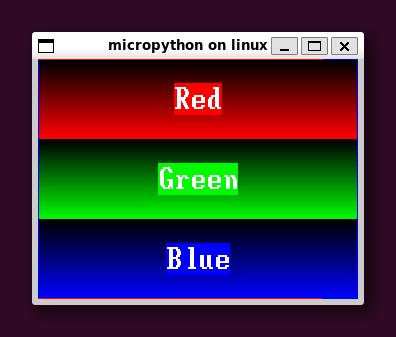
| 2 | color_test.py | CPython · MCU | core | color_test |
| 3 | eventsys_simpletest.py | CPython · MCU · PyScript | core | — |
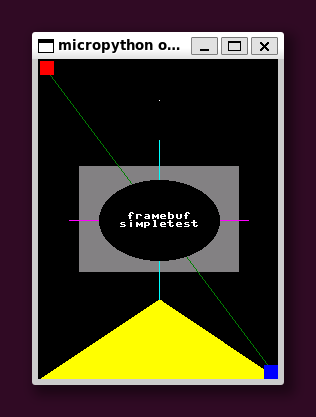
| 4 | framebuf_simpletest.py | CPython · MCU | core | framebuf |
| 5 | graphics_simpletest.py | CPython · MCU | core | — |
| 6 | eventsys_touch_test.py | CPython · MCU | core | — |
| 7 | calc_graphics.py | CPython · PyScript | core | — |
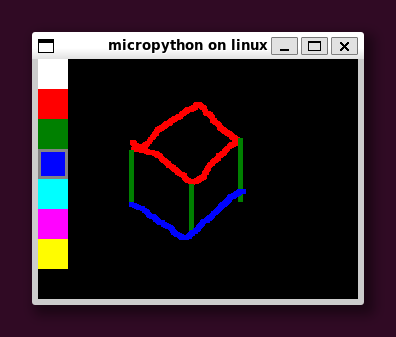
| 8 | paint.py | CPython · PyScript | core | paint |
| 9 | widgets_clinic_queue.py | CPython · MCU | utils | — |
PyScript requires asyncio — see PyScript asyncio guide.
Hello and basics
| Resource | Description | Platforms | Packages |
|---|---|---|---|
| App starter | Copy-paste app boilerplate (doc only) | CPython · MCU · PyScript | core |
pydevices_demo.py | Clicks, rotation, scroll (runtime.run_forever) | CPython · MCU · PyScript | core |
hello.py | Minimal text (tft_config) | CPython · MCU · Wokwi | core |
color_test.py | Color bars | CPython · MCU | core |
logo.py | Logo drawing | CPython · MCU | core |
displaysys_block_test.py | Block transfer test | CPython · MCU | core |
displaysys_fill_rect_test.py | Fill rect test | CPython · MCU | core |
Events and input
| Script | Description | Platforms | Packages |
|---|---|---|---|
eventsys_simpletest.py | Event loop basics | CPython · MCU · PyScript | core |
eventsys_touch_test.py | Touch events | CPython · MCU | core |
eventsys_encoder_test.py | Rotary encoder | MCU | core |
scroll_touch_test.py | Touch scrolling (cycles display_drv ↔ DisplayBuffer) | CPython · MCU | utils |
joystick_list_select.py | Joystick + list | CPython · MCU | core |
keypins_simpletest.py | Keypad pins | MCU | utils |
Drawing and fonts
| Script | Description | Platforms | Packages |
|---|---|---|---|
framebuf_simpletest.py | framebuf API | CPython · MCU | core |
graphics_simpletest.py | pygraphics module | CPython · MCU | core |
font_simpletest.py | Font: cycles string_blit / per_pixel / displaybuf | CPython · MCU | utils |
font_list.py | List / preview .bin fonts from a directory | CPython · MCU | core |
fonts.py | Page through fonts | CPython · MCU | core |
boxlines.py | Lines and boxes | CPython · MCU | core |
bouncing_balls.py | Colored balls animation | CPython · MCU · PyScript | core |
Bitmaps and palettes
| Script | Description | Platforms | Packages |
|---|---|---|---|
bmp565_simpletest.py | BMP565 load/draw (slice + full blit) | CPython · MCU | pygraphics |
bmp565_sprite.py | Sprite animation | CPython · MCU | pygraphics |
bmp565_sprite_transparent.py | Transparency | CPython · MCU | pygraphics |
bmp565_scroll.py | Scrolling bitmap | CPython · MCU | pygraphics |
bmp565_scroll_sprite.py | Scrolling sprite | CPython · MCU | pygraphics |
palettes_demo.py | Palettes: cycles wheel / cube / material | CPython · MCU | core |
pbm_simpletest.py | PBM images | CPython · MCU | core |
Widgets and apps
| Script | Description | Platforms | Packages |
|---|---|---|---|
calc_graphics.py | Pocket calculator (pygraphics) | CPython · MCU · PyScript | core |
calc_widgets.py | Pocket calculator (pdwidgets) | CPython · MCU · PyScript | utils |
calc_lvgl.py | Pocket calculator (LVGL) | CPython · MCU · PyScript | LVGL |
paint.py | Paint app | CPython · PyScript | core |
testris.py | Tetris-like game | CPython · MCU | core |
apollo.py | Apollo DSKY | CPython · PyScript | core |
widgets_*.py | pdwidgets demos | CPython · MCU | utils |
console_simpletest.py | Console add-on | CPython · MCU | utils |
console_advanced_demo.py | Advanced console | CPython · MCU | utils |
Display buffers and misc
| Script | Description | Platforms | Packages |
|---|---|---|---|
displaybuf_simpletest.py | DisplayBuffer | CPython · MCU | utils |
scroll.py | Scrolling text | CPython · MCU | core |
rotations.py | Display rotation | CPython · MCU | core |
nano_gui_simpletest.py | Nano-GUI hardware check | CPython · MCU · PyScript | utils + micropython-nano-gui |
micro_gui_simpletest.py | Micro-GUI smoke | CPython · MCU · PyScript | utils + micropython-micro-gui |
touch_gui_simpletest.py | Touch GUI smoke | CPython · MCU · PyScript | utils + micropython-touch |
lv_test_timer.py | LVGL timer (follows runtime.timer_async) | CPython · MCU · PyScript | LVGL |
Subdirectories
Runnable demos in subfolders use the same entry rules (<name>/<name>.py or __init__.py) and optional # pyscript skip: / featured / modules: headers.
| Directory | Script | Platforms | Notes |
|---|---|---|---|
alien/ | alien.py | CPython · MP · MCU | Sprite bounce; runtime.poll() quit each frame |
chango/ | chango.py | CPython · MP · MCU · PyScript | One-shot font demo; runtime.poll() after draws |
noto_fonts/ | noto_fonts.py | MP · MCU · PyScript | One-shot Noto font demo; same tail as chango |
proverbs/ | proverbs.py | CPython · MP · MCU | Chinese proverb slideshow; quit via runtime.poll() |
tiny_toasters/ | tiny_toasters.py | CPython · MP · MCU | Sprite animation; quit via runtime.poll() |
apollo/ | apollo.py | CPython · PyScript | DSKY emulator (dsky.py + BMP assets) |
assets/ | — | — | Shared fonts and images |
Screenshots and live demos
See Try pydevices-examples for the full gallery and browser/Wokwi demos.