VeritasGraph: The All-in-One GraphRAG Framework

May 29, 2026 ยท View on GitHub

Stop chunking blindly. Combine the structure of Tree-Search with the reasoning of Knowledge Graphs. Runs locally or in the cloud.

Project Logo

PyPI version Python 3.10+ License: MIT

๐ŸŽฏ Traditional RAG guesses based on similarity. VeritasGraph reasons based on structure.
Don't just find the documentโ€”understand the connection.


๐ŸŒณ + ๐Ÿ”— Graph + Tree: The Ultimate Retrieval

Why choose? VeritasGraph includes the hierarchical "Table of Contents" navigation of PageIndex PLUS the semantic reasoning of a Knowledge Graph.

Document Root
โ”œโ”€โ”€ [1] Introduction
โ”‚   โ”œโ”€โ”€ [1.1] Background โ†โ”€โ”€ Tree Navigation
โ”‚   โ””โ”€โ”€ [1.2] Objectives
โ”œโ”€โ”€ [2] Methodology โ†โ”€โ”€โ”€โ”€โ”€โ”€โ”€โ”€โ”€ Graph Links
โ”‚   โ””โ”€โ”€ relates_to โ”€โ”€โ”€โ”€โ”€โ”€โ”€โ”€โ”€โ”€โ†’ [3.1] Findings
โ””โ”€โ”€ [3] Results

๐Ÿ“Š Feature Comparison

FeatureVector RAGPageIndexVeritasGraph
Retrieval TypeSimilarityTree Search๐Ÿ† Tree + Graph Reasoning
AttributionโŒ Lowโš ๏ธ Mediumโœ… 100% Verifiable
Multi-hop ReasoningโŒโŒโœ…
Tree Navigation (TOC)โŒโœ…โœ…
Semantic Searchโœ…โŒโœ…
Cross-section LinkingโŒโŒโœ…
Visual Graph ExplorerโŒโŒโœ… Built-in UI
100% Local/Privateโš ๏ธ VariesโŒ Cloudโœ… On-Premise
Open Sourceโš ๏ธ VariesโŒ Proprietaryโœ… MIT License
Cross-section linkingโŒโŒโœ…

VeritasGraph is a production-ready framework that solves the fundamental problem with vector-search RAG: context blindness. While traditional RAG chunks your documents into isolated fragments and hopes cosine similarity finds the right one, VeritasGraph builds a knowledge graph that actually understands how your information connects.

The result? Multi-hop reasoning that answers complex questions, transparent attribution for every claim, and a hierarchical tree structure that navigates documents like a human wouldโ€”all running on your own infrastructure.

Traditional RAG vs VeritasGraph comparison

๐Ÿš€ Get Started in 2 Lines

No GPU? No problem. Try VeritasGraph instantly:

pip install veritasgraph
veritasgraph demo --mode=lite

That's it. This launches an interactive demo using cloud APIs (OpenAI/Anthropic)โ€”no local models required.

Open in Colab: Vectorless RAG ย ย  Open in Colab: Vision RAG ย ย  Open in Colab: Tree Accuracy


๐ŸŽฌ See It In Action

VeritasGraph Master Demo

โ–ถ๏ธ What you're seeing: A query triggers multi-hop reasoning across the knowledge graph...

Watch VeritasGraph build reasoning paths in real-time
โ–ถ๏ธ Watch VeritasGraph build reasoning paths in real-time.

Watch how to Convert Charts & Tables to Knowledge Graphs in Minutes | Vision RAG Tutorial
โ–ถ๏ธ Convert Charts & Tables to Knowledge Graphs in Minutes | Vision RAG Tutorial

๐Ÿ’ก What you're seeing: A query triggers multi-hop reasoning across the knowledge graph. Nodes light up as connections are discovered, showing exactly how the answer was foundโ€”not just what was found.


๐Ÿง  VeritasReason

A Framework for Building Context Graphs and Decision Intelligence Layers for AI

Python 3.8+ License: MIT PyPI Version Total Downloads CI GitHub Discussions GitHub Issues GitHub Stars

โญ Give us a Star ยท ๐Ÿด Fork us ยท ๐Ÿ’ฌ Join the Discussion ยท ๐Ÿ› Report an Issue

Transform Chaos into Intelligence. Build AI systems with context graphs, decision tracking, and advanced knowledge engineering that are explainable, traceable, and trustworthy โ€” not black boxes.

๐ŸŽฌ See it in action โ€” 30-second policy-compliance demo

VeritasGraph + VeritasReason policy-compliance demo

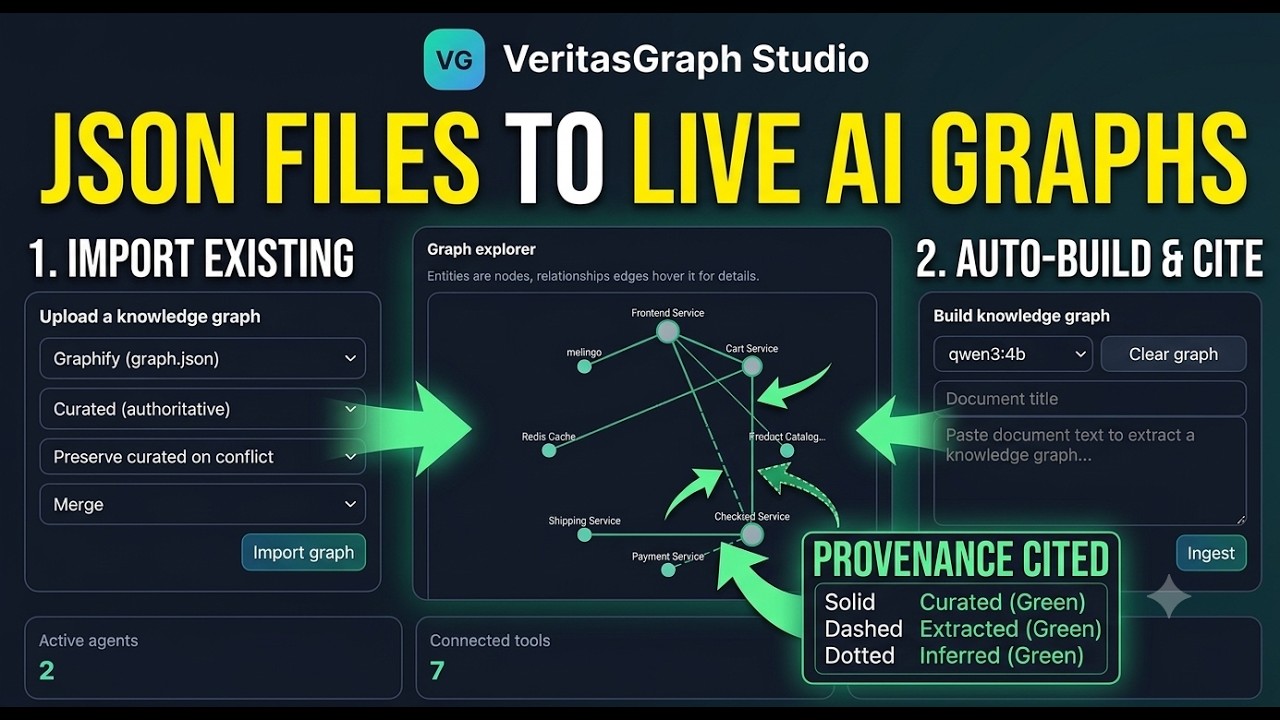
Ask "Which purchase orders violated our Segregation-of-Duties policy in Q1?" โ€” the engine pulls the policy clause via GraphRAG, runs the YAML rules over your ERP triples, and returns the violators with the rule ID and the exact policy citation.

Try it yourself:

pip install veritas-reason
veritasreason-policy-demo

Choose Your Path

ModeBest ForRequirements
--mode=liteQuick demo, no GPUOpenAI/Anthropic API key
--mode=localPrivacy, offline useOllama + 8GB RAM
--mode=fullProduction, all featuresDocker + Neo4j
# Lite mode (cloud APIs, zero setup)
export OPENAI_API_KEY="sk-..."
veritasgraph demo --mode=lite

# Local mode (100% offline with Ollama)
veritasgraph demo --mode=local --model=llama3.2

# Full mode (complete GraphRAG pipeline)
veritasgraph start --mode=full

๐Ÿ“ฆ Installation

# Basic install (includes lite mode)
pip install veritasgraph

# With optional dependencies
pip install veritasgraph[web]      # Gradio UI + visualization
pip install veritasgraph[graphrag] # Microsoft GraphRAG integration  
pip install veritasgraph[ingest]   # YouTube & web article ingestion
pip install veritasgraph[all]      # Everything

๐Ÿ“– Quick Start (Python API)

Once you're ready to integrate VeritasGraph into your code:

from veritasgraph import VisionRAGPipeline

# Simplest usage - auto-detects available models
pipeline = VisionRAGPipeline()
doc = pipeline.ingest_pdf("document.pdf")
result = pipeline.query("What are the key findings?")
print(result.answer)
๐Ÿ”ง Advanced: Custom Configuration
from veritasgraph import VisionRAGPipeline, VisionRAGConfig

# Configure for local Ollama models
config = VisionRAGConfig(vision_model="llama3.2-vision:11b")
pipeline = VisionRAGPipeline(config)

# Ingest a PDF document (automatically extracts hierarchical structure)
doc = pipeline.ingest_pdf("document.pdf")

# Query with full visual context
result = pipeline.query("What are the key findings in the tables?")

๐ŸŒณ Hierarchical Tree Support

The Power of PageIndex's Tree + The Flexibility of a Graph

VeritasGraph now combines two powerful retrieval paradigms:

  • Tree-based navigation - Human-like retrieval through Table of Contents structure
  • Graph-based search - Semantic similarity across the entire document
from veritasgraph import VisionRAGPipeline

pipeline = VisionRAGPipeline()
doc = pipeline.ingest_pdf("report.pdf")

# View the document's hierarchical structure (like a Table of Contents)
print(pipeline.get_document_tree())
# Output:
# Document Root
# โ”œโ”€โ”€ [1] Introduction (pp. 1-5)
# โ”‚   โ”œโ”€โ”€ [1.1] Background (pp. 1-2)
# โ”‚   โ””โ”€โ”€ [1.2] Objectives (pp. 3-5)
# โ”œโ”€โ”€ [2] Methodology (pp. 6-15)
# โ”‚   โ”œโ”€โ”€ [2.1] Data Collection (pp. 6-10)
# โ”‚   โ””โ”€โ”€ [2.2] Analysis Framework (pp. 11-15)
# โ””โ”€โ”€ [3] Results (pp. 16-30)

# Navigate to a specific section (tree-based retrieval)
section = pipeline.navigate_to_section("Methodology")
print(section['breadcrumb'])  # ['Document Root', 'Methodology']
print(section['children'])    # [Data Collection, Analysis Framework]

# Or use graph-based semantic search
result = pipeline.query("What methodology was used?")
# Returns answer with section context: "๐Ÿ“ Location: Document > Methodology > Analysis Framework"

Why Hierarchical Trees Matter

Traditional RAGVeritasGraph with Trees
Chunks documents randomlyPreserves document structure
Loses section contextMaintains parent-child relationships
Can't navigate by structureSupports TOC-style navigation
No hierarchy awarenessFull tree traversal (ancestors, siblings, children)

CLI Usage

veritasgraph --version                                    # Show version
veritasgraph info                                         # Check dependencies  
veritasgraph init my_project                              # Initialize new project
veritasgraph ingest document.pdf --ingest-mode=document-centric  # Don't Chunk. Graph.

๏ฟฝ Ingestion Capabilities

VeritasGraph offers multiple ways to ingest content into your knowledge graph:

"Don't Chunk. Graph." - Document-Centric Mode

Traditional RAG splits documents into arbitrary 500-token chunks, destroying context. VeritasGraph's document-centric mode treats whole pages or sections as single retrievable nodes:

from veritasgraph import VisionRAGPipeline, VisionRAGConfig

config = VisionRAGConfig(ingest_mode="document-centric")  # Tables stay intact!
pipeline = VisionRAGPipeline(config)
doc = pipeline.ingest_pdf("annual_report.pdf")

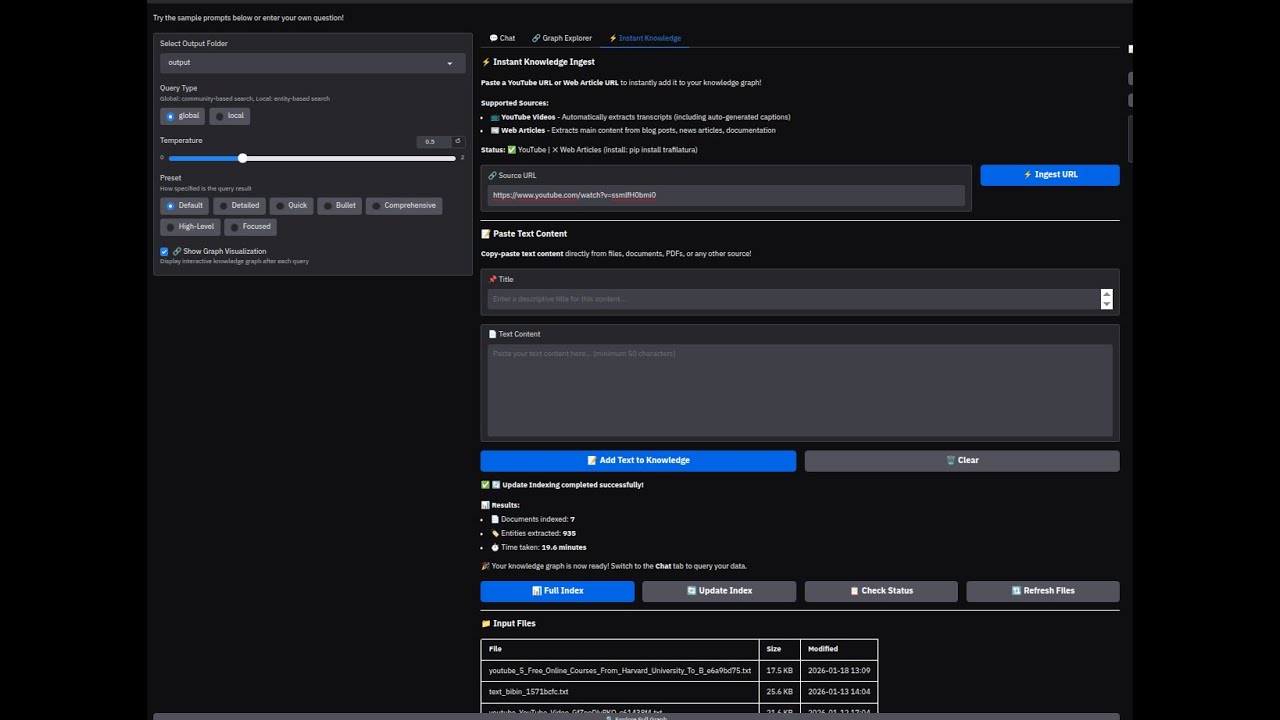
โšก Instant Knowledge Ingest

Add content to your knowledge graph with one click:

SourceHow It Works
๐Ÿ“บ YouTubePaste URL โ†’ auto-extracts transcript
๐Ÿ“ฐ Web ArticlesPaste URL โ†’ extracts main content
๐Ÿ“„ PDFsUpload โ†’ document-centric extraction
๐Ÿ“ TextPaste directly โ†’ instant indexing
# CLI ingestion
veritasgraph ingest https://youtube.com/watch?v=xxx
veritasgraph ingest https://example.com/article
veritasgraph ingest document.pdf --mode=document-centric

Ingestion Modes

ModeDescriptionBest For
document-centricWhole pages/sections as nodes (default)Most documents
pageEach page = one nodeSlide decks, reports
sectionEach section = one nodeStructured documents
chunkTraditional 500-token chunksLegacy compatibility

stars issues forks license

โžก๏ธโšก๏ธ Live documentation

๐Ÿ“– Article

๐Ÿ“„ Research Paper

๐ŸŽฎ Try Live Demo - Stable URL - always redirects to current server


Why choose VeritasGraph for your Knowledge Graph GitHub project?

If you landed here searching for an open-source knowledge graph on GitHub, VeritasGraph is built specifically for teams who need a production-grade, self-hostable graph stack โ€” not just a demo notebook.

VeritasGraph turns unstructured documents into a fully traversable knowledge graph of nodes (entities) and edges (typed relationships), then layers Graph + Tree retrieval on top so an LLM can perform multi-hop reasoning with verifiable citations.

What you get out of the box:

  • ๐Ÿงฌ Knowledge Graph construction โ€” automated entity & relation extraction, ontology-aware schemas, and incremental updates as new documents arrive.
  • ๐Ÿ”— Linked-data & RDF friendly โ€” export your graph to RDF / Turtle, plug into existing semantic web pipelines, or back it with a graph database like Neo4j.
  • ๐Ÿงญ Graph analytics โ€” community detection, centrality, and path-finding to surface non-obvious connections across your corpus.
  • ๐Ÿ“š Ontology & taxonomy support โ€” define domain ontologies (or let VeritasGraph infer one) so retrieval respects the structure of your knowledge.
  • ๐Ÿ” GraphRAG retrieval โ€” hybrid Graph + Tree + vector search that beats pure vector RAG on multi-hop and cross-document questions.
  • ๐Ÿ›ก๏ธ Verifiable attribution โ€” every generated claim is anchored back to specific nodes, edges, and source spans in the graph.
  • ๐Ÿ  100% local or hybrid โ€” run entirely on-premise with Ollama, or mix in OpenAI-compatible APIs. Your knowledge graph never has to leave your infrastructure.

Who is it for? Engineers building enterprise search, compliance assistants, research copilots, scientific literature explorers, agent memory systems, and any application where "the answer" depends on how facts connect, not just whether they appear near each other in a vector index.

Related terminology this project covers: knowledge graph, graph database, ontology, taxonomy, linked data, RDF, SPARQL-style traversal, nodes, edges, triples, GraphRAG, multi-hop reasoning, semantic web, graph analytics, entity resolution, knowledge engineering.

๐Ÿ‘‰ Star the repo if you'd like to follow VeritasGraph's roadmap for open-source knowledge graphs on GitHub โ€” it genuinely helps other developers discover the project.


Why VeritasGraph?

โœ… Fully On-Premise & Secure

Maintain 100% control over your data and AI models, ensuring maximum security and privacy.

โœ… Verifiable Attribution

Every generated claim is traced back to its source document, guaranteeing transparency and accountability.

โœ… Advanced Graph Reasoning

Answer complex, multi-hop questions that go beyond the capabilities of traditional vector search engines.

โœ… Hierarchical Tree + Graph (NEW!)

Combines PageIndex-style TOC navigation with graph flexibility. Navigate documents like humans do (through sections and subsections) while also leveraging semantic search across the entire graph.

โœ… Interactive Graph Visualization

Explore your knowledge graph with an interactive 2D graph explorer powered by PyVis, showing entities, relationships, and reasoning paths in real-time.

โœ… Open-Source & Sovereign

Build a sovereign knowledge asset, free from vendor lock-in, with full ownership and customization.


๐Ÿ›๏ธ Enterprise Compliance: VeritasGraph + VeritasReason

GraphRAG is brilliant at describing what your documents say. But enterprise questions like "Which purchase orders violated our Segregation-of-Duties policy last quarter?" are not similarity-search problems โ€” they are rule-evaluation problems over structured records (purchase orders, attendance logs, ledger entries).

For those, VeritasGraph ships with a sister module: VeritasReason โ€” a deterministic reasoning engine (forward-chaining + Rete + SPARQL, built on the VeritasReason core) that fires policy rules over a triplet store and returns auditable answers with W3C PROV-O provenance.

โ”Œโ”€โ”€โ”€โ”€โ”€โ”€โ”€โ”€โ”€โ”€โ”€โ”€โ”€โ”€โ”€โ”€โ”     โ”Œโ”€โ”€โ”€โ”€โ”€โ”€โ”€โ”€โ”€โ”€โ”€โ”€โ”€โ”€โ”€โ”€โ”€โ”€โ”€โ”€โ”     โ”Œโ”€โ”€โ”€โ”€โ”€โ”€โ”€โ”€โ”€โ”€โ”€โ”€โ”€โ”€โ”€โ”€โ”€โ”€โ”€โ”€โ”
โ”‚ Policy PDFs    โ”‚     โ”‚ ERP / HRIS / DB    โ”‚     โ”‚ User question      โ”‚
โ”‚ (handbooks,    โ”‚     โ”‚ (PO, attendance,   โ”‚     โ”‚ "Which POs violate โ”‚
โ”‚  contracts)    โ”‚     โ”‚  ledger, vendors)  โ”‚     โ”‚  SoD this quarter?"โ”‚
โ””โ”€โ”€โ”€โ”€โ”€โ”€โ”€โ”ฌโ”€โ”€โ”€โ”€โ”€โ”€โ”€โ”€โ”˜     โ””โ”€โ”€โ”€โ”€โ”€โ”€โ”€โ”€โ”€โ”ฌโ”€โ”€โ”€โ”€โ”€โ”€โ”€โ”€โ”€โ”€โ”˜     โ””โ”€โ”€โ”€โ”€โ”€โ”€โ”€โ”€โ”€โ”ฌโ”€โ”€โ”€โ”€โ”€โ”€โ”€โ”€โ”€โ”€โ”˜
        โ”‚                        โ”‚                          โ”‚
        โ–ผ                        โ–ผ                          โ–ผ
 โ”Œโ”€โ”€โ”€โ”€โ”€โ”€โ”€โ”€โ”€โ”€โ”€โ”€โ”€โ”€โ”€โ”€โ”€โ”    โ”Œโ”€โ”€โ”€โ”€โ”€โ”€โ”€โ”€โ”€โ”€โ”€โ”€โ”€โ”€โ”€โ”€โ”€โ”€โ”€โ”€โ”€โ”€โ”   โ”Œโ”€โ”€โ”€โ”€โ”€โ”€โ”€โ”€โ”€โ”€โ”€โ”€โ”€โ”€โ”€โ”€โ”€โ”€โ”€โ”€โ”
 โ”‚ VeritasGraph    โ”‚    โ”‚ ingest_structured.py โ”‚   โ”‚ policy_search.py   โ”‚
 โ”‚ GraphRAG index  โ”‚    โ”‚  SQL โ†’ triples +     โ”‚   โ”‚ 1. RAG โ†’ policy id โ”‚
 โ”‚ (text, RAG)     โ”‚    โ”‚  narrative .txt      โ”‚   โ”‚ 2. Reasoner โ†’ factsโ”‚
 โ””โ”€โ”€โ”€โ”€โ”€โ”€โ”€โ”€โ”ฌโ”€โ”€โ”€โ”€โ”€โ”€โ”€โ”€โ”˜    โ””โ”€โ”€โ”€โ”€โ”€โ”€โ”€โ”€โ”€โ”€โ”ฌโ”€โ”€โ”€โ”€โ”€โ”€โ”€โ”€โ”€โ”€โ”€โ”˜   โ”‚ 3. LLM narration   โ”‚
          โ”‚                        โ”‚               โ””โ”€โ”€โ”€โ”€โ”€โ”€โ”€โ”€โ”€โ”ฌโ”€โ”€โ”€โ”€โ”€โ”€โ”€โ”€โ”€โ”€โ”˜
          โ””โ”€โ”€โ”€โ”€โ”€โ”€โ”€โ”€โ”ฌโ”€โ”€โ”€โ”€โ”€โ”€โ”€โ”€โ”€โ”€โ”€โ”€โ”€โ”€โ”€โ”˜                         โ”‚
                   โ–ผ                                         โ–ผ
        โ”Œโ”€โ”€โ”€โ”€โ”€โ”€โ”€โ”€โ”€โ”€โ”€โ”€โ”€โ”€โ”€โ”€โ”€โ”€โ”€โ”€โ”€โ”€โ”€โ”€โ”€โ”€โ”              โ”Œโ”€โ”€โ”€โ”€โ”€โ”€โ”€โ”€โ”€โ”€โ”€โ”€โ”€โ”€โ”€โ”€โ”€โ”€โ”€โ”€โ”
        โ”‚ VeritasReason            โ”‚              โ”‚ Compliance answer  โ”‚
        โ”‚ TripletStore + RuleSet   โ”‚ โ”€โ”€โ”€โ”€โ”€โ”€โ”€โ”€โ”€โ”€โ”€โ–ถ โ”‚ + violators table  โ”‚
        โ”‚ ForwardChainer + PROV-O  โ”‚              โ”‚ + clause citations โ”‚
        โ””โ”€โ”€โ”€โ”€โ”€โ”€โ”€โ”€โ”€โ”€โ”€โ”€โ”€โ”€โ”€โ”€โ”€โ”€โ”€โ”€โ”€โ”€โ”€โ”€โ”€โ”€โ”˜              โ””โ”€โ”€โ”€โ”€โ”€โ”€โ”€โ”€โ”€โ”€โ”€โ”€โ”€โ”€โ”€โ”€โ”€โ”€โ”€โ”€โ”˜

๐Ÿ’ผ Worked example โ€” Procurement / SOX Segregation-of-Duties

Question: "Which purchase orders violated our Segregation-of-Duties policy in Q1 2026, and which employees were involved?"

A vector RAG would happily quote the policy. VeritasGraph + VeritasReason enumerate the offenders deterministically.

1. Ingest the policy (unstructured) โ€” already supported

Drop Procurement_Policy_2026.pdf into graphrag-ollama-config/input/ and run graphrag index. The clauses are now retrievable text units.

2. Ingest the ERP records (structured) โ€” new module

export ERP_DB_URL="postgresql://readonly:***@erp-db:5432/erp"
python -m graphrag-ollama-config.ingest_structured

ingest_structured.py reads employees, purchase_orders, and vendors, and emits:

  • Narrative text into input/structured_*.txt so GraphRAG can quote rows.

  • RDF triples into the VeritasReason store, e.g.

    po:PO-2204  proc:approvedBy  emp:E118
    po:PO-2204  proc:paidBy      emp:E118
    po:PO-2204  proc:amount      48750.00
    

    Each triple is tagged with source=erp://purchase_orders/PO-2204 for PROV-O.

3. Encode the policy as rules โ€” rules/sod_policy.yaml

- id: SOD-01
  description: Same employee must not both APPROVE and PAY a purchase order.
  when:
    - (?po proc:approvedBy ?e)
    - (?po proc:paidBy     ?e)
  then:
    - (?po proc:violates policy:SoD#SOD-01)
  cite:
    - policy_doc: "Procurement_Policy_2026.pdf#section-3.1"

Rules SOD-02 (request โ‰  approve), SOD-03 ($25k+ needs Director), SOD-04 (related-party vendor) ship with the repo.

4. Ask in natural language โ€” new query type

In the Gradio UI, pick policy_compliance from the Query type dropdown:

Which purchase orders violated our Segregation-of-Duties policy in Q1 2026?

Under the hood, policy_search.py:

  1. Calls VeritasGraph RAG to identify the policy (policy:SoD) and pull the clause text for citation.
  2. Runs the VeritasReason ForwardChainer over the triple store, firing only rules tagged with that policy.
  3. Hands the structured result + RAG context to the LLM for narration.

5. Get an auditable answer

PORuleEvidence
PO-2204SOD-01Approved & paid by emp:E118 (Sarah Chen)
PO-2317SOD-03$48,750 approved by emp:E091 (role: Manager)
PO-2402SOD-04Vendor V-77 is related party of approver E140

3 purchase orders violated the Segregation-of-Duties policy in Q1 2026: PO-2204 (rule SOD-01, ยง3.1 of the Procurement Policy)โ€ฆ Every cell links to the source ERP row and the policy clause.

Why split the work?

ConcernLives in
Quoting unstructured policy textVeritasGraph (GraphRAG)
Counting / joining structured recordsVeritasReason (rule engine)
Provenance for every claimBoth โ€” unified PROV-O
Natural-language interfaceLLM narrator on top

The same pattern applies to leave-policy violations (HRIS attendance), expense-report fraud (ledger + receipts), clinical protocol breaches (EHR + guidelines), or KYC/AML (transactions + watchlists). Define the SQL โ†’ triple mapping in ingest_structured.py, write the rules in rules/*.yaml, and ask in plain English. See veritas-reason/plan.md for the original design notes and a leave-policy walk-through.

โœ… Try it in 30 seconds (no install required)

A self-contained smoke test ships with the repo. It seeds a fake ERP into a tiny in-memory triple store, evaluates the four rules in rules/sod_policy.yaml, and prints the violators with citations:

python tests/test_policy_compliance_demo.py

๐ŸŽฌ See it in motion

Animated demo: question โ†’ RAG identifies policy โ†’ ForwardChainer fires four SoD rules โ†’ audit-ready answer with citations

Headless Chromium drives a self-contained HTML stage that mirrors the actual rule firing in rules/sod_policy.yaml. Re-record at any time with demos/policy-compliance/record.py (Playwright + Pillow, ~12 s, no ffmpeg). Source files in demos/policy-compliance/.

Expected output:

โœ“ Found rule file:  rules/sod_policy.yaml
  (4 rules declared)
โœ“ Seeded MiniStore: 60 triples (5 purchase orders, 5 employees)
โœ“ Reasoner fired. Detected 4 violation(s):

  PO         Rule     Evidence
  ---------- -------- ----------------------------------------
  po:PO-2204 SOD-01   Approved & paid by emp:E118
  po:PO-2301 SOD-02   Requested & approved by emp:E091
  po:PO-2317 SOD-03   \$48,750.00 approved by emp:E091 (role:Manager, not Director-level)
  po:PO-2402 SOD-04   Vendor vendor:V77 related to approver emp:E140
โœ“ All four SoD rules fired exactly as expected.

This proves the rule definitions are correct before you wire up the heavy upstream veritas-reason runtime.

๐Ÿงช Testing your own business questions โ€” step by step

  1. Pick a business question that mixes a policy with records, e.g.

    • "Which expense reports exceeded the per-diem cap last quarter?"
    • "Which trades violated the personal-account-dealing policy?"
    • "Which contractors were paid without an approved SOW?"
  2. Drop the policy document into GraphRAG so the answer can cite it:

    cp Travel_and_Expense_Policy_2026.pdf graphrag-ollama-config/input/
    cd graphrag-ollama-config && python -m graphrag.index --root .
    
  3. Map the structured tables by editing graphrag-ollama-config/ingest_structured.py. Add a TableMapping for each SQL table โ€” give every triple a source= URI:

    TableMapping(
        name="expense_lines",
        sql="SELECT report_id, emp_id, expense_date, category, amount, currency FROM expense_lines",
        subject=lambda r: f"exp:{r.report_id}",
        triples=lambda r: [
            (f"exp:{r.report_id}", "fin:submittedBy",  f"emp:{r.emp_id}"),
            (f"exp:{r.report_id}", "fin:incurredOn",  f"date:{r.expense_date}"),
            (f"exp:{r.report_id}", "fin:category",    f"cat:{r.category}"),
            (f"exp:{r.report_id}", "fin:amount",      float(r.amount),
             {"currency": r.currency}),
        ],
        narrative=lambda r: (
            f"Employee {r.emp_id} submitted a {r.category} expense of "
            f"{r.amount} {r.currency} on {r.expense_date} (report {r.report_id})."
        ),
        source_uri=lambda r: f"finance://expense_lines/{r.report_id}",
    )
    
  4. Encode the policy as YAML rules in rules/<your_policy>.yaml. Keep the cite: block โ€” that's what makes the answer auditable:

    - id: EXP-01
      description: Meal expenses above the \$75 / day per-diem cap are a violation.
      when:
        - (?x rdf:type fin:ExpenseLine)
        - (?x fin:category cat:Meals)
        - (?x fin:amount   ?amt)  filter(?amt > 75)
      then:
        - (?x fin:violates policy:ExpensePolicy#EXP-01)
      cite:
        - policy_doc: "Travel_and_Expense_Policy_2026.pdf#section-2.3"
        - clause:     "Meal reimbursements may not exceed \$75 per traveler per day."
    
  5. Smoke-test the rules with the demo harness pattern. Copy tests/test_policy_compliance_demo.py, replace the fake-ERP seed function with a fake-finance one, and run:

    python tests/test_policy_compliance_demo.py
    

    You should see your EXP-01 fire on exactly the rows you expect โ€” before running against production.

  6. Wire the live database โ€” set the env var and run the structured ingester:

    export ERP_DB_URL="postgresql://readonly:***@db:5432/finance"
    python graphrag-ollama-config/ingest_structured.py
    
  7. Ask the question in the UI โ€” start the Gradio app and pick policy_compliance from the Query type dropdown:

    cd graphrag-ollama-config && python app.py
    

    Type your question. The handler in graphrag-ollama-config/policy_search.py identifies the policy via RAG, fires only the matching rules, and returns a table of violators with two-sided citations (policy clause + source row).

  8. Audit the answer. Every violation row links back to the exact ERP/HRIS record (source= URI) and the exact paragraph of the policy PDF (text_unit_id). If a regulator asks "why did you flag this person?" the trail is reproducible.

๐Ÿ’ก The demo harness in step 5 runs in <1 s and needs only Python's stdlib, so it's perfect for CI. Keep one demo per policy and you have a regression test suite for your compliance rules.


๐Ÿš€ Demo

Video Walkthrough

A brief video demonstrating the core functionality of VeritasGraph, from data ingestion to multi-hop querying with full source attribution.

๐Ÿ“บ YouTube Tutorial

VeritasGraph YouTube Tutorial

๐ŸŽฌ Watch on YouTube: VeritasGraph - Enterprise Graph RAG Demo

Linux

Video Walkthrough


System Architecture Screenshot

The following diagram illustrates the end-to-end pipeline of the VeritasGraph system:

 graph TD
    subgraph "Indexing Pipeline (One-Time Process)"
        A --> B{Document Chunking};
        B --> C{"LLM-Powered Extraction<br/>(Entities & Relationships)"};
        C --> D[Vector Index];
        C --> E[Knowledge Graph];
    end

    subgraph "Query Pipeline (Real-Time)"
        F[User Query] --> G{Hybrid Retrieval Engine};
        G -- "1. Vector Search for Entry Points" --> D;
        G -- "2. Multi-Hop Graph Traversal" --> E;
        G --> H{Pruning & Re-ranking};
        H -- "Rich Reasoning Context" --> I{LoRA-Tuned LLM Core};
        I -- "Generated Answer + Provenance" --> J{Attribution & Provenance Layer};
        J --> K[Attributed Answer];
    end

    style A fill:#f2f2f2,stroke:#333,stroke-width:2px
    style F fill:#e6f7ff,stroke:#333,stroke-width:2px
    style K fill:#e6ffe6,stroke:#333,stroke-width:2px

Five-Minute Magic Onboarding (Docker)

Clone the repo and run a full VeritasGraph stack (Ollama + Neo4j + Gradio app) with one command:

  1. Update docker/five-minute-magic-onboarding/.env with your Neo4j password (defaults for the rest).
  2. From the same folder run:
    cd docker/five-minute-magic-onboarding
    docker compose up --build
    
  3. Services exposed:

See docker/five-minute-magic-onboarding/README.md for deeper details.


๐ŸŒ Free Cloud Deployment (Share with Developers)

Share VeritasGraph with your team using these free deployment options:

Run with the --share flag to get a public URL instantly:

cd graphrag-ollama-config
python app.py --share

This creates a temporary public URL like https://xxxxx.gradio.live that works for 72 hours. Perfect for quick demos!

Option 2: Ngrok (Persistent Local Tunnel)

Keep Ollama running locally while exposing the UI to the internet:

  1. Install ngrok: https://ngrok.com/download (free account required)

  2. Start your app locally:

    cd graphrag-ollama-config
    python app.py --host 0.0.0.0 --port 7860
    
  3. In another terminal, create the tunnel:

    ngrok http 7860
    
  4. Share the ngrok URL (e.g., https://abc123.ngrok.io) with developers.

Option 3: Cloudflare Tunnel (Free, No Account Required)

# Install cloudflared
# Windows: winget install cloudflare.cloudflared
# Mac: brew install cloudflared
# Linux: https://developers.cloudflare.com/cloudflare-one/connections/connect-apps/install-and-setup/

# Start the tunnel
cloudflared tunnel --url http://localhost:7860

Option 4: Hugging Face Spaces (Permanent Free Hosting)

For a permanent demo (without local Ollama), deploy to Hugging Face Spaces:

  1. Create a new Space at https://huggingface.co/spaces
  2. Choose "Gradio" as the SDK
  3. Upload your graphrag-ollama-config folder
  4. Set environment variables in Space settings (use OpenAI/Groq API instead of Ollama)

Comparison Table

MethodDurationLocal OllamaSetup TimeBest For
--share72 hoursโœ… Yes1 minQuick demos
NgrokUnlimited*โœ… Yes5 minTeam evaluation
CloudflareUnlimited*โœ… Yes5 minTeam evaluation
HF SpacesPermanentโŒ No (use cloud LLM)15 minPublic showcase

*Free tier has some limitations


OpenAI-Compatible API Support

VeritasGraph supports any OpenAI-compatible API, making it easy to use with various LLM providers:

ProviderTypeNotes
OpenAICloudNative API support
Azure OpenAICloudFull Azure integration
GroqCloudUltra-fast inference
Together AICloudOpen-source models
OpenRouterCloudMulti-provider routing
AnyscaleCloudScalable endpoints
LM StudioLocalEasy local deployment
LocalAILocalDocker-friendly
vLLMLocal/ServerHigh-performance serving
OllamaLocalDefault setup

Quick Setup

  1. Copy the configuration files:

    cd graphrag-ollama-config
    cp settings_openai.yaml settings.yaml
    cp .env.openai.example .env
    
  2. Edit .env with your provider settings:

    # Example: OpenAI
    GRAPHRAG_API_KEY=sk-your-openai-api-key
    GRAPHRAG_LLM_MODEL=gpt-4-turbo-preview
    GRAPHRAG_LLM_API_BASE=https://api.openai.com/v1
    GRAPHRAG_EMBEDDING_MODEL=text-embedding-3-small
    GRAPHRAG_EMBEDDING_API_BASE=https://api.openai.com/v1
    
  3. Run GraphRAG:

    python -m graphrag.index --root . --config settings_openai.yaml
    python app.py
    

Hybrid Configurations

Mix different providers for LLM and embeddings (e.g., Groq for fast LLM + local Ollama for embeddings):

GRAPHRAG_API_KEY=gsk_your-groq-key
GRAPHRAG_LLM_MODEL=llama-3.1-70b-versatile
GRAPHRAG_LLM_API_BASE=https://api.groq.com/openai/v1
GRAPHRAG_EMBEDDING_API_KEY=ollama
GRAPHRAG_EMBEDDING_MODEL=nomic-embed-text
GRAPHRAG_EMBEDDING_API_BASE=http://localhost:11434/v1

๐Ÿ“– Full documentation: See OPENAI_COMPATIBLE_API.md for detailed provider configurations, environment variables reference, and troubleshooting.


Switching Between Ollama and OpenAI-Compatible APIs

You can easily switch between different LLM providers by editing your .env file. Here are the most common configurations:

Option 1: Full Ollama (100% Local/Private)

# LLM - Ollama
GRAPHRAG_API_KEY=ollama
GRAPHRAG_LLM_MODEL=llama3.1-12k
GRAPHRAG_LLM_API_BASE=http://localhost:11434/v1

# Embeddings - Ollama
GRAPHRAG_EMBEDDING_MODEL=nomic-embed-text
GRAPHRAG_EMBEDDING_API_BASE=http://localhost:11434/v1
GRAPHRAG_EMBEDDING_API_KEY=ollama

Option 2: Full OpenAI (Cloud)

# LLM - OpenAI
GRAPHRAG_API_KEY=sk-proj-your-key
GRAPHRAG_LLM_MODEL=gpt-4-turbo-preview
GRAPHRAG_LLM_API_BASE=https://api.openai.com/v1

# Embeddings - OpenAI
GRAPHRAG_EMBEDDING_MODEL=text-embedding-3-small
GRAPHRAG_EMBEDDING_API_BASE=https://api.openai.com/v1
GRAPHRAG_EMBEDDING_API_KEY=sk-proj-your-key

Option 3: Hybrid (OpenAI LLM + Ollama Embeddings)

Best of both worlds - powerful cloud LLM with local embeddings for privacy:

# LLM - OpenAI
GRAPHRAG_API_KEY=sk-proj-your-key
GRAPHRAG_LLM_MODEL=gpt-4-turbo-preview
GRAPHRAG_LLM_API_BASE=https://api.openai.com/v1

# Embeddings - Ollama (local)
GRAPHRAG_EMBEDDING_MODEL=nomic-embed-text
GRAPHRAG_EMBEDDING_API_BASE=http://localhost:11434/v1
GRAPHRAG_EMBEDDING_API_KEY=ollama

Quick Reference

ProviderAPI BaseAPI KeyExample Model
Ollamahttp://localhost:11434/v1ollamallama3.1-12k
OpenAIhttps://api.openai.com/v1sk-proj-...gpt-4-turbo-preview
Groqhttps://api.groq.com/openai/v1gsk_...llama-3.1-70b-versatile
Together AIhttps://api.together.xyz/v1your-keymeta-llama/Meta-Llama-3.1-70B-Instruct-Turbo
LM Studiohttp://localhost:1234/v1lm-studio(model loaded in LM Studio)

โš ๏ธ Important: Embeddings must match your index! If you indexed with nomic-embed-text (768 dimensions), you must query with the same model. Switching embedding models requires re-indexing your documents.


Guide to build graphrag with local LLM

image

Environment

I'm using Ollama ( llama3.1) on Windows / Linux and Ollama (nomic-text-embed) for text embeddings

Please don't use WSL if you use LM studio for embeddings because it will have issues connecting to the services on Windows (LM studio)

IMPORTANT! Fix your model context length in Ollama

Ollama's default context length is 2048, which might truncate the input and output when indexing

I'm using 12k context here (10*1024=12288), I tried using 10k before, but the results still gets truncated

Input / Output truncated might get you a completely out of context report in local search!!

Note that if you change the model in setttings.yaml and try to reindex, it will restart the whole indexing!

First, pull the models we need to use

ollama serve
# in another terminal
ollama pull llama3.1
ollama pull nomic-embed-text

Then build the model with the Modelfile in this repo

ollama create llama3.1-12k -f ./Modelfile

Steps for GraphRAG Indexing

First, activate the conda enviroment

conda create -n rag python=<any version below 3.12>
conda activate rag

Clone this project then cd the directory

cd graphrag-ollama-config

Then pull the code of graphrag (I'm using a local fix for graphrag here) and install the package

cd graphrag-ollama
pip install -e ./
 

You can skip this step if you used this repo, but this is for initializing the graphrag folder

pip install sympy
pip install future
pip install ollama
python -m graphrag.index --init --root .

Create your .env file

cp .env.example .env

Move your input text to ./input/

Double check the parameters in .env and settings.yaml, make sure in setting.yaml, it should be "community_reports" instead of "community_report"

Then finetune the prompts (this is important, this will generate a much better result)

You can find more about how to tune prompts here

python -m graphrag.prompt_tune --root . --domain "Christmas" --method random --limit 20 --language English --max-tokens 2048 --chunk-size 256  --no-entity-types --output ./prompts

Then you can start the indexing

python -m graphrag.index --root .

You can check the logs in ./output/<timestamp>/reports/indexing-engine.log for errors

Test a global query

python -m graphrag.query \
--root . \
--method global \
"What are the top themes in this story?"

Using the UI

First, make sure requirements are installed

pip install -r requirements.txt

Then run the app using

gradio app.py

To use the app, visit http://127.0.0.1:7860/


๐Ÿ”— Interactive Graph Visualization

VeritasGraph includes an interactive 2D knowledge graph explorer that visualizes entities and relationships in real-time!

Graph Explorer Tab

Graph Explorer Interactive knowledge graph showing entities, communities, and relationships

Chat with Graph Context

Chat Interface Query responses with full source attribution and graph visualization

Features

FeatureDescription
Query-aware subgraphShows only entities related to your query
Community coloringNodes grouped by community membership
Red highlightQuery-related entities shown in red
Node sizingBigger nodes = more connections
InteractiveDrag, zoom, hover for entity details
Full graph explorerView entire knowledge graph

How It Works

  1. After each query, the system extracts the relevant subgraph (nodes/edges) used for reasoning
  2. PyVis generates an interactive HTML visualization
  3. Switch to the ๐Ÿ”— Graph Explorer tab to see the visualization
  4. Click "Explore Full Graph" to view the entire knowledge graph

Toggle Visualization

Use the checkbox "๐Ÿ”— Show Graph Visualization" in the left panel to enable/disable automatic graph updates after each query.


๐Ÿ“‘ Table of Contents


1. Core Capabilities

VeritasGraph integrates four critical components into a cohesive, powerful, and secure system:

  • Multi-Hop Graph Reasoning โ€“ Move beyond semantic similarity to traverse complex relationships within your data.
  • Efficient LoRA-Tuned LLM โ€“ Fine-tuned using Low-Rank Adaptation for efficient, powerful on-premise deployment.
  • End-to-End Source Attribution โ€“ Every statement is linked back to specific source documents and reasoning paths.
  • Secure & Private On-Premise Architecture โ€“ Fully deployable within your infrastructure, ensuring data sovereignty.

2. The Architectural Blueprint: From Unstructured Data to Attributed Insights

The VeritasGraph pipeline transforms unstructured documents into a structured knowledge graph for attributable reasoning.

Stage 1: Automated Knowledge Graph Construction

  • Document Chunking โ€“ Segment input docs into granular TextUnits.
  • Entity & Relationship Extraction โ€“ LLM extracts structured triplets (head, relation, tail).
  • Graph Assembly โ€“ Nodes + edges stored in a graph database (e.g., Neo4j).

Stage 2: The Hybrid Retrieval Engine

  • Query Analysis & Entry-Point Identification โ€“ Vector search finds relevant entry nodes.
  • Contextual Expansion via Multi-Hop Traversal โ€“ Graph traversal uncovers hidden relationships.
  • Pruning & Re-Ranking โ€“ Removes noise, keeps most relevant facts for reasoning.

Stage 3: The LoRA-Tuned Reasoning Core

  • Augmented Prompting โ€“ Context formatted with query, sources, and instructions.
  • LLM Generation โ€“ Locally hosted, LoRA-tuned open-source model generates attributed answers.
  • LoRA Fine-Tuning โ€“ Specialization for reasoning + attribution with efficiency.

Stage 4: The Attribution & Provenance Layer

  • Metadata Propagation โ€“ Track source IDs, chunks, and graph nodes.
  • Traceable Generation โ€“ Model explicitly cites sources.
  • Structured Attribution Output โ€“ JSON object with provenance + reasoning trail.

3. Beyond Semantic Search: Solving the Multi-Hop Challenge

Traditional RAG fails at complex reasoning (e.g., linking an engineer across projects and patents).
VeritasGraph succeeds by combining:

  • Semantic search โ†’ finds entry points.
  • Graph traversal โ†’ connects the dots.
  • LLM reasoning โ†’ synthesizes final answer with citations.

4. Secure On-Premise Deployment Guide

Prerequisites

Hardware

  • CPU: 16+ cores
  • RAM: 64GB+ (128GB recommended)
  • GPU: NVIDIA GPU with 24GB+ VRAM (A100, H100, RTX 4090)

Software

  • Docker & Docker Compose
  • Python 3.10+
  • NVIDIA Container Toolkit

Configuration

  • Copy .env.example โ†’ .env
  • Populate with environment-specific values

6. Project Philosophy & Future Roadmap

Philosophy

VeritasGraph is founded on the principle that the most powerful AI systems should also be the most transparent, secure, and controllable.

The project's philosophy is a commitment to democratizing enterprise-grade AI, providing organizations with the tools to build their own sovereign knowledge assets.

This stands in contrast to reliance on opaque, proprietary, cloud-based APIs, empowering organizations to maintain full control over their data and reasoning processes.

Roadmap

Planned future enhancements include:

  • Expanded Database Support โ€“ Integration with more graph databases and vector stores.

  • Advanced Graph Analytics โ€“ Community detection and summarization for holistic dataset insights (inspired by Microsoftโ€™s GraphRAG).

  • Agentic Framework โ€“ Multi-step reasoning tasks, breaking down complex queries into sub-queries.

  • Visualization UI โ€“ A web interface for graph exploration and attribution path inspection.

7. Acknowledgments & Citations

This project builds upon the foundational research and open-source contributions of the AI community.

We acknowledge the influence of the following works:

  • HopRAG โ€“ pioneering research on graph-structured RAG and multi-hop reasoning.

  • Microsoft GraphRAG โ€“ comprehensive approach to knowledge graph extraction and community-based reasoning.

  • LangChain & LlamaIndex โ€“ robust ecosystems that accelerate modular RAG system development.

  • Neo4j โ€“ foundational graph database technology enabling scalable Graph RAG implementations.

Star History

Star History Chart


๐Ÿ† Awards & Citation

๐Ÿ“œ ICASF 2025 Recognition

Presented at the International Conference on Applied Science and Future Technology (ICASF 2025).

๐Ÿ“„ View Appreciation Certificate

๐Ÿ“š Cite This Work

If you use VeritasGraph in your research, please cite:

@article{VeritasGraph2025,
  title={VeritasGraph: A Sovereign GraphRAG Framework for Enterprise-Grade AI with Verifiable Attribution},
  author={Bibin Prathap},
  journal={International Conference on Applied Science and Future Technology (ICASF)},
  year={2025}
}

๐Ÿ“„ Read the Paper