Antigravity Pulse
April 6, 2026 · View on GitHub
100% local and private. An 85 KB status bar extension that monitors your Antigravity AI model quota at a glance, without external network calls, OAuth flows, or background processes.


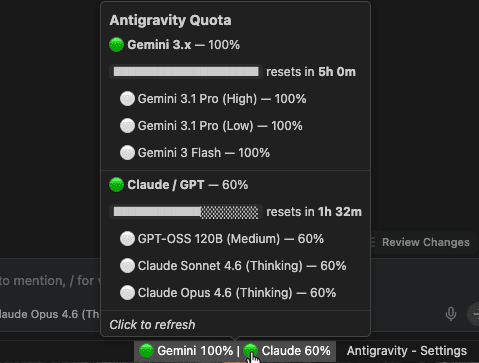
Hover for a rich Markdown tooltip with per-pool progress bars, model breakdown, and reset timers. Click for a quick-access options menu.
New in 1.6.0
Google One AI Credits — your AI credit balance is now visible directly in the status bar:
- Shows
✦ AI 23.5kat a glance, with full balance in the tooltip (✦ Google AI Credits — 23,473) - Toggle on/off via the options menu or
antigravityPulse.showAICreditssetting - Automatically parsed from Antigravity's local API — no extra setup needed
Previous highlights
- 1.5.0 — Click-to-options menu: click the status bar for a quick-pick with all controls
- 1.4.3 — Compact display mode for narrow windows (
Cmd+Shift+P→ Cycle Display Mode) - 1.4.0 — Smart polling: pauses when you leave Antigravity, resumes on return
- 1.3.8 — Reset countdown in the status bar
Why Antigravity Pulse?
Antigravity already shows your quota in the settings panel but it requires 3 clicks to access. This extension puts it in your status bar so you always see it without navigating anywhere. Per pool, per model, one glance.
Privacy first
Everything runs 100% on your machine. The extension reads quota data from the Antigravity process already running locally. No requests ever leave localhost.
- No internet requests, every call stays on
127.0.0.1 - No Google authentication, no OAuth, no tokens stored, no login required
- No data sent to any server, your usage patterns stay private
- No special permissions, no filesystem access, no telemetry
Lightweight
The entire extension is 85 KB unpacked. No bundled webviews, no CSS frameworks, no localization files. Three TypeScript files compiled to plain JavaScript.
- Activates in milliseconds
- Smart polling: refreshes every 30 seconds while Antigravity is focused, pauses entirely when you switch away
- Zero dependencies beyond the VS Code API
Clear at a glance
Each model pool gets a color-coded health indicator directly in the status bar:
| Icon | Status | Remaining |
|---|---|---|
| 🟢 | Healthy | > 50% |
| 🟡 | Low | 20% – 50% |
| 🔴 | Critical | < 20% |
Per-pool quota tracking
Antigravity groups AI models into independent quota pools, each resetting every ~5 hours:
| Label | Pool | Includes |
|---|---|---|
| Gemini | Gemini 3.x | Gemini 3.1 Pro (High), Gemini 3.1 Pro (Low) |
| Claude | Claude / GPT | Claude Sonnet 4.6, Claude Opus 4.6, GPT-OSS 120B |
| Gem Flash | Gemini 3 Flash |
Each pool's quota is tracked independently. Exhausting Claude/GPT does not affect your Gemini quota.
Hover tooltip
Hover over the status bar item for a detailed, formatted breakdown:
- Per-pool remaining percentage with visual progress bars
- Time until reset for each pool
- Individual model quotas when models within a pool differ
- Clean Markdown formatting, no popup windows
How it works
- Process detection scans for the Antigravity
language_serverprocess - Token extraction reads the CSRF token from the process arguments
- Port discovery finds the correct local API port
- Local API call
POST https://127.0.0.1:{port}/.../GetUserStatus, strictly local - Display groups models by pool, updates the status bar every 30 seconds
Install
Install from Open VSX. In the Extensions panel, search for Antigravity Pulse @sort:name to find the extension directly, then click Install. You'll get automatic updates with every new release.
Manual install (no auto-updates)
- Download the
.vsixfrom Releases Cmd+Shift+P→ Extensions: Install from VSIX...- Select the file and reload
Configuration
| Setting | Default | Description |
|---|---|---|
antigravityPulse.pollingInterval | 30 | Refresh interval in seconds (min: 30) |
antigravityPulse.showAICredits | true | Show Google One AI credits balance in the status bar |
antigravityPulse.clockFormat | auto | Clock format for reset times: auto (OS locale), 12h, or 24h |
antigravityPulse.showResetTime | false | Show time until quota reset next to each pool in the status bar |
antigravityPulse.smartPolling | true | Pause polling when Antigravity is not focused and resume on return |
antigravityPulse.displayMode | full | Status bar density: full (all details) or compact (abbreviated names and times) |
Requirements
- Antigravity IDE must be running (the extension reads from its local process)
Contributing
This is an open-source project and contributions are welcome. If you find a bug, have a feature request, or want to submit a PR, head to the GitHub repo.
If Antigravity Pulse saves you time, consider giving it a ⭐ to help others find it.