Dank Terminal Theme for Dank Material Shell
April 29, 2026 · View on GitHub

A bar widget that lets you manage your terminal emulator theme from your desktop, with instant hot-reload and a curated color grid. Supports Ghostty, Kitty, Alacritty, and WezTerm.
Features
- Multi-terminal support: Switch themes for Ghostty, Kitty, Alacritty, and WezTerm from the same widget
- Terminal dropdown selector: Pick your active terminal from a dropdown between the navigation arrows
- 76 built-in themes: 21 curated popular themes + 55 additional, with real color previews
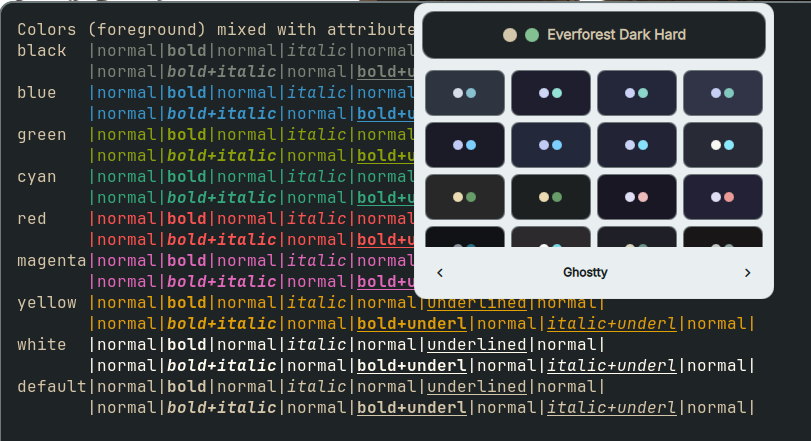
- Instant hot-reload: Themes apply without restarting the terminal
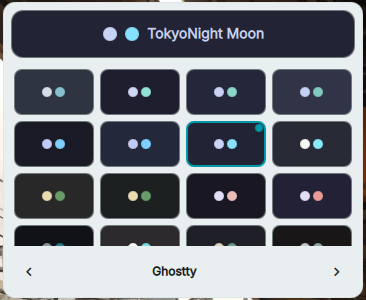
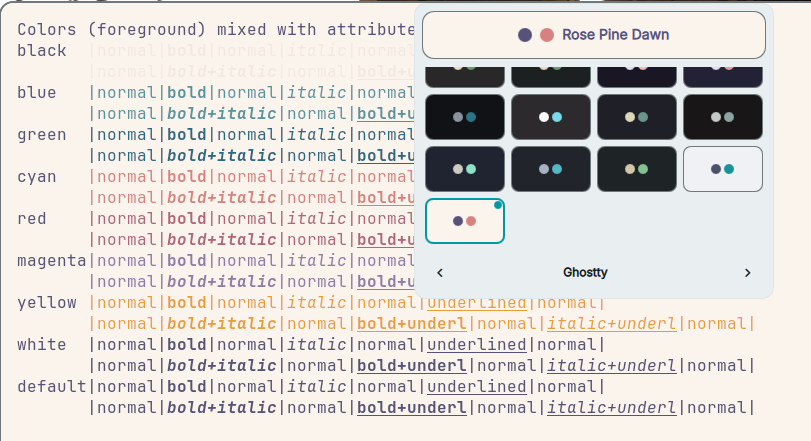
- Color grid: See actual background, foreground, and accent colors at a glance
- Navigation arrows: Cycle through themes with prev/next buttons
- Persistent selection: Remembers your last theme and terminal across sessions
- Configurable grid: Choose 3, 4, 5, or 6 columns in settings
Requirements
- Dank Material Shell (DMS) >= 1.4.0
- At least one of the following terminal emulators:
- Ghostty - no additional setup required
- Kitty - uses the built-in
kitty +kitten themessystem - Alacritty - requires internet connection on first use (themes are downloaded from the alacritty-theme repository and cached locally)
- WezTerm - no additional setup required
Installation
Via DMS
dms plugins install DankTerminalTheme
Via DMS GUI
- Open DMS Settings (
Mod+,) and go to the Plugins tab - Click Browse
- Find Dank Terminal Theme and click Install
Manually
cd ~/.config/DankMaterialShell/plugins
git clone https://github.com/eduardez/DankTerminalTheme.git
- Open DMS Settings (
Mod+,) and go to the Plugins tab - Click Scan for plugins
- Enable the Dank Terminal Theme plugin
Usage
Selecting a Terminal
- Click the palette icon in your navbar to open the theme picker
- Click the terminal name dropdown (between the arrows) to select your terminal emulator
- Explore the themes
Switching Themes
- Click any color swatch in the grid to apply it instantly
- The current theme is highlighted with a colored border and indicator dot
Navigation Arrows
Use the prev/next arrows to cycle through themes sequentially. The terminal selector dropdown sits between them.
Grid View
The popout shows a color grid with actual background, foreground, and accent color previews. Configure the number of columns in Settings (default: 4).
Settings
| Setting | Description | Default |
|---|---|---|
| Terminal Emulator | Which terminal to apply themes to | Ghostty |
| Show All Themes | Show all 76 themes instead of just the main ones | Off |
| Grid Columns | Number of columns in the color grid | 4 |
| Ghostty Config Path | Custom path to Ghostty config (relative to home) | ~/.config/ghostty/config |
| Show Navigation Arrows | Show prev/next arrows in the popout footer | On |
How It Works
Each terminal emulator has a different theming mechanism. The plugin handles all of them transparently.
Ghostty
Uses Ghostty's native theme configuration option with built-in themes.
- Removes the old
theme =line from~/.config/ghostty/config - Appends
theme = <name>to the config file - Sends
SIGUSR2to all Ghostty processes to trigger a config reload
If SIGUSR2 is not available, manually reload with Ctrl+Shift+, in Ghostty.
Kitty
Uses Kitty's built-in theme system via kitty +kitten themes --dump-theme.
- Dumps the selected theme content using
kitty +kitten themes --dump-theme <name> - Writes the output to
~/.config/kitty/current-theme.conf - Ensures
include current-theme.confis present in~/.config/kitty/kitty.conf - Sends
SIGUSR1to all Kitty processes to trigger a config reload
Requires Kitty's built-in themes (included by default).
Alacritty
Downloads and caches theme TOML files from the alacritty-theme repository.
- On first use, downloads the theme TOML from GitHub (
masterbranch) to~/.config/alacritty/themes/themes/ - Creates a symlink at
~/.config/alacritty/active-theme.tomlpointing to the selected theme file - Ensures
import = [ "~/.config/alacritty/active-theme.toml" ]is present in~/.config/alacritty/alacritty.toml - Alacritty auto-reloads when the config file is touched
Note: First-time theme application requires an internet connection to download the theme file. Subsequent uses are served from the local cache.
WezTerm
Modifies the color_scheme setting in WezTerm's Lua configuration.
- If no config exists, creates
~/.config/wezterm/wezterm.luawith a minimal configuration including the color scheme - If a config exists, uses
sedto replace thecolor_scheme = "..."line - WezTerm auto-reloads on config file changes
Note: If you have a custom wezterm.lua, the plugin looks for a color_scheme assignment and replaces it. Complex configs may need manual adjustment.
Theme Coverage
Not all 76 themes are available for every terminal. When a theme isn't available for a terminal, the closest alternative is used (e.g., "Iceberg Dark" maps to "Iceberg" in Kitty).
| Terminal | Available Themes | Notes |
|---|---|---|
| Ghostty | 76/76 | All themes available |
| Kitty | ~58/76 | Uses closest match when exact theme unavailable |
| Alacritty | ~53/76 | Depends on themes in the alacritty-theme repo |
| WezTerm | ~63/76 | 600+ built-in color schemes, many match by name |
Permissions
settings_read/settings_write- persist theme selection, terminal choice, and settingsprocess- update terminal configs, send signals, and download theme files
Files
plugin.json- Plugin manifestDankTerminalTheme.qml- Main widget: themes array, color grid popout, per-terminal apply logicDankTerminalThemeSettings.qml- Settings panel with terminal selectorREADME.md- This file
Author
EduarD3V
License
Same as DankMaterialShell