friflo POST
August 3, 2022 · View on GitHub


Goal
Main goal of this extension is storing all HTTP request & response data automatically as files in a VSCode workspace.
This ensures these files are still available in new VSCode sessions.
It also enables utilizing VSCode build-in tools for request & response files.
E.g. JSON Schema validation
of JSON request & response files, storing them in git and comparing subsequent response results with previous ones in
VSCode Diff Viewer.
Motivation
This project was created for friflo/Friflo.Json.Fliox to validate requests send to a Fliox Hub.
Meanwhile validation is supported by the Hub Explorer itself. But will keep this project alive.
Features
- Send files in your workspace like JSON or XML via HTTP POST, PUT & PATCH with a single click on a CodeLens button.
E.g.say-hello.test.json - Store HTTP responses like JSON or XML automatically as files in the workspace.
E.g.say-hello.test.resp.json - Store HTTP request / response header automatically as a markdown file in the workspace.
E.g.say-hello.test.resp.md - Enables utilizing VSCode language validators like JSON Schema to provide Code Completion and validation for request and response files.
- Show and edit HTTP response directly in a separate workspace editor tab.
- Toggle between response body and headers with a single click in the editor tab.
E.g. toggle betweensay-hello.test.resp.json&say-hello.test.resp.md - As the response header file is markdown it contains links to its request & response body file. These links are convenient when storing these files in GitHub. See screenshot below.
- Enables using other utilities like node processing request & response files as they are valid JSON or XML
- Enables using git as a simple regression test to compare response bodies and headers with previous requests.
- Enables configuration via the config file
.post-configfor all request files in a folder to:- set the http
"endpoints"and specific http"headers" - set the
"response""folder"for response files. - set
"variables"used to replace their occurrences in the request body. E.g."user": "{{user}}", - set
"additionalProperties"used to add its properties to the request body.
- set the http
- Code Completion and validation for config file in VSCode editor.
- If a request file - e.g.
my-request.json- is in a folder without a.post-configexecuting friflo POST: POST Request from View > Command Palette... will ask to create an initial.post-config.
.post-config example
{
  "endpoints": [
    { "fileMatch": ["*.json"], "url": "http://localhost:8010/" }
  ],
  "headers":   {
    "Connection":   "Keep-Alive"
  },
  "response":  {
    "folder":       "response"
  },
  "variables": {
    "{{user}}":     "admin"
  },
  "additionalProperties": {
    "token":        "token"
  }
}
Usage
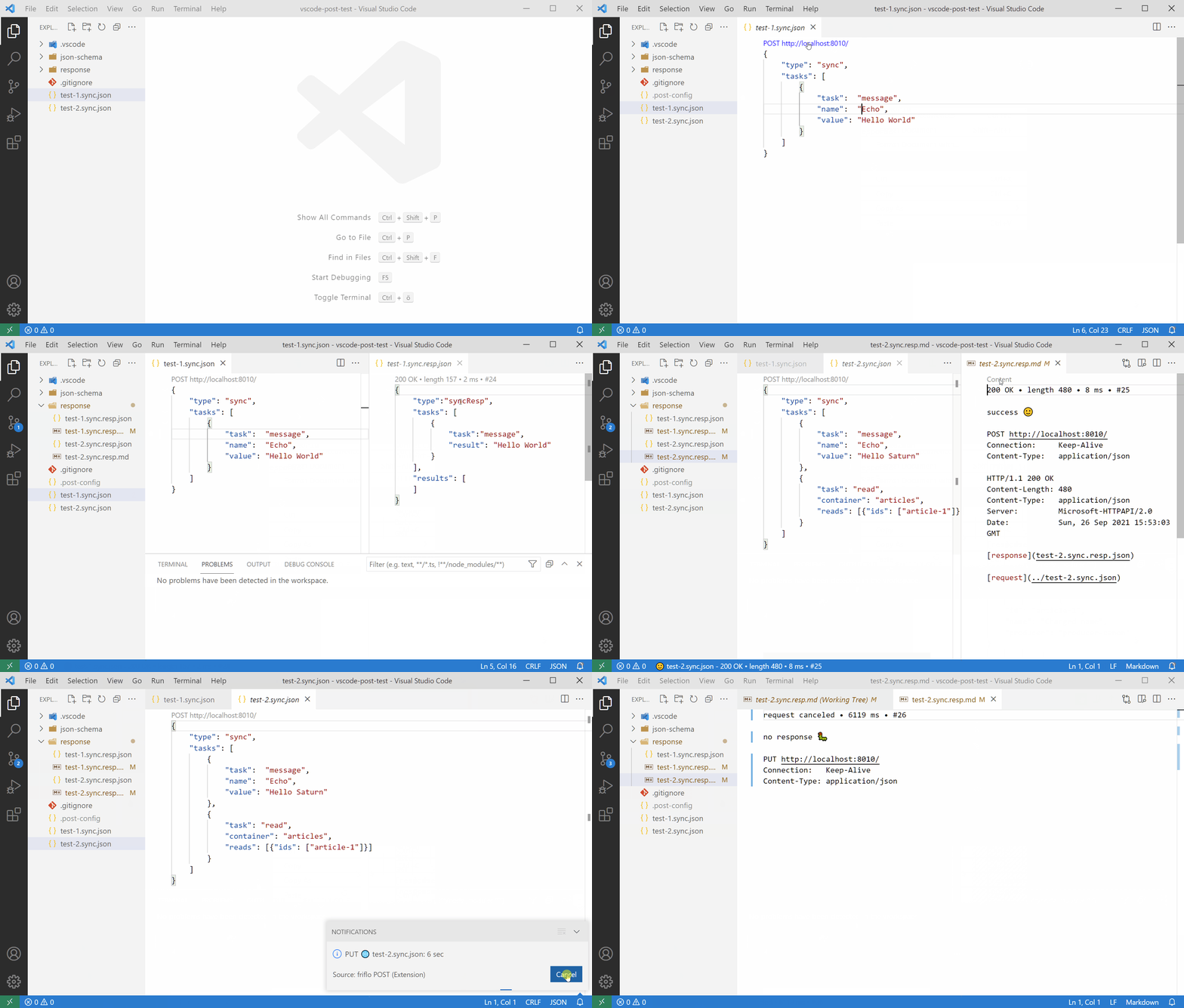
The screen recording (one minute) below show the entire workflow.
- Using Context menu > POST Request to create
.post-configfile and adjust theendpointurl - Click the POST button on top of the JSON file and toggle in the response tab between response body (JSON) and headers
- Demonstrate JSON Schema validation of JSON request & response files.
- Execute a second request with a single click using the configuration from the beginning.
- Execute a third request - this time PUT - to show the error case when the server is not responding.
The request is canceled by clicking on the progress indicator in the status bar. - Use VSCode Source Control to show the diff of the response info with a previous successful request.
Example HTTP response header
The links response & request point to the related response & request file in the repository.

Tips
- As every request file generate two response files e.g.
test.resp.jsonandtest.resp.mdin theresponsefolder it may be desired to hide them in the EXPLORER panel. To do this add the section below to.vscode/settings.json.
{
    "settings": {
        "files.exclude": {
            "**/response/*.resp.json": true,
            "**/response/*.resp.md":   true
        }
    }
}
License
Feedback
As this project is very young GitHub issue reports are welcome!
First commit: 2021-09-22. Published in VSCode Marketplace: 2021-09-26.
GitHub Issues