Change the paths in ./dwpose/wholebody.py Lines 15 and 16.
May 23, 2025 · View on GitHub
DynamiCtrl: Rethinking the Basic Structure and the Role of Text for High-quality Human Image Animation
Haoyu Zhao, Zhongang Qi, Cong Wang, Qingqing Zheng, Guansong Lu, Fei Chen, Hang Xu and Zuxuan Wu



🎏 Introduction
TL; DR: DynamiCtrl is the first framework to propose the "Joint-text" paradigm to the pose-guided human animation task and achieve effective pose control within the diffusion transformer (DiT) architecture.
CLICK for the full introduction
With diffusion transformer (DiT) excelling in video generation, its use in specific tasks has drawn increasing attention. However, adapting DiT for pose-guided human image animation faces two core challenges: (a) existing U-Net-based pose control methods may be suboptimal for the DiT backbone; and (b) removing text guidance, as in previous approaches, often leads to semantic loss and model degradation. To address these issues, we propose DynamiCtrl, a novel framework for human animation in video DiT architecture. Specifically, we use a shared VAE encoder for human images and driving poses, unifying them into a common latent space, maintaining pose fidelity, and eliminating the need for an expert pose encoder during video denoising. To integrate pose control into the DiT backbone effectively, we propose a novel Pose-adaptive Layer Norm model. It injects normalized pose features into the denoising process via conditioning on visual tokens, enabling seamless and scalable pose control across DiT blocks. Furthermore, to overcome the shortcomings of text removal, we introduce the "Joint-text" paradigm, which preserves the role of text embeddings to provide global semantic context. Through full-attention blocks, image and pose features are aligned with text features, enhancing semantic consistency, leveraging pretrained knowledge, and enabling multi-level control. Experiments verify the superiority of DynamiCtrl on benchmark and self-collected data (e.g., achieving the best LPIPS of 0.166), demonstrating strong character control and high-quality synthesis.
📺 Overview on YouTube
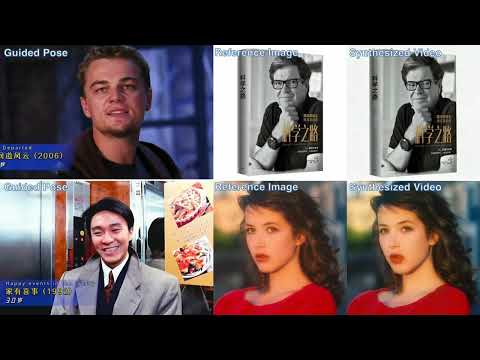 Please click to watch.
⚔️ DynamiCtrl for High-quality Pose-guided Human Image Animation
We first refocus on the role of text for this task and find that fine-grained textual information helps improve video quality. In particular, we can achieve fine-grained local controllability using different prompts.
CLICK to check the prompts used for generation in the above three cases.
Prompt (left): “The image depicts a stylized, animated character standing amidst a chaotic and dynamic background. The character is dressed in a blue suit with a red cape, featuring a prominent "S" emblem on the chest. The suit has a belt with pouches and a utility belt. The character has spiky hair and is standing on a pile of debris and rubble, suggesting a scene of destruction or battle. The background is filled with glowing, fiery elements and a sense of motion, adding to the dramatic and intense atmosphere of the scene."
Prompt (mid): “The person in the image is a woman with long, blonde hair styled in loose waves. She is wearing a form-fitting, sleeveless top with a high neckline and a small cutout at the chest. The top is beige and has a strap across her chest. She is also wearing a black belt with a pouch attached to it. Around her neck, she has a turquoise pendant necklace. The background appears to be a dimly lit, urban environment with a warm, golden glow."
Prompt (right): “The person in the image is wearing a black, form-fitting one-piece outfit and a pair of VR goggles. They are walking down a busy street with numerous people and colorful neon signs in the background. The street appears to be a bustling urban area, possibly in a city known for its vibrant nightlife and entertainment. The lighting and signage suggest a lively atmosphere, typical of a cityscape at night."
Fine-grained video control
CLICK to check the prompts used for generation in the above background-control cases.
Scene 1: The person in the image is wearing a white, knee-length dress with short sleeves and a square neckline. The dress features lace detailing and a ruffled hem. The person is also wearing clear, open-toed sandals. The background shows a bustling futuristic city at night, with neon lights reflecting off the wet streets and flying cars zooming above.
Scene 2: The person in the image is wearing a white, knee-length dress with short sleeves and a square neckline. The dress features lace detailing and a ruffled hem. The person is also wearing clear, open-toed sandals. The background shows a vibrant market street in a Middle Eastern bazaar, filled with colorful fabrics, exotic spices, and merchants calling out to customers.
Scene 3: The person in the image is wearing a white, knee-length dress with short sleeves and a square neckline. The dress features lace detailing and a ruffled hem. The person is also wearing clear, open-toed sandals. The background shows a sunny beach with golden sand, gentle ocean waves rolling onto the shore, and palm trees swaying in the breeze.
Scene 4: The person in the image is wearing a white, knee-length dress with short sleeves and a square neckline. The dress features lace detailing and a ruffled hem. The person is also wearing clear, open-toed sandals. The background shows a high-tech research lab with sleek metallic walls, glowing holographic screens, and robotic arms assembling futuristic devices.
Scene 5: The person in the image is wearing a white, knee-length dress with short sleeves and a square neckline. The dress features lace detailing and a ruffled hem. The person is also wearing clear, open-toed sandals. The background shows a mystical ancient temple hidden deep in the jungle, covered in vines, with glowing runes carved into the stone walls.
Scene 6: The person in the image is wearing a white, knee-length dress with short sleeves and a square neckline. The dress features lace detailing and a ruffled hem. The person is also wearing clear, open-toed sandals. The background shows a serene snowy forest with tall pine trees, soft snowflakes falling gently, and a frozen river winding through the landscape.
Scene 7: The person in the image is wearing a white, knee-length dress with short sleeves and a square neckline. The dress features lace detailing and a ruffled hem. The person is also wearing clear, open-toed sandals. The background shows an abandoned industrial warehouse with broken windows, scattered debris, and rusted machinery covered in dust.
🚧 Todo
Click for Previous todos
- [✔] Release the project page and demos.
- [✔] Paper on Arxiv on 27 Mar 2025.
- [✔] Release inference code.
- [✔] Release models.
- [✔] Release training code.
📋 Changelog
- 2025.05.20 Code and models released!
- 2025.03.30 Project page and demos released!
- 2025.03.10 Project Online!
Installation
For usage (SFT fine-tuning, inference), you can install the dependencies with:
conda create --name dynamictrl python=3.10

source activate dynamictrl

pip install -r requirements.txt
Model Zoo
We provide three grou of checkpoints:
- DynamiCtrl-5B: trained with whole person image w/o mask and corresponding driving pose sequence.
- Dynamictrl-5B-Mask_B01: trained with masked background in person image and pose sequence.
- Dynamictrl-5B-Mask_C01: trained with masked clothes in person image and pose sequence.
| name | Details | HF weights 🤗 |
|---|---|---|
| DynamiCtrl-5B | SFT w/ whole image | dynamictrl-5B |
| Dynamictrl-5B-Mask_B01 | SFT w/ masked Background | dynamictrl-5B-mask-B01 |
| Dynamictrl-5B-Mask_C01 | SFT w/ masked human Clothing | dynamictrl-5B-mask-C01 |
Causal VAE, T5 are used as our VAE model and text encoder.
cd checkpoints

pip install -U huggingface_hub

huggingface-cli download --resume-download --local-dir-use-symlinks False gulucaptain/DynamiCtrl --local-dir ./DynamiCtrl

huggingface-cli download --resume-download --local-dir-use-symlinks False gulucaptain/Dynamictrl-Mask_B01 --local-dir ./Dynamictrl-Mask_B01

huggingface-cli download --resume-download --local-dir-use-symlinks False gulucaptain/Dynamictrl-Mask_C01 --local-dir ./Dynamictrl-Mask_C01
Download the checkponts of DWPose for human pose estimation:
cd checkpoints

git clone https://huggingface.co/yzd-v/DWPose

# Change the paths in ./dwpose/wholebody.py Lines 15 and 16.
👍 Quick Start
Direct Inference w/ Driving Video
image="./assets/human1.jpg"
video="./assets/motion1.mp4"

model_path="./checkpoints/DynamiCtrl"
output="./outputs"

CUDA_VISIBLE_DEVICES=0 python scripts/dynamictrl_inference.py \
    --prompt="Input the test prompt here." \
    --reference_image_path=$image \
    --ori_driving_video=$video \
    --model_path=$model_path \
    --output_path=$output \
    --num_inference_steps=25 \
    --width=768 \
    --height=1360 \
    --num_frames=37 \
    --pose_control_function="padaln" \
    --guidance_scale=3.0 \
    --seed=42 \
Tips: When using the trained DynamiCtrl model without a masked area, you should ensure that the prompt content aligns with the provided human image, including the person's appearance and the background description.
You can write the prompt by youself or we also provide a guidance to use Qwen2-VL tool to help you write the prompt corresponding to the content of image automatically, you can follow this blog How to use Qwen2-VL.
Inference w/ Maksed Human Image
Thanks to the proposed "Joint-text" paradigm for this task, we can achieve fine-grained control over human motion, including background and clothing areas. It is also easy to use, just provide a human image with blacked-out areas, and you can directly run the inference script for generation. Note to replace the model path. How to automatically get the mask area? You can follow this blog: How to get mask of subject.
Note: please replace the "transformer" folder in DynamiCtrl with the "Dynamictrl-Mask_B01" or "Dynamictrl-Mask_C01" folder.
image="./assets/maksed_human1.jpg" # Required
video="./assets/motion.mp4"

model_path="./checkpoints/Dynamictrl" # or "Dynamictrl-5B-Mask_C01"
output="./outputs"

CUDA_VISIBLE_DEVICES=0 python scripts/dynamictrl_inference.py \
    --prompt="Input the test prompt here." \
    --reference_image_path=$image \
    --ori_driving_video=$video \
    --model_path=$model_path \
    --output_path=$output \
    --num_inference_steps=25 \
    --width=768 \
    --height=1360 \
    --num_frames=37 \
    --pose_control_function="padaln" \
    --guidance_scale=3.0 \
    --seed=42 \
Tips: Although the "Dynamictrl-5B-Mask_B01" and "Dynamictrl-5B-Mask_C01" models are trained with masked human images, you can still directly test whole human images with these two models. Sometimes, they may even perform better than the basic "Dynamictrl-5B" model.
Memory and time cost
| Device | Num of frames | Reslolutions | Time | GPU-mem |
|---|---|---|---|---|
| H20 | 37 | 1360 * 768 | 3 min 50s | 28.4 GB |
| H20 | 37 | 1024 * 576 | 1 min 40s | 24.7 GB |
| H20 | 37 | 1360 * 1360 | 9 min 28s | 34.8 GB |
| H20 | 37 | 1024 * 1024 | 3 min 50s | 28.4 GB |
Training
Please find the instructions on data preparation and training here.
🔅 More Applications:
Digital Human (contains long video performance)
Show cases: long video with 12 seconds, driving by the same audio.
The identities of the digital human are generated by vivo's BlueLM model (Text to image generation).
Two steps to generate a digital human:
-
Prepare a human image and a guided pose video, and generate the video materials using our DynamiCtrl.
-
Use the output video and an audio file, and apply MuseTalk to generate the correct lip movements.
📍 Citation
If you find this repository helpful, please consider citing:
@article{zhao2025dynamictrl,
      title={DynamiCtrl: Rethinking the Basic Structure and the Role of Text for High-quality Human Image Animation},
      author={Haoyu, Zhao and Zhongang, Qi and Cong, Wang and Qingping, Zheng and Guansong, Lu and Fei, Chen and Hang, Xu and Zuxuan, Wu},
      year={2025},
      journal={arXiv:2503.21246},
}
💗 Acknowledgements
This repository borrows heavily from CogVideoX. Thanks to the authors for sharing their code and models.
🧿 Maintenance
This is the codebase for our research work. We are still working hard to update this repo, and more details are coming in days.