thesisdown
August 16, 2026 · View on GitHub
🗄️ This repository is archived and no longer maintained
It’s been a good run. {thesisdown} has helped a lot of people write a lot of theses, and I’m grateful to everyone who used it, adapted it, filed an issue, or sent a pull request. I’m no longer able to give this project the attention it deserves, and the wider R Markdown world has largely moved on to Quarto, so I’ve made the repository read-only.
The template still works. Before archiving, I fixed the two bugs that broke the stock template on current versions of pandoc: the
Lonely \itemerror on any thesis containing a citation (pandoc 3.1.7+), and theUndefined control sequence: \pandocboundederror on any thesis containing a figure (pandoc 3.2.1+). If you cloned or forked this repo before August 2026 and your thesis stopped compiling, pulltemplate.texfrom this repo. That’s very likely your fix. Note that the updated template now requires pandoc >= 3.1.7.Want to take it over? I’d be genuinely happy to see someone keep this going. If you’d like to maintain {thesisdown}, either as a new home for this codebase or by having me point people at your fork, please email me at chester.ismay@gmail.com. I’m open to transferring the repository outright to someone who plans to actively maintain it.
If you’re starting a new thesis today, I’d suggest looking at Quarto’s book format and the Quarto thesis extensions for your institution first. Many of the forks listed below are also more actively maintained than this repo.
This project was inspired by the
bookdown package and is an
updated version of my Senior Thesis template in the reedtemplates
package here. It was
originally designed to only work with the Reed College LaTeX template,
but has since been adapted to work with many different institutions by
many different individuals. Check out the Customizing thesisdown to
your
institution
section below for examples.
Currently, the PDF and gitbook versions are fully-functional. The word and epub versions are developmental, have no templates behind them, and are essentially calls to the appropriate functions in bookdown.
If you are new to working with bookdown/rmarkdown, please read over
the documentation available in the gitbook template at
https://ismayc.github.io/thesisdown_book.
The current output for the four versions is here:
- PDF (Generating LaTeX file is available here with other files in the book directory.)
- Word
- ePub
- gitbook
Under the hood, the Reed College LaTeX template is used to ensure that documents conform precisely to submission standards. At the same time, composition and formatting can be done using lightweight markdown syntax, and R code and its output can be seamlessly included using rmarkdown.
Customizing thesisdown to your institution
In an ideal world, this package would support a variety of different LaTeX templates from a wide range of institutions and we’d love to get it there at some point. Until that time, realize that this was designed to only work with the Reed College LaTeX template but others have adapted it to work with their institutions. Here are some that have customized it to fit their needs. It is recommended you review how they changed the files by comparing their repositories to this one and then make tweaks to yours as needed.
Note that this repository is archived, so the list below is frozen and issues and pull requests are closed. Several of these forks are more actively maintained than this repo. If one matches your institution, start there and file any questions with them rather than here. If you’ve built a template you’d like listed, that will have to wait for a new maintainer (see the note at the top).
Theses written with thesisdown
Over the years people kindly submitted their finished theses to the issue tracker. Here are those, with thanks to their authors for sharing both the work and the source that produced it. Reading a real thesis’s source is one of the better ways to learn how to bend the template to your own institution.
| Author | Institution | Completed | Thesis | Template used |
|---|---|---|---|---|
| Michelle Kimberly Jamieson | University of Glasgow | January 2023 | Source · PDF | ismayc/thesisdown |
| Matan Mazor | University College London | December 2021 | Source · Web | ismayc/thesisdown |
| Antoine Bichat | Université Paris-Saclay | December 2020 | Source · Web | abichat/hadamardown |
Brief summaries, in the authors’ own words:
- Jamieson, Severe mental illness and employment: a retrospective population-based observational study using the Adult Psychiatric Morbidity Survey (2000 and 2007), using logistic regression reporting Average Partial Effects to investigate associations between severe mental illness and economic activity, alongside an argument for wider adoption of reflexive practice in quantitative research.
- Mazor, Inference about absence in perceptual decision making: representing the absence of an object requires knowing that you would know if it were present. This thesis addresses that second-order, counterfactual reasoning, covering its reliance on prior metacognitive knowledge, its relative encapsulation from metacognitive monitoring, its neural underpinning, and its relation with default reasoning.
- Bichat, Discovering multi-scale metagenomic signatures through hierarchical organization of species: using hierarchical information (taxonomy or phylogeny) to increase the statistical power of differential abundance analyses in metagenomics, including a new detection procedure modeling taxa-associated z-scores as an Ornstein-Uhlenbeck process on a tree.
Using thesisdown from Chester’s GitHub
Special thanks to Ben Marwick for
helping to add a lot more clarity to the directions below from the
README of his spin-off huskydown
package.
Using {thesisdown} has some prerequisites which are described below. To compile PDF documents using R, you are going to need to have LaTeX installed. By far the easiest way to install LaTeX on any platform is with the tinytex R package:
install.packages(c('tinytex', 'rmarkdown'))
tinytex::install_tinytex()
# after restarting RStudio, confirm that you have LaTeX with
tinytex:::is_tinytex()
You may need to install a few extra LaTeX packages on your first attempt to knit as well. Here is one such example of how to do so:
tinytex::tlmgr_install("babel-portuges")
To use {thesisdown} from RStudio:
-
Ensure that you have already installed LaTeX and the fonts described above, and are using the latest version of RStudio. You can use
thesisdownwithout RStudio. For example, you can write the Rmd files in your favorite text editor (e.g. Atom, Notepad++). But RStudio is probably the easiest tool for writing both R code and text in your thesis. It also provides a nice way to build your thesis while editing. We’ll proceed assuming that you have decided to use the RStudio workflow. -
Install the {bookdown} and {thesisdown} packages. Note that {thesisdown} is not available on CRAN at the moment and that’s why
install.packages("thesisdown")won’t work. Useremotes::install_github()as shown below instead to install the package.if (!require("remotes")) install.packages("remotes", repos = "https://cran.rstudio.org") remotes::install_github("rstudio/bookdown") remotes::install_github("ismayc/thesisdown")
Note that you may need to restart RStudio at this point for the following dialog to show up.
- Get started with the {thesisdown} template. There are two options for doing so.
-
3a) RECOMMENDED Create a new RStudio project with a {thesisdown} template.
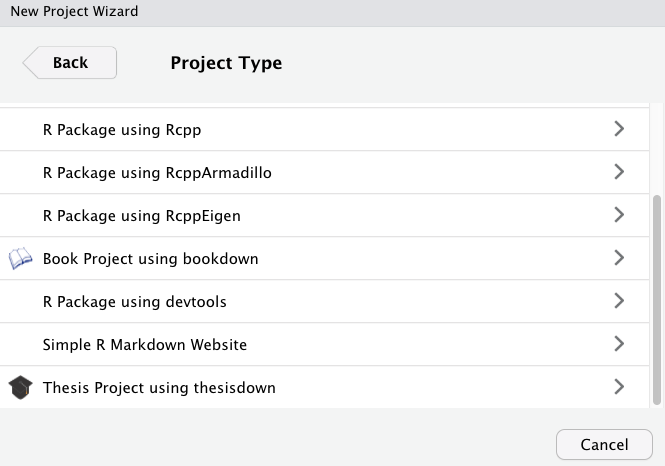
In RStudio, click on File > New Project > New Directory. Then select Thesis Project using thesisdown from the dropdown that will look something like the image below. You’ll see the graduation cap as the icon on the left for the appropriate project type.
Next, give your project a name and specify where you’d like the files to appear. In the screenshot below, the project name is
my_thesisand it will appear as a new folder on my Desktop.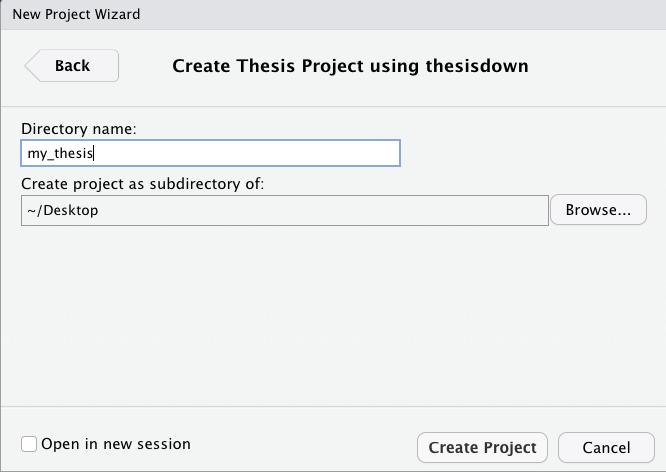
If you got this far, skip over step 3b which is the older version of getting the template. It might force you to change some of the directories to get knitting to work and has some other limitations as well. That’s why step 3a is recommended.
-
3b) Use the New R Markdown dialog to select Thesis:
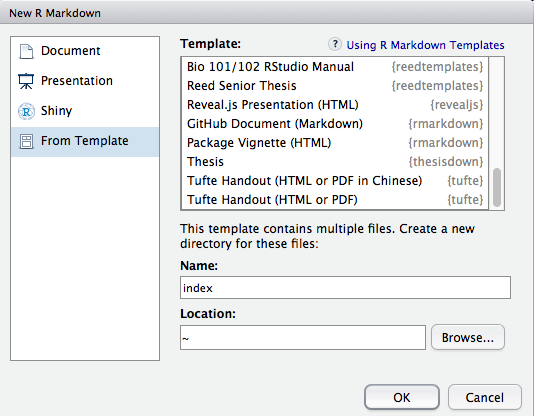
Note that this will currently only Knit if you name the directory
indexas shown above. This guarantees thatindex.htmlis generated correctly for the Gitbook version of the thesis.
- After choosing which type of output you’d like in the YAML at the
top of
index.Rmd, Knit theindex.Rmdfile to get the book in PDF or HTML formats.
Day-to-day writing of your thesis
You need to edit the individual chapter R Markdown files to write your
thesis. It’s recommended that you version control your thesis using
GitHub if possible. RStudio can also easily sync up with GitHub to make
the process easier. While writing, you should git commit your work
frequently, after every major activity on your thesis. For example,
every few paragraphs or section of text, and after major step of
analysis development. You should git push at the end of each work
session before you leave your computer or change tasks. For a gentle,
novice-friendly guide to getting starting with using Git with R and
RStudio, see https://happygitwithr.com/.
Rendering
To render your thesis into a PDF, open index.Rmd in RStudio and then
click the “knit” button. To change the output formats between PDF,
gitbook and Word, look at the output: field in index.Rmd and
comment-out the formats you don’t want.
The PDF file of your thesis will be deposited in the _book/ directory,
by default.
Components
The following components are ones you should edit to customize your thesis:
_bookdown.yml
This is the main configuration file for your thesis. You can change the name of your outputted file here for your thesis and other options about your thesis here.
index.Rmd
This file contains all the meta information that goes at the beginning
of your document. You’ll need to edit the top portion of this file (the
YAML) to put your name on the first page, the title of your thesis, etc.
Note that you need to have at least one chapter start in the index.Rmd
file for the build to work. For the template, this is done with
# Introduction in the example from the template.
01-chap1.Rmd, 02-chap2.Rmd, etc.
These are the Rmd files for each chapter in your dissertation. Write your thesis in these. If you’re writing in RStudio, you may find the wordcount addin useful for getting word counts and readability statistics in R Markdown documents.
bib/
Store your bibliography (as bibtex files) here. We recommend using the citr addin and Zotero to efficiently manage and insert citations.
csl/
Specific style files for bibliographies should be stored here. A good source for citation styles is https://github.com/citation-style-language/styles#readme.
figure/ and data/
Store your figures and data here and reference them in your R Markdown files. See the bookdown book for details on cross-referencing items using R Markdown.