dadbod-grip.nvim
July 31, 2026 · View on GitHub
D   ███████╗███████╗██╗███████╗
A  ██╔═════╝██╔══██║██║██╔══██║
D  ██║  ███╗██████╔╝██║███████║
b  ██║   ██║██╔══██╗██║██╔════╝
o  ╚██████╔╝██║  ██║██║██║
d   ╚═════╝ ╚═╝  ╚═╝╚═╝╚═╝
Connect to PostgreSQL, MySQL, SQLite, DuckDB, or MotherDuck and edit tables like Vim buffers. |
 Chonk |



Connect to PostgreSQL, MySQL, SQLite, or DuckDB and edit tables like Vim buffers. Rows stage with color coding, preview as SQL, and commit in a single transaction. Undo committed changes. Follow foreign keys through a breadcrumb trail. Open any Markdown file as a runnable SQL notebook and execute individual blocks with <C-CR>. Generate SQL from natural language.
A command palette (<C-p>) surfaces every action without memorizing keymaps. The query pad has SQL syntax highlighting, a formatter, and built-in completion. Every Vim motion works. Nothing installs outside Neovim.
| Editing | Analysis | Schema & AI |
|---|---|---|
Command palette <C-p> searchable action list | Data profiling sparkline distributions | FK navigation breadcrumb trail |
SQL Notebooks gn pick .md and .sql files from project | Block execution <C-CR> runs fence under cursor · narrative untouched | Demo notebook :GripStart · seventeen tables · one investigation |
SQL formatter gF sql-formatter · pg_format · Lua fallback | Query Doctor plain-English EXPLAIN | DDL create · rename · drop via UI |
| SQL syntax highlighting query pad with treesitter | Visual staging violet · green · red rows | File as table Parquet · CSV · JSON · remote URLs |
| Local Files picker open CSV/JSON/Parquet from cwd without typing a path | Live SQL preview float updates as you stage | AI SQL Anthropic · OpenAI · Gemini · Ollama |
Inline cell editing popup with Vim normal mode (<Esc>) | Data diff gD compare tables by primary key | Multi-DB PostgreSQL · SQLite · MySQL · DuckDB · MotherDuck · SQL Server (read-only) |
| Mutation preview full SQL before apply | Column filter builder gF with operators and wildcards | Schema grouping sidebar sections per attached database |
Cross-DB federation :GripAttach Postgres · MySQL · SQLite · MotherDuck | Export CSV · TSV · JSON · SQL · Markdown · Table | Connection health T tests all connection types |
Surface nav 1-3 sidebar · query pad · grid | ER diagram 4 tree-spine layout with FK follow | Remappable keymaps override or disable any key via setup() |
Write mode --write · edit files and write back to disk | Watch mode --watch · auto-refresh grid on a timer | Depth views 5-9 Stats · Columns · FK · Indexes · Constraints |
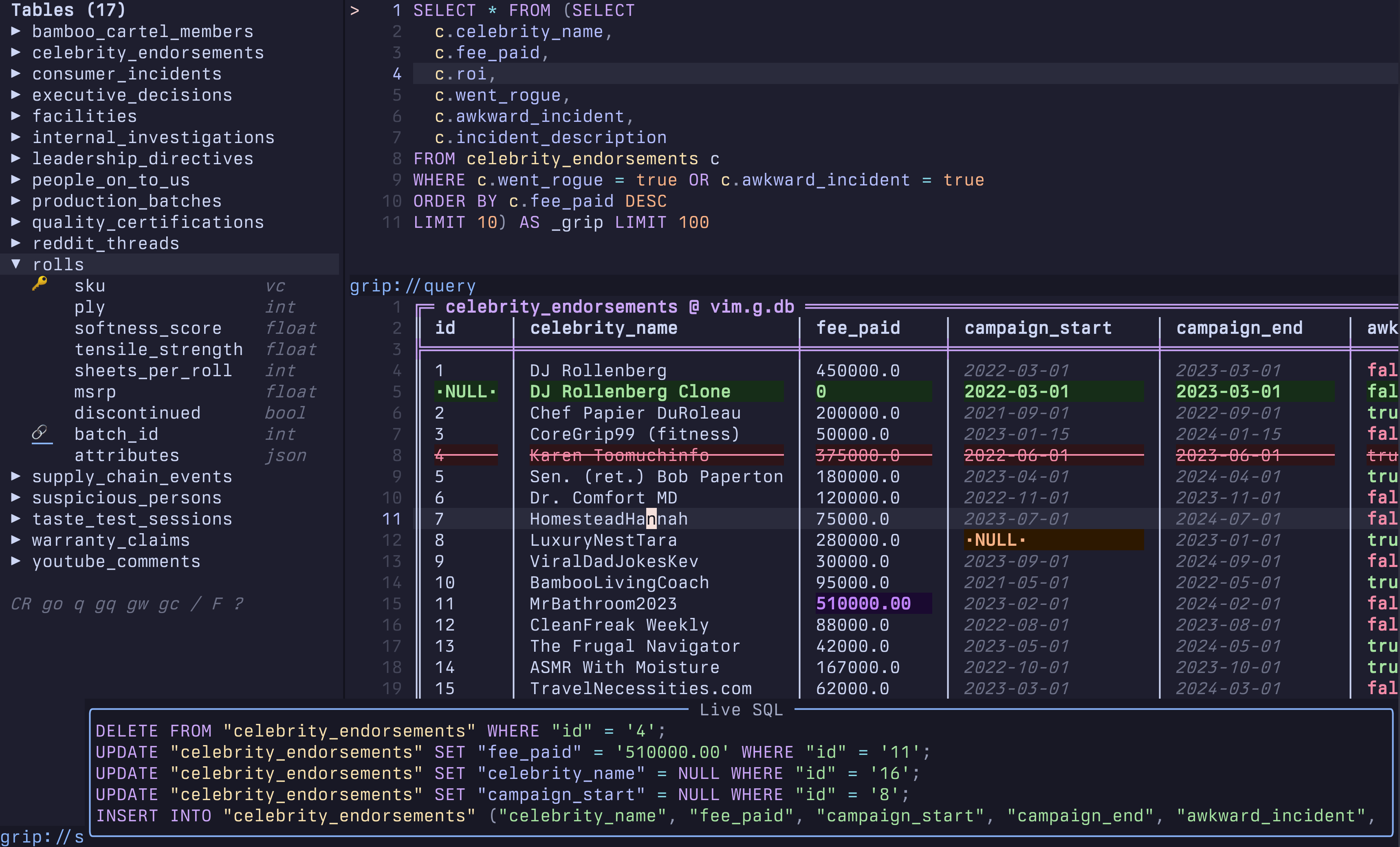
An example database is included. :GripStart opens it with seventeen tables and something in the consumer incidents that does not add up. See the walkthrough for the full investigation.
Contents
- Quickstart
- Features
- Keybindings
- Commands
- Requirements
- Install
- Configuration
- Usage
- Architecture
- Testing
- Ecosystem
Quickstart
-- lazy.nvim (always latest stable release)
{ "joryeugene/dadbod-grip.nvim", version = "*" }
Then :checkhealth dadbod-grip to verify your setup, :GripStart to explore the demo database, or :GripConnect to pick your own. Schema sidebar + query pad open automatically.
Auto-discovery of local Docker stacks
The picker discovers running postgres containers on every open by reading
Docker labels (the same convention DataGrip and Beekeeper Studio use).
Add this to any docker-compose.yml and the stack appears in :GripPick
the moment it starts, disappears when it stops, no editing of
~/.grip/connections.json required:
services:
  postgres:
    image: postgres:17
    ports:
      - "${HOST_PORT:-5432}:5432"
    labels:
      dev.localdb.kind: postgres
      dev.localdb.name: "my project ${BRANCH_SLUG}"
      dev.localdb.user: postgres
      dev.localdb.database: postgres
      dev.localdb.password: postgres
Multiple worktrees on different ports just work: each stack shows up under its own name. Containers without these labels are ignored.
To opt out (no shell-out to docker ps on picker open):
require("dadbod-grip").setup({ discovery = false })
Connection strings
postgresql://user:pass@host:5432/dbname
mysql://user:pass@host:3306/dbname
sqlserver://user:pass@host:1433/dbname
mssql://user:pass@host:1433/dbname
sqlite:path/to/file.db
duckdb:path/to/file.duckdb

/path/to/file.csv          ← direct file (also .parquet .json .xlsx)
https://host/data.parquet  ← remote file via httpfs

duckdb::memory:            ← single-query scratch (tables don't persist between queries)
Beyond name and url, what an entry can carry depends on where it lives:
| field | connections.json | g:dbs |
|---|---|---|
name, url | yes | yes |
type | yes | no |
env_file | yes | no |
mode | yes | no |
color | yes | no |
attachments | yes | no |
g:dbs is read as the vim-dadbod-ui format, so a color or mode written there is discarded on
read — those belong in .grip/connections.json or ~/.grip/connections.json.
Sources are deduplicated by URL in this order: discovered Docker containers, project file, global
file, g:dbs, $DATABASE_URL, g:db. The first hit wins, so an entry can keep its URL in g:dbs
while its color and mode live in the JSON file. One case merges rather than discards: a
discovered container colliding with a connections.json entry keeps the container's name and
adopts the file entry's type, env_file, mode, color and attachments — discovery
contributes liveness, the file contributes configuration.
Keeping the password out of the connection file
A connection entry can reference its password instead of storing it. Any ${NAME} in the URL is
resolved when you connect, from the .env file the entry points at:
{
  "name": "dev",
  "url": "postgresql://api@dev.internal:5432/app?sslmode=require",
  "env_file": "~/work/api/.env"
}
with url written as postgresql://api:${DEV_DB_PASSWORD}@dev.internal:5432/app?sslmode=require.
Values come from env_file first and fall back to the process environment, so ${PGPASSWORD}
alone works with no env_file at all. A placeholder that cannot be resolved is an error, and so is
one that resolves to an empty value — a bare KEY= is the usual shape of a committed .env
template, and substituting it would hand psql a URL with no password, which falls through to
~/.pgpass and may connect with a different credential instead of failing. Either way the entry
shows as ? in the picker and names the variable when you try to connect.
If a literal password happens to contain ${WORD}, write $${WORD} — a doubled dollar produces
the literal text and resolves nothing. The escape is only special immediately before {NAME}, so
pa$$word is left alone.
The .env file is parsed for KEY=value and export KEY=value lines, one pair of surrounding
quotes is stripped, whole-line # comments and blank lines are ignored. A # within a value is
part of the value, not the start of a comment — a password may legitimately contain one. It is read at connect time and
memoized on the file's mtime, so a password a teammate rotates mid-session is picked up on the
next query. If the file is still git-crypt-locked, grip says so by name instead of failing with a
parse error, and — because failed reads are never cached — git-crypt unlock takes effect on the
very next connect, with no restart.
What this buys you: the secret lives in exactly one place you already control, and
~/.grip/connections.json never receives it. vim.g.db holds the template, and expansion
happens at a single point on the way to the database client, so no code path that writes to disk
ever sees the expanded URL. Passwords also travel to psql, mysql and sqlcmd in the process
environment rather than in argv, so they do not show up in another user's ps.
The exception is DuckDB federation. ATTACH inlines the attached database's DSN into the SQL
string, and grip passes that string to duckdb -c, so an attachment's password is visible in
ps for the lifetime of every query against that connection — including one that came from
${VAR}. If that matters to you, do not attach a credentialed database into DuckDB until this is
moved onto DuckDB's secrets manager.
One limit, stated plainly: a templated URL in vim.g.db is grip-only. vim-dadbod's :DB
command and any statusline that reads that variable will see the literal ${NAME}. If you rely on
either, keep those connections un-templated.
Read-only connections
An entry can carry "mode": "ro", and grip then connects with the client's own read-only switch:
PGOPTIONS=-c default_transaction_read_only=on for postgres, a SET SESSION TRANSACTION READ ONLY
merged into mysql's init command, -readonly for sqlite and duckdb. Grid editing is off, and the
DDL commands (:GripCreate, :GripDrop, :GripRename, :GripFill, the sidebar's create/drop and
the column operations) decline up front instead of prompting and failing at the server.
Press r in the connection picker to connect in the opposite mode for this session only — the
file is not modified.
This is a guard against accidents, not a security boundary. Every one of those mechanisms is
reversible from the query pad: begin; set transaction read write; … on postgres, and its
equivalents elsewhere. If a connection must not be able to write, give it a database role that
cannot — that is the boundary; mode is the seatbelt.
Three more limits worth knowing:
- If the postgres URL already carries its own
options=parameter, that wins overPGOPTIONS, so the session is not actually read-only even though grip shows it asRO. Connecting such an entry read-only warns you once, since this is the one case where theRObadge overstates what the server was told. -readonlyis applied only to a database file that already exists.duckdb::memory:and a not-yet-created sqlite file connect normally — the flag would abort the former outright and turn "create it" into an error for the latter.- A connection pooler refuses the option outright. Pgbouncer-compatible poolers (DigitalOcean's
pooler port, for instance) reject unknown startup parameters, so
PGOPTIONSdoes not degrade the session — it fails the connection withFATAL: unsupported startup parameter in options: default_transaction_read_only. Unlike the two limits above, this is not an overstatedRObadge; there is no session at all. Point amode: "ro"entry at the direct port rather than the pooled one.
Colour-coding a connection
An entry can carry "color", and grip tints that connection's window borders, grid rules and
schema sidebar title, so a red production connection does not look like a green local one:
{ "name": "prod", "url": "postgresql://…", "mode": "ro", "color": "red" }
The value is one of green, orange, red, blue, violet, yellow, or a #rrggbb string.
Every accent also carries a ctermfg — a hex value is approximated onto the nearest xterm palette
entry — so none of this needs a truecolor terminal. An unknown value is ignored rather than raised.
Three highlight groups carry it: GripConnAccent, GripConnAccentBold (the sidebar title), and
GripBorder, which is derived from the accent. That derivation is what makes an entry without a
color restore the default border instead of leaving the previous connection's tint behind. All
three are redefined on every connection switch and re-applied whenever highlights are rebuilt, so
they survive a :colorscheme change — and because they are redefined rather than merged, defining
them yourself will not stick.
Cross-database federation (DuckDB as hub)
:GripAttach postgres:dbname=sales host=localhost user=me  pg
:GripAttach sqlite:legacy.db  legacy
:GripAttach md:cloud_analytics  cloud
Then query across all of them:
SELECT pg.customers.name, legacy.orders.total
FROM pg.customers JOIN legacy.orders ON pg.customers.id = legacy.orders.customer_id
Extensions install automatically. Attachments persist and restore on reconnect.
DuckDB: Files, HTTPS, and S3
When your active connection is DuckDB, any file DuckDB can read becomes a live queryable table.
One-shot access (not saved to connections):
:GripOpen ~/data/report.parquet
:GripOpen https://example.com/dataset.parquet
:GripOpen s3://my-bucket/data.parquet
Save as a named connection (appears in gc every time):
gc → + New connection → paste file path or URL → give it a name
Cross-federation: local DuckDB + remote parquet + attached Postgres:
SELECT l.user_id, r.event_date, p.email
FROM local_events l
JOIN read_parquet('s3://my-bucket/events.parquet') r ON l.id = r.id
JOIN pg.users p ON l.user_id = p.user_id
DuckDB's httpfs extension installs automatically on first use. For S3 access, set
AWS_ACCESS_KEY_ID and AWS_SECRET_ACCESS_KEY in your environment. Public buckets
work without credentials.
Features
Multi-Engine and Federation
- PostgreSQL, MySQL, SQLite, DuckDB, MotherDuck. Schema browsing, inline editing, and metadata inspection for each engine.
- Cross-database federation via DuckDB. Attach a PostgreSQL production database and a local SQLite alongside a DuckDB analytics file with
:GripAttach, then JOIN across all three with standard SQL. - MotherDuck cloud works as a primary connection or as an attachment to a local DuckDB session.
- Parquet, CSV, JSON, and remote URLs open as live editable tables via DuckDB. No database connection needed for file queries.
- Extensions auto-install. Attaching
postgres:loadspostgres_scanner. Attachingsqlite:loadssqlite_scanner. No manual INSTALL/LOAD. - Attachments persist in
.grip/connections.jsonand restore automatically when you reconnect.
Data Editing
- Inline cell editing with a popup editor, NULL handling, and type-aware display.
- Visual change staging with color-coded rows (violet=modified, red=deleted, green=inserted).
- Pure SQL generation with live preview before applying changes.
- Transaction safety wraps all DML in BEGIN/COMMIT with ROLLBACK on error.
- Batch editing in visual mode to set, delete, or NULL multiple rows at once.
- Row cloning via
cduplicates the current row as a staged INSERT with primary keys cleared. Edit the PK fields, then apply. - Two-tier undo + redo: local staging undo (50-deep) with
<C-r>redo, plus transaction undo that reverses committed changes (10-deep, with confirmation). NULL values in typed columns (boolean, integer, geometry) are correctly restored as SQL NULL, not empty strings. - Mutation preview:
UPDATE,DELETE, andINSERTfrom the query pad show affected rows before executing. SET values appear teal (modified), DELETE rows appear red, INSERT rows appear green. Pressato execute,uto cancel.
Query and Navigation
- Sort, filter, and pagination using
s/Sto sort,f/<C-f>/Fto filter,gp/gPfor saved filter presets, andH/Lto page (or]p/[p). - Foreign key navigation via
gfto follow a FK to its referenced row, and<C-o>to go back. The clause scoping the grid to the referenced row is pinned:FandXclear the filters you applied without dropping you out of the FK context, and the query pad follows each hop. - Reverse FK navigation via
gmto open the rows in other tables that reference the current row (e.g.orders.user_id ← users). One referencing table opens directly; several show a picker ofchild_table.fk_column. Hops chain: users → orders → order_items. - Query history via
ghor:GripHistorybrowsing all executed queries with timestamp and SQL preview, stored in.grip/history.jsonl. - Data profiling via
gRor:GripProfileshowing sparkline distributions, completeness, cardinality, and top values per column. - Column statistics via
gSshowing count, distinct, nulls, min/max, and an ASCII distribution: numeric columns get eight labelled buckets, everything else gets its top values, both as horizontal bars. - Aggregate on selection via
gain visual mode showing count/sum/avg/min/max. - Query Doctor via
:GripExplaintranslating EXPLAIN plans into plain-English health checks with cost bars and index suggestions. - AI SQL generation via
Aor:GripAskturning natural language into SQL queries using Anthropic, OpenAI, Gemini, or local Ollama. AI reads existing query pad SQL to modify it rather than generating from scratch. Schema context cached per connection.
SQL Notebooks
- Notebook picker via
gnfrom the grid, query pad, or schema sidebar. Scans.mdand.sqlfiles in your project and shows a preview of each. - Block execution via
<C-CR>with cursor inside any```sql ```fence: that block's SQL executes, surrounding Markdown prose is untouched. - Smart fallback: cursor outside any fence runs the full buffer; visual selection always runs the selected text. Same key, context-aware behavior.
- No special format: any Markdown file with SQL fences is a notebook. Write the question, then a SQL block, then what to look for in the result. Each block runs independently against the current connection.
- Demo notebook:
:GripStartloadsdemo/softrear-internal.mdautomatically — sixteen sections of a data quality investigation, runnable block by block.
Schema and Workflow
- ER diagram via
gGor4: a tree-spine float showing tables with PK/FK/column summary, arranged by FK depth with box-drawing connectors.4opens the full map;gGfrom a table context focuses that table plus direct parents and children. Press<CR>on any table to open its grid. Pressfto follow a foreign key andHto go back (breadcrumb trail updates).Tab/S-Tabcycle between tables. PressgGorqto close. Column names truncate gracefully; overflow columns show a right-aligned+Ncount. Works from the grid, the query pad, and the schema sidebar. - Schema browser via
:GripSchemaorgbshowing a sidebar tree with columns, types, and PK/FK markers.gbopens/focuses the browser from any buffer; pressinggbfrom inside closes it. - Table picker via
:GripTablesorgT/gtproviding a fuzzy finder with column preview. Available from all three buffers: grid, query pad, and sidebar. In the sidebar,goopens the table under cursor withORDER BY created_at / PK DESCso the latest rows appear first. - SQL query pad via
:GripQueryorq. A persistent scratch buffer that pipes results into editable grids. Clicking a table in the sidebar or picker never replaces pad content: new queries append below existing SQL with a blank separator so all your work stays intact.<C-CR>runs the visual selection or the full buffer; when cursor is inside a```sql ```fence, only that block runs.gnopens the notebook picker to load any.mdor.sqlfile.gAreads existing pad content and modifies it rather than generating from scratch. Pressingqor2focuses the pad without overwriting anything. - Built-in SQL completion with table names, column names, SQL keywords, and alias tracking. No extra plugins required. In DuckDB federated sessions, columns from all attached databases appear with schema-qualified names (e.g.
pg.users.email). Works with nvim-cmp (sourcedadbod_grip), blink.cmp, or standalone via<C-Space>and auto-trigger. - Saved queries via
:GripSaveand:GripLoadpersisting to project-local.grip/queries/files. - Connection profiles via
:GripConnectorgCstoring connections in.grip/connections.jsonwithg:dbsbackward compatibility. Connections auto-persist globally (~/.grip/connections.json) so they're available from any project. Connecting opens the full workspace (schema sidebar + query pad) automatically. The picker shows a Local Files (cwd) section listing.csv,.parquet,.json,.xlsx, and other supported files in your working directory so you can open them without typing a path. Presssto save a local file as a named connection. Each connection displays a session-scoped health indicator (*ok,ounknown,xfailed); pressTon any file-based connection to retest it instantly. - Data diff via
:GripDifforgDcomparing two tables by primary key with color-coded change highlighting. Auto-switches to compact layout on narrow terminals (<120 cols), toggle withgv.
Schema Operations (DDL)
- Table properties via
gIor:GripPropertiesshowing columns, indexes, row count, and table size. - Column rename via
Rin properties view or:GripRenamewith DDL preview and confirmation. - Column add/drop via
+and-in properties view with type prompts and destructive confirmation. - Create table via
:GripCreateor+in schema browser with an interactive column designer. - Drop table via
:GripDroporDin schema browser with typed confirmation and CASCADE awareness.
Display
- Conditional formatting that colors negatives red, booleans green/red, past dates dim, and URLs underlined.
- Column hide/show using
-to hide,g-to restore all, andgHfor a visibility picker. - Smart column auto-fit that distributes extra terminal width to truncated columns.
- Export to clipboard in 6 formats via
gE: CSV, TSV, JSON, SQL INSERT, Markdown, and Grip Table (box-drawing). - Export to file via
gXor:GripExport: saves the current result set as CSV, JSON, or SQL INSERT statements.
Multi-Database
- PostgreSQL, SQLite, MySQL/MariaDB, and DuckDB adapters with adapter-specific metadata queries.
- Multi-schema PostgreSQL: all schemas visible in sidebar (not just
public). Tables from other schemas appear asschema.table. - File-as-table support where
:Grip /path/to/data.parquetopens Parquet/CSV/JSON/XLSX files via DuckDB. - Remote file querying where
:Grip https://example.com/data.csvopens remote files via DuckDB httpfs. - MySQL backslash safety: MySQL sessions use
NO_BACKSLASH_ESCAPESso backslashes in cell values are treated as literals, not escape characters. Values likeC:\path\to\fileround-trip correctly.
File Modes: Watch and Write
Files opened via :Grip support two modes that turn static files into live, editable datasets.
Write mode: :Grip /path/to/data.parquet --write
Stage inline cell edits as normal, then press a to apply. Instead of running DML against a database, grip uses DuckDB's COPY TO to write the modified data back to disk in the original format. Parquet, CSV, TSV, JSON, NDJSON, and Arrow are all supported. A destructive-action confirmation fires before the file is overwritten. Remote https:// URLs are always read-only regardless of the flag.
Watch mode: :Grip /path/to/data.csv --watch or :Grip file.csv --watch=10s
The grid re-runs the query on a timer and updates rows automatically. Default interval is 5 seconds; use --watch=Ns to set a custom one. Watch pauses while you have staged changes so you never lose in-progress edits to a background refresh.
Both modes are available from the connection picker and live on any open grid:
| Connection picker | Open grid | |
|---|---|---|
| Write mode | ! on a [file] connection | g! to toggle |
| Watch mode | W on any connection | gW to toggle |
Active modes show as a colored badge in the grid's winbar: red ✎ WRITE and blue ↺ 5s. Modes are never persisted; always opt-in per session.
Additional
- Composite primary key support for multi-column WHERE clauses.
- Read-only mode is auto-detected when no primary key exists.
- DBUI integration via
open_smart()is optional since grip works standalone. - Live SQL floating preview via
glshows real-time SQL as you stage changes. - Column type annotations via
Toverlays type info on headers. - Row view transpose via
Kshows a vertical column-by-column view of the current row. JSON cells are automatically pretty-printed inline. - JSON tree drilldown via
gKopens a JSON/JSONB cell as a collapsible tree instead of a one-line blob.<CR>/zaexpands or collapses a node,yyanks the value under cursor,gyyanks its JSONPath (e.g.$.items[2].price),qcloses. Objects show{...} (N keys), arrays[...] (N items); small documents (≤ 20 leaves) open fully expanded. Also works from inside theKrow view: pressgKon any line to drill into that column. - JSON-aware editing: pressing
i/<CR>on a JSON cell pre-fills the editor with formatted, indented JSON for easy inspection and editing. The editor opens wider and taller with JSON syntax highlighting. - Full-buffer cell editor via
gBopens the cell value in a real split buffer — built for large JSON and long text. JSON is pretty-printed withft=json, prose columns (body, notes, description, ...) open as markdown, and:wstages the buffer content back to the cell (saving with no textual changes stages nothing). Read-only grids open the value in view mode (qcloses). Split style is configurable viasetup({ cell_split = "vertical" }). - Full Vim motions in the cell editor: the editor starts in INSERT mode for quick changes. Press
<Esc>to drop into NORMAL mode and use any Vim motion (ciw,dw,s,cW, etc.). Press<CR>or<C-s>to save from either mode; pressqor<Esc>from NORMAL to cancel. A live footer shows INSERT vs NORMAL hints. - Word wrap: long cell values wrap at word boundaries inside the editor float instead of scrolling horizontally.
- Enum value hints: editing a cell whose column has at most 8 distinct non-NULL values (status, role, and other enum-ish columns) shows those values as muted virtual text in the editor (
values: active │ pending │ done), so you never have to remember valid enum values. Fetched once per session withSELECT DISTINCTand cached; free-text columns show nothing.
Keybindings
All keybindings are buffer-local to the grip grid. Press ? for in-buffer help.
Navigation
| Key | Action |
|---|---|
j/k | Move between rows |
h/l | Move cursor within row |
w/b | Next / previous column |
Tab/S-Tab | Next / previous column |
gg | First data row |
G | Last data row |
0/^ | First column |
$ | Last column |
- | Hide column under cursor |
g- | Restore all hidden columns |
gH | Column visibility picker |
= | Cycle column width: compact → expanded (full, uncapped) → reset |
{/} | Previous / next modified row |
<CR> | Expand cell value in popup |
K | Row view (vertical transpose) |
y | Yank cell value to clipboard |
Y | Yank row as CSV |
gY | Yank entire table as CSV |
Editing
| Key | Action |
|---|---|
i / <CR> | Edit cell under cursor |
gB | Open cell value in a split buffer (:w stages; JSON pretty-printed) |
n | Set cell to NULL |
gU | Set column value for all visible rows (skips staged-deleted rows; confirms above 50 rows) |
p | Paste clipboard into cell |
P | Paste multi-line clipboard into consecutive rows |
o | Insert new row after cursor |
c | Clone row (copy values, clear PKs) |
d | Toggle delete on current row |
u | Undo last edit (multi-level) |
<C-r> | Redo |
U | Undo all (reset to original) |
a | Apply all staged changes to DB |
Batch Editing (visual mode)
| Key | Action |
|---|---|
e | Set all selected cells in column to same value |
d | Toggle delete on all selected rows |
n | Set all selected cells in column to NULL |
y | Yank selected cells in column (newline-separated) |
No selection needed for whole-page edits: gU in normal mode stages the same value for the current column across all visible rows of the page (staged-deleted rows are skipped, staged INSERT rows are included, other pages are untouched). Handy for bulk-editing a status field without writing SQL.
Sort / Filter / Pagination
| Key | Action |
|---|---|
s | Toggle sort on column (ASC → DESC → off) |
S | Stack secondary sort on column |
f | Quick filter by cell value |
<C-f> | Freeform WHERE clause filter |
F | Clear the filters you applied (an FK-navigation scope is kept) |
gp | Load saved filter preset |
gP | Save current filter as preset |
gn | Filter: column IS NULL |
gF | Filter builder (=, !=, >, <, LIKE, IN, IS NULL/NOT NULL) |
X | Reset view (clear sort/your filters/page) |
H / L | Previous / next page |
]p / [p | Previous / next page (alternate) |
]P / [P | Last / first page |
FK Navigation
| Key | Action |
|---|---|
gf | Follow foreign key under cursor |
gm | Reverse FK: jump to rows referencing the current row |
<C-o> | Go back in FK navigation stack |
Surface Navigation and Depth Views (1-9)
Keys 1–3 navigate between the three primary surfaces. Each key has a primary action (go to that surface) and a secondary action (press again when already there):
| Key | Primary | Secondary (already on that surface) |
|---|---|---|
1 | Schema sidebar | Connections picker |
2 | Query pad | Query history |
3 | Grid / records | Table picker |
Keys 4–9 are depth views: lenses applied to the current table, available from grid, sidebar, and query pad:
| Key | View | Description |
|---|---|---|
4 | ER diagram | Tree-spine FK map (all tables, box-drawing connectors) |
5 | Column Stats | Count, null%, distinct count, min, max per column |
6 | Columns | Name, type, nullable, default, PK/FK markers |
7 | Foreign Keys | Outbound (this table →) and inbound (→ this table) |
8 | Indexes | Name, type, unique flag, columns covered |
9 | Constraints | CHECK, UNIQUE, NOT NULL constraints |
Note: explain query plan is at gQ (Query Doctor).
Analysis & Export
| Key | Action |
|---|---|
ga | Aggregate selected cells (visual mode) |
gS | Column statistics popup (with ASCII distribution) |
gR | Table profile (sparkline distributions) |
gQ | Query Doctor (plain-English EXPLAIN) |
gx | Open URL in current cell (http/https/ftp) |
gD | Diff against another table |
gv | Toggle compact/wide diff layout |
gE | Export to clipboard (CSV, TSV, JSON, SQL INSERT, Markdown, Grip Table) |
gX | Export to file (csv/json/sql). Also :GripExport |
Inspection
| Key | Action |
|---|---|
gs | Preview staged SQL in float |
gc | Copy staged SQL to clipboard |
gi | Table info (columns, types, PKs) |
gI | Table properties (columns, indexes, stats) |
ge | Explain cell under cursor |
gK | JSON tree drilldown (collapsible tree; y yanks value, gy yanks JSONPath) |
gV | DDL float (CREATE TABLE with columns, PKs, FKs, indexes) |
Schema & Workflow
| Key | Action |
|---|---|
go / gT / gt | Pick table (fuzzy finder) |
gb | Schema browser (focus if open; close from inside) |
gC / <C-g> | Switch database connection |
gO | Open read-only query result as editable table |
gW | Toggle watch mode (auto-refresh on timer, default 5s) |
gL | Pin / unpin result. Pinned results survive subsequent query executions. |
gJ | Result switcher: pick from all open grip result buffers (pinned listed first). |
g! | Toggle write mode (apply edits overwrites local file) |
gN | Rename column under cursor |
q | Focus query pad (pre-fills if empty; appends if pad has content) |
gw | Jump to grid (from query pad or sidebar) |
gh | Query history browser |
A | AI SQL generation (natural language) |
Advanced
| Key | Action |
|---|---|
gl | Toggle live SQL floating preview |
T | Toggle column type annotations |
r | Refresh (re-run query) |
:q | Close grip buffer |
? | Show help |
Query Pad
| Key | Action |
|---|---|
<C-CR> | Execute buffer (or SQL fence under cursor in notebooks) or selection (visual) into grip grid |
<S-CR> | Execute and always open result in a new split (never reuses an existing grid) |
<C-s> | Save query with :GripSave |
gn | Notebook picker (load .md or .sql file from project) |
gq | Load saved query (picker with SQL preview) |
gA | AI SQL generation (natural language) |
gF | Format SQL (external tool cascade: sql-formatter, pg_format, sqlfluff, or Lua) |
go / gT / gt | Table picker |
gh | Query history (with SQL preview) |
gw | Jump to grid window |
gb | Schema browser (focus if open; close from inside) |
gC / <C-g> | Switch database connection |
gG / 4 | ER diagram float |
1 | Schema sidebar |
2 | Query history (secondary; already in query pad) |
3 | Jump to grid (table picker if no grid is open) |
5–9 | Jump to grid in depth view (5=Stats, 6=Columns, 7=FK, 8=Indexes, 9=Constraints) |
Schema Sidebar
| Key | Action |
|---|---|
<CR> | Open table in grid |
<S-CR> | Open table in new split |
l / zo | Expand columns |
h / zc | Collapse |
L | Expand all |
H | Collapse all |
/ | Filter by name |
F | Clear filter |
n / N | Next / previous table match |
y | Yank table or column name |
r | Refresh schema |
go | Open table under cursor, ORDER BY latest (created_at / PK DESC) |
1 | Connections picker (secondary; already in sidebar) |
2 | Open query pad |
3 | Jump to grid / open table under cursor (table picker if no node) |
4 | ER diagram float |
5–9 | Open table under cursor in depth view (5=Stats, 6=Columns, 7=FK, 8=Indexes, 9=Constraints) |
gT / gt | Table picker (fuzzy finder) |
gb / <Esc> | Close sidebar |
gw | Jump to grid |
gC / gc / <C-g> | Switch connection |
gh | Query history |
gq | Saved queries |
q | Open query pad |
D | Drop table (with confirmation) |
+ | Create table |
? | Show help |
Commands
| Command | Description |
|---|---|
:Grip [table|SQL|file|url] | Open table, run query, or open file as table. Flags: --write (edit file in-place, writes back on apply), --watch (auto-refresh every 5s), --watch=Ns (custom interval in seconds) |
:GripSchema | Toggle schema browser sidebar |
:GripTables | Open table picker with column preview |
:GripQuery [sql] | Open SQL query pad |
:GripSave [name] | Save query pad content to .grip/queries/ |
:GripLoad [name] | Load a saved query (picker if no name) |
:GripHistory | Browse query history (timestamp + SQL preview) |
:GripConnect [url] | Connect and open workspace (schema + query pad) |
:GripExplain [sql] | Query Doctor: plain-English EXPLAIN with tips |
:GripProfile [table] | Profile columns with sparkline distributions |
:GripAsk [question] | AI SQL generation from natural language |
:GripProperties [table] | Show table properties (columns, indexes, stats) |
:GripRename old new | Rename a column in the current table |
:GripCreate | Create a new table interactively |
:GripDiff {table1} {table2} | Compare two tables by PK (compact/wide, toggle gv) |
:GripDrop [table] | Drop a table with typed confirmation |
:GripToggle | Close all grip windows, or reopen if closed |
Requirements
- Neovim 0.10+
- One or more database CLI tools in PATH:
- PostgreSQL:
psql - SQLite:
sqlite3 - MySQL/MariaDB:
mysql(auto-detects MariaDB and uses--batchoutput) - DuckDB:
duckdb - SQL Server:
sqlcmd(read-only grid support in v1)
- PostgreSQL:
Install
lazy.nvim (recommended)
The plugin ships a lazy.lua spec so all commands work as lazy-load triggers automatically.
You do not need to copy a cmd = { ... } list into your config; leaving it out
prevents stale command lists when new :Grip* commands are added.
version = "*" tracks the latest stable release tag. Omit it to track HEAD (rolling).
{
  "joryeugene/dadbod-grip.nvim",
  version = "*",   -- always latest stable; remove to track HEAD
}
Local checkout for development/testing:
{
  "joryeugene/dadbod-grip.nvim",
  dir = "~/Documents/GitHub/dadbod-grip.nvim",
}
Keeping the GitHub repo string as the first field preserves lazy.nvim's plugin identity while loading files from your local checkout.
With keymaps (recommended):
{
  "joryeugene/dadbod-grip.nvim",
  version = "*",
  keys = {
    { "<leader>db", "<cmd>GripConnect<cr>",  desc = "DB connect" },
    { "<leader>dg", "<cmd>Grip<cr>",         desc = "DB grid" },
    { "<leader>dt", "<cmd>GripTables<cr>",   desc = "DB tables" },
    { "<leader>dq", "<cmd>GripQuery<cr>",    desc = "DB query pad" },
    { "<leader>ds", "<cmd>GripSchema<cr>",   desc = "DB schema" },
    { "<leader>dh", "<cmd>GripHistory<cr>",  desc = "DB history" },
  },
  opts = {},
}
Demo (Softrear Analyst Portal, no database needed):
{ "<leader>dd", "<cmd>GripStart<cr>", desc = "DB demo" },
Completion engines:
dadbod-grip ships built-in SQL completion (tables, columns, aliases, DuckDB federation) with no extra plugins. Completions fire as you type and <C-Space> opens the menu manually.
To use blink.cmp or nvim-cmp instead, disable the built-in popup and register the source:
-- blink.cmp
require("dadbod-grip").setup({ completion = false })

require("blink.cmp").setup({
  sources = {
    providers = {
      dadbod_grip = { name = "Grip SQL", module = "dadbod-grip.completion.blink" },
    },
  },
})
-- nvim-cmp
require("dadbod-grip").setup({ completion = false })

require("cmp").setup({
  sources = {
    { name = "dadbod_grip" },
    { name = "nvim_lsp" },
    { name = "buffer" },
  },
})
Copilot ghost text works alongside either engine (filetype is sql).
packer.nvim
use {
  "joryeugene/dadbod-grip.nvim",
  tag = "v*",   -- latest stable release
}
vim-plug
Plug 'joryeugene/dadbod-grip.nvim', { 'tag': 'v*' }
Configuration
setup() is called automatically by the plugin loader with sensible defaults. Override if needed:
require("dadbod-grip").setup({
  limit            = 100,      -- default row limit for SELECT queries
  max_col_width    = 40,       -- max display width per column
  timeout          = 30000,    -- query timeout in ms (default: 10000; raise for slow tunnels)
  completion       = true,     -- set false to use blink.cmp/nvim-cmp instead
  connections_path = nil,      -- absolute path to a shared connections.json file
  border           = "rounded",
  picker           = "builtin",-- "builtin", "telescope", or "snacks"
  cell_split       = "horizontal", -- gB cell buffer: "horizontal" or "vertical" split
  sticky_header    = true,     -- keep the column names visible while scrolling (set false to reclaim the line)
})
With sticky_header on (the default), the grid's column-name row is mirrored into the window's
winbar, so it stays in place once a long table scrolls past it — and the column the cursor is
in is highlighted there, the same way it is inside the grid. The mirrored row follows horizontal
scrolling too, so it stays aligned with the cells underneath on wide tables.
While the grid's own header is still on screen there is nothing to repeat, so the winbar goes
blank rather than showing the column names twice. It stays blank rather than disappearing: an
absent winbar gives the window its line back and would shift the whole grid by a row every time
scrolling crosses that threshold. It costs one screen line per grid window; set
sticky_header = false to get that line back for good.
Connections added via the picker save to .grip/connections.json in the project root. A second file, ~/.grip/connections.json, holds global connections shared across all projects. Both are merged in the picker. When at least one global connection exists, the picker groups connections under "global" and "project" section headers. Press G on any project connection to promote it to global.
Setting connections_path overrides this two-tier behavior: grip reads and writes connections to that single file only.
Setting picker to "telescope" or "snacks" delegates simple pickers (table picker, command palette, history) to that backend. Complex pickers (connections, saved queries) always use the built-in picker. Falls back to built-in gracefully when the configured backend is not installed.
AI SQL generation (optional):
require("dadbod-grip").setup({
  ai = {
    provider = nil,       -- nil = auto-detect, or "anthropic"/"openai"/"gemini"/"ollama"
    model = nil,          -- nil = provider default
    api_key = nil,        -- nil = env var, "env:VAR", "cmd:op read ...", or direct string
    base_url = nil,       -- override for ollama or proxy
  }
})
Provider auto-detection priority: ANTHROPIC_API_KEY > OPENAI_API_KEY > GEMINI_API_KEY > ollama (local). Explicit provider setting always wins.
To disable AI entirely (skips schema pre-warm on connection open, shows an info message on A/gA):
require("dadbod-grip").setup({ ai = false })
Remapping keymaps
All keymaps are remappable via setup(). Pass action names as keys. Set a key to false to disable it entirely.
require("dadbod-grip").setup({
  keymaps = {
    -- remap the command palette off C-p (e.g. if you use C-p for telescope)
    palette          = "<F1>",

    -- remap AI to a leader sequence instead of bare A
    ai               = "<leader>da",

    -- change apply to <Space> instead of a
    grid_apply       = "<Space>",

    -- remap pagination to ][ instead of H/L
    grid_next_page   = "]",
    grid_prev_page   = "[",

    -- disable the live SQL preview toggle if you never use it
    grid_live_sql    = false,

    -- use <leader>n for notebooks instead of gn
    open_notebook    = "<leader>n",
  }
})
Action names are stable API. The full list is in lua/dadbod-grip/keymaps.lua.
Common actions worth knowing:
| Action name | Default | Surface |
|---|---|---|
palette | <C-p> | all |
ai | A | grid + sidebar |
qpad_ai | gA | query pad |
qpad_execute | <C-CR> | query pad |
open_notebook | gn | query pad |
grid_apply | a | grid |
grid_fk_follow | gf | grid |
grid_fk_referencing | gm | grid |
grid_profile | gR | grid |
grid_col_stats | gS | grid |
connections | gC | all |
tab_1 / tab_2 / tab_3 | 1 / 2 / 3 | all |
Usage
Standalone Workflow (no DBUI needed)
:GripConnect → pick a database → schema sidebar + query pad open automatically
That's the whole setup. One command. From there:
<CR>on a table in the schema sidebar opens the grid<C-CR>in the query pad runs SQL into a gridAin the query pad generates SQL from natural language
Everything else (:GripSchema, :GripQuery, :GripTables) still works individually if you prefer.
Quick Examples
:Grip users                           → open table in editable grid
:Grip SELECT * FROM orders LIMIT 50   → run arbitrary SQL
:Grip /path/to/data.parquet           → open Parquet file via DuckDB
:Grip /path/to/data.csv --write       → edit file in-place (writes back on apply)
:Grip /path/to/data.csv --watch       → auto-refresh grid every 5s
:Grip /path/to/data.csv --watch=10s   → auto-refresh with custom interval
:Grip https://example.com/data.csv   → open remote file via httpfs
:GripConnect                          → pick a connection, open full workspace
:GripExplain                          → EXPLAIN current query in plain English
DBUI Integration (optional)
If you also use vim-dadbod-ui, open_smart() detects DBUI context:
- DBUI SQL buffer: opens that table, reuses the dbout window
- dbout result buffer: traces back to the source table name
- Normal buffer: uses the word under cursor as a table name
Public API
local grip = require("dadbod-grip")

-- Optional config override (auto-called with defaults by plugin loader)
grip.setup(opts)

-- Direct open: table name or SQL, connection URL, view options
grip.open("users", "postgresql://localhost/mydb", { reuse_win = winid })

-- Smart open: auto-detects DBUI context
grip.open_smart()
Architecture
  :Grip  :GripNew  :GripQuery  :GripAttach  :GripStart  ...
                              │
  ╔═══════════════════════════▼══════════════════════════╗
  ║  INIT.LUA                                            ║
  ║  parse commands · manage sessions · orchestrate      ║
  ╚══════╦════════════════════╦══════════════════╦═══════╝
         ║                    ║                  ║
  ┌──────▼──────┐  ┌──────────▼──────────┐  ┌───▼──────────┐
  │  VIEW.LUA   │  │  SCHEMA.LUA         │  │ QUERY_PAD    │
  │  grid · UI  │  │  sidebar tree       │  │ SQL·notebooks│
  │  keymaps    │  │  metadata · DDL     │  │ gn · C-CR    │
  └──────┬──────┘  └──────────┬──────────┘  └───┬──────────┘
         └────────────────────┼─────────────────┘
                              │
  ┌──────────────── FEATURES ────────────────────────────┐
  │  AI.LUA        SQL gen · schema context assembly     │
  │                Anthropic · OpenAI · Gemini · Ollama  │
  │  DDL.LUA       alter · add/drop column · create/drop │
  │  DIFF.LUA      PK-matched row comparison · colorized │
  │  PROFILE.LUA   sparkline distributions · col stats   │
  └──────────────────────────────┬───────────────────────┘
                                 │
  ┌──────────────── PURE CORE ───────────────────────────┐
  │  no mutations · no I/O · values in, values out       │
  │  DATA.LUA    immutable state transforms              │
  │  QUERY.LUA   query specs as plain values             │
  │  SQL.LUA     pure SQL string generation              │
  └──────────────────────────────┬───────────────────────┘
                                 │
  ╔══════════════════════════════▼═══════════════════════╗
  ║  DB.LUA  ─  I/O BOUNDARY                             ║
  ║  CSV parse · adapter dispatch · transaction safety   ║
  ╚═════╦════════════╦════════════╦════════════╦═════════╝
        ║            ║            ║            ║
    ┌───▼──┐    ┌───▼───┐     ┌───▼───┐   ┌────▼────────┐
    │ psql │    │sqlite3│     │ mysql │   │ duckdb      │
    └──────┘    └───────┘     └───────┘   │ :GripAttach │
                                          │ cross-DB    │
                                          │ CSV·parquet │
                                          └─────────────┘
Design principles:
- Immutable state:
data.luanever mutates. Every operation returns a new state table. - Query as value:
query.luatreats query specs as plain Lua tables composed by pure functions. - I/O at the boundary: Only
db.luaand adapters run shell commands. Everything else is pure. - Adapter pattern: URL scheme → adapter module. Each adapter implements query, execute, get_primary_keys, get_column_info, get_foreign_keys, get_indexes, get_table_stats, list_tables, and explain.
- Transaction safety: Apply wraps all DML in BEGIN/COMMIT with ROLLBACK on error.
Testing
PostgreSQL
createdb grip_test
psql grip_test < tests/seed_pg.sql
SQLite
sqlite3 tests/seed_sqlite.db < tests/seed_sqlite.sql
MySQL
mysql -u root -e "CREATE DATABASE IF NOT EXISTS grip_test"
mysql -u root grip_test < tests/seed_mysql.sql
DuckDB
duckdb tests/seed_duckdb.duckdb < tests/seed_duckdb.sql
The SQLite DB (tests/seed_sqlite.db) is committed to the repo for zero-setup testing. Seed files share the same 13 tables + 1 view but each has adapter-specific types in type_zoo (e.g. PostgreSQL TSVECTOR/RANGE/MACADDR, MySQL SET/YEAR/GEOMETRY, DuckDB HUGEINT/STRUCT/MAP/UNION, SQLite type affinity coercion).
Open each table with :Grip <table_name> and verify rendering, editing, sort/filter/pagination, and FK navigation.
Ecosystem
- vim-dadbod started Vim database tooling. Optional. If installed, grip reads its
g:db/g:dbsvariables as connection sources for smooth migration from existing dadbod or DBUI setups. - vim-dadbod-completion is an alternative SQL completion source. dadbod-grip's built-in completion is self-contained, alias-aware, and federation-aware; no additional plugins needed for the query pad.
- vim-dadbod-ui is a sidebar tree browser with saved queries. Optional since grip has its own schema browser and query pad.
Credits
Created by @joryeugene, who designed and wrote the plugin.
Maintained by @GlebYavorski.
Thanks to @Kimilhee for multibyte/CJK cell alignment and @mireq for earlier contributions, and to everyone who filed the issues that shaped the 3.9.0 release.
dadbod-grip.nvim · edit data like a vim buffer · github