OpenMiChroM
March 25, 2025 · View on GitHub
|Citing OpenMiChroM| |PyPI| |conda-forge| |ReadTheDocs| |NDB| |Update| |Downloads| |GitHub-Stars|
.. |Citing OpenMiChroM| image:: https://img.shields.io/badge/cite-OpenMiChroM-informational :target: https://open-michrom.readthedocs.io/en/latest/Reference/citing.html .. |PyPI| image:: https://img.shields.io/pypi/v/OpenMiChroM.svg :target: https://pypi.org/project/OpenMiChroM/ .. |conda-forge| image:: https://img.shields.io/conda/vn/conda-forge/OpenMiChroM.svg :target: https://anaconda.org/conda-forge/OpenMiChroM .. |ReadTheDocs| image:: https://readthedocs.org/projects/open-michrom/badge/?version=latest :target: https://open-michrom.readthedocs.io/en/latest/ .. |NDB| image:: https://img.shields.io/badge/NDB-Nucleome%20Data%20Bank-informational :target: https://ndb.rice.edu/ .. |Update| image:: https://anaconda.org/conda-forge/openmichrom/badges/latest_release_date.svg :target: https://anaconda.org/conda-forge/openmichrom .. |Downloads| image:: https://anaconda.org/conda-forge/openmichrom/badges/downloads.svg :target: https://anaconda.org/conda-forge/OpenMiChroM .. |GitHub-Stars| image:: https://img.shields.io/github/stars/junioreif/OpenMiChroM.svg?style=social :target: https://github.com/junioreif/OpenMiChroM




Documentation <https://open-michrom.readthedocs.io/>__
| Install <https://open-michrom.readthedocs.io/en/latest/GettingStarted/installation.html>__
| Tutorials <https://open-michrom.readthedocs.io/en/latest/Tutorials/Tutorial_Single_Chromosome.html>__
| Forum <https://groups.google.com/g/open-michrom>__
Overview
OpenMiChroM <https://www.sciencedirect.com/science/article/pii/S0022283620306185>_ is a Python library for performing chromatin dynamics simulations and analyses. OpenMiChroM uses the OpenMM <http://openmm.org/>_ Python API employing the MiChroM (Minimal Chromatin Model) <https://www.pnas.org/content/113/43/12168>_ energy function. The chromatin dynamics simulations generate an ensemble of 3D chromosomal structures that are consistent with experimental Hi-C maps. OpenMiChroM also allows simulations of a single or multiple chromosome chains using high-performance computing on different platforms (GPUs and CPUs). It is a highly flexible framework that can be extended for chromatin modeling and simulations across different species and for general biomolecular simulations.
.. image:: https://raw.githubusercontent.com/junioreif/OpenMiChroM/main/docs/source/images/OpenMiChroM_intro_small.jpg :align: center :height: 300px
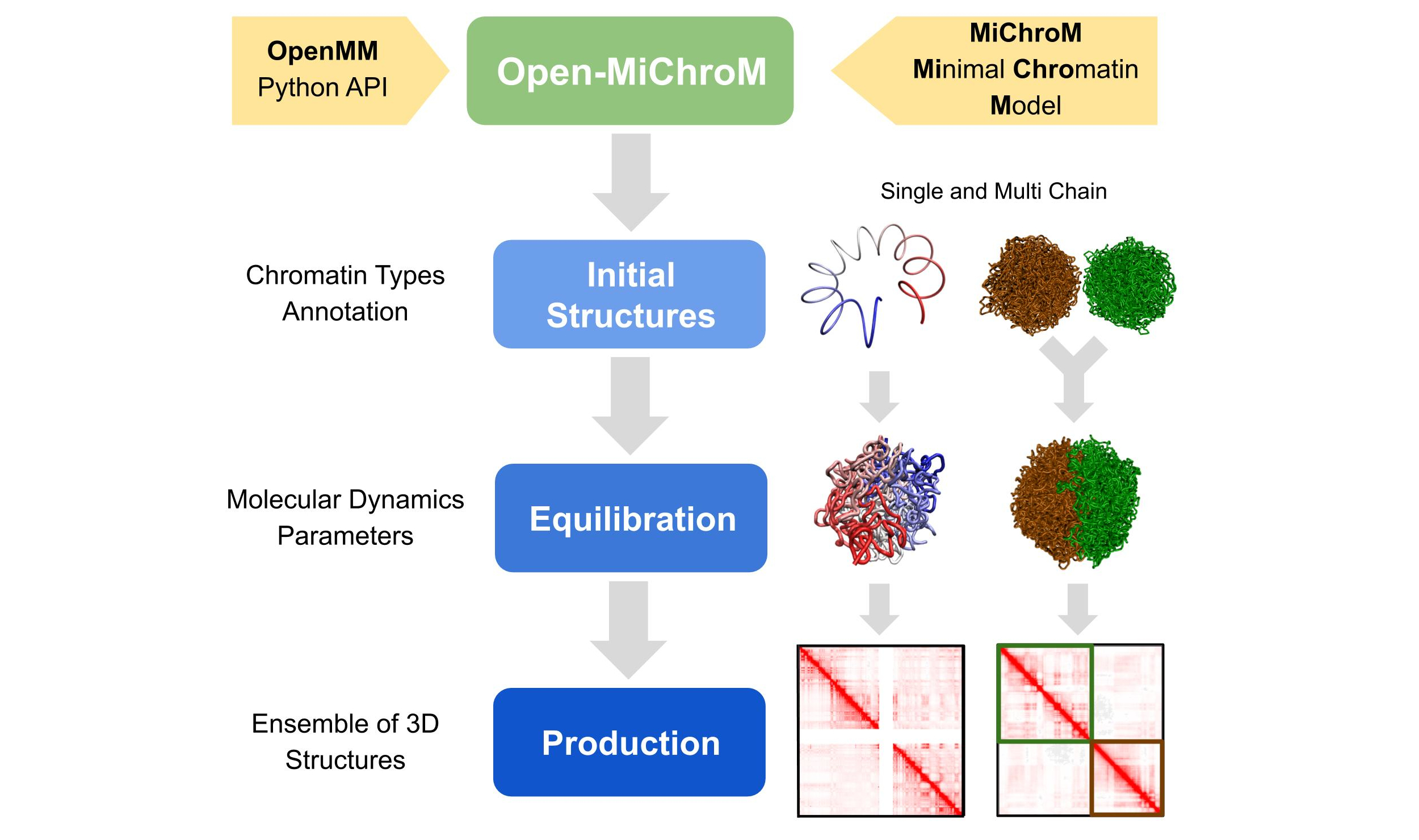
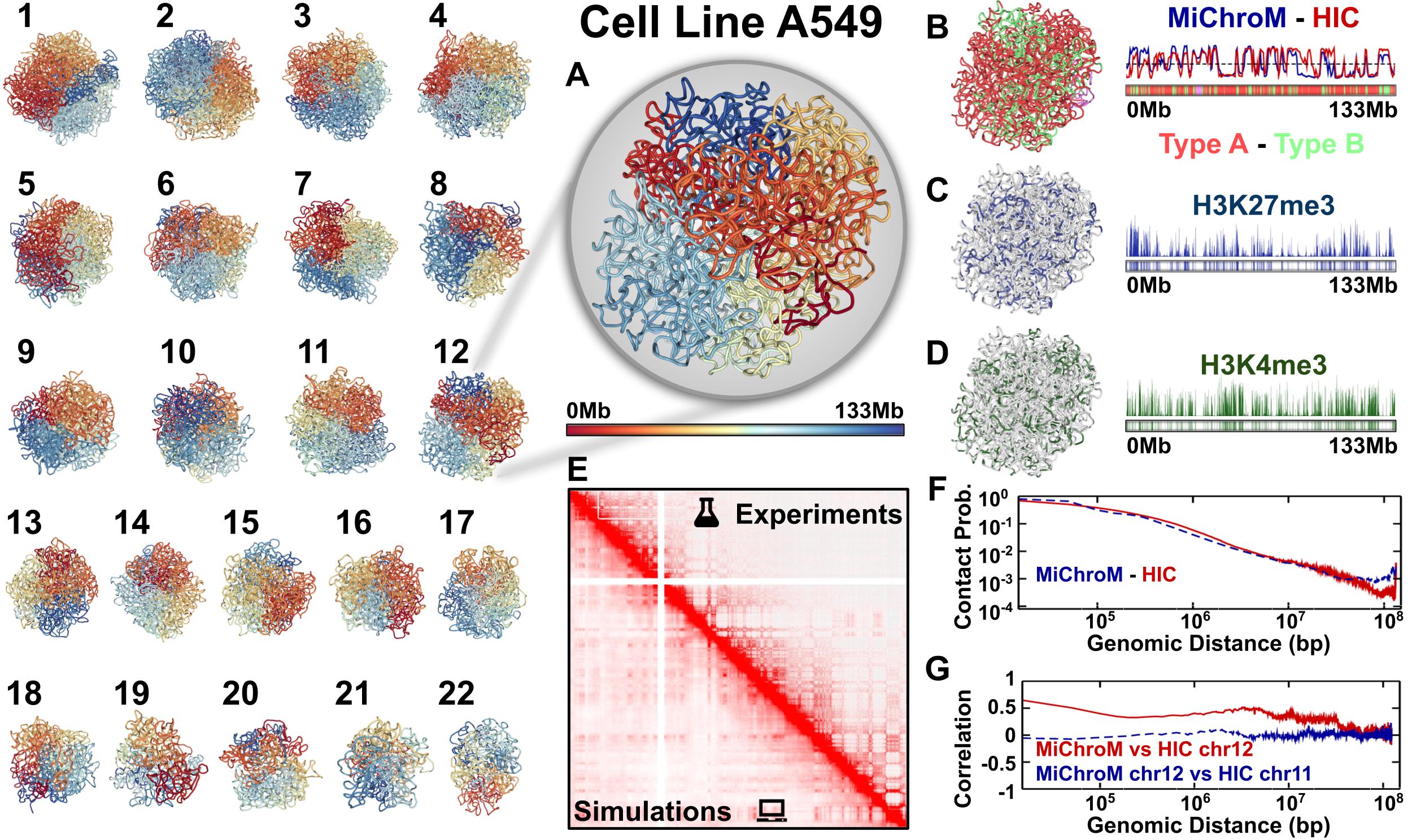
The chromatin dynamics simulations can be performed for different human cell lines, cell phases (interphase to metaphase), and various organisms from DNAzoo <https://www.dnazoo.org/>. Chromatin subcompartment annotations are available at the NDB (Nucleome Data Bank) <https://ndb.rice.edu/>. The OpenMiChroM package accepts the chromatin sequence of compartments and subcompartments as input to create and simulate a chromosome polymer model. Examples of running the simulations and generating in silico Hi-C maps can be found here <https://open-michrom.readthedocs.io/en/latest/Tutorials/Tutorial_Single_Chromosome.html>_.
.. image:: https://raw.githubusercontent.com/junioreif/OpenMiChroM/main/docs/source/images/A549_NDB.jpg :align: center :height: 300px
Usage
The following code snippet shows how to generate a single chromosome polymer model and run a chromatin dynamics simulation using OpenMiChroM:
::
  from OpenMiChroM.ChromDynamics import MiChroM
  sim = MiChroM(name='stomach_GRCh38', temperature=1.0, timeStep=0.01)
  sim.setup(platform="cuda")
  sim.saveFolder('stomach_GRCh38_chr10_simulation')
  sim.buildClassicMichrom(ChromSeq='inputs/stomach_GRCh38.bed', chromosome='chr10')

  sim.createReporters(statistics=True, traj=True, outputName=None, trajFormat="cndb", energyComponents=True, interval=10**3)
  sim.run(nsteps=10**5, report=True, interval=10**4)
Resources
Reference Documentation <https://open-michrom.readthedocs.io/>__: Examples, tutorials, and class details.Installation Guide <https://open-michrom.readthedocs.io/en/latest/GettingStarted/installation.html>__: Instructions for installing OpenMiChroM.GitHub repository <https://github.com/junioreif/OpenMiChroM/>__: Download the OpenMiChroM source code.Issue tracker <https://github.com/junioreif/OpenMiChroM/issues>__: Report issues/bugs or request features.
Citation
When using OpenMiChroM for chromatin dynamics simulations or analyses, please use this citation <https://open-michrom.readthedocs.io/en/latest/Reference/citing.html>.
We also thank Polychrom <https://github.com/open2c/polychrom>, where part of this code was inspired. You can use this citation <https://zenodo.org/records/3579473>_.
Installation
The OpenMiChroM library can be installed via pip <https://pypi.org/project/OpenMiChroM/>, conda <https://conda.io/projects/conda/>, or compiled from source.
Install via pip
The code below will install OpenMiChroM from PyPI:
::
pip install OpenMiChroM
.. note::
**OpenMiChroM** relies on the `OpenMM <http://openmm.org/>`_ API to run the chromatin dynamics simulations.

OpenMM is now available as a pip-installable package. You can install it using pip openmm[cuda12] to iinstall to use with GPU's or openmm to install for CPU's only:

.. code-block:: bash

    pip install openmm[cuda12]

Alternatively, if you prefer to use conda, install OpenMM from the `conda-forge channel <https://conda-forge.org/>`_ with:

.. code-block:: bash

    conda install -c conda-forge openmm
Install via conda
If you prefer using conda, you can install OpenMiChroM from
conda-forge <https://anaconda.org/conda-forge/OpenMiChroM>__ with the following command:
::
conda install -c conda-forge OpenMiChroM
.. hint::
Sometimes, the installation via conda may appear to be stuck. If this happens, update conda/anaconda using the command below and try installing **OpenMiChroM** again.
::
conda update --prefix /path/to/anaconda3/ anaconda
Required Libraries
The following libraries are required for installing OpenMiChroM:
Python <https://www.python.org/>__ (>=3.6)NumPy <https://www.numpy.org/>__ (>=1.14)SciPy <https://www.scipy.org/>__ (>=1.5.0)h5py <https://www.h5py.org/>__ (>=2.0.0)pandas <https://pandas.pydata.org/>__ (>=1.0.0)scikit-learn <https://scikit-learn.org/>__ (>=0.20.0)