MoDoMoDo: Multi-Domain Data Mixtures for Multimodal LLM Reinforcement Learning
August 23, 2025 · View on GitHub
🏠Home | 📄Paper | Current Version: v1.0
This repository is the official PyTorch implementation of the paper: MoDoMoDo: Multi-Domain Data Mixtures for Multimodal LLM Reinforcement Learning.
Reinforcement Learning with Verifiable Rewards (RLVR) has pushed language-only models to state-of-the-art results on reasoning tasks, yet extending it to multimodal LLMs is non-trivial: verifiable VL datasets are scarce and highly heterogeneous, and existing efforts usually fine-tune on just one task domain, which limits generalization. This focus can be inadequate for achieving the desirable generalization and comprehensive reasoning capabilities of MLLMs. While pooling several diverse datasets could cover a broader range of vision-language skills, using multiple training datasets introduces challenges, including potential conflicting objectives resulting from interactions among diverse datasets, as well as corresponding unstable behaviors during training This tension makes the dataset mixture itself a core design question —- How to mix diverse datasets in RLVR to achieve the wide-range of multimodal capabilities?
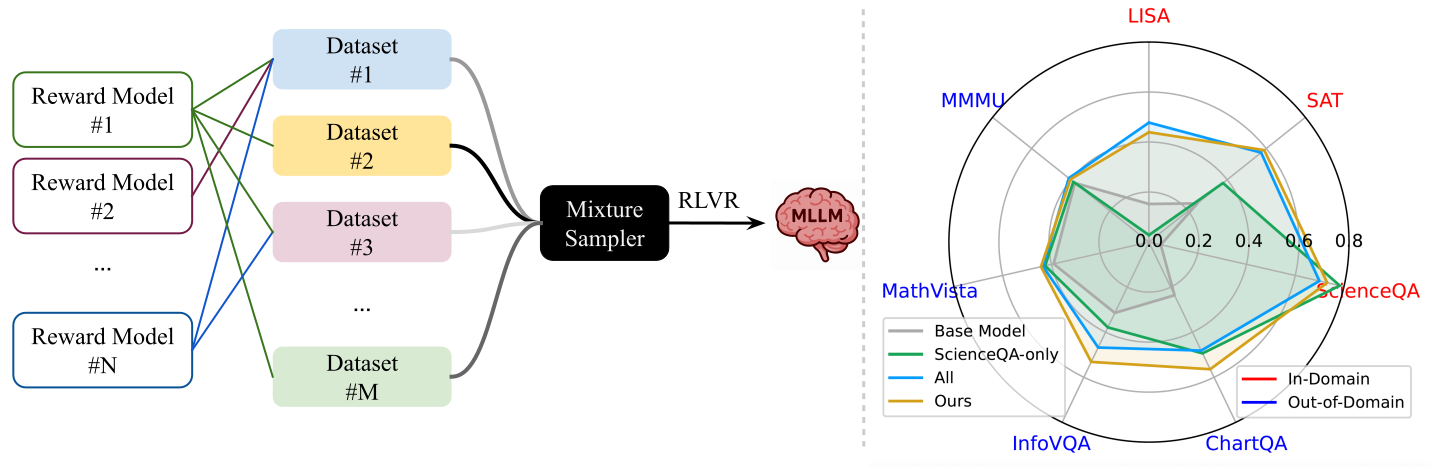
Release Notes
[06/2024] 🚀 First-Time Release of the Training and Evaluation Code of MoDoMoDo!
Installation
MoDoMoDo has been tested on A100s and H100s.
First, clone this repo:
git clone https://github.com/lynl7130/MoDoMoDo

# Prepare result folders:
mkdir -p <repo>/MoDoMoDo/lmms-eval/results
mkdir -p <repo>/MoDoMoDo/outputs
mkdir -p <repo>/MoDoMoDo/output_figures

# Prepare Environment Variables
export OPENAI_API_KEY=?
export HF_TOKEN=?
export WANDB_API_KEY=?
Note, OPENAI_API_KEY would require purchase. Feel free to skip it if you don't want to evalute on mathvista.
Next, there're two options to install the environment.
Option 1: Install with Conda and Pip
# create conda environment
conda create -n modomodo python=3.10
conda activate modomodo

# install pytorch based on cuda version
# for example, for cuda 12.1:
pip install torch==2.5.1 torchvision==0.20.1 torchaudio==2.5.1 --index-url https://download.pytorch.org/whl/cu121

# install packages with special condition
pip install vllm==0.7.2 --no-deps
pip install flash-attn==2.7.3 --no-build-isolation

# install all other packages
# enter cloned repo
cd <repo>/MoDoMoDo
pip install -r requirements.txt
Option 2: Docker Installation
cd <repo>/MoDoMoDo/docker
sudo docker build -t modomodo-image .

# Run Docker Container with mounted volumes and host networking
sudo docker run --gpus all -it \
  --shm-size=1024m \
  --network host \
  -e WANDB_API_KEY=$WANDB_API_KEY \
  -e HF_TOKEN=$HF_TOKEN \
  -e OPENAI_API_KEY=$OPENAI_API_KEY \
  -v <repo>/MoDoMoDo:/app/MoDoMoDo \
  modomodo-image
Note, --gpus all assumes Docker 19.03+ with nvidia‑container‑toolkit installed.
If you’re on an older setup, add --runtime=nvidia.
Download datasets and base models
Prepare the 5 verifiable datasets MoDoMoDo uses:
python slurms/prepare_data.py
This script would save all datasets to be under <repo>/MoDoMoDo/share_data/:
📚 Dataset download summary
| Dataset |  repo repo | Split | Storage† | # Items |
|---|---|---|---|---|
| GeoQAV Problems | yiqingliang/geoqav-problems-dataset | train | 42 MB | 1,969 |
| ScienceQA Problems | yiqingliang/scienceqa-problems-dataset | train | 398 MB | 6,218 |
| ScienceQA (test) | yiqingliang/scienceqa-problems-dataset-test | test | 129 MB | 2,017 |
| LISA Problems | yiqingliang/lisa-problems-dataset | train | 572 MB | 1,326 |
| LISA (test) | yiqingliang/lisa-problems-dataset-test | test | 1.27 GB | 3,397 |
| SAT Problems | yiqingliang/sat-problems-dataset | train | 3 GB | 15,000 |
| SAT (test) | yiqingliang/sat-problems-dataset-test | test | 337 MB | 1,928 |
| SAT (mini) | yiqingliang/sat-problems-dataset-mini | train | 31.2 MB | 64 |
| ViRFT‑COCO | laolao77/ViRFT_COCO | train | 1.15 GB | 5,997 |
† Approximate; may not match the exact values on your machine.
LISA & COCO: All bounding box values are normalized to range from 0 to 1000, adaptive to image height and width, starting from top left corner. (x1, y1): Top-Left, (x1, y2): Bottom-Left.
If by any chance you don't want to download all of them,
uncomment some items in slurms/prepare_data.py:
data_paris = [
    ...
]
Train MoDoMoDo
First, select a configuration $config following Name Convention: ${date}_${exp}_Instruct_fv. This name would corresponds to a yaml file configs/${config}.yaml.
- An example for
$config:250509_Norm_Instruct_fv - This naming convention could ensure the later visualization code can find the ckpt results
Then, run training on 4 GPUs (recommend to check below notes before running!)
bash slurms/train_by_config.sh "$config" 4 12346
The training would be logged in wandb. Do wandb init if prompted before first training.
The checkpoints would be saved to share_models/${config}.
Note: we need to use different ports if you want to run multiple training at the same time.
- vLLM port: YAML
port, default:8000 - DDP port:
slurms/train_by_config.shargument controlled--master_port, default:12346
Data Mixture Control
reward_weights and reward_funcs must have same length. They would control how each reward function is weighted invariant to the dataset.
interleave_probs and dataset_names must have same length,
They would control how likely each dataset is sampled during each training example sampling.
By default, mix_strategy: "interleave_under", so if one of the dataset is exhausted, the training would end.
GPU Usage and vLLM support
slurms/train_by_config.sh would assume you have NUM_DEVICES GPUs with first NUM_DEVICES-1 GPUs used for training, the last GPU used to host vLLM for generation acceleration.
This script would be compatible with configuration yamls containing use_vllm: true.
If you want to change the number of GPUs, change
NUM_DEVICES=4 in slurms/train_by_config.sh by passing in argument and change num_generations hyperparameter in YAML config.
An example on 2 GPUs:
CUDA_VISIBLE_DEVICES=0,1 bash slurms/train_by_config.sh 250505_Norm_2gpu_Instruct_fv 2 12345
Be aware, num_generations hyperparameter has to be as least per_device_eval_batch_size and divides per_device_eval_batch_size x (NUM_DEVICES-1).
If you don't want vLLM
Use slurms/train_by_config_novllm.sh instead of slurms/train_by_config.sh for training.
An example:
CUDA_VISIBLE_DEVICES=0,1 bash slurms/train_by_config_novllm.sh 250505_Norm_2gpu_novllm_Instruct_fv 2 12347
Make sure in YAML:
max_prompt_lengthis set tonull.use_vllmis set tofalse.- Be aware,
num_generationshyperparameter has to be as leastper_device_eval_batch_sizeand dividesper_device_eval_batch_size x NUM_DEVICES.
If OOM...
If you run into OOM, consider turning off vLLM or tuning
per_device_train_batch_sizegradient_accumulation_stepsnum_generations
Publish Trained Checkpoints
To push trained checkpoints (suppose saving every 500 steps and last) using above configuration $config to huggingface repo as $organization/$save-500, ...:
python slurms/push_ckpt_to_hub.py --repo_name "$config" --save_name "$save" --token "$token" --organization "$organization"
Evaluate HF Hub Models (Qwen2-VL style)
Note, each job would occupy a port. So remember to select different ports when evaluating multiple experiments.
If we want to evalute $organization/$save_500 checkpoint with 4 GPUs:
# on scienceqa_test, lisa_test, sat_test
CUDA_VISIBLE_DEVICES=0,1,2,3 source slurms/test_by_ckpt_lmms_reason_final.sh $organization/$save-500 4 29500

# on mmmu,mathvista,chartqa,infovqa
CUDA_VISIBLE_DEVICES=4,5,6,7 source slurms/test_by_ckpt_lmms_reason.sh $organization/$save-500 4 29501
These would save results to <repo>/MoDoMoDo/outputs folder.
It's normal for the evualtion to take hours...
And feel free to use less gpus for evaluation.
If you want to evaluate checkpoints following other styles, try to change --model qwen2_vl_reason in test_by_ckpt_lmms_reason.sh and test_by_ckpt_lmms_reason_final.sh.
We have additionally supported evaluation of
qwen2_5_vl_reason: Qwen2.5-VLinternvl2_reason: InternVL2
Regex Grab Logs and Create markdown Results
Assume for each checkpoint, you have finished above both scripts' evaluatoin:
python extract_metrics.py
python generate_markdown.py --row-avg last # this would use last-row mode to aggregate ckpt score
python generate_markdown.py # this would use step-averaged mode to aggregate ckpt score
This would save the xxx.md that could be used for Data Mixture Prediction, Visualization.
Check the arguments of generate_markdown.py for fancier markdown creation.
Data Mixture Prediction Based on markdown Results
You would need to specify which markdown you use for each script you run below.
- Heuristic: check
compute_weights/*.pyorcompute_weights_no1/*.py. To reproduce our weights, checklatex/250430_gold.md. - Model-based: check
check_linear/*.py. To reproduce our weights, checklatex/250515_gold.md.
Note:
- Seed series do not need Data Mixture Prediction.
- Be very careful with which
xxx.mdare you using!
Visualize Results as Images Based on markdown Results
Refer to latex/create_*.py
These files also strongly rely on markdown selection.
Add one Dataset (using SAT dataset as an example)
-
Make sure your dataset strictly follow the verifiable format.
-
in
slurms/prepare_data.py:
data_pairs = [
    ["yiqingliang/sat-problems-dataset", "share_data/sat-problems-dataset", token], #token is required for private dataset
    ...
]
Then, run:
python slurms/prepare_data_2503.py
- edit
src/open_r1/dataset_info.json, add an entry:
"share_data/sat-problems-dataset":{
        "file_name": "share_data/sat-problems-dataset",
        "formatting": "SAT",
        "load_from": "disk",
        "file_ext": "arrow"
    }
- edit
src/open_r1/dataset_utils/converter.py
-
Add
"SAT"option inDatasetAttr.formattingliterals (corresponds to"formatting") -
Add an entry to
SYSTEM_PROMPT:
"SAT": ("A conversation between User and Assistant. The user asks a question, and the Assistant solves it. The assistant "
    "first thinks about the reasoning process in the mind and then provides the user with the answer. The reasoning "
    "process and answer are enclosed within <think> </think> and <answer> </answer> tags, respectively, i.e., "
    "<think> reasoning process here </think><answer> answer here </answer>"
),
-
(optional) Add
class SATDatasetConverter(DatasetConverter)with proper arguments, if existing DatasetConverters could not serve the new dataset well. -
Add
"SAT": SATDatasetConverterentry toDATASET_CONVERTERS
- edit
src/open_r1/dataset_utils/processor.py
- (optional) Add prepartion function
def prepare_images_SAT(x):
    return x["image"]
- Add
"SAT": prepare_images_SATentry toImage_Prepare_Funcs
-
(Optional) Add
src/open_r1/rewards/sat.py -
(Optional) Add entries in
src/open_r1/rewards/__init__.py
BibTex
If you find our repository useful, please consider giving it a star ⭐ and citing our paper:
@misc{liang2025modomodomultidomaindatamixtures,
      title={MoDoMoDo: Multi-Domain Data Mixtures for Multimodal LLM Reinforcement Learning},
      author={Yiqing Liang and Jielin Qiu and Wenhao Ding and Zuxin Liu and James Tompkin and Mengdi Xu and Mengzhou Xia and Zhengzhong Tu and Laixi Shi and Jiacheng Zhu},
      year={2025},
      eprint={2505.24871},
      archivePrefix={arXiv},
      primaryClass={cs.CV},
      url={https://arxiv.org/abs/2505.24871},
}
Contributors and Acknowledgement
MoDoMoDo's Amazing Core Contributors:
Yiqing Liang, Jielin Qiu, Wenhao Ding, Zuxin Liu, James Tompkin, Mengdi Xu, Mengzhou Xia, Zhengzhong Tu, Laixi Shi, Jiacheng Zhu
Are from (unordered)
- Brown University
- Massachusetts Institute of Technology
- NVIDIA Research
- Salesforce Research
- Carnegie Mellon University
- Princeton University
- Texas A&M University
- California Institute of Technology
We thank open-r1, trl, PhysBench, lmms-eval, LLaMA-Factory, Visual-RFT, VLM-R1, R1-V for code reference.