Tutorial 10 - A Deeper Understanding of Domina Events
February 27, 2017 · View on GitHub
In the previous tutorial we introduced the Ajax model of communication between the browser and the server by exploiting the shoreleave-remote-ring and shoreleave-remote libraries.
In this tutorial, prior to extending our comprehension of Ajax in the CLJS/CLJ context, we're going to get a better and deeper understanding of DOM event management provided by domina.
To fulfill this objective, we're first going to line up the login example introduced in the 4th Tutorial with the more Clojure-ish programming style already adopted for the Shopping Calculator example in the previous tutorials.
Preamble
If you want to start working from the end of the previous tutorial, assuming you have git installed, do the following:
git clone https://github.com/magomimmo/modern-cljs.git
cd modern-cljs
git checkout se-tutorial-09
Introduction
The following picture shows our old Login Form friend.
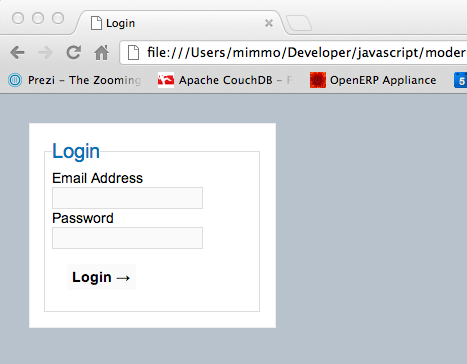
As you perhaps remember from the 4th Tutorial, we desire to adhere to the progressive enhancement strategy which allows any browser to access our login form, regardless of the browser capabilities.
The lowest user experience is the one offered by a web application when the browser does not support JS (or it has been disabled by the user). The highest user experience is the one offered by a web application when the browser supports JS and the application uses the Ajax communication model.
Generally speaking, you should always start by first supporting the lowest user experience. Then you step to the next layer by supporting JS and finally you realize the best user experience enhancement by introducing the Ajax model of communication between the browser and the server.
Because this series of tutorials is mostly about CLJS and not about CLJ, we skipped the layer representating the lowest user experience which is based on CLJ only. Yet, we promise to fill this gap in successive tutorials explaining the usage of CLJ libraries on the server side.
Line up Login Form with Shopping Calculator Form
The 8th tutorial left to the smart user the task of updating the Login Form with the same kind of DOM manipulation used in implementing the Shopping Calculator.
Start IFDE
As usual we like to work in a live environment. So let's launch IFDE:
cd /path/to/modern-cljs
boot dev
...
Elapsed time: 21.757 sec
Then in a new terminal launch the bREPL as usual
# from a new terminal
cd /path/to/modern-cljs
boot repl -c
...
boot.user=> (start-repl)
<< started Weasel server on ws://127.0.0.1:51016 >>
<< waiting for client to connect ... Connection is ws://localhost:51016
Writing boot_cljs_repl.cljs...
and visit the http://localhost:3000/index.html URL to activate the bREPL
 connected! >>
To quit, type: :cljs/quit
nil
cljs.user=>
index.html
Let's work together on the first step of this task. We start by
reviewing the html code of index.html (i.e., the Login Form).
<!doctype html>
<html lang="en">
<head>
...
...
</head>
<body>
<form action="login.php" method="post" id="loginForm" novalidate>
<fieldset>
<legend>Login</legend>
...
...
<div>
<label for="submit"></label>
<input type="submit" value="Login →" id="submit">
</div>
</fieldset>
</form>
<script src="main.js"></script>
<script>
modern_cljs.login.init();
</script>
</body>
</html>
NOTE 1: The original and non-existent
login.phpserver script is still attached to the formactionattribute. In a later tutorial we're going to replace it with a corresponding service implemented in CLJ.
As you remember, when we revised the Shopping Calculator code to
make it more Clojure-ish, we started by changing the type attribute
of the Shopping Form's button from type="submit" to
type="button". But having decided to adhere to a progressive
enhancement strategy, this is not something that we should have done
because a plain button type is not going anywhere if the browser
doesn't support JS. So we need to stay with the submit type of
button.
First try
Start by making the programming style of login.cljs more
Clojure-ish. First we want to remove any CLJS/JS interop calls by
using domina. Open login.cljs, update the requirement of the
namespace declarations and change the init function to make it more
Clojur-ish
;;; namespace declaration
(ns modern-cljs.login
  (:require [domina.core :refer [by-id value]]
            [domina.events :refer [listen!]]))
;;; init
(defn ^:export init []
  (if (and js/document
           (aget js/document "getElementById"))
    (listen! (by-id "submit") :click validate-form)))
NOTE 2: The domina.events library contains a robust event handling API that wraps the Google Closure event handling code and exposing it in an idiomatic functional way for both the
bubblingevent propagation phase and thecapturephase. In our login form example, by having used thelisten!function, we have also implicitly chosen thebubblingphase. That said, in domina thesubmitevent does not bubble up, so we needed to attach the listener function (i.e.,validate-form) to the:clickevent of thesubmitbutton, instead of attaching it to theloginForm.
As soon as you save the file, it gets recompiled and reloaded.
Reload the index.html URL to allow the updated init function
to be called again. Do not fill in any field (or fill in just one of them),
and click the Login button. The application reacts by showing you the
usual alert window reminding you to complete the form. Click the
OK button and be prepared for an unexpected result.
Instead of showing the login form to allow the user to complete it,
the process flows directly to the default action attribute of the
form which, by calling a non-existent server-side script (i.e.,
login.php), returns the Page not found message generated by the
ring/compojure web server. That's very bad!
Prevent the default
Go back to the index.html URL and require the domain.events
namespace at the bREPL and ask for the Event protocol docstring:
cljs.user> (require '[domina.events :as evt])
nil
cljs.user> (doc evt/Event)
-------------------------
domina.events/Event
Protocol
  nil

  prevent-default
  ([evt])
  Prevents the default action, for example a link redirecting to a URL

  stop-propagation
  ([evt])
  Stops event propagation

  target
  ([evt])
  Returns the target of the event

  current-target
  ([evt])
  Returns the object that had the listener attached

  event-type
  ([evt])
  Returns the type of the the event

  raw-event
  ([evt])
  Returns the original GClosure event
nil
We now know that the Event protocol supports, among others, the
prevent-default function, which is what we need to interrupt the
process of passing control from the submit button to the form
action attribute.
The prevent-default function requires the fired event (e.g.,
:click) to be passed to the validate-form listener. Let's modify its
definition according to the above information.
First we have to update the domina.events requirement by adding
prevent-default symbol to the :refer option
(ns modern-cljs.login
  (:require [domina.core :refer [by-id value]]
            [domina.events :refer [listen! prevent-default]]))
Then we can go on by updating the validate-form definition as
follows:
(defn validate-form [e]
  (if (or (empty? (value (by-id "email")))
          (empty? (value (by-id "password"))))
    (do
      (prevent-default e)
      (js/alert "Please, complete the form!"))
    true))
Here we took advantage of the necessity to update the validate-form
function to improve its Clojure-ish style. The semantics of the
validation-form are now much more readable than before:
- if the
valueof theemailorpasswordis empty, prevent the form action from being fired, raise the alert window asking the user to enter the email and the password and finally return control to the form; - otherwise return
trueto pass control to the default action of the form.
NOTE 3: If you carefully watch the
validate-formimplementation you should note that theifbranch traversed when its condition istrue(i.e., when thepasswordare empty), it does not return thefalsevalue regularly used to block event propagation to theactionattribute of the form. That's becausevalidate-formis now internally callingprevent-default, so returningfalsewould be redundant.
To make the above mechanics more clear, we also update the init
function by wrapping the validate-form listener inside an anonymous
function taking the event e as argument. If you want, you can can
safely leave it as before.
(defn ^:export init []
  (if (and js/document
           (aget js/document "getElementById"))
    (listen! (by-id "submit") :click (fn [e] (validate-form e)))))
Save the file and reload the index.html page. As you perhaps
remember, the init function is called, as a JS script, when the page
is loaded. This is one of the rare case in which the live IFDE is not
able to automate this manual activity.
Now play with the Login Form to verify that it started working again as expected.
Catch early react instantly
It's now time to see if we can improve the user experience of the login form by introducing few more DOM events and DOM manipulation features of Domina.
One of the first lessons I learned when I started programming was that any error has to be caught and managed as soon as possible.
In our login form context, as soon as possible means that the syntactical correctness of the email and password typed in by the user has to be verified as soon as their input fields lose focus (i.e., blur).
Email/Password validators
A pretty short specification of our desire could be the following:
-
As soon as the email input field loses focus, check its syntactical correctness by matching its value against one of the several email regex validators available on the net; if the validation does not pass, make the error evident to help the user;
-
A soon as the password input field loses focus, check its syntactical correctness by matching its value against one of the several password regex validators; if the validation does not pass, make the error evident to the user.
Although a nice looking implementation of the above specification is left to you, let's show at least a very crude sample from which to start.
NOTE 4: Take a look at the end of
this postfor an HTML5-compliant approach to password validation.
Open the login.cljs source file and start by adding two
dynamic vars to be used for the email and password fields
validation:
;;; 4 to 8, at least one numeric digit.
(def ^:dynamic *password-re*
  #"^(?=.*\d).{4,8}$")

(def ^:dynamic *email-re*
  #"^[_a-z0-9-]+(\.[_a-z0-9-]+)*@[a-z0-9-]+(\.[a-z0-9-]+)*(\.[a-z]{2,4})$")
If you had the chance to read the differences between CLJ and CLJS, you already know that CLJS support for regular-expressions is JS support.
Now add the :blur event listener to both the email and password
input fields in the init function:
(defn ^:export init []
  (if (and js/document
           (aget js/document "getElementById"))
    (let [email (by-id "email")
          password (by-id "password")]
      (listen! (by-id "submit") :click (fn [evt] (validate-form evt)))
      (listen! email :blur (fn [evt] (validate-email email)))
      (listen! password :blur (fn [evt] (validate-password password))))))
We have not passed the event to the two new listeners because, as opposed
to the previous validate-form case, it is not needed to
prevent any default action or to stop the propagation of the
event. Instead, we passed them the element on which the blur event
occurred.
Now define the two new validators. Here is a very crude implementation
of them. Remember to define them before the validate-form and after
the two newly defined regexs.
(defn validate-email [email]
  (destroy! (by-class "email"))
  (if (not (re-matches *email-re* (value email)))
    (do
      (prepend! (by-id "loginForm") (html [:div.help.email "Wrong email"]))
      false)
    true))

(defn validate-password [password]
  (destroy! (by-class "password"))
  (if (not (re-matches *password-re* (value password)))
    (do
      (append! (by-id "loginForm") (html [:div.help.password "Wrong password"]))
      false)
    true))
I'm very bad both in HTML and CSS. So, don't take this as something to
be proud of. Anyone can do better than me. I just added a few CSS classes
(i.e., help, email and password) using the hiccups library to
manage the email and password help messages.
Obviously you have to update the namespace declaration as well to be
able to use the the append!, by-class, destroy! and prepend!
symbols from the domina.core namespace and the html symbol from
the hiccups.core namespace.
(ns modern-cljs.login
  (:require [domina.core :refer [append!
                                 by-class
                                 by-id
                                 destroy!
                                 prepend!
                                 value]]
            [domina.events :refer [listen! prevent-default]]
            [hiccups.runtime])
  (:require-macros [hiccups.core :refer [html]]))
To complete the coding, review the validate-form function as
follows:
(defn validate-form [evt]
  (let [email (by-id "email")
        password (by-id "password")
        email-val (value email)
        password-val (value password)]
    (if (or (empty? email-val) (empty? password-val))
      (do
        (destroy! (by-class "help"))
        (prevent-default evt)
        (append! (by-id "loginForm") (html [:div.help "Please complete the form"])))
      (if (and (validate-email email)
               (validate-password password))
        true
        (prevent-default evt)))))
Note that validate-form now internally calls the two newly-defined
validators, and if they do not both return true, it calls
prevent-default to prevent the action attached to
the loginForm from being fired.
The following is the complete and final login.cljs source code:
(ns modern-cljs.login
  (:require [domina.core :refer [append!
                                 by-class
                                 by-id
                                 destroy!
                                 prepend!
                                 value]]
            [domina.events :refer [listen! prevent-default]]
            [hiccups.runtime])
  (:require-macros [hiccups.core :refer [html]]))

;;; 4 to 8, at least one numeric digit.
(def ^:dynamic *password-re*
  #"^(?=.*\d).{4,8}$")

(def ^:dynamic *email-re*
  #"^[_a-z0-9-]+(\.[_a-z0-9-]+)*@[a-z0-9-]+(\.[a-z0-9-]+)*(\.[a-z]{2,4})$")

(defn validate-email [email]
  (destroy! (by-class "email"))
  (if (not (re-matches *email-re* (value email)))
    (do
      (prepend! (by-id "loginForm") (html [:div.help.email "Wrong email"]))
      false)
    true))

(defn validate-password [password]
  (destroy! (by-class "password"))
  (if (not (re-matches *password-re* (value password)))
    (do
      (append! (by-id "loginForm") (html [:div.help.password "Wrong password"]))
      false)
    true))

(defn validate-form [evt]
  (let [email (by-id "email")
        password (by-id "password")
        email-val (value email)
        password-val (value password)]
    (if (or (empty? email-val) (empty? password-val))
      (do
        (destroy! (by-class "help"))
        (prevent-default evt)
        (append! (by-id "loginForm")
                 (html [:div.help "Please complete the form"])))
      (if (and (validate-email email)
               (validate-password password))
        true
        (prevent-default evt)))))

(defn ^:export init []
  (if (and js/document
           (aget js/document "getElementById"))
    (let [email (by-id "email")
          password (by-id "password")]
      (listen! (by-id "submit") :click (fn [evt] (validate-form evt)))
      (listen! email :blur (fn [evt] (validate-email email)))
      (listen! password :blur (fn [evt] (validate-password password))))))
To make the help messages more evident to the user, add the following CSS rule
to styles.css which resides in the html/css directory.
.help { color: red; }
Reload again the index.html page to re-attach the lesteners to
the Login Form. Verify the result by playing with the input fields and
the Login button. You should see something like the following
pictures.


Event Types
If you're interested in knowing all of the event types supported by
domina, here is the native code from goog.events.eventtype.js,
which enumerates the event types supported by the Google Closure native code on
which domina is based.
Another way to know which events are supported by domina is to
inspect the Google library goog.events/EventType directly. If we do
this in the domina.events namespace it will save some typing.
cljs.user> (in-ns 'domina.events)
nil
domina.events> (map keyword (goog.object/getValues goog.events/EventType))
(:click :rightclick :dblclick :mousedown :mouseup :mouseover :mouseout
 :mousemove :mouseenter :mouseleave :selectstart :wheel :keypress
 :keydown :keyup :blur :focus :deactivate :DOMFocusIn :DOMFocusOut
 :change :reset :select :submit :input :propertychange :dragstart :drag
 :dragenter :dragover :dragleave :drop :dragend :touchstart :touchmove
 :touchend :touchcancel :beforeunload :consolemessage :contextmenu
 :DOMContentLoaded :error :help :load :losecapture :orientationchange
 :readystatechange :resize :scroll :unload :hashchange :pagehide
 :pageshow :popstate :copy :paste :cut :beforecopy :beforecut
 :beforepaste :online :offline :message :connect :webkitAnimationStart
 :webkitAnimationEnd :webkitAnimationIteration :webkitTransitionEnd
 :pointerdown :pointerup :pointercancel :pointermove :pointerover
 :pointerout :pointerenter :pointerleave :gotpointercapture
 :lostpointercapture :MSGestureChange :MSGestureEnd :MSGestureHold
 :MSGestureStart :MSGestureTap :MSGotPointerCapture :MSInertiaStart
 :MSLostPointerCapture :MSPointerCancel :MSPointerDown :MSPointerEnter
 :MSPointerHover :MSPointerLeave :MSPointerMove :MSPointerOut
 :MSPointerOver :MSPointerUp :text :textInput :compositionstart
 :compositionupdate :compositionend :exit :loadabort :loadcommit
 :loadredirect :loadstart :loadstop :responsive :sizechanged
 :unresponsive :visibilitychange :storage :DOMSubtreeModified
 :DOMNodeInserted :DOMNodeRemoved :DOMNodeRemovedFromDocument
 :DOMNodeInsertedIntoDocument :DOMAttrModified
 :DOMCharacterDataModified :beforeprint :afterprint)
To complete the application of the progressive enhancement strategy to the Login form, we should implement the server-side counterpart of the above CLJS code and line up the Login form to the Shopping Form approach adopted in the 9th tutorial to allow the browser to communicate with the server via Ajax.
We'll do our best in subsequent tutorials.
You can now stop any boot related process and reset your git repository.
git reset --hard
Next Step - Tutorial 11: HTML on Top, Clojure on the Bottom
In the next tutorial we're going to cover the highest and the deepest layers of the progressive enhancement strategy to the Login Form.
License
Copyright © Mimmo Cosenza, 2012-15. Released under the Eclipse Public License, the same as Clojure.